
بايتك BCAUBS134BK
Bytech Massive Bluetooth Long Bar Speaker-BK User Manual
الموديل: BCAUBS134BK
1. المقدمة
شكرا لك على الشراءasing the Bytech Massive Bluetooth Long Bar Speaker-BK. This manual provides essential information for the proper setup, operation, and maintenance of your new speaker. Please read this manual thoroughly before using the product to ensure optimal performance and longevity.
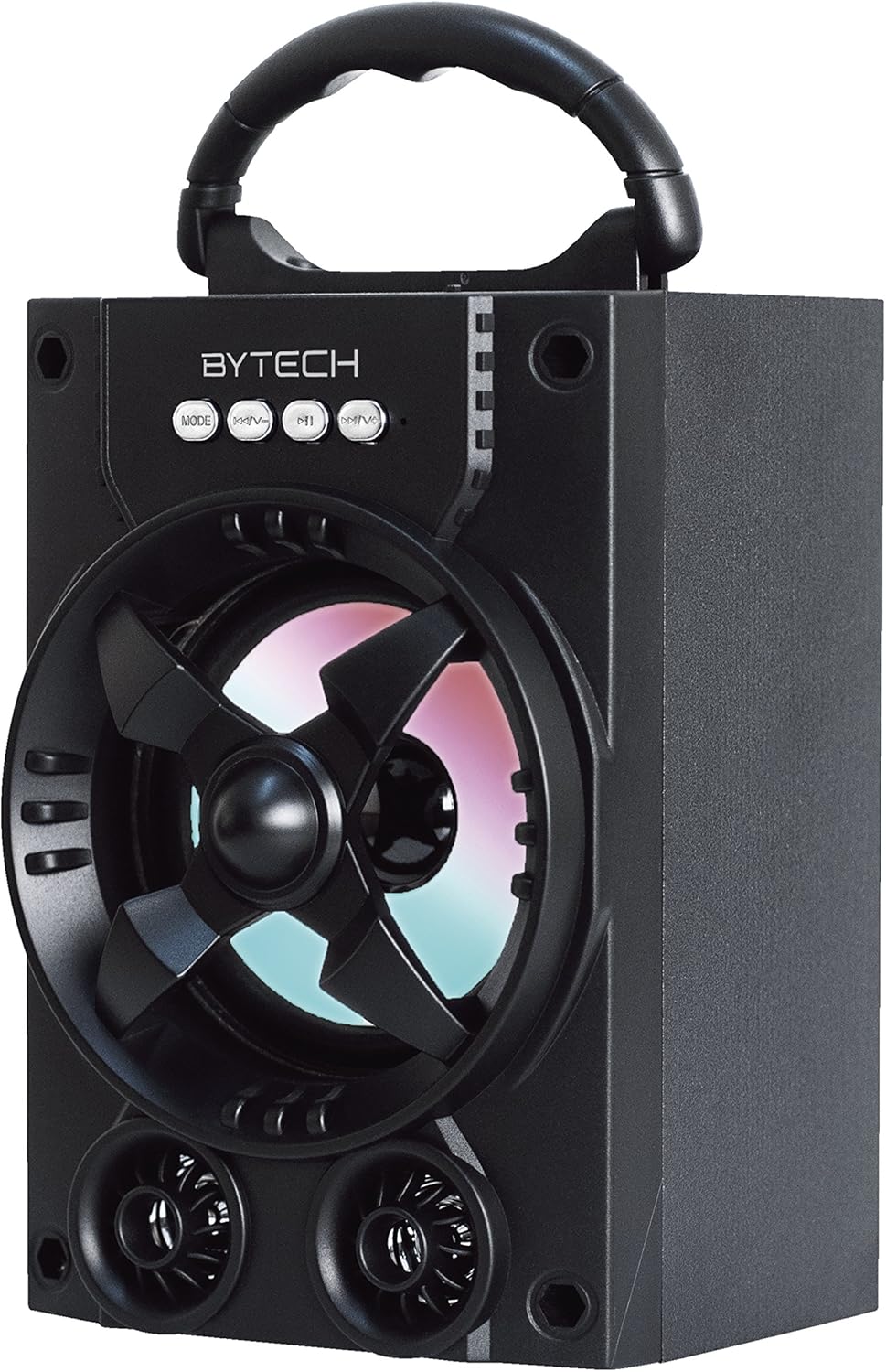
الشكل 1.1: الجبهة view of the Bytech Massive Bluetooth Long Bar Speaker-BK, showcasing its design, handle, and speaker grille with LED lights.
2. محتويات العبوة
يرجى التحقق من الحزمة للعناصر التالية:
- Bytech Massive Bluetooth Long Bar Speaker-BK
- كابل شحن USB
- دليل المستخدم (هذا المستند)
إذا كانت أي من العناصر مفقودة أو تالفة، يرجى الاتصال بدعم العملاء.
3. مواصفات المنتج
- LED Performance Lights: Dynamic LED lights that synchronize with your music for an enhanced audio-visual experience.
- مقبض حمل مريح: Integrated handle for easy portability, allowing you to take your music anywhere.
- اتصال بلوتوث عالمي: Seamlessly connect wirelessly to your smartphone, tablet, or other Bluetooth-enabled devices.
- الصوت المحيط: Designed to deliver a high-quality surround sound experience.
- تصميم محمول: Ideal for various settings, including parties, outdoor gatherings, and personal use.

Figure 1.2: The speaker shown with its retail packaging, illustrating its key features such as multi-color LED lights, Bluetooth connectivity, and surround sound capability.
4. الضوابط والمؤشرات
The speaker features intuitive controls and indicators for easy operation:
- زر الوضع: Press to switch between available input modes (e.g., Bluetooth).
- الزر الخامس: Press to decrease volume. Long press to skip to the previous track.
- زر V+: اضغط لزيادة مستوى الصوت. اضغط مطولاً للانتقال إلى المقطع التالي.
- زر M: (Function not explicitly detailed, typically for mode or mute)
- أضواء LED: Indicate power status, charging status, and provide dynamic light effects during audio playback.
5. دليل الإعداد
5.1 شحن السماعة
- قم بتوصيل الطرف الصغير من كابل شحن USB بمنفذ الشحن الموجود على مكبر الصوت.
- قم بتوصيل الطرف الكبير من كابل شحن USB بمحول طاقة USB (غير متضمن) أو بمنفذ USB الخاص بالكمبيوتر.
- سيُظهر مؤشر LED حالة الشحن (على سبيل المثال، أحمر للشحن، ومطفأ عند اكتمال الشحن).
- اترك البطارية تشحن بالكامل لمدة ساعتين إلى ثلاث ساعات تقريبًا قبل الاستخدام الأول.
5.2 تشغيل/إيقاف التشغيل
- To power on, press and hold the Power button (location not specified, typically near charging port or on control panel) for a few seconds until you hear an audible prompt or see the LED lights activate.
- لإيقاف التشغيل، اضغط مع الاستمرار على زر الطاقة مرة أخرى حتى يتم إيقاف تشغيل مكبر الصوت.
5.3 اقتران بلوتوث
- Ensure the speaker is powered on and in Bluetooth pairing mode (indicated by a flashing LED light or audible prompt).
- على هاتفك الذكي أو جهازك اللوحي، انتقل إلى إعدادات البلوتوث.
- بحث عن available devices. The speaker will appear as "BYTECH" or a similar name.
- حدد المتحدث من القائمة لبدء عملية الاقتران.
- Once successfully paired, the LED indicator will typically become solid, and you may hear a confirmation tone.
6. تعليمات التشغيل
6.1 تشغيل الصوت عبر البلوتوث
- After successful Bluetooth pairing, open your preferred music application on your connected device.
- Select and play your desired audio. The sound will be streamed wirelessly to the speaker.
- Use the V+ and V- buttons on the speaker or your connected device to adjust the volume.
- Long press V+ or V- to skip tracks.
6.2 LED Performance Lights
The speaker features integrated LED lights that enhance your listening experience. These lights typically activate automatically when the speaker is powered on and playing audio. Specific controls for light modes are not detailed, but they are designed to provide dynamic visual effects.
6.3 تبديل الوضع
اضغط على وضع button to cycle through available input modes. While Bluetooth is the primary connectivity, other modes (if available, such as FM radio or AUX input) can be accessed via this button.
7. الصيانة والعناية
- تنظيف: استخدم قطعة قماش ناعمة وجافة لتنظيف السطح الخارجي للسماعة. لا تستخدم المنظفات الكاشطة أو الشمع أو المذيبات.
- تخزين: عند عدم الاستخدام لفترات طويلة، قم بتخزين مكبر الصوت في مكان بارد وجاف بعيدًا عن أشعة الشمس المباشرة ودرجات الحرارة القصوى.
- العناية بالبطارية: لإطالة عمر البطارية، تجنب تفريغها بالكامل بشكل متكرر. أعد شحن السماعة بانتظام، حتى في حال عدم استخدامها، للحفاظ على صحة البطارية.
- مقاومة الماء: هذا المنتج هو لا waterproof. Avoid exposure to water, rain, or excessive moisture to prevent damage.
8. استكشاف الأخطاء وإصلاحها
إذا واجهت مشكلات مع مكبر الصوت الخاص بك، فراجع المشكلات والحلول الشائعة التالية:
| مشكلة | السبب المحتمل | حل |
|---|---|---|
| لا يتم تشغيل مكبر الصوت. | بطارية منخفضة. | اشحن السماعة بالكامل. |
| لا يوجد صوت من مكبر الصوت. | Volume too low; Not paired; Incorrect mode. | Increase volume on speaker and device; Ensure successful Bluetooth pairing; Press MODE button to select correct input. |
| اتصال البلوتوث غير مستقر أو فاشل. | الجهاز بعيد جدًا؛ تداخل؛ مشكلة في الاقتران. | Move device closer to speaker (within 33 ft/10m); Avoid obstacles; Forget device on your phone and re-pair. |
| مصابيح LED لا تعمل. | Speaker not powered on or playing audio. | Ensure speaker is on and audio is playing. |
9. المواصفات
| ميزة | التفاصيل |
|---|---|
| ماركة | بايتك |
| اسم الموديل | بايتك |
| رقم موديل العنصر | BCAUBS134BK |
| نوع السماعة | الصوت المحيطي |
| تكنولوجيا الاتصال | بلوتوث |
| تكنولوجيا الاتصالات اللاسلكية | بلوتوث |
| الأجهزة المتوافقة | الهاتف الذكي |
| الحد الأقصى لقوة خرج السماعة | 20 واط |
| استجابة التردد | 20 كيلو هرتز |
| مقاومة | 1 أوم |
| حجم السماعة | 5 بوصة |
| مصدر الطاقة | كهربائي سلكي (للشحن) |
| نوع البطارية | 1 بطارية ليثيوم أيون مطلوبة |
| لون | أسود |
| أبعاد المنتج | 4.75 × 5.5 × 8.5 بوصة |
| وزن العنصر | 1.3 رطل |
| مقاوم للماء | لا |
| بلد المنشأ | الصين |
| رمز المنتج الموحد | 805112038121 |
10. معلومات الضمان
Bytech products are manufactured to the highest quality standards. For specific warranty terms and conditions, please refer to the warranty card included with your purchase or visit the official Bytech webالموقع. احتفظ بإثبات الشراء الخاص بك لتقديم مطالبات الضمان.
11. دعم العملاء
For technical assistance, troubleshooting, or general inquiries, please contact Bytech customer support. Contact information can typically be found on the product packaging, the official Bytech webالموقع أو إيصال الشراء الخاص بك.
ملاحظة: لم تتوفر أي فيديوهات رسمية للمنتج من البائع لتضمينها بناءً على البيانات المقدمة.
Ask a question about this manual
Ask about setup, troubleshooting, compatibility, parts, safety, or missing instructions. Manuals+ will review the question and use this page’s manual context to help answer it.