
1. المقدمة
This manual provides essential information for the safe and efficient operation of your Digi International WR21-L52A-DE1-TB Cellular Wireless Router. Please read this manual thoroughly before installation and use, and retain it for future reference. This device is designed to provide reliable cellular connectivity for various applications.
2. معلومات السلامة
- مزود الطاقة: Use only the power adapter supplied with the device. Using an incorrect adapter may damage the device and void the warranty.
- تهوية: Ensure adequate ventilation around the router. Do not block ventilation openings.
- بيئة: Avoid exposing the device to extreme temperatures, humidity, direct sunlight, or corrosive environments.
- الخدمة: لا تحاول فتح أو إصلاح الجهاز بنفسك. أحل جميع أعمال الصيانة إلى فنيين مؤهلين.
- هوائيات: Ensure antennas are securely connected before powering on the device.
3. محتويات العبوة
تأكد من وجود جميع العناصر في العبوة:
- Digi International WR21-L52A-DE1-TB Cellular Wireless Router
- محول الطاقة
- Antennas (quantity may vary)
- كابل إيثرنت
- دليل البدء السريع (إذا كان متضمنًا)
إذا كانت أي من العناصر مفقودة أو تالفة، اتصل بالبائع على الفور.
4. انتهى المنتجview
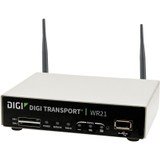
الصورة: الجبهة view of the Digi International WR21-L52A-DE1-TB Cellular Wireless Router. This image displays the compact form factor of the device, likely showing ports for antennas, power, and network connections.
The Digi International WR21-L52A-DE1-TB is a robust cellular wireless router designed for reliable and secure connectivity. It features multiple connectivity options and is suitable for various industrial and enterprise applications requiring remote access and data transfer over cellular networks.
5. الإعداد
5.1. تركيب بطاقة SIM
- تأكد من إيقاف تشغيل جهاز التوجيه وفصله عن مصدر الطاقة.
- Locate the SIM card slot(s) on the device. Refer to the device's physical markings for exact location.
- Insert the activated cellular SIM card into the slot with the gold contacts facing down and the notched corner oriented correctly. Push until it clicks into place.
- If applicable, secure the SIM card tray or cover.
5.2. اتصال الهوائي
- Identify the cellular antenna ports (typically labeled 'MAIN' and 'DIV' or similar).
- Screw the provided cellular antennas onto the corresponding ports until finger-tight. Do not overtighten.
- ضع الهوائيات لاستقبال الإشارة الأمثل.
5.3. توصيل الطاقة
- قم بتوصيل محول الطاقة بمنفذ إدخال الطاقة الخاص بالجهاز التوجيهي.
- قم بتوصيل محول الطاقة بمأخذ كهربائي مناسب.
- The router will power on automatically or may require pressing a power button. Observe the LED indicators for power status.
5.4. الاتصال بالشبكة (اختياري)
- To connect a device via Ethernet, plug one end of an Ethernet cable into an available LAN port on the router.
- Plug the other end of the Ethernet cable into the network port of your computer or other network device.
6. تعليمات التشغيل
6.1. تشغيل / إيقاف التشغيل
- تشغيل الطاقة: Connect the power adapter. The device will typically power on automatically. Observe the power LED.
- إيقاف التشغيل: Disconnect the power adapter from the electrical outlet. For controlled shutdown, refer to the device's web interface or specific documentation for a software shutdown procedure if available.
6.2. الوصول إلى Web الواجهة
- Ensure your computer is connected to the router via Ethernet or Wi-Fi (if enabled).
- افتح web المتصفح (على سبيل المثال، Chrome، Firefox، Edge).
- Enter the router's default IP address (e.g., 192.168.1.1 or 192.168.0.1) into the address bar and press Enter. Refer to the Quick Start Guide or device label for the exact default IP address.
- Enter the default username and password when prompted. These are typically found on a label on the device or in the Quick Start Guide.
- Upon successful login, you will access the router's configuration interface.
6.3. التكوين الأساسي
ضمن web من خلال واجهة المستخدم، يمكنك ضبط إعدادات متنوعة:
- Cellular Settings: Verify APN settings, signal strength, and connection status.
- إعدادات الشبكة: Configure LAN IP address, DHCP server, and port forwarding.
- حماية: Change default login credentials, configure firewall rules, and VPN settings.
- تحديث البرامج الثابتة: Check for and apply firmware updates to ensure optimal performance and security.
7. الصيانة
- تنظيف: استخدم قطعة قماش ناعمة وجافة لتنظيف الجزء الخارجي من جهاز التوجيه. لا تستخدم المنظفات السائلة أو البخاخات.
- تحديثات البرامج الثابتة: التحقق من الشركة المصنعة بشكل منتظم webموقع لتحديثات البرامج الثابتة. يضمن تحديث البرامج الثابتة الحصول على أحدث الميزات والتصحيحات الأمنية وتحسينات الأداء.
- الظروف البيئية: Ensure the router is operating within its specified temperature and humidity ranges to prevent overheating or damage.
8. استكشاف الأخطاء وإصلاحها
8.1. لا يوجد اتصال خلوي
- Verify the SIM card is correctly inserted and activated with your cellular provider.
- Check antenna connections and ensure they are positioned for optimal signal.
- تسجيل الدخول إلى web interface to check cellular signal strength and connection status.
- أعد تشغيل جهاز التوجيه.
8.2. تعذر الوصول Web الواجهة
- Ensure your computer is directly connected to the router via Ethernet.
- Verify your computer's IP address is in the same subnet as the router (e.g., if router is 192.168.1.1, computer should be 192.168.1.x).
- حاول مسح ذاكرة التخزين المؤقت للمتصفح الخاص بك أو استخدام متصفح آخر.
- If you forgot the password, a factory reset might be necessary (refer to specific device documentation for this procedure, as it will erase all configurations).
8.3. بطء سرعة الاتصال
- Check cellular signal strength in the web interface. Weak signal can lead to slow speeds.
- Ensure antennas are properly positioned and unobstructed.
- Verify your cellular data plan has not reached its data cap or is being throttled.
- Restart the router and connected devices.
9. المواصفات
| ميزة | وصف |
|---|---|
| نموذج | WR21-L52A-DE1-TB |
| ماركة | ديجي الدولية |
| بروتوكول الاتصال | خلوي |
| تكنولوجيا الاتصال | USB |
| طريقة التحكم | بعيد |
| ميزة خاصة | خدمة WPS |
| الأجهزة المتوافقة | كمبيوتر شخصي |
| الاستخدامات الموصى بها | بيت |
| رمز المنتج الموحد | 747356312219 |
10. الضمان والدعم
For detailed warranty information, please refer to the warranty card included with your product or visit the official Digi International website. Technical support is available through the manufacturer's support channels. Please have your product model number (WR21-L52A-DE1-TB) and serial number ready when contacting support.