
1. المقدمة
The EPEVER VS6048AU is a 60A common positive Pulse Width Modulation (PWM) solar charge controller designed for 12V, 24V, 36V, and 48V solar panel power systems. It incorporates advanced digital techniques to ensure efficient and reliable battery charging and load management. This controller is suitable for various applications, including solar home systems, traffic signals, solar street lights, and solar garden lamps.
المميزات الرئيسية:
- 3-سtagشحن PWM الذكي: السائبة ، التعزيز / المعادلة ، الطفو.
- Supports three battery charging options: Sealed, Gel, and Flooded.
- Integrated LCD display for dynamic monitoring of operating data and working conditions.
- Dual USB output ports (Max. 5VDC/2.4A) for charging electronic devices.
- إعدادات أزرار سهلة الاستخدام لتشغيل مريح ومناسب.
- Multiple load control modes for versatile application.
- وظيفة إحصاءات الطاقة.
- وظيفة تعويض درجة حرارة البطارية.
- Extensive electronic protections for system safety.

Image 1.1: The EPEVER VS6048AU Solar Charge Controller shown in various application settings, including home power supply, street lighting, monitoring, and green energy solutions.
2. معلومات السلامة
يرجى قراءة جميع التعليمات والتحذيرات بعناية قبل التركيب والتشغيل. قد يؤدي عدم اتباع هذه التعليمات إلى صدمة كهربائية أو حريق أو إصابة بالغة.
- تأكد من أن جميع الأسلاك موصلة بشكل صحيح ومستقطبة بشكل آمن لمنع تلف وحدة التحكم والمكونات الأخرى.
- افصل دائمًا لوحة الطاقة الشمسية وبطارية الطاقة قبل تركيب وحدة التحكم أو ضبطها.
- Install the controller in a well-ventilated area, away from flammable gases, moisture, and direct sunlight.
- استخدم قواطع الدائرة أو الصمامات المناسبة للوحة الشمسية والبطارية ودوائر الحمل.
- لا تقم بتفكيك وحدة التحكم أو محاولة إصلاحها بنفسك. اتصل بفنيين مؤهلين للصيانة.
- Wear appropriate personal protective equipment, including eye protection, when working with batteries.
- أبعد الأطفال عن مكونات نظام الطاقة الشمسية.
الحماية الإلكترونية: The VS6048AU controller includes comprehensive electronic protections:
- حماية قطبية عكسية PV
- ارتفاع مستوى شحن البطاريةtagالحماية الإلكترونية
- البطارية على حماية التفريغ
- حماية البطارية من عكس القطبية
- حماية من ارتفاع درجة حرارة البطارية
- حماية من الحمل الزائد
- تحميل حماية ماس كهربائى
- حماية من ارتفاع درجة حرارة وحدة التحكم

Image 2.1: Visual representation of the electronic protections integrated into the controller and a basic solar power system connection diagram.
3. انتهى المنتجview
Familiarize yourself with the components and interface of your EPEVER VS6048AU solar charge controller.

الصورة 3.1: الجبهة view of the EPEVER VS6048AU controller with key components labeled.
- شاشة LCD: Shows system status, parameters, and error codes.
- زر القائمة: Used to navigate through different display interfaces and enter/exit setting modes.
- زر SET: Used to confirm selections, modify parameters, and clear data.
- USB Output Ports (5VDC/2.4A): لشحن الأجهزة الإلكترونية الخارجية.
- Temp. Sensor Port (RTS Port): Connects to the optional remote temperature sensor for accurate battery temperature compensation.
- محطات الطاقة الشمسية الكهروضوئية: Connect to the solar panel array.
- أطراف البطارية: قم بتوصيله ببطارية التخزين.
- محطات التحميل: قم بالتوصيل بأحمال التيار المستمر.
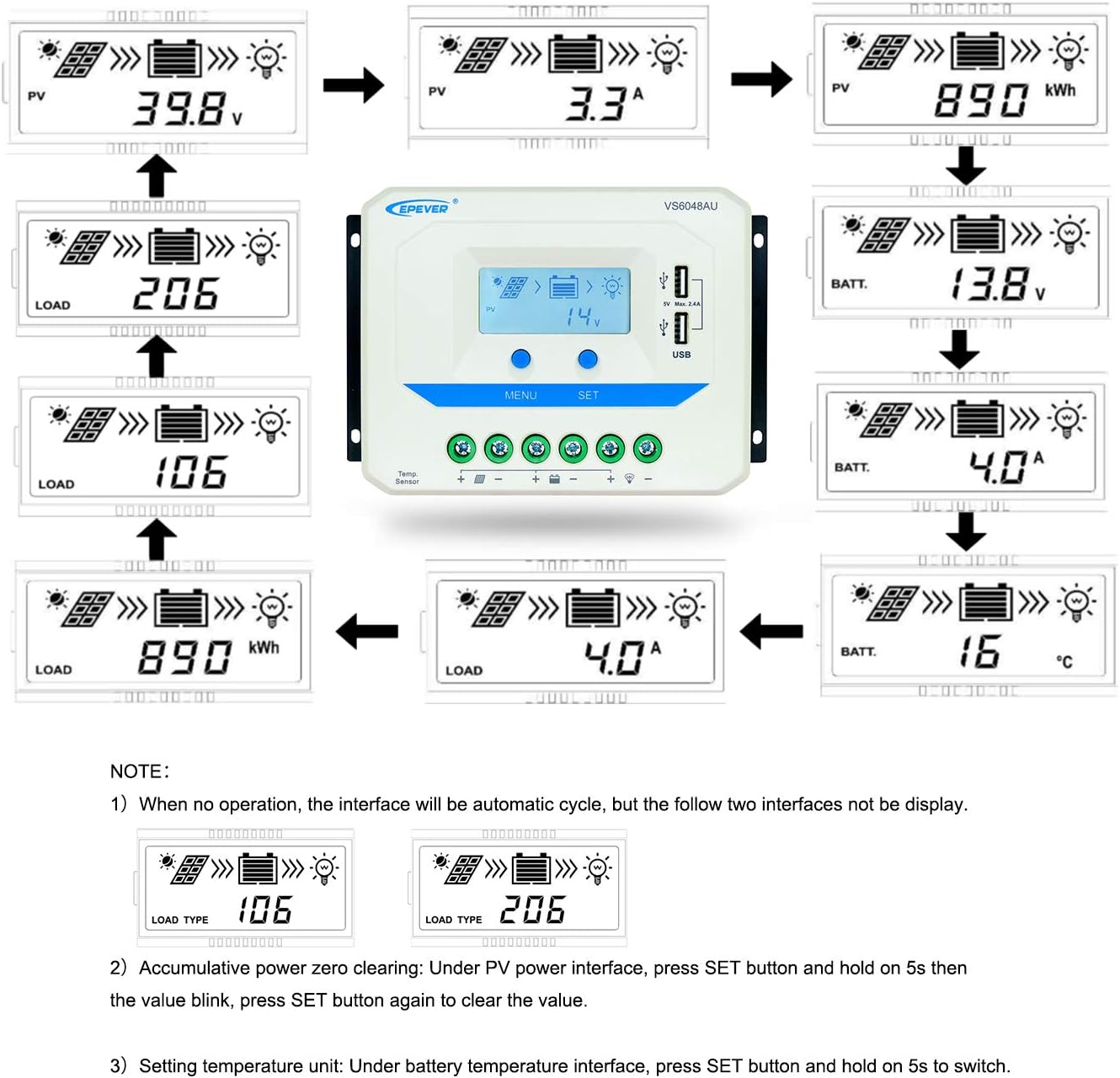
Image 3.2: Dimensions of the EPEVER VS6048AU Solar Charge Controller (approximately 21.4 cm x 12.87 cm x 7.22 cm).
LCD Display Status Description
The LCD display provides visual feedback on the system's operational status. Refer to the table below for icon meanings:

Image 3.3: Detailed description of the icons displayed on the VS6048AU LCD screen.
4. الإعداد والتثبيت
اتبع هذه الخطوات لتثبيت منظم شحن الطاقة الشمسية بشكل صحيح. تأكد من فصل جميع مصادر الطاقة قبل إجراء أي توصيلات.
تسلسل الأسلاك:
- قم بتوصيل البطارية: Connect the battery to the controller's battery terminals. Ensure correct polarity (positive to positive, negative to negative). The controller will detect the battery voltage.
- توصيل الحمل: قم بتوصيل الحمل المستمر بأطراف الحمل في وحدة التحكم. تأكد من صحة القطبية.
- ربط اللوحة الشمسية: قم بتوصيل مجموعة الألواح الشمسية بأطراف PV الخاصة بوحدة التحكم. تأكد من صحة القطبية.
مهم: قم دائمًا بتوصيل البطارية أولاً، ثم اللوحة الشمسية، وأخيرًا الحمل. افصلها بالترتيب العكسي: الحمل، ثم اللوحة الشمسية، ثم البطارية.
دليل فيديو التثبيت:
Video 4.1: An official EPEVER video demonstrating the connection process for the solar charge controller, including battery and load connections. This visual guide can assist with proper installation.
5. تعليمات التشغيل
The EPEVER VS6048AU controller features an intuitive LCD display and button interface for monitoring and configuration.
نظام الملاحة عبر شاشة LCD:
When no operation is performed, the LCD interface will automatically cycle through various display screens, showing real-time data such as PV voltage، التيار، جهد البطاريةtagهـ، وحالة التحميل.
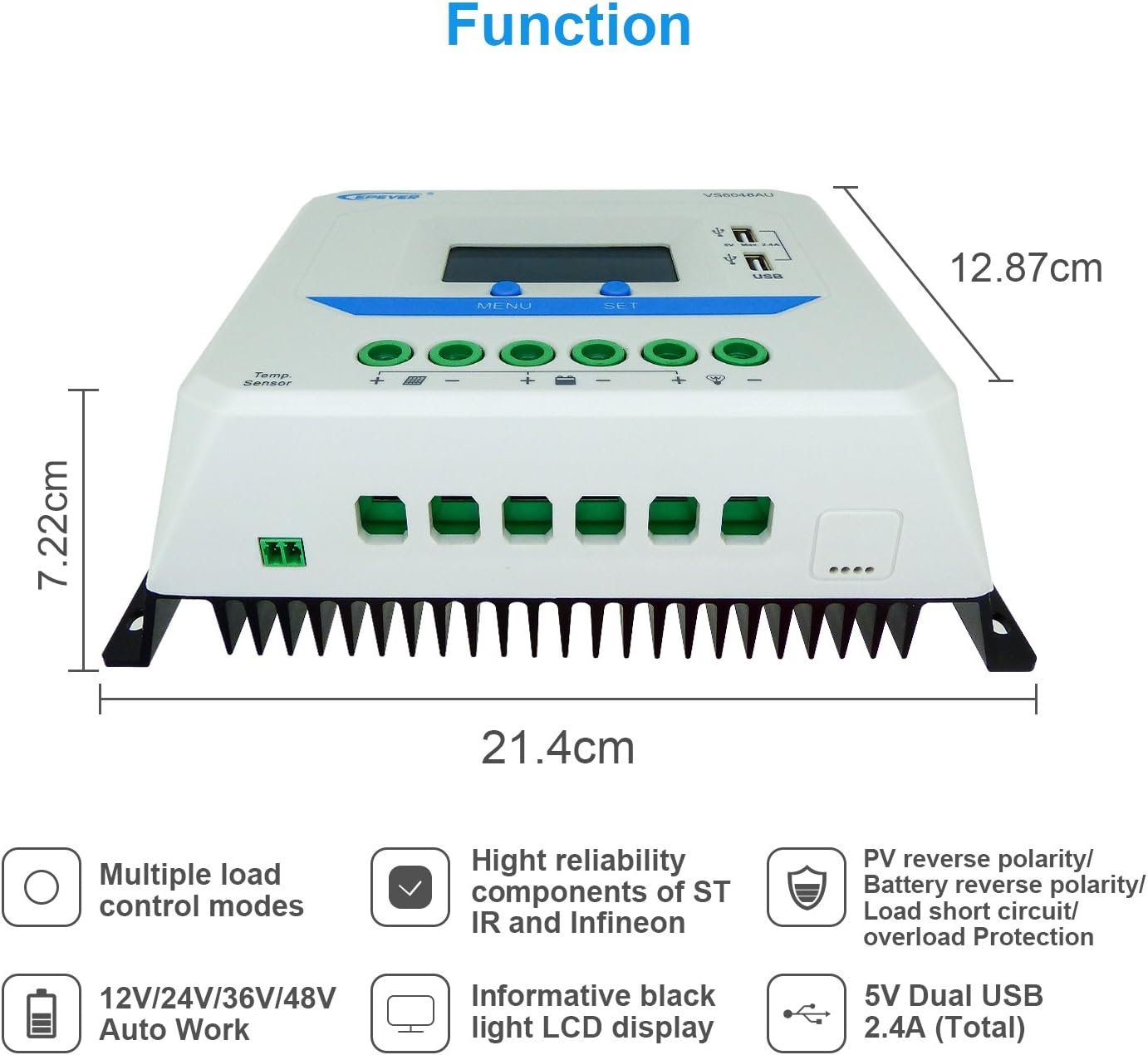
Image 5.1: Illustration of the automatic cycling interfaces on the VS6048AU LCD display.
- اضغط على قائمة طعام button to manually cycle through the display interfaces.
- اضغط مع الاستمرار على قائمة طعام button to enter or exit the parameter setting mode.
- In parameter setting mode, use the تعيين button to adjust values or confirm selections.
عمليات خاصة:
- Accumulative Power Clearing: Under the PV power interface, press and hold the تعيين button for 5 seconds until the value blinks, then press تعيين again to clear the accumulative power value.
- ضبط وحدة درجة الحرارة: Under the battery temperature interface, press and hold the تعيين button for 5 seconds to switch between Celsius (°C) and Fahrenheit (°F).
أوضاع الشحن:
يستخدم جهاز التحكم 3 ثوانٍtage intelligent PWM charging algorithm:
- الشحن بالجملة: يتم شحن البطارية بأقصى تيار حتى يصل جهدها إلىtagيصل e إلى مجلد Boosttage.
- Boost/Equalize Charging: The battery is charged at a constant voltage. An Equalize charge is typically performed once a month to balance battery cells.
- تعويم الشحن: حجم البطاريةtage is maintained at the Float voltage, and the charging current is reduced to a trickle to keep the battery fully charged.
The controller supports charging for Sealed, Gel, and Flooded battery types. Ensure the correct battery type is selected in the settings for optimal charging performance.
مخرج يو اس بي:
The dual USB ports provide a maximum output of 5VDC/2.4A for charging compatible electronic devices.
6. الصيانة
Regular maintenance ensures the longevity and optimal performance of your EPEVER VS6048AU solar charge controller.
- نظافة: حافظ على وحدة التحكم نظيفة وخالية من الغبار والأوساخ. استخدم قطعة قماش جافة للتنظيف.
- الاتصالات: افحص جميع توصيلات الأسلاك بشكل دوري للتأكد من إحكامها وخلوها من التآكل. فالتوصيلات غير المحكمة قد تتسبب في ارتفاع درجة الحرارة وتلف الأسلاك.
- تهوية: تأكد من أن منطقة التركيب تتمتع بتهوية كافية لمنع ارتفاع درجة حرارة وحدة التحكم.
- تقتيش: Inspect the controller and wiring for any signs of damage, such as frayed cables or cracked casing. Replace damaged components immediately.
- صحة البطارية: مراقبة حجم البطاريةtage and performance regularly. Ensure the battery type setting in the controller matches your battery.
7. استكشاف الأخطاء وإصلاحها
يتناول هذا القسم المشكلات الشائعة التي قد تواجهها مع جهاز التحكم في شحن الطاقة الشمسية.
| مشكلة | السبب المحتمل | حل |
|---|---|---|
| لا يوجد عرض على شاشة LCD | البطارية غير متصلة أو مستوى الصوت منخفضtagهـ؛ عكس القطبية. | تحقق من توصيلات البطارية والقطبية. تأكد من حجم البطاريةtagالبريد أعلى من 9 فولت. |
| البطارية لا تشحن | PV panels not connected; PV reverse polarity; insufficient sunlight; PV open circuit voltagهـ منخفضة جدًا. | Check PV connections and polarity. Ensure adequate sunlight. Verify PV open circuit voltagه ضمن المواصفات. |
| التحميل لا يعمل | Load disconnected; load short circuit; load overload; battery low voltagقطع البريد. | Check load connections. Remove short circuit. Reduce load. Recharge battery. |
| تحكم في ارتفاع درجة الحرارة | Poor ventilation; excessive ambient temperature; prolonged high current operation. | Ensure proper ventilation. Relocate controller to a cooler environment. Reduce load if possible. |
| مخرج USB لا يعمل | Device not compatible; controller fault. | Try another USB device. If issue persists, contact support. |
8. المواصفات
Detailed technical specifications for the EPEVER VS6048AU Solar Charge Controller.

Image 8.1: Comprehensive technical specifications table for the EPEVER VS-AU series, including the VS6048AU model.
| المعلمة | القيمة (VS6048AU) |
|---|---|
| نموذج | VS6048AU |
| حجم النظام الاسميtage | 12V/24V/36V/48V Auto Work |
| حجم إدخال البطاريةtage المدى | 9V ~ 64V |
| تيار الشحن/التفريغ المقدر | 60 أمبير |
| الأعلى. PV Open Circuit Voltage | 96 فولت |
| نوع البطارية | مغلق (افتراضي) / جل / مغمور |
| زيادة حجم الشحنtage | Sealed: 14.4V, Gel: 14.2V, Flooded: 14.6V |
| تعادل حجم الشحنtage | Sealed: 14.6V, Gel: No, Flooded: 14.8V |
| تعويم حجم الشحنtage | مختوم / جل / مغمور: 13.8 فولت |
| حجم منخفضtagإعادة توصيل المجلدtage | مختوم / جل / مغمور: 12.6 فولت |
| حجم منخفضtagه قطع الاتصال المجلدtage | مختوم / جل / مغمور: 11.1 فولت |
| الاستهلاك الذاتي | ≤10 مللي أمبير (12 فولت)، ≤18 مللي أمبير (24 فولت) |
| تعويض درجة الحرارة | -3mV/°C/2V (77°F) |
| التأريض | إيجابي مشترك |
| مخرج يو اس بي | 5VDC/2.4A (الإجمالي) |
| البعد الكلي | 214×128.7×72.2 ملم |
| محطات طرفية | 3AWG (25 مم²) |
| الوزن الصافي | 1.02 كجم |
| حاوية | IP30 |
| درجة حرارة بيئة العمل | -25 درجة مئوية ~ +55 درجة مئوية |
| نطاق الرطوبة | ≤95% (NC) |
9. الضمان والدعم
EPEVER products are designed for reliability and performance. For technical assistance or warranty inquiries, please refer to the following:
- الدعم الفني: EPEVER provides technical support through its local service centers. For assistance, please contact the authorized dealer or service center in your region.
- معلومات الضمان: Please refer to the warranty card included with your product or visit the official EPEVER webالموقع للحصول على شروط وأحكام الضمان التفصيلية.
- Free Solar System Design: EPEVER's service centers may offer free solar system design assistance to help you optimize your setup.