
بلاك ماجيك ديزاين سينيكAMPOCHDMFT4K
كاميرا سينما بوكيت 4K من بلاك ماجيك ديزاين (CINEC)AMPدليل التعليمات OCHDMFT4K
Comprehensive guide for setup, operation, and maintenance of your CINECAMPOCHDMFT4K.
المنتج انتهىview
The Blackmagic Design Pocket Cinema Camera 4K (model CINECAMPOCHDMFT4K) is a handheld digital film camera designed for professional video production. It features a 4/3" CMOS sensor, 13 stops of dynamic range, and dual native ISO up to 25,600, enabling high-quality video capture in various lighting conditions. The camera supports recording in industry-standard formats such as Apple ProRes and 12-bit Blackmagic RAW.
تتضمن الميزات الرئيسية ما يلي:
- Incredible Image Quality: 4/3" image sensor with 4096 x 2160 native resolution, active MFT lens mount, 13 stops dynamic range, and dual native ISO up to 25,600.
- خيارات تسجيل متعددة: Records to SD/UHS-II and CFast 2.0 cards, or external SSD via USB-C.
- متنوع القدرات File التنسيقات: Supports Apple ProRes (up to 4K) and 12-bit Blackmagic RAW. Includes DaVinci Resolve Studio activation key.
- تصميم سهل الاستخدام: Lightweight carbon fiber polycarbonate composite body with a multifunction handgrip and a large, bright 5" LCD display.
- اتصال واسع النطاق: Full-size HDMI, mini XLR with 48-volt phantom power, 3.5mm microphone and headphones connections, USB-C, and Bluetooth.
محتويات الحزمة
The Blackmagic Design Pocket Cinema Camera 4K package includes:
- Blackmagic Design Pocket Cinema Camera 4K body
- DaVinci Resolve Studio activation key
- Lens turret dust cap
- 30W power supply with locking connector and international adapters
- LP-E6 battery
دليل الإعداد
1. تركيب البطارية
The camera uses an LP-E6 battery. To install:
- حدد مكان حجرة البطارية في الجزء السفلي من الكاميرا.
- افتح غطاء حجرة البطارية.
- Insert the LP-E6 battery, ensuring correct orientation.
- أغلق غطاء حجرة البطارية جيدًا.

الشكل 1: خلفي view of the camera, showing the battery compartment location.
2. إدخال بطاقة الذاكرة
The camera supports SD/UHS-II and CFast 2.0 cards. To insert:
- Locate the memory card slots on the side of the camera.
- افتح غطاء فتحة بطاقة الذاكرة.
- Insert the SD or CFast card into the appropriate slot until it clicks into place.
- أغلق غطاء فتحة بطاقة الذاكرة.

الشكل 2: الجانب view of the camera, illustrating the memory card slots.
3. تركيب العدسة
The camera features an active Micro Four Thirds (MFT) lens mount. To attach a lens:
- Remove the lens turret dust cap from the camera body.
- قم بمحاذاة النقطة الحمراء الموجودة على العدسة مع النقطة الحمراء الموجودة على حامل عدسة الكاميرا.
- أدخل العدسة برفق في الحامل وقم بتدويرها في اتجاه عقارب الساعة حتى تستقر في مكانها.
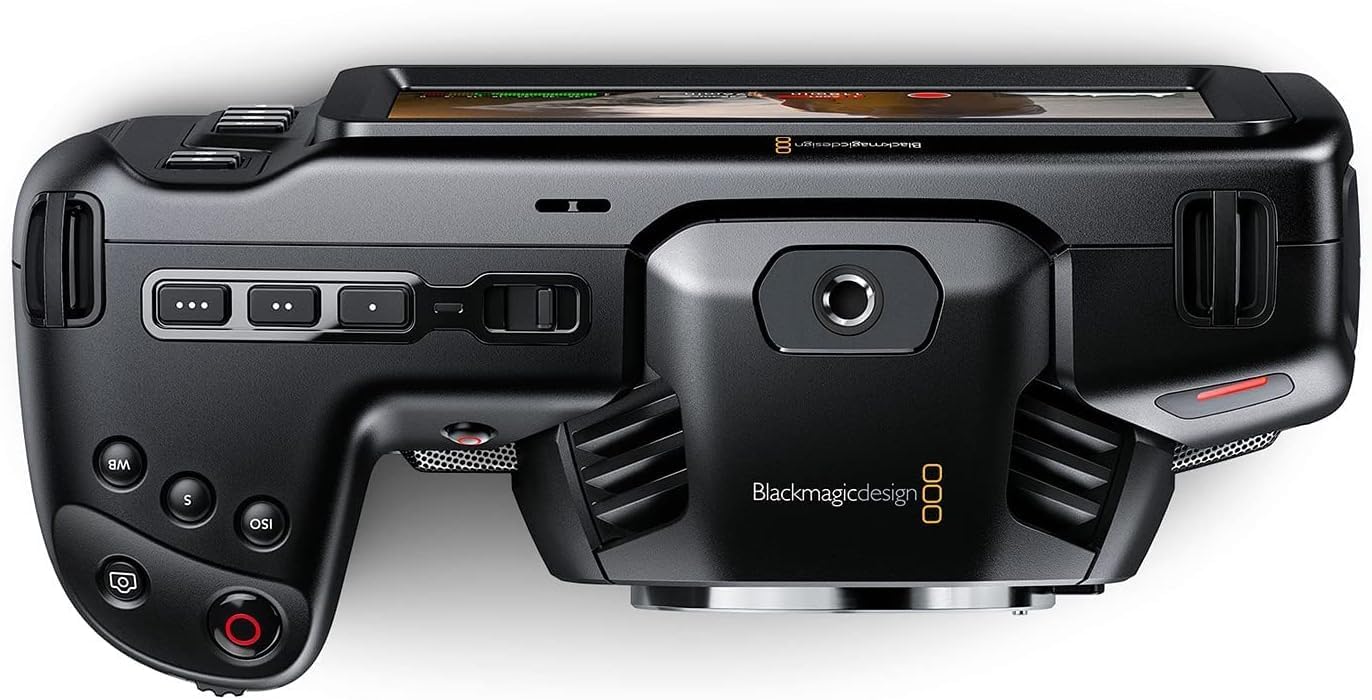
الشكل 3: الجبهة view of the camera, highlighting the MFT lens mount.
4. توصيل الطاقة
For extended operation, connect the included 30W power supply:
- Connect the appropriate international adapter to the power supply.
- قم بتوصيل مصدر الطاقة بمأخذ التيار الكهربائي الموجود على الحائط.
- Connect the locking DC power connector to the 12V input port on the camera.

الشكل 4: الجانب view of the camera, showing the 12V power input and other connectivity options.
تعليمات التشغيل
1. تشغيل / إيقاف التشغيل
To power on the camera, slide the "ON/OFF" switch located on the top left side of the camera body. To power off, slide the switch back to the "OFF" position.
2. Basic Controls and Touchscreen Interface
The camera features a large 5" touchscreen LCD for intuitive control. Physical buttons are also available for quick access to essential functions such as ISO, Shutter, White Balance, and Record.

Figure 5: Camera screen showing various recording settings and options.
3. إعدادات التسجيل
Access recording settings via the touchscreen menu. You can select:
- Codec and Quality: Choose between Blackmagic RAW (Constant Bitrate, Constant Quality Q0, Q5) or Apple ProRes (422 HQ, 422, 422 LT, 422 Proxy).
- دقة: Options include 4K DCI (4096x2160), 4K 2.4:1 (4096x1720), Ultra HD (3840x2160), 2.8K Anamorphic (2880x2160), 2.6K 16:9 (2688x1512), and HD (1920x1080).
- معدل الإطارات: Up to 60fps in 4K and 120fps in HD.

الشكل 6: مفصل view of the camera's menu for selecting recording codecs and resolutions.
4. إدخال الصوت
The camera offers versatile audio input options:
- Mini XLR: For professional microphones, with 48-volt phantom power support.
- إدخال 3.5 مم: For external microphones or line-level audio.
- ميكروفونات ستيريو مدمجة: For convenient on-camera audio capture.
- مقبس سماعة رأس مقاس 3.5 ملم: لأغراض المراقبة الصوتية.
5. External Monitoring and Storage
Connect external monitors via the full-size HDMI port. For extended recording, use the USB-C port to connect external SSD media.
صيانة
- تنظيف: Use a soft, dry cloth to clean the camera body. For the lens and sensor, use specialized cleaning kits and follow manufacturer guidelines.
- تخزين: Store the camera in a dry, dust-free environment, ideally in a protective case when not in use. Remove batteries during long-term storage.
- تحديثات البرامج الثابتة: قم بفحص تصميم Blackmagic بانتظام webموقع للحصول على تحديثات البرامج الثابتة لضمان الأداء الأمثل والوصول إلى الميزات الجديدة.
استكشاف الأخطاء وإصلاحها
If you encounter issues with your camera, consider the following general troubleshooting steps:
- قضايا الطاقة: Ensure the battery is fully charged or the power adapter is securely connected. Check battery orientation.
- مشاكل التسجيل: Verify that memory cards are correctly inserted and have sufficient free space. Check selected codec and resolution settings for compatibility with your workflow.
- جودة الصورة: Ensure the lens is clean and properly attached. Check ISO settings for excessive noise in low light.
- برمجة: If using DaVinci Resolve Studio, ensure it is updated to the latest version.
For more detailed troubleshooting, refer to the comprehensive manual available on the Blackmagic Design support webموقع.
تحديد
| أبعاد المنتج | 7.01 × 3.37 × 3.78 بوصة |
| وزن العنصر | 1.53 رطل |
| رقم موديل العنصر | سينيكAMPOCHDMFT4K |
| ماركة | بلاك ماجيك ديزاين |
| تقنية مستشعر الصور | جهاز اقتران الشحنات |
| دقة التقاط الفيديو | 4K |
| الفتحة القصوى | 2.8 مليمتر |
| نوع ذاكرة فلاش | SD |
| تنسيق التقاط الفيديو | Blackmagic RAW, ProRes 422 |
| تنسيق الصوت المدعوم | AAC، MP3، PCM |
| حجم الشاشة | 5 بوصة |
| تكنولوجيا الاتصال | USB |
| البطاريات | 1 بطاريات مطلوبة (متضمنة) |
الضمان والدعم
للحصول على معلومات الضمان والدعم الفني، يرجى الرجوع إلى موقع Blackmagic Design الرسمي. webالموقع أو تواصل مع خدمة العملاء مباشرةً. احتفظ بإيصال الشراء كإثبات للشراء في حال وجود أي مطالبات بالضمان.
Online resources and additional documentation can be found at: Blackmagic Design Support
Ask a question about this manual
Ask about setup, troubleshooting, compatibility, parts, safety, or missing instructions. Manuals+ will review the question and use this page’s manual context to help answer it.