
مقدمة
Thank you for choosing the Awei B923BL Wireless Magnetic Sports Bluetooth Earphones. This manual provides essential information for setting up, operating, maintaining, and troubleshooting your new earphones. Please read it carefully before use to ensure optimal performance and longevity of your device.
محتويات الحزمة
يرجى التحقق من الحزمة للعناصر التالية:
- Awei B923BL Wireless Magnetic Sports Bluetooth Earphones
- كابل شحن USB
- أحجام متعددة من أطراف الأذن
- دليل المستخدم
المنتج انتهىview
The Awei B923BL earphones are designed for active lifestyles, featuring a wireless Bluetooth connection and a magnetic design for convenient storage around your neck when not in use. They include an integrated microphone for hands-free calling.

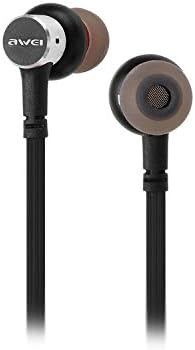
يثبت
1. شحن سماعات الأذن
Before first use, fully charge your earphones. Connect the provided USB charging cable to the charging port on the earphones and the other end to a USB power source (e.g., computer USB port, wall adapter). The indicator light will show charging status and turn off or change color when fully charged.
2. اقتران بلوتوث
- تأكد من إيقاف تشغيل سماعات الأذن.
- Press and hold the multi-function button (usually the power button) until the indicator light flashes red and blue alternately, indicating pairing mode.
- On your mobile phone or Bluetooth-enabled device, go to the Bluetooth settings and enable Bluetooth.
- بحث عن available devices. You should see "Awei B923BL" or a similar name in the list.
- Select "Awei B923BL" to connect. Once connected, the indicator light will usually flash blue slowly or turn off, and you may hear a confirmation tone.
- إذا طُلب منك إدخال كلمة المرور، أدخل "0000".
Once paired, the earphones will automatically connect to the last paired device when turned on, if the device's Bluetooth is active and within range.
تعليمات التشغيل
تشغيل/إيقاف الطاقة
- تشغيل الطاقة: Press and hold the multi-function button for approximately 3 seconds until the blue indicator light flashes.
- إيقاف التشغيل: Press and hold the multi-function button for approximately 5 seconds until the red indicator light flashes and then turns off.
تشغيل الموسيقى
- تشغيل/إيقاف مؤقت: اضغط على الزر متعدد الوظائف مرة واحدة.
- المسار التالي: اضغط مع الاستمرار على زر رفع الصوت.
- المسار السابق: اضغط مع الاستمرار على زر خفض مستوى الصوت.
استدعاء إدارة
- الرد/إنهاء المكالمة: اضغط على الزر متعدد الوظائف مرة واحدة.
- رفض المكالمة: اضغط مع الاستمرار على زر الوظائف المتعددة لمدة 2 ثوانٍ تقريبًا.
- إعادة الاتصال بالرقم الأخير: اضغط مرتين على زر الوظائف المتعددة.
التحكم في مستوى الصوت
- ارفع على الصوت: اضغط على زر الصوت +.
- تقليل الحجم: اضغط على زر التحكم في الصوت.
صيانة
- Clean the earphones regularly with a soft, dry cloth. Do not use harsh chemicals or abrasive materials.
- قم بإزالة أطراف الأذن ونظفها بالماء والصابون الخفيف إذا لزم الأمر، مع التأكد من جفافها تمامًا قبل إعادة تركيبها.
- قم بتخزين سماعات الأذن في مكان بارد وجاف بعيدًا عن أشعة الشمس المباشرة ودرجات الحرارة القصوى.
- Avoid exposing the earphones to water or excessive moisture.
- لا تحاول تفكيك سماعات الأذن أو تعديلها، لأن ذلك سيؤدي إلى إلغاء الضمان.
استكشاف الأخطاء وإصلاحها
- سماعات الأذن لا تعمل: تأكد من شحن سماعات الأذن بالكامل.
- لا يمكن الاقتران بالجهاز:
- Make sure the earphones are in pairing mode (flashing red and blue).
- تأكد من تمكين البلوتوث على جهازك.
- قرّب سماعات الأذن من جهازك.
- حاول إعادة تشغيل كل من سماعات الأذن وجهازك.
- قم بمسح اتصالات البلوتوث السابقة على جهازك إذا كان لديك عدد كبير منها.
- لا يوجد صوت أو مستوى الصوت منخفض:
- تحقق من مستويات الصوت في كل من سماعات الأذن والجهاز المتصل.
- تأكد من توصيل سماعات الأذن بجهازك بشكل صحيح.
- حاول تشغيل مصادر صوتية مختلفة.
- مشاكل جودة المكالمة:
- تأكد من عدم وجود عائق أمام الميكروفون.
- انتقل إلى منطقة ذات تداخل أقل.
تحديد
| ميزة | التفاصيل |
|---|---|
| العلامة التجارية | أوي |
| رقم الموديل | ب923ب |
| لون | أسود |
| عامل شكل سماعة الرأس | في الأذن |
| تكنولوجيا الاتصال | لاسلكي |
| تكنولوجيا الاتصالات اللاسلكية | لاسلكي |
| وصف الفئة العمرية | بالغ |
| مادة | ممحاة |
| الأجهزة المتوافقة | الهواتف المحمولة |
| ميزة الكابل | بدون كابل |
| طريقة التحكم | يلمس |
| عدد العناصر | 1 |
| الشركة المصنعة | أوي |
| المميزات الخاصة | Microphone Included (Note: This model does not feature active noise cancellation as per product description.) |
الضمان والدعم
معلومات الضمان
This product comes with a 1-year manufacturer's warranty from the date of purchase. For warranty claims or service, please contact the manufacturer or their authorized service agent. For further details, you may also contact the retailer where the product was purchased.
دعم العملاء
If you encounter any issues not covered in this manual or require further assistance, please refer to the contact information provided with your product packaging or visit the official Awei webموقع لموارد الدعم.