
1. المقدمة
The ZEBRONICS ZEB-DB250JP is a versatile Bluetooth wireless gamepad designed for an enhanced gaming experience across multiple platforms. It features 17 buttons, dual analog sticks, dual vibration motors, and quad front triggers for precise control. This gamepad is compatible with Android smartphones, tablets, Android TV boxes, Android TVs, and PCs running Windows 98 / 2000 / ME / XP / NT / VISTA / 7 / 8 / 10. It also supports PS3 consoles. The ergonomic design ensures comfortable use, and a phone mount is included for mobile gaming.
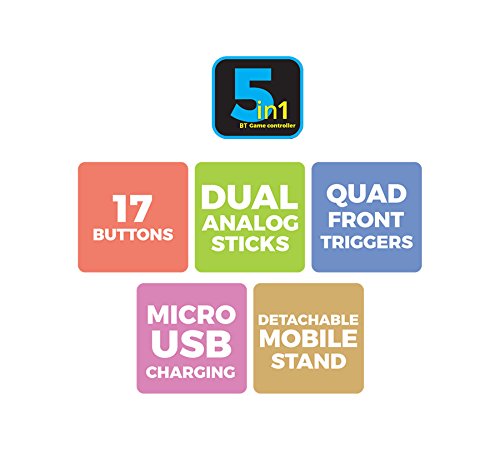
الصورة 1: انتهىview of ZEB-DB250JP key features including 17 buttons, dual analog sticks, quad front triggers, micro USB charging, and a detachable mobile stand.
2. ماذا يوجد في الصندوق
- 1 x ZEB-DB250JP Joypad
- 1 × كابل شحن ميكرو USB
- 1 x Detachable Phone Mount
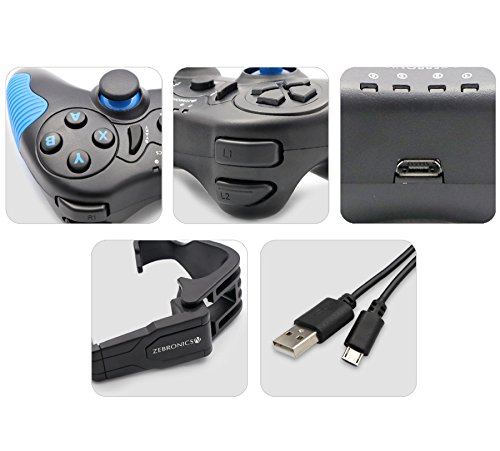
Image 2: A collage showing the ZEB-DB250JP gamepad, its triggers, micro USB port, detachable phone mount, and charging cable.
3. الإعداد
3.1 شحن لوحة الألعاب
Before initial use, fully charge the gamepad. Connect the provided Micro USB cable to the gamepad's charging port and the other end to a USB power source (e.g., computer USB port, USB wall adapter). The built-in 300mAh battery provides extended playtime.

الصورة 3: الأعلى view of the ZEB-DB250JP gamepad, highlighting the Micro USB charging port located between the L1/R1 and L2/R2 triggers.
3.2 Bluetooth Pairing (Android Devices & PS3)
- تأكد من شحن وحدة التحكم.
- اضغط مع الاستمرار على بيت الزر بالإضافة إلى X button simultaneously until the indicator lights on the gamepad begin to flash, indicating it is in pairing mode.
- On your Android smartphone, tablet, Android TV box, or Android TV, navigate to the Bluetooth settings.
- بحث عن available devices and select "ZEB-DB250JP" (or similar name) from the list.
- Once connected, the indicator light on the gamepad will become solid. The Bluetooth range is approximately 8 meters.
- For PS3, connect the gamepad via USB cable first, then follow the console's instructions for pairing a new controller.
3.3 اتصال الكمبيوتر
For PC gaming, the ZEB-DB250JP can be connected via the provided USB cable. Simply plug the Micro USB end into the gamepad and the USB-A end into an available USB port on your computer. The gamepad is compatible with Windows 98 / 2000 / ME / XP / NT / VISTA / 7 / 8 / 10 and should be recognized automatically.
3.4 Attaching the Phone Mount
To use the gamepad with your smartphone, attach the included phone mount to the designated slot on the gamepad. Secure your smartphone firmly into the mount.
4. تعليمات التشغيل
4.1 زر تخطيط
The ZEB-DB250JP features a standard gamepad layout with 17 buttons, including:
- عصا تحكم تناظرية مزدوجة: للحصول على حركة دقيقة والتحكم في الكاميرا.
- D- الوسادة: لوحة تحكم اتجاهية للتنقل بين القوائم وإدخالات محددة في اللعبة.
- أزرار الإجراءات (A، B، X، Y): لإجراءات داخل اللعبة.
- Quad Front Triggers (L1, L2, R1, R2): For additional actions, often used for shooting or accelerating.
- زر الصفحة الرئيسة: For power on/off and system functions.
- SELECT/BACK and START/MENU Buttons: For game menus and options.


Image 4: Left side of the ZEB-DB250JP gamepad showing the D-pad and left analog stick. Image 5: Right side of the ZEB-DB250JP gamepad showing the action buttons (A, B, X, Y) and right analog stick.
4.2 تشغيل/إيقاف التشغيل
- للتشغيل ، اضغط على بيت زر.
- لإيقاف التشغيل ، اضغط مع الاستمرار على بيت button for a few seconds until the gamepad shuts down.
4.3 الألعاب
Once connected, the gamepad should be recognized by compatible games. Refer to your game's settings for controller configuration and button mapping. The dual vibration motors provide haptic feedback for an immersive gaming experience.
5. الصيانة
- تنظيف: استخدم قطعة قماش ناعمة وجافة لتنظيف وحدة التحكم. تجنب استخدام المواد الكيميائية القاسية أو المواد الكاشطة.
- تخزين: قم بتخزين وحدة التحكم في اللعبة في مكان بارد وجاف بعيدًا عن أشعة الشمس المباشرة ودرجات الحرارة العالية.
- العناية بالبطارية: لإطالة عمر البطارية، تجنب تفريغها بالكامل بشكل متكرر. اشحن وحدة التحكم بانتظام، حتى لو لم تكن قيد الاستخدام لفترات طويلة.
6. استكشاف الأخطاء وإصلاحها
- لا يمكن توصيل وحدة التحكم عبر البلوتوث:
- Ensure the gamepad is charged.
- Make sure the gamepad is in pairing mode (HOME + X).
- قم بإيقاف وتشغيل البلوتوث على جهازك.
- Forget the device from your Bluetooth settings and try pairing again.
- Ensure your device is within the 8-meter Bluetooth range. - Buttons unresponsive or delayed input:
- Check battery level and charge if low.
- Ensure there are no obstructions between the gamepad and the connected device.
- For PC, try connecting via USB cable to rule out wireless interference.
- أعد تشغيل وحدة التحكم والجهاز المتصل بها. - وحدة التحكم لا تشحن:
- Verify the Micro USB cable is securely connected to both the gamepad and the power source.
- Try a different Micro USB cable or power adapter.
- Ensure the power source is functional. - الاهتزاز لا يعمل:
- Check if the game supports vibration feedback.
- Ensure vibration settings are enabled in the game or device settings.
7. المواصفات
| ماركة | الزبرونيك |
| اسم الموديل | عصا التحكم التناظرية |
| الأجهزة المتوافقة | Android, PC, PS3 |
| نوع وحدة التحكم | لوحة الألعاب |
| تكنولوجيا الاتصال | بلوتوث (v3.0) |
| مميزات المنتج | Wireless, Dual Vibration Motors |
| كمية الأزرار | 17 |
| نوع مصدر الطاقة | تعمل بالبطارية |
| بطارية | Built-in 300mAH |
| مدى البلوتوث | 8m |
| وزن العنصر | 370 جرام |
| أبعاد العنصر | 17 × 12 × 6 سنتيمتر |
| لون | Red (as per product details, though main image shows black/red) |
| رقم الموديل | DB250JP |
8. الضمان والدعم
The ZEBRONICS ZEB-DB250JP Bluetooth Gamepad Joystick comes with a ضمان لمدة سنة واحدة. For any warranty claims or service, please carry the product to an authorized ZEBRONICS Service Center. For a list of service centers, refer to the product information provided at the time of purchase or visit the official ZEBRONICS webموقع.
For further assistance or technical support, please contact ZEBRONICS customer service.