
مقدمة
This manual provides comprehensive instructions for the setup, operation, maintenance, and troubleshooting of your Thomson Universal 2-in-1 Zapper Remote Control ROC Z107. Please read this manual carefully before using the device to ensure optimal performance and longevity.
المنتج انتهىview
The Thomson ROC Z107 is a universal remote control designed to operate two devices, typically a Television (TV) and a Set-Top Box (STB). It features large buttons for ease of use and includes a learning function for expanded compatibility.
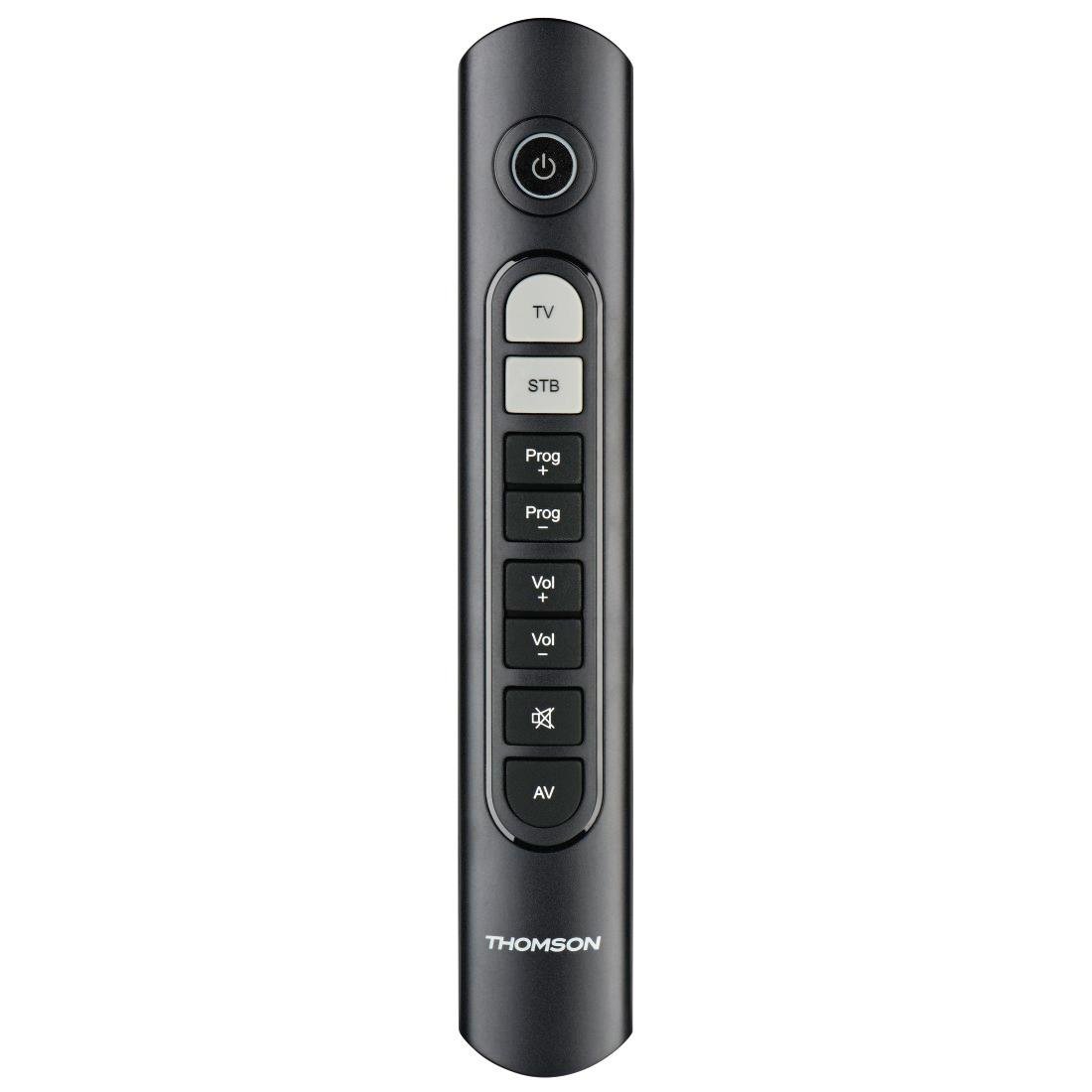
Image: Thomson Universal 2-in-1 Zapper Remote Control ROC Z107. This image displays the remote control from a slightly angled top-down perspective, highlighting its ergonomic design and the layout of its primary buttons.
يثبت
1. تركيب البطارية
- افتح غطاء حجرة البطارية في الجزء الخلفي من جهاز التحكم عن بعد.
- Insert two AAA batteries, ensuring correct polarity (+ and -). Two AAA batteries are included with your purchase.
- أغلق غطاء حجرة البطارية جيدًا.
2. Initial Programming (Pre-programmed Devices)
The remote control is pre-programmed for many popular brands such as LG, Sony, Samsung, Sharp, and Philips. For these brands, the remote may function immediately after battery installation without further setup. Test the remote with your TV and STB.
3. Learning Function (For Unlisted or Specific Functions)
If your device is not immediately compatible or if you wish to add specific functions from your original remote, use the learning function:
- Place the Thomson remote and your original remote control head-to-head, approximately 2-5 cm apart.
- Press and hold the desired device button (TV or STB) on the Thomson remote until the indicator light blinks.
- Press the button on the Thomson remote that you wish to program. The indicator light will blink slowly.
- Press the corresponding button on your original remote control. The indicator light on the Thomson remote will blink rapidly to confirm successful learning.
- كرر العملية للأزرار الأخرى حسب الحاجة.
- Press the device button (TV or STB) again to exit learning mode.
4. Master Volume and Program Selection
This feature allows you to designate which device (TV or STB) controls the volume and program channels, regardless of which device mode the remote is currently in. Refer to the full user manual for specific steps on setting up master control functions.
تعليمات التشغيل
The Thomson ROC Z107 remote control features a simplified button layout for essential functions.

Image: Close-up of Thomson ROC Z107 remote control buttons. This image provides a detailed view of the remote's buttons, including Power, TV, STB, Program Up/Down, Volume Up/Down, Mute, and AV input selection.
- زر الطاقة (⏻): Turns the selected device (TV or STB) on or off.
- زر التلفزيون: Selects the Television control mode.
- زر جهاز الاستقبال: Selects the Set-Top Box control mode.
- Prog + / Prog - Buttons: Changes the program/channel up or down.
- Vol + / Vol - Buttons: يزيد أو يخفض مستوى الصوت.
- زر كتم الصوت (🔇): كتم الصوت أو إلغاء كتمه.
- AV Button: Switches the input source on the TV (e.g., HDMI 1, HDMI 2, AV).
صيانة
استبدال البطارية
When the remote control's performance degrades or the indicator light does not respond, it is time to replace the batteries. Follow the battery installation steps outlined in the Setup section.
تنظيف
لتنظيف جهاز التحكم عن بعد، استخدم قطعة قماش ناعمة وجافة. تجنب استخدام المنظفات السائلة أو المواد الكاشطة، لأنها قد تُلحق الضرر بسطح جهاز التحكم أو مكوناته الداخلية.
استكشاف الأخطاء وإصلاحها
- جهاز التحكم عن بعد لا يستجيب:
- تأكد من تركيب البطاريات بشكل صحيح وعدم نفادها. استبدلها إذا لزم الأمر.
- تأكد من عدم وجود أي عوائق بين جهاز التحكم عن بعد وجهاز استقبال الأشعة تحت الحمراء الخاص بالجهاز.
- Verify that the remote is in the correct device mode (TV or STB).
- وظائف محددة لا تعمل:
- If a specific button does not work, it may not be programmed for your device or the device may not support that function. Use the learning function to program the button from your original remote.
- Some older devices may have limited compatibility with universal remotes.
- Remote range is limited:
- تأكد من أن البطاريات جديدة.
- The maximum operating range is 10 meters. Operating beyond this distance may result in unreliable performance.
تحديد
| ماركة | تومسون |
| اسم الموديل | ROC Z107 |
| رقم الموديل | 00132672 |
| مادة | بلاستيك |
| لون | أسود |
| الانتقال | Infrared (IR Wireless) |
| عدد الأجهزة المدعومة | 2 (TV, STB) |
| الأجهزة الطرفية المتوافقة | Television, DTH, Set-Top Box |
| مصدر الطاقة | 2 × بطاريات AAA (مضمنة) |
| الحد الأقصى للمدى | 10 متر |
| أبعاد المنتج | 31.5 × 15.5 × 4 سم |
| وزن العنصر | 170 جرام |
| عدد الأزرار | 9 |
ضمان
This product is covered by a manufacturer's warranty. Please refer to the warranty card included in the product packaging or contact Thomson customer support for detailed warranty information and terms.
يدعم
For further assistance, technical support, or inquiries regarding your Thomson Universal 2-in-1 Zapper Remote Control ROC Z107, please visit the official Thomson webيمكنك زيارة الموقع الإلكتروني أو الاتصال بقسم خدمة العملاء. عادةً ما تجد معلومات الاتصال على عبوة المنتج أو على الموقع الإلكتروني الرسمي للعلامة التجارية.