
مقدمة
This manual provides essential instructions for the Jam Audio Out There Active Noise Cancelling On-Ear Bluetooth Headphones. Please read this guide thoroughly to ensure proper use, maintenance, and to maximize your listening experience. These headphones offer active noise cancellation, Bluetooth connectivity, hands-free calling, and a comfortable on-ear design.
ماذا يوجد في الصندوق
تأكد من وجود جميع العناصر في العبوة:
- Out There Headphones
- كابل AUX (3.5 مم)
- كابل شحن USB
- دليل البدء السريع (راجع هذا الدليل للحصول على تعليمات مفصلة)

Image: Contents of the Jam Audio Out There headphone package, including the headphones, AUX cable, and USB charging cable.
المنتج انتهىview والضوابط
Familiarize yourself with the headphone's layout and controls for optimal use.
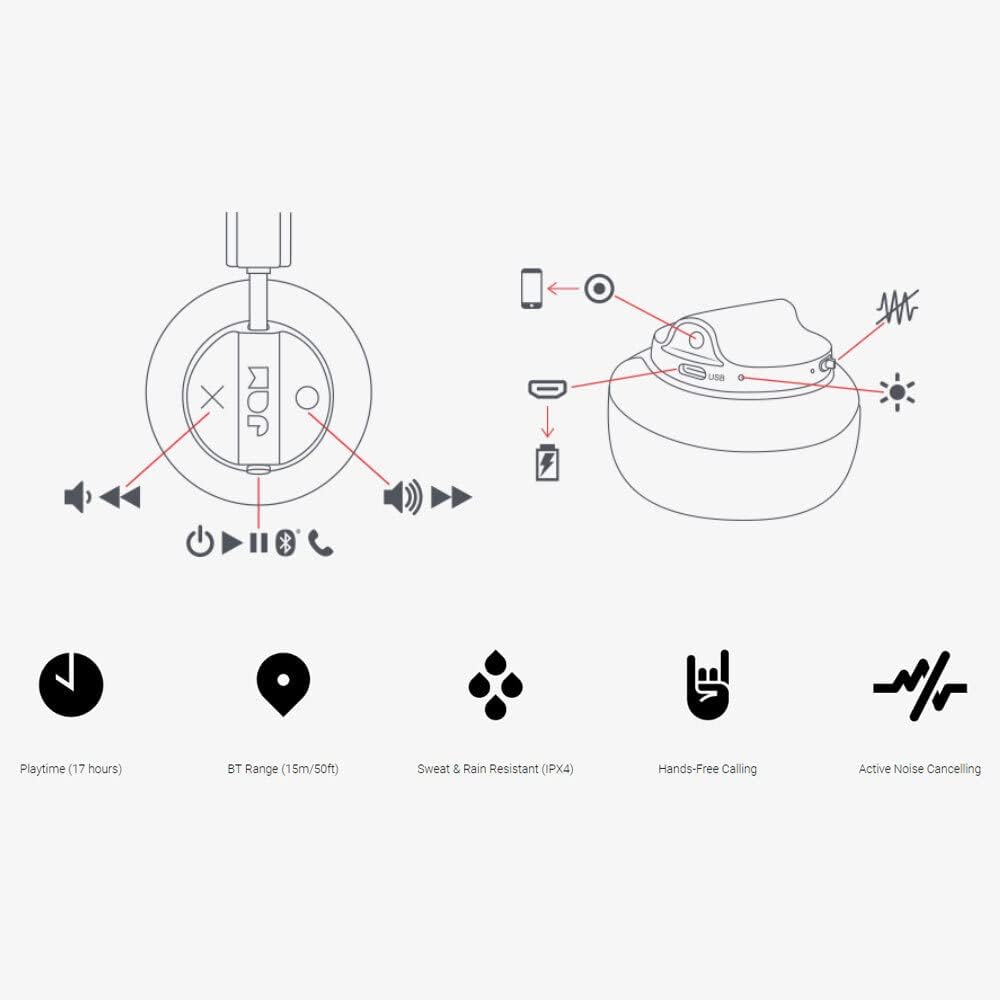
Image: Detailed diagram illustrating the control buttons and ports on the Jam Audio Out There headphones, including power, volume, track navigation, call management, and the charging port.
- زر الطاقة: اضغط مع الاستمرار للتشغيل / إيقاف التشغيل.
- رفع الصوت / المسار التالي: اضغط لفترة قصيرة لرفع مستوى الصوت، واضغط لفترة طويلة للانتقال إلى المسار التالي.
- خفض الصوت / المسار السابق: اضغط لفترة قصيرة لخفض مستوى الصوت، واضغط لفترة طويلة للانتقال إلى المسار السابق.
- تشغيل/إيقاف مؤقت/الرد على المكالمة: Single press to play/pause music or answer/end a call.
- Active Noise Cancelling (ANC) Switch: Toggle to activate or deactivate noise cancellation.
- منفذ الشحن: منفذ Micro USB للشحن.
- منفذ AUX-in: مقبس 3.5 ملم لتوصيل الصوت السلكي.
يثبت
1. شحن سماعات الرأس
Before first use, fully charge your headphones. Connect the provided USB charging cable to the charging port on the headphones and the other end to a USB power source. The LED indicator will show charging status and turn off when fully charged. A full charge takes approximately 2 hours and provides up to 17 hours of playtime.

Image: The Jam Audio Out There headphones provide up to 17 hours of playtime on a single charge.
2. تشغيل / إيقاف التشغيل
- To power on: Press and hold the Power button for 3 seconds. The LED indicator will flash.
- To power off: Press and hold the Power button for 3 seconds. The LED indicator will turn off.
3. اقتران بلوتوث
- تأكد من إيقاف تشغيل سماعات الرأس.
- Press and hold the Power button for 5 seconds until the LED indicator flashes red and blue, indicating pairing mode.
- على جهازك (الهاتف الذكي، الجهاز اللوحي، الكمبيوتر)، قم بتمكين البلوتوث وابحث عن الأجهزة المتاحة.
- Select "JAM Out There" from the list of devices.
- Once paired, the LED indicator on the headphones will turn solid blue.
- The headphones have a Bluetooth range of up to 15 meters (50 feet).

Image: The Jam Audio Out There headphones offer Bluetooth compatibility, allowing a range of up to 15 meters or 50 feet from your connected device.
تعليمات التشغيل
تشغيل الموسيقى
- تشغيل/إيقاف مؤقت: اضغط على زر التشغيل/الإيقاف المؤقت مرة واحدة.
- المسار التالي: اضغط لفترة طويلة على زر رفع الصوت.
- المسار السابق: اضغط لفترة طويلة على زر خفض الصوت.
- ضبط مستوى الصوت: اضغط ضغطة قصيرة على زر رفع الصوت أو زر خفض الصوت.
الاتصال بدون استخدام اليدين
- الرد/إنهاء المكالمة: اضغط على زر التشغيل/الإيقاف المؤقت مرة واحدة.
- رفض المكالمة: اضغط مع الاستمرار على زر التشغيل / الإيقاف المؤقت لمدة ثانيتين.
- إجراء مكالمة: Initiate the call from your connected device. The audio will automatically transfer to the headphones.
- Music will automatically pause during a call and resume after the call ends.
إلغاء الضوضاء النشط (ANC)
- To activate ANC: Slide the ANC switch to the ON position. The ANC indicator light will illuminate.
- To deactivate ANC: Slide the ANC switch to the OFF position. The ANC indicator light will turn off.
- Using ANC can reduce ambient noise, enhancing your listening experience. Note that ANC can be used independently or with Bluetooth audio.
Wired Connection (AUX-in)
For a wired connection, use the provided 3.5mm AUX cable. Plug one end into the headphone's AUX-in port and the other into your audio device. This allows you to continue listening even if the headphone battery is depleted or if Bluetooth is not available.
صيانة
- تنظيف: امسح سماعات الرأس بقطعة قماش ناعمة وجافة. لا تستخدم مواد كيميائية قاسية أو مواد كاشطة.
- تخزين: قم بتخزين سماعات الرأس في مكان بارد وجاف بعيداً عن درجات الحرارة القصوى.
- مقاومة الماء: These headphones are IPX4 rated, meaning they are resistant to sweat and light splashes of water. Do not submerge them in water or expose them to heavy rain. Ensure the charging port cover is securely closed when not charging to maintain water resistance.
- العناية بالبطارية: لإطالة عمر البطارية، تجنب تفريغ شحن سماعات الرأس بالكامل بشكل متكرر. اشحنها بانتظام، حتى في حال عدم استخدامها لفترات طويلة.
استكشاف الأخطاء وإصلاحها
| مشكلة | حل |
|---|---|
| سماعات الرأس لا تعمل | Ensure the headphones are charged. Connect to a power source using the USB cable. |
| غير قادر على الاقتران عبر البلوتوث |
|
| لا يوجد صوت أو مستوى صوت منخفض |
|
| Active Noise Cancelling not working | Ensure the ANC switch is in the ON position and the ANC indicator light is illuminated. |
| Headphones falling apart or breaking | While the product is designed for durability, excessive force or improper handling can cause damage. Handle with care. If issues persist, refer to warranty information. |
تحديد
- اسم الموديل: هناك بالخارج
- رقم الموديل: HX-HP303BK
- الاتصال: Bluetooth, 3.5 mm Jack (AUX-in)
- النطاق اللاسلكي: حتى 15 مترا (50 قدما)
- عمر البطارية: تصل إلى 17 ساعة
- التحكم في الضوضاء: إلغاء الضوضاء النشط
- مقاومة الماء: IPX4 Rated (Sweat and Rain Resistant)
- وضع الأذن: على الأذن
- مادة: المطاط والسيليكون
- وزن السلعة: 5.1 أونصة (0.32 رطل)
- أبعاد المنتج: 8.58 × 3.19 × 8.66 بوصة
- المكونات المتضمنة: Headphones, Charging Cord, AUX Cable
انتهى فيديو المنتجview
شاهد الفيديو الرسمي لهذا المنتج للحصول على نظرة عامة مرئيةview of the Jam Audio product line, including the Out There headphones.
Video: An official Jam Audio sizzle video showcasing various products, including the Out There headphones, highlighting their design and features.
الضمان والدعم
For warranty information, product registration, or technical support, please refer to the official Jam Audio webالموقع أو تواصل مع خدمة العملاء. احتفظ بإثبات الشراء لطلبات الضمان.