
Sephia A11
Sephia A11 Portable Bluetooth Speaker
دليل المستخدم
مقدمة
Thank you for choosing the Sephia A11 Portable Bluetooth Speaker. This manual provides essential information for setting up, operating, and maintaining your speaker to ensure optimal performance and longevity. The Sephia A11 offers versatile connectivity options, including Bluetooth, USB, Micro SD, and AUX input, delivering clear and powerful audio in a compact design.
ماذا يوجد في الصندوق
- Sephia A11 Bluetooth Speaker
- كابل الشحن
- كابل aux
- دليل المستخدم (هذا المستند)

Image: The Sephia A11 Portable Bluetooth Speaker, showcasinيتميز بتصميمه الأسود الأنيق وشبكته الأمامية.
المنتج انتهىview
Familiarize yourself with the buttons and ports on your Sephia A11 speaker.
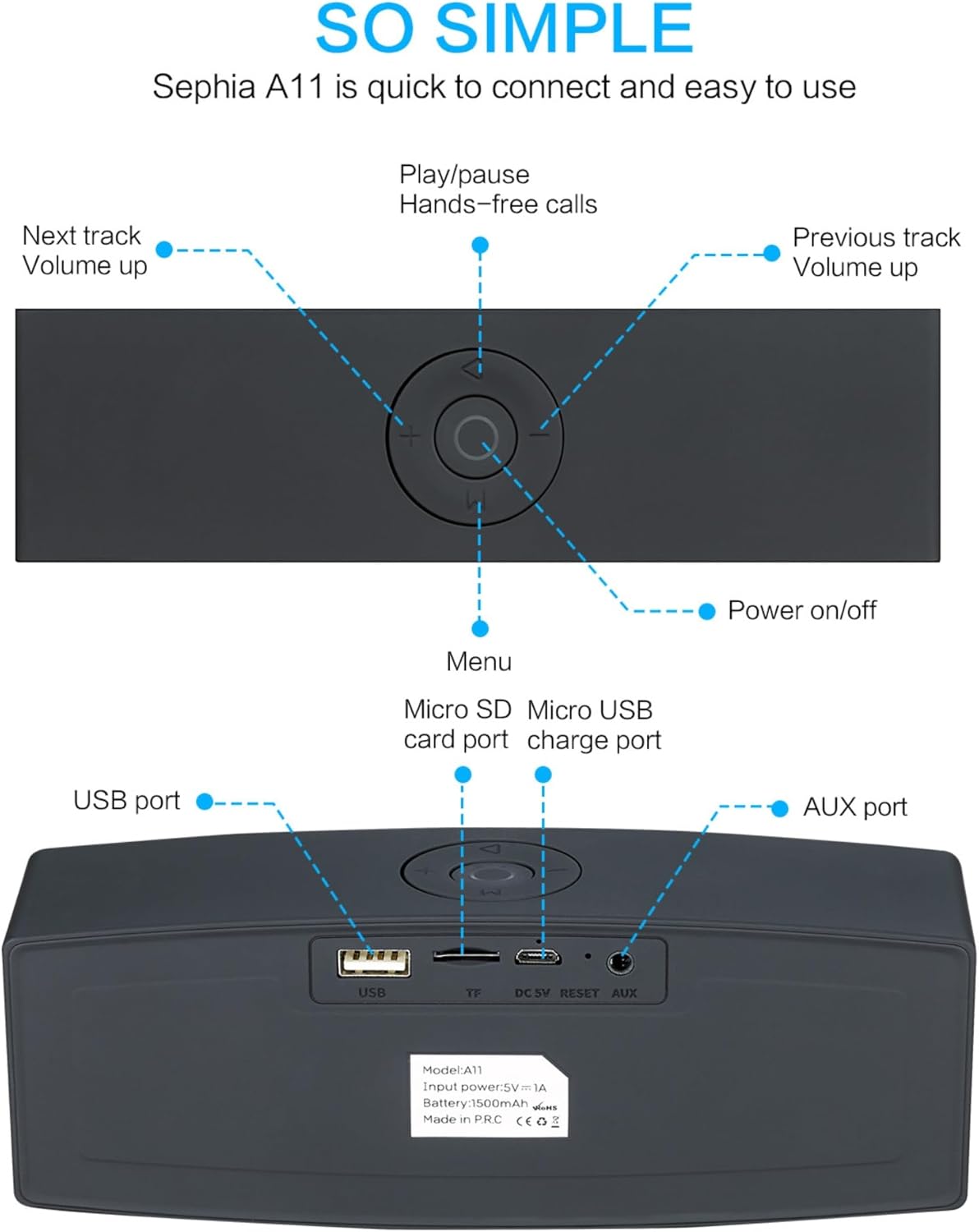
Image: Detailed diagram illustrating the top control panel and rear input/output ports of the Sephia A11 speaker.
أدوات التحكم العلوية:
- زر التشغيل / الإيقاف: اضغط مع الاستمرار لتشغيل مكبر الصوت أو إيقاف تشغيله.
- زر التشغيل/الإيقاف المؤقت: Press to play or pause audio. Also used for hands-free calls (answer/end).
- Previous Track / Volume Down Button (-): اضغط ضغطة قصيرة للانتقال إلى المقطع السابق، واضغط ضغطة طويلة لخفض مستوى الصوت.
- Next Track / Volume Up Button (+): اضغط ضغطة قصيرة للانتقال إلى المقطع التالي، واضغط ضغطة طويلة لزيادة مستوى الصوت.
- زر القائمة (M): Press to switch between input modes (Bluetooth, USB, Micro SD, AUX).
المنافذ الخلفية:
- منفذ USB: لتشغيل الصوت من محرك أقراص USB أو لشحن الأجهزة الخارجية.
- Micro SD Card Slot (TF): لتشغيل الصوت من بطاقة Micro SD.
- Micro USB Charge Port (DC 5V): لشحن مكبر الصوت.
- زر إعادة الضبط: ثقب صغير لإعادة ضبط الجهاز عند الحاجة.
- منفذ AUX: For wired audio connection using the provided 3.5mm AUX cable.
يثبت
1. شحن مكبر الصوت
- Connect the supplied charging cable to the Micro USB Charge Port (DC 5V) on the rear of the speaker.
- قم بتوصيل الطرف الآخر من كابل الشحن بمحول طاقة USB (غير متضمن) أو بمنفذ USB الخاص بالكمبيوتر.
- The charging indicator light will illuminate. Once fully charged, the light will change or turn off (refer to specific model behavior if indicated by LED). A full charge provides up to 8 hours of playtime.
2. تشغيل / إيقاف التشغيل
- To power on, press and hold the Power On/Off button on the top panel until you hear an audible prompt or see an indicator light.
- To power off, press and hold the Power On/Off button again until the speaker shuts down.
3. اقتران بلوتوث
- Ensure the speaker is powered on and in Bluetooth mode. If not, press the 'M' (Menu) button to switch to Bluetooth mode. The speaker will enter pairing mode, indicated by a flashing LED light and an audible prompt.
- على جهازك المحمول (الهاتف الذكي، الجهاز اللوحي، الكمبيوتر المحمول)، قم بتمكين البلوتوث وابحث عن الأجهزة المتاحة.
- Select "Sephia A11" from the list of found devices.
- Once successfully paired, the speaker will provide an audible confirmation, and the LED indicator will stop flashing.
- يبلغ مدى البلوتوث الخاص بالسماعة 10 أمتار (33 قدمًا).
4. Wired Connections (AUX, USB, Micro SD)
- مدخلات AUX: Connect one end of the supplied 3.5mm AUX cable to the AUX port on the speaker and the other end to the audio output of your device (e.g., MP3 player, computer). The speaker will automatically switch to AUX mode or can be selected using the 'M' button.
- تشغيل USB: أدخل محرك أقراص فلاش USB يحتوي على الصوت files into the USB port. The speaker will automatically detect and play the audio files.
- تشغيل بطاقة Micro SD: أدخل بطاقة Micro SD التي تحتوي على الصوت files into the Micro SD (TF) slot. The speaker will automatically detect and play the audio files.
تشغيل مكبر الصوت
تشغيل الصوت
- تشغيل/إيقاف مؤقت: Press the Play/Pause button to toggle between playing and pausing audio.
- ضبط مستوى الصوت: Long press the '+' button to increase volume, and long press the '-' button to decrease volume.
- المسار التالي / السابق: Short press the '+' button for the next track, and short press the '-' button for the previous track.

Image: A hand demonstrating how to interact with the top control buttons of the Sephia A11 speaker.
الاتصال بدون استخدام اليدين
- When a call comes in while connected via Bluetooth, press the Play/Pause button to answer the call.
- اضغط على زر التشغيل/الإيقاف المؤقت مرة أخرى لإنهاء المكالمة.
- يُتيح الميكروفون المدمج إجراء اتصال واضح.
صيانة
- تنظيف: استخدم قطعة قماش ناعمة وجافة لتنظيف سطح السماعة. تجنب استخدام المنظفات الكاشطة أو الكحول أو المذيبات الكيميائية، لأنها قد تُتلف الطبقة الخارجية.
- تخزين: قم بتخزين مكبر الصوت في مكان بارد وجاف بعيدًا عن أشعة الشمس المباشرة ودرجات الحرارة القصوى.
- العناية بالبطارية: To prolong battery life, avoid fully discharging the speaker frequently. Charge the speaker regularly, even if not in use for extended periods.
- مقاومة الماء: هذه السماعة غير مقاومة للماء. تجنب تعريضها للماء أو الرطوبة الزائدة.
استكشاف الأخطاء وإصلاحها
| مشكلة | السبب المحتمل | حل |
|---|---|---|
| مكبر الصوت لا يعمل. | بطارية منخفضة؛ زر الطاقة غير مضغط لفترة كافية. | اشحن السماعة بالكامل. اضغط مع الاستمرار على زر التشغيل لمدة 3-5 ثوانٍ. |
| لا يوجد صوت من مكبر الصوت. | مستوى الصوت منخفض جدًا؛ وضع الإدخال غير صحيح؛ الجهاز غير متصل بشكل صحيح. | Increase speaker and device volume. Press 'M' button to select correct input mode. Re-pair Bluetooth or re-connect AUX/USB/SD. |
| فشل اقتران البلوتوث. | مكبر الصوت ليس في وضع الاقتران؛ الجهاز بعيد جدًا؛ تداخل. | Ensure speaker is in Bluetooth pairing mode (flashing LED). Move speaker closer to device. Turn off other Bluetooth devices. Try forgetting "Sephia A11" on your device and re-pairing. |
| جودة الصوت رديئة. | Low battery; Device volume too high (distortion); Interference. | Charge the speaker. Adjust volume on both speaker and device. Move away from sources of interference. |
تحديد
| اسم الموديل | أ11 |
| أبعاد | 18 × 7 × 5 سم |
| وزن | 426 جرام |
| تكنولوجيا الاتصال | بلوتوث، يو اس بي، مايكرو اس دي، ايه يو اكس |
| طاقة خرج السماعة | 6 Watts (2 x 3W drivers) |
| استجابة التردد | 20 هرتز - 20 كيلو هرتز |
| نوع البطارية | أيون الليثيوم |
| وقت اللعب | تصل إلى 8 ساعة |
| مدى البلوتوث | حتى 10 مترا (33 قدما) |
| المميزات الخاصة | Bass Boost, Portable, Hi-Res Audio, Built-in Microphone, Shockproof |

Image: Visual representation of the Sephia A11 speaker's dimensions.
الضمان والدعم
The Sephia A11 Portable Bluetooth Speaker comes with a ضمان لمدة 12 شهرًا من تاريخ الشراء، مع تغطية عيوب التصنيع. يُرجى الاحتفاظ بإيصال الشراء للمطالبة بالضمان.
For technical support, warranty inquiries, or further assistance, please refer to the contact information provided with your purchase or visit the official Sephia webموقع.
Ask a question about this manual
Ask about setup, troubleshooting, compatibility, parts, safety, or missing instructions. Manuals+ will review the question and use this page’s manual context to help answer it.