
1. المقدمة
This manual provides detailed instructions for the installation, operation, maintenance, and troubleshooting of your FSP 400W Micro ATX Power Supply (Model FSP400-60GHS(85)-R1). This power supply unit is designed for compact small form factor PC systems, offering 400 watts of power output with 80 Plus Bronze certification for high efficiency. It is compatible with Intel and AMD CPU systems and standard PC configurations.
Please read this manual thoroughly before installation and operation to ensure proper usage and to prevent damage to the unit or other components.
2. معلومات السلامة
تحذير: Power supplies contain high voltagالمكونات الإلكترونية. لا تفتح وحدة التغذية الكهربائية.asinز. لا توجد أجزاء قابلة للصيانة من قبل المستخدم في الداخل. فتح جasing will void the warranty and poses a risk of electric shock.
- تأكد من فصل مصدر الطاقة عن مأخذ التيار المتردد قبل التركيب أو الصيانة.
- قم بتركيب مصدر الطاقة في منطقة جيدة التهوية.
- Do not operate the power supply in high humidity or extreme temperature environments.
- استخدم فقط الكابلات المرفقة مع مصدر الطاقة.
- تأكد من توصيل جميع الكابلات بشكل آمن قبل تشغيل النظام.
- هذا المنتج مصمم للاستخدام في أجهزة الكمبيوتر الشخصية. لا تستخدمه لأي غرض آخر.
3. محتويات العبوة
تأكد من وجود جميع العناصر المدرجة أدناه في الحزمة الخاصة بك:
- FSP 400W Micro ATX Power Supply (FSP400-60GHS(85)-R1)
- سلك الطاقة المتردد
- SFX to PS2 Bracket
- دليل المستخدم
- Mounting Screws (typically included with PC cases, but sometimes with PSUs)

Figure 3.1: Package Contents. Shows the power supply unit, user manual, various power cables, an AC power cord, and an SFX to PS2 adapter bracket.
4. انتهى المنتجview
The FSP400-60GHS(85)-R1 is a compact power supply designed for small form factor systems. Key features include an 80mm cooling fan with thermal sensing technology and an energy-saving 1-watt standby mode.
4.1 التخطيط المادي

الشكل 4.1: بزاوية view of the FSP 400W Micro ATX Power Supply, highlighting the fan grille, power switch, and AC power input.

الشكل 4.2: خلفي view of the power supply, detailing the main power switch and the AC power input socket.

الشكل 4.3: الجزء العلوي view of the power supply, showing the protective grille over the 80mm cooling fan.
4.2 موصلات الإخراج
The power supply includes various connectors to power your system components:
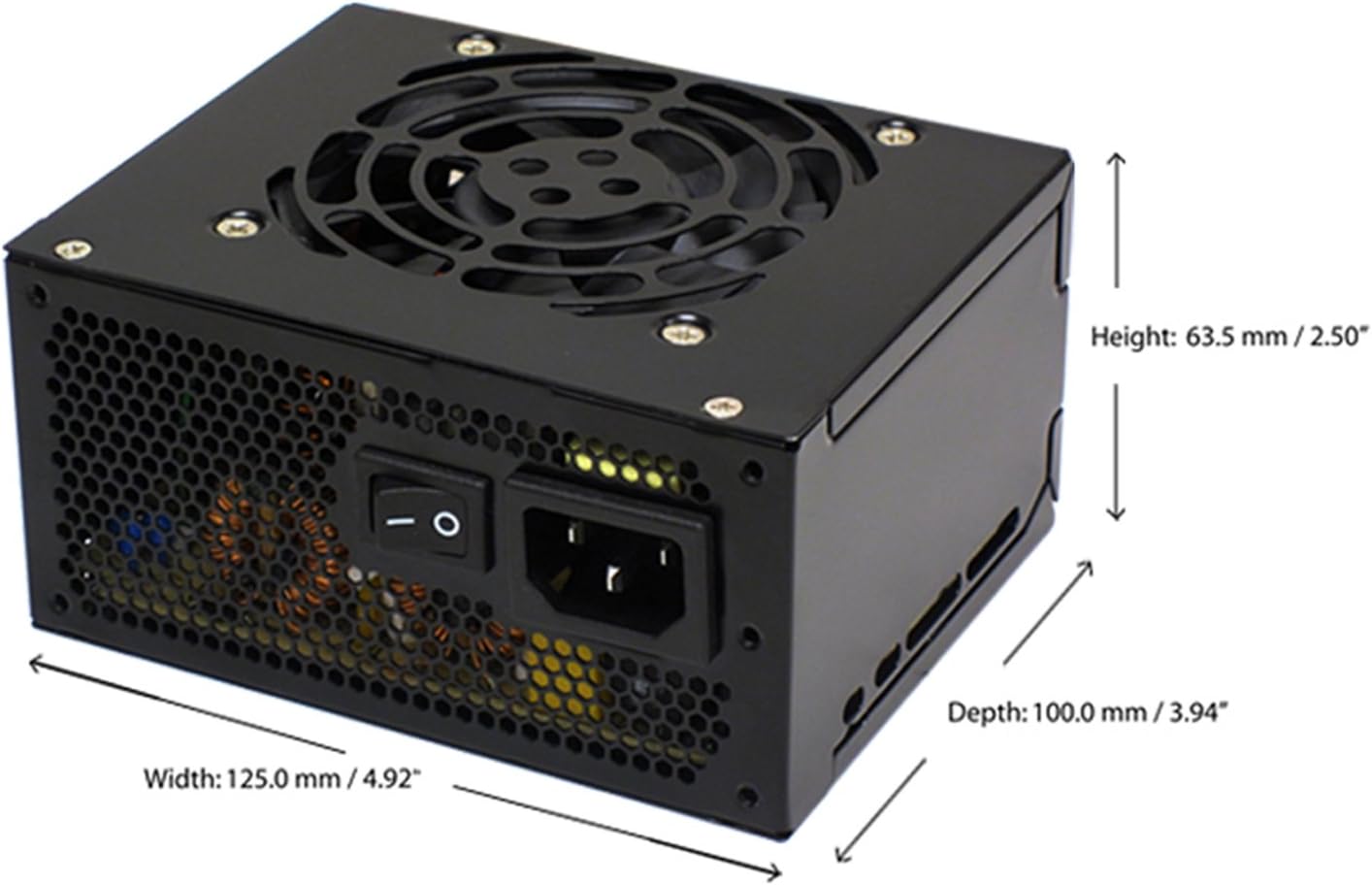
Figure 4.4: Diagram illustrating the types and quantities of output connectors available on the FSP400-60GHS(85)-R1 power supply.
- Main 24 Pin (1): For motherboard power.
- P4 | EPS 4+4 Pin (1): للحصول على قوة معالجة مركزية.
- PCI-E 8 Pin (6+2) (1): لبطاقات الرسوميات.
- Molex 4 Pin (3): For older peripherals and fans.
- Serial ATA 15 Pin (3): For SATA hard drives and SSDs.
- FDD 4 Pin (1): For floppy disk drives or other legacy devices.
5. الإعداد والتثبيت
Before beginning installation, ensure your computer system is powered off and disconnected from the AC power outlet. It is recommended to wear an anti-static wrist strap to prevent electrostatic discharge (ESD) damage to components.
5.1 تركيب مصدر الطاقة
- إعداد القضية: Open your computer case. Identify the power supply mounting area.
- تركيب وحدة إمداد الطاقة:
- For SFX cases: Insert the FSP400-60GHS(85)-R1 directly into the SFX power supply bay and secure it with screws.
- For standard ATX cases: Attach the included SFX to PS2 bracket to the power supply. Then, mount the power supply with the bracket into the ATX power supply bay and secure it with screws.

Figure 5.1: The FSP 400W Micro ATX Power Supply shown with the SFX to PS2 adapter bracket installed, ready for mounting in a standard ATX case.

Figure 5.2: Illustration demonstrating how the SFX power supply fits into a PS2 (ATX) case using the provided adapter bracket.
5.2 توصيل الكابلات
Connect the appropriate cables to your motherboard and components. Refer to your motherboard and component manuals for specific connection points.
- طاقة اللوحة الأم: Connect the 24-pin ATX connector to the corresponding socket on your motherboard.
- طاقة وحدة المعالجة المركزية: Connect the 4+4-pin EPS/ATX 12V connector to the CPU power socket on your motherboard.
- قوة بطاقة الرسومات: If your graphics card requires external power, connect the 6+2-pin PCI-E connector(s) to the graphics card.
- أجهزة التخزين: Connect SATA power connectors to your SATA hard drives, SSDs, and optical drives.
- الأجهزة الطرفية: Use Molex 4-pin connectors for case fans or other legacy peripherals as needed.
- إدارة الكابلات: قم بترتيب الكابلات بشكل أنيق لضمان تدفق الهواء بشكل صحيح داخل العلبة.
Once all internal connections are made, close your computer case.
5.3 الاتصال الخارجي
- قم بتوصيل سلك الطاقة المترددة بمدخل التيار المتردد الخاص بمصدر الطاقة.
- قم بتوصيل الطرف الآخر من سلك الطاقة المتردد بمقبس حائط مؤرض أو بجهاز حماية من زيادة التيار.
- Ensure the power switch on the back of the power supply is in the "OFF" (O) position before plugging it in.
6. تعليمات التشغيل
6.1 تشغيل النظام
- After all connections are secure, flip the power switch on the back of the power supply to the "ON" (I) position.
- اضغط على زر الطاقة الموجود على علبة الكمبيوتر لبدء تشغيل النظام.
6.2 Thermal Control System
The FSP400-60GHS(85)-R1 features an 80mm cooling fan with thermal sensing technology. This system automatically adjusts the fan speed based on the internal temperature of the power supply, optimizing cooling performance while minimizing noise.
6.3 Energy Saver Standby Mode
This power supply is designed with an energy-saving 1-watt standby mode, reducing power consumption when the system is in a low-power state or turned off but still connected to AC power.
7. الصيانة
تضمن الصيانة المناسبة طول عمر وأداء مصدر الطاقة الخاص بك على النحو الأمثل.
- تنظيف: Periodically clean the exterior of the power supply and its fan grille to prevent dust buildup. Use a soft, dry cloth or compressed air. Ensure the power supply is disconnected from AC power before cleaning.
- تهوية: Ensure that the power supply's fan and ventilation openings are not obstructed. Good airflow is crucial for cooling.
- سلامة الكابل: افحص جميع كابلات الطاقة بانتظام بحثًا عن أي علامات تآكل أو اهتراء أو تلف. استبدل الكابلات التالفة فورًا.
Do not attempt to open the power supply unit for internal cleaning or repair. This will void the warranty and can be dangerous.
8. استكشاف الأخطاء وإصلاحها
إذا واجهت مشكلات مع مصدر الطاقة لديك، فراجع المشكلات والحلول الشائعة التالية:
8.1 No Power to System
- تحقق من مصدر الطاقة الكهربائية: Ensure the AC power cord is securely plugged into both the power supply and a working wall outlet.
- مفتاح التشغيل: Verify that the power switch on the back of the power supply is in the "ON" (I) position.
- الاتصالات الداخلية: Confirm that the 24-pin ATX and 4+4-pin EPS/ATX 12V connectors are firmly seated in the motherboard.
- دائرة مقصورة: Disconnect all peripheral power cables (SATA, Molex, PCI-E) and attempt to power on. If the system powers on, a short circuit may exist in one of the connected components or cables. Reconnect them one by one to identify the faulty component.
8.2 System Instability or Random Shutdowns
- التحميل الزائد: Ensure your system's power requirements do not exceed the 400W capacity of the power supply.
- تهوية: Check for proper airflow within the case and ensure the power supply's fan is not obstructed. Overheating can cause instability.
- وصلات الكابلات: Re-check all power connections to ensure they are secure. Loose connections can lead to intermittent power delivery.
8.3 ضوضاء المروحة المفرطة
- تراكم الغبار: Clean the fan grille and fan blades with compressed air.
- إعاقة: Ensure no cables or foreign objects are interfering with the fan's rotation.
- بيئة التشغيل: High ambient temperatures can cause the thermal control system to increase fan speed. Ensure adequate room ventilation.
If troubleshooting steps do not resolve the issue, contact FSP customer support or your retailer for assistance.
9. المواصفات
Detailed technical specifications for the FSP400-60GHS(85)-R1 power supply:
| اسم الموديل | FSP 400W Micro ATX Power Supply |
| رقم الموديل | FSP400-60GHS(85)-R1 |
| ماركة | FSP |
| انتاج واتtage | 400 واط |
| شهادة 80 بلس | 80 بلس برونزي |
| عامل الشكل | Micro ATX (SFX with PS2 bracket) |
| طريقة التبريد | Air (80mm fan with thermal control) |
| تصميم مزود الطاقة | غير وحدات |
| حجم الإدخالtage | 100 - 265 Volts (AC) |
| الأبعاد (الطول × العرض × الارتفاع) | 4.9 × 3.9 × 2.5 بوصة (125.0 × 100.0 × 63.5 مم) |
| وزن العنصر | 2.31 رطل |
| الأجهزة المتوافقة | Personal Computer (AMD/Intel CPU systems) |
| الموصلات | Main 24 Pin (1), P4 | EPS 4+4 Pin (1), PCI-E 8 Pin (6+2) (1), Molex 4 Pin (3), Serial ATA 15 Pin (3), FDD 4 Pin (1) |
| الإلتزام البيئي | RoHS, Lead-Free, Green Product (G.P) |

Figure 9.1: Physical dimensions of the FSP 400W Micro ATX Power Supply.

Figure 9.2: Illustrative diagram showing typical cable lengths for the power supply connectors.
10. معلومات الضمان
The FSP 400W Micro ATX Power Supply (FSP400-60GHS(85)-R1) is covered by a ضمان الشركة المصنعة لمدة عامين. This warranty guarantees the quality and performance of the product for the specified period from the date of purchase.
The warranty covers defects in materials and workmanship under normal use. It does not cover damage resulting from improper installation, accidents, misuse, abuse, natural disasters, or unauthorized modifications or repairs. Opening the power supply casinسيؤدي ذلك إلى إلغاء الضمان.
For warranty claims or service, please retain your proof of purchase and contact FSP customer support.
11. دعم العملاء
If you require further assistance, have questions, or need to report an issue that cannot be resolved using the troubleshooting guide, please contact FSP customer support.
- FSP Webموقع: Visit the official FSP webموقع إلكتروني لمعلومات المنتج، والأسئلة الشائعة، وموارد الدعم.
- معلومات الاتصال: Refer to the FSP website or your product packaging for the most current customer service contact details (phone, email, or support portal).
When contacting support, please have your product model number (FSP400-60GHS(85)-R1) and proof of purchase readily available.