
LevelOne FVT-2202
دليل مستخدم محول الوسائط إيثرنت السريع LevelOne FVT-2202
Model: FVT-2202 | Brand: LevelOne
1. المقدمة
This manual provides detailed instructions for the installation, operation, and maintenance of the LevelOne FVT-2202 Fast Ethernet Media Converter. The FVT-2202 is designed to convert 10/100Base-TX Fast Ethernet signals to 100Base-FX fiber optic signals, extending network reach over fiber optic cable. It supports both 10Mbps and 100Mbps network speeds, making it suitable for various network environments.
يرجى قراءة هذا الدليل جيداً قبل تشغيل الجهاز لضمان الأداء السليم ومنع حدوث أي تلف.
2. محتويات العبوة
تأكد من أن الحزمة الخاصة بك تحتوي على العناصر التالية:
- LevelOne FVT-2202 Fast Ethernet Media Converter
- محول طاقة (5 فولت تيار مستمر)
- دليل المستخدم (هذا المستند)
في حال وجود أي عناصر مفقودة أو تالفة، يرجى الاتصال بالبائع على الفور.
3. الوصف المادي
The LevelOne FVT-2202 is a compact media converter designed for reliable performance. It features standard RJ45 and fiber optic (SC) ports, along with LED indicators for status monitoring.
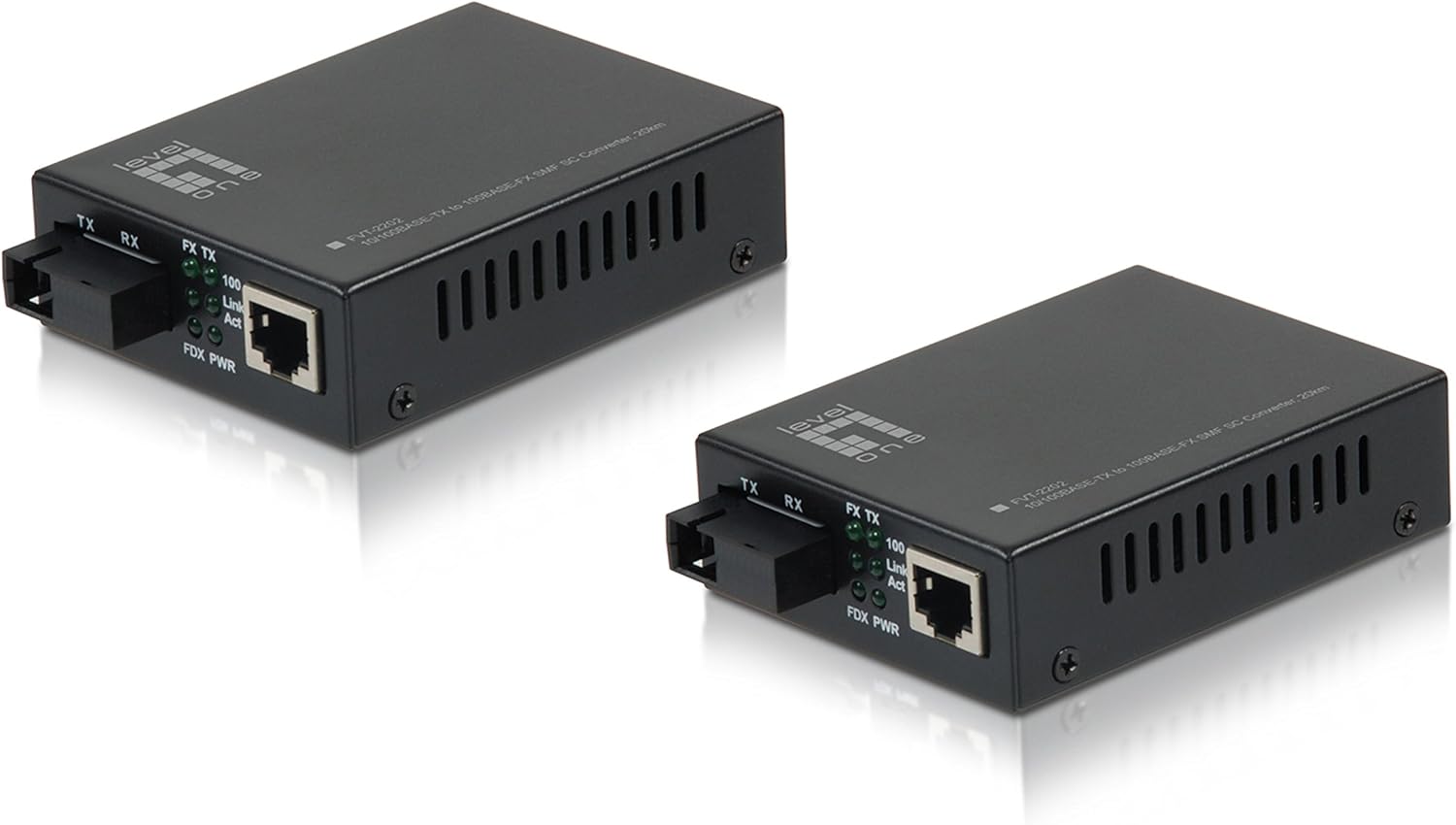
الشكل 3.1: أمام view of the LevelOne FVT-2202 Media Converter, showing the RJ45 Ethernet port, SC fiber optic port, and LED indicators for TX, RX, Link/Act, and Power.

الشكل 3.2: مؤخرة view of the LevelOne FVT-2202 Media Converter, highlighting the 5VDC power input and DIP switches for configuration.
3.1. مؤشرات LED
| قاد | حالة | وصف |
|---|---|---|
| PWR | أخضر (تشغيل) | الجهاز يستقبل الطاقة. |
| FX Link / Act | أخضر (تشغيل) | Fiber optic link is established. |
| FX Link / Act | أخضر (وامض) | Data is being transmitted or received over the fiber optic link. |
| TX رابط / قانون | أخضر (تشغيل) | Ethernet link is established. |
| TX رابط / قانون | أخضر (وامض) | يتم إرسال البيانات أو استقبالها عبر وصلة الإيثرنت. |
3.2. مفاتيح DIP
The FVT-2202 features DIP switches for advanced configuration. Refer to the markings on the device for specific switch functions, which typically include settings for LFP (Link Fault Pass-through), speed, and duplex mode.
- التبديل 1: LFP (Link Fault Pass-through) Enable/Disable
- التبديل 2: Auto-Negotiation Enable/Disable
- التبديل 3: 100Mbps/10Mbps Speed Selection (when Auto-Negotiation is disabled)
- التبديل 4: Full-Duplex/Half-Duplex Selection (when Auto-Negotiation is disabled)
حذر:
Ensure the device is powered off before changing DIP switch settings to prevent potential damage or incorrect configuration.
4. الإعداد والتثبيت
Follow these steps to properly install and connect your LevelOne FVT-2202 Media Converter:
- تهيئة البيئة: Ensure the installation location is clean, dry, and has adequate ventilation. Avoid areas with extreme temperatures or humidity.
- أجهزة إيقاف التشغيل: Before making any connections, ensure that all network devices (switches, routers, computers) that will connect to the media converter are powered off.
- Configure DIP Switches (if necessary): If specific network settings are required (e.g., fixed speed/duplex, LFP), adjust the DIP switches on the rear of the converter according to your network requirements. Refer to Section 3.2 for details.
- توصيل كابل الألياف البصرية: Connect one end of the fiber optic cable (SC connector) to the FX port on the FVT-2202. Connect the other end to your fiber optic network device (e.g., fiber switch, another media converter). Ensure the transmit (TX) and receive (RX) fibers are correctly matched.
- توصيل كابل إيثرنت: Connect a standard RJ45 Ethernet cable from your copper-based network device (e.g., Ethernet switch, computer) to the TX port on the FVT-2202.
- توصيل محول الطاقة: Plug the provided 5VDC power adapter into the power input jack on the FVT-2202. Then, plug the power adapter into a suitable electrical outlet.
- تشغيل الأجهزة: Power on the FVT-2202. The PWR LED should illuminate green. Then, power on your connected network devices.
- التحقق من الاتصالات: Check the Link/Act LEDs for both the FX (fiber) and TX (Ethernet) ports. A solid green light indicates a successful link. Blinking lights indicate data activity.
مهم:
Always handle fiber optic cables with care. Avoid bending them sharply or exposing the connectors to dust and dirt, which can degrade performance.
5. التشغيل
Once the LevelOne FVT-2202 is properly installed and powered on, it operates automatically as a transparent media converter. It translates Ethernet signals between copper and fiber optic mediums without requiring any software configuration.
5.1. الوظائف الأساسية
- The converter transparently passes Ethernet frames between the RJ45 (copper) and SC (fiber) interfaces.
- It supports both 10Mbps and 100Mbps Fast Ethernet speeds.
- Auto-negotiation is typically enabled by default on the RJ45 port to automatically detect the speed and duplex mode of the connected device.
- The fiber optic port operates at 100Mbps full-duplex.
5.2. Monitoring Status
The LED indicators provide a quick visual status of the converter's operation:
- الصمام PWR: Confirms the device is powered.
- FX Link/Act LED: Indicates the status of the fiber optic link and data activity.
- مؤشر LED الخاص بوصلة الإرسال/النشاط: Indicates the status of the Ethernet link and data activity.
Refer to Section 3.1 for a detailed explanation of LED behaviors.
6. الصيانة
The LevelOne FVT-2202 Media Converter is designed for minimal maintenance. However, following these guidelines can help ensure its longevity and reliable performance:
- تنظيف: Keep the device clean and free from dust. Use a soft, dry cloth for cleaning the exterior. Do not use liquid or aerosol cleaners.
- Fiber Optic Connectors: Ensure fiber optic connectors are clean. Dust or dirt on the fiber end-faces can significantly degrade signal quality. Use appropriate fiber optic cleaning tools if necessary.
- تهوية: Ensure that the ventilation holes on the device are not blocked to prevent overheating.
- مزود الطاقة: Use only the power adapter provided with the device. Using an incorrect power adapter can damage the converter.
- الظروف البيئية: قم بتشغيل الجهاز ضمن الظروف البيئية المحددة له (درجة الحرارة، الرطوبة) لمنع حدوث خلل.
7. استكشاف الأخطاء وإصلاحها
If you encounter issues with your LevelOne FVT-2202 Media Converter, refer to the following troubleshooting steps:
| مشكلة | السبب المحتمل | حل |
|---|---|---|
| لا يوجد طاقة (مصباح LED للطاقة مطفأ) | محول الطاقة غير متصل أو معيب. | Check power adapter connection to the device and wall outlet. Ensure the outlet is functional. Try a different power adapter if available and compatible. |
| No Fiber Link (FX Link/Act LED Off) | Fiber cable disconnected, damaged, or incorrect TX/RX connection. | Verify fiber cable connections at both ends. Ensure TX/RX are correctly matched. Inspect cable for damage. Clean fiber connectors. Check the remote fiber device. |
| No Ethernet Link (TX Link/Act LED Off) | Ethernet cable disconnected, damaged, or incorrect speed/duplex settings. | Verify Ethernet cable connection. Inspect cable for damage. Ensure the connected device is powered on and functioning. Check DIP switch settings for speed/duplex if auto-negotiation is disabled. |
| Poor Network Performance | Cable issues, duplex mismatch, or excessive network traffic. | Check cable quality and length. Ensure duplex settings are consistent across connected devices (auto-negotiation recommended). Monitor network traffic. |
If the problem persists after trying these solutions, please contact LevelOne technical support for further assistance.
8. المواصفات
| اسم الموديل | ففت-2202 |
| ماركة | المستوى الاول |
| معيار الشبكة | 10/100Base-TX, 100Base-FX |
| معدل نقل البيانات | 100 Megabits Per Second (10/100Mbps) |
| Connector Type (Copper) | آر جيه 45 |
| Connector Type (Fiber) | SC (Single-Mode Fiber, 20km range) |
| نوع الكابل | Ethernet, Fiber Optic |
| ميزة خاصة | Data Transfer, Link Fault Pass-through (LFP) via DIP switch |
| لون | أسود |
| الاستخدام الداخلي والخارجي | في الهواء الطلق |
| امتثال | RoHS, FCC Part 15 |
| وزن العنصر | 11.3 أونصات |
| أبعاد المنتج (الطول × العرض × الارتفاع) | 2.8 × 3.7 × 1.02 بوصة |
| مدخلات الطاقة | 5 فولت تيار مستمر |
9. الضمان والدعم
LevelOne products are backed by a manufacturer's warranty. For specific warranty terms and conditions, please refer to the warranty card included with your product or visit the official LevelOne webالموقع. احتفظ بإيصال الشراء كإثبات للشراء.
For technical support, product registration, or to download the latest drivers and firmware, please visit the LevelOne support portal or contact their customer service department. Contact information can typically be found on the LevelOne webموقع: www.level1.com
Ask a question about this manual
Ask about setup, troubleshooting, compatibility, parts, safety, or missing instructions. Manuals+ will review the question and use this page’s manual context to help answer it.