
1. المقدمة
Thank you for choosing the XTUGA BK510 Single Channel Wireless In-Ear Monitor System. This system is designed to provide professional-grade audio monitoring for musicians, performers, and presenters. It features UHF wireless technology with 100 selectable channels, ensuring clear and reliable sound transmission. This manual will guide you through the setup, operation, and maintenance of your new in-ear monitor system.
2. معلومات السلامة
يرجى قراءة وفهم جميع تعليمات السلامة قبل تشغيل هذا الجهاز. احتفظ بهذا الدليل للرجوع إليه مستقبلاً.
- الامتثال للجنة الاتصالات الفيدرالية: Most users do not need a license to operate this wireless microphone system. However, operation is subject to certain restrictions: the system must not cause harmful interference, must operate at a low power level (not exceeding 50 milliwatts), and has no protection from interference received from any other device.
- لوائح لجنة الاتصالات الفيدرالية: Purchasers should be aware that the FCC is currently evaluating the use of wireless microphone systems, and these rules are subject to change. For more information, contact the FCC at 1-888-CALL-FCC (TTY: 1-888-TELL-FCC) or visit the FCC's wireless microphone webموقع: fcc.gov/cgb/wirelessmicrophones.
- السلامة الكهربائية: To prevent electric shock, do not open the device casinز. إحالة جميع أعمال الصيانة إلى موظفين مؤهلين.
- مصدر الطاقة: استخدم محول الطاقة المرفق فقط. تأكد من أن مستوى الصوتtagيتوافق مع متطلبات الجهاز.
- الماء والرطوبة: لا تعرض الجهاز للماء أو المطر أو الرطوبة الزائدة.
- حرارة: أبقِ الجهاز بعيدًا عن مصادر الحرارة مثل المشعات، أو أجهزة التدفئة، أو المواقد، أو غيرها من الأجهزة التي تنتج الحرارة.
- تهوية: Ensure proper ventilation around the transmitter unit. Do not block any ventilation openings.
- Earphone Volume: تجنب الاستماع إلى مستويات صوت عالية لفترات طويلة لمنع تلف السمع.
3. محتويات العبوة
تأكد من تضمين جميع العناصر المذكورة أدناه في عبوتك. في حال وجود أيٍّ منها مفقودًا أو تالفًا، يُرجى التواصل مع البائع.
- 1x XTUGA BK510 Transmitter Unit
- 1x XTUGA BK510 Bodypack Receiver
- 1x Detachable Antenna
- 1x Power Adapter (DC 12V-18V)
- 2x Audio Cables (1/4" TS to 1/4" TS)
- 1x Pair of Earbud Headphones (White)

صورة: XTUGA BK510 Single Channel Wireless In-Ear Monitor System package contents, showing the transmitter, bodypack receiver, antenna, power adapter, two audio cables, and white earbud headphones.
4. انتهى المنتجview
4.1 وحدة الإرسال
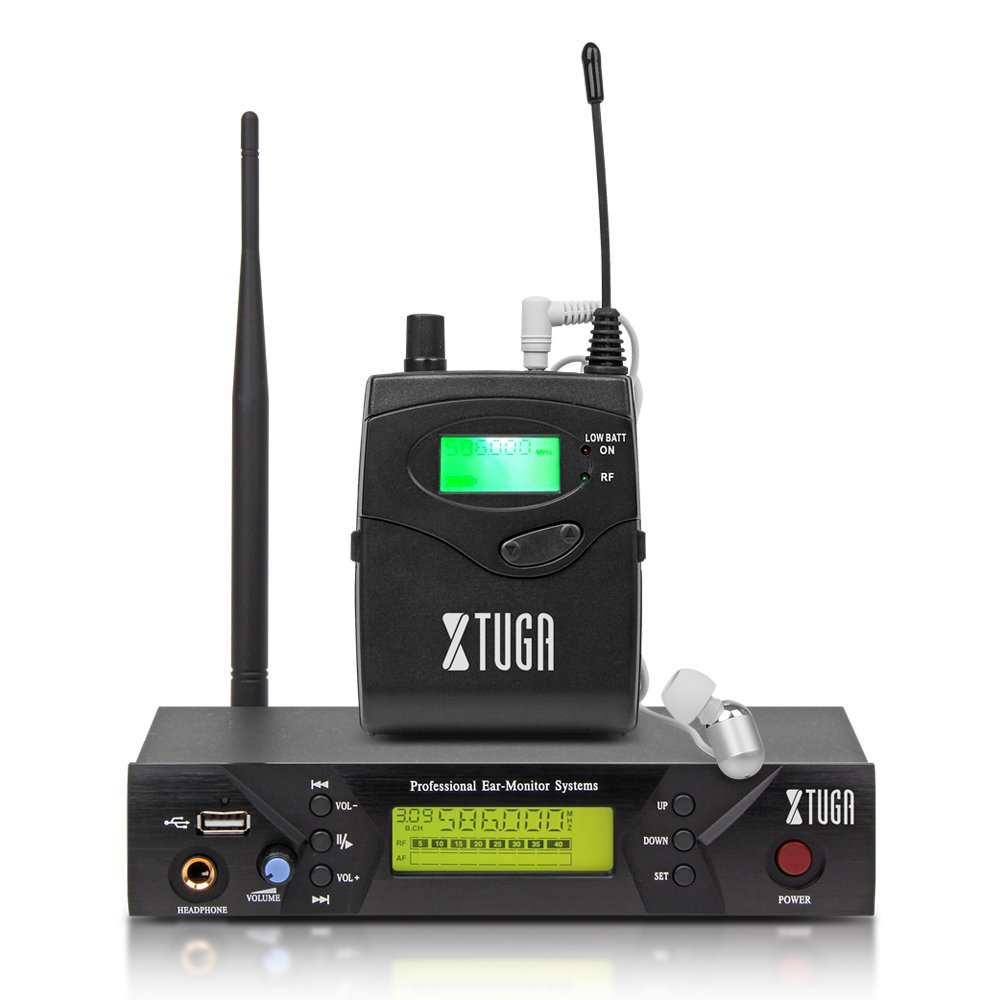
صورة: Front panel of the XTUGA BK510 transmitter unit, featuring a USB port, headphone output, volume control, channel selection buttons (UP/DOWN), SET button, power button, and an LCD display.
- منفذ USB: For connecting USB devices (e.g., for playback or recording, specific functionality may vary).
- HEADPHONE Output: 3.5mm jack for wired headphone monitoring directly from the transmitter.
- مقبض الصوت: Adjusts the output volume for the HEADPHONE output.
- أزرار أعلى/أسفل: Used to navigate and select channels or frequencies.
- زر SET: يؤكد الاختيارات أو يدخل إلى قوائم الإعدادات.
- زر الطاقة: Turns the transmitter unit on or off.
- شاشة LCD: Shows current channel, frequency, and other operational information.

صورة: Rear panel of the XTUGA BK510 transmitter unit, showing the DC IN power input, AF IN (L) and AF IN (R) combo XLR/TRS inputs, AF LEVEL (Left/Right) adjustment knobs, and the ANTENNA connector.
- DC IN (12V-18V): مدخل الطاقة لمحول الطاقة المرفق.
- AF IN (L)/(R): Combo XLR/TRS inputs for connecting audio sources (e.g., mixer output).
- AF LEVEL (Left/Right): Rotary knobs to adjust the input audio level for each channel.
- ANTENNA Connector: For attaching the detachable antenna.
4.2 Bodypack Receiver

صورة: أمام view of the XTUGA BK510 bodypack receiver, showing the LCD display, LOW BATT indicator, RF indicator, and control buttons.
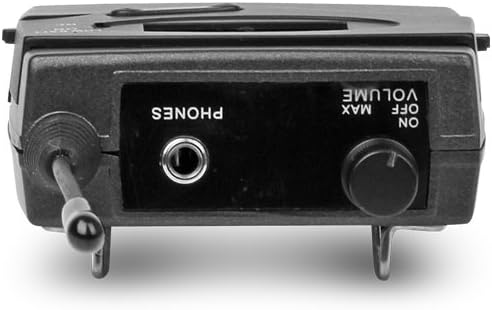
صورة: قمة view of the XTUGA BK510 bodypack receiver, showing the PHONES output jack and the ON/OFF/VOLUME knob.

صورة: XTUGA BK510 bodypack receiver with the battery compartment open, showing slots for two AA batteries and the belt clip on the back.
- شاشة LCD: Shows current channel, frequency, and battery status.
- LOW BATT Indicator: يضيء عند انخفاض مستوى طاقة البطارية.
- مؤشر التردد اللاسلكي: Illuminates when receiving a radio frequency signal from the transmitter.
- ON/OFF/VOLUME Knob: Turns the receiver on/off and adjusts the headphone volume.
- مخرجات الهواتف: 3.5mm jack for connecting in-ear headphones.
- حجرة البطارية: تتسع لبطاريتين من نوع AA.
- مشبك الحزام: For attaching the bodypack to clothing or a belt.
5. دليل الإعداد
- Connect Transmitter Antenna: Screw the detachable antenna onto the ANTENNA connector on the rear panel of the transmitter unit. Ensure it is securely fastened.
- قم بتشغيل جهاز الإرسال: Connect the provided power adapter to the DC IN (12V-18V) port on the rear of the transmitter, then plug the adapter into a suitable power outlet.
- توصيل مصدر الصوت: Use the included 1/4" TS cables (or XLR cables, not included) to connect your audio source (e.g., mixer's auxiliary output, monitor send) to the AF IN (L) and/or AF IN (R) inputs on the transmitter's rear panel. For mono operation, typically use AF IN (L).
- Install Receiver Batteries: Open the battery compartment on the bodypack receiver and insert two AA batteries, observing correct polarity (+/-). Close the compartment securely.
- Connect Headphones to Receiver: Plug your in-ear headphones into the PHONES output jack on the bodypack receiver.
6. تعليمات التشغيل
- تشغيل جهاز الإرسال: Press the POWER button on the transmitter's front panel. The LCD display will illuminate.
- مستقبل الطاقة: Rotate the ON/OFF/VOLUME knob on the bodypack receiver clockwise until it clicks and the LCD display illuminates.
- Select Channel/Frequency (Transmitter):
- Use the UP/DOWN buttons on the transmitter to browse through the available 100 UHF channels.
- Press the SET button to confirm your desired channel. The display will show the selected frequency.
- Choose a channel that is clear of interference in your operating environment.
- Sync Receiver to Transmitter: The bodypack receiver should automatically sync to the transmitter's frequency. If not, consult the receiver's specific instructions (often involves holding a SET or SYNC button on the receiver while the transmitter is broadcasting). Ensure the RF indicator on the receiver is lit, indicating a successful connection.
- Adjust Audio Input Level (Transmitter): Play audio through your connected source. Adjust the AF LEVEL (Left/Right) knobs on the rear of the transmitter until the audio level is appropriate without clipping (distortion). Monitor the audio through the transmitter's HEADPHONE output if desired.
- Adjust Monitoring Volume (Receiver): Put on your in-ear headphones. Slowly rotate the ON/OFF/VOLUME knob on the bodypack receiver to adjust the listening volume to a comfortable level. Avoid excessively high volumes to protect your hearing.
- Begin Monitoring: Your XTUGA BK510 system is now ready for use.
7. الصيانة
- تنظيف: امسح الأجهزة بقطعة قماش ناعمة وجافة. لا تستخدم المنظفات السائلة أو المذيبات.
- استبدال البطارية: When the LOW BATT indicator on the bodypack receiver illuminates, replace both AA batteries with fresh ones. Remove batteries if the receiver will not be used for an extended period.
- تخزين: قم بتخزين النظام في مكان بارد وجاف بعيدًا عن أشعة الشمس المباشرة ودرجات الحرارة القصوى.
- رعاية الهوائي: تعامل مع الهوائي بحرص لتجنب ثنيه أو كسره.
8. استكشاف الأخطاء وإصلاحها
| مشكلة | السبب المحتمل | حل |
|---|---|---|
| لا يوجد صوت من جهاز الاستقبال. |
|
|
| تداخل أو تشويش. |
|
|
| Low audio quality (e.g., lack of bass). |
|
|
| LOW BATT indicator on receiver is lit. | البطاريات منخفضة. | Replace both AA batteries immediately. |
9. المواصفات
| ميزة | التفاصيل |
|---|---|
| نموذج | بي كيه 510 |
| ماركة | XTUGA |
| تكنولوجيا الاتصال | Wired, Wireless (RF) |
| الاتصالات اللاسلكية | UHF (100 Channels) |
| Transmitter Material | معدن |
| Bodypack Receiver Batteries | 2 بطاريات AA (مطلوبة) |
| مدخلات طاقة المرسل | تيار مستمر 12 فولت-18 فولت |
| أبعاد جهاز الإرسال | 17.72 × 11.81 × 4.72 بوصة |
| وزن السلعة (تقريبًا) | 3.34 رطل (الحزمة الإجمالية) |
| المميزات الخاصة | Lightweight (receiver), Volume Control |
| الشركة المصنعة | صنع في الصين |
10. الضمان والدعم
ضمان: No specific warranty information is provided within this user manual. For details regarding warranty coverage, terms, and conditions, please refer to the product packaging, the purchase receipt, or contact the manufacturer directly.
يدعم: For technical assistance, troubleshooting beyond this guide, or inquiries about your XTUGA BK510 system, please contact XTUGA customer support. You may find contact information on the official XTUGA webالموقع أو من خلال نقطة الشراء الأصلية الخاصة بك.
معلومات لجنة الاتصالات الفدرالية: For regulatory questions concerning wireless microphone systems, you can contact the FCC at 1-888-CALL-FCC (TTY: 1-888-TELL-FCC) or visit fcc.gov/cgb/wirelessmicrophones.