
Propel Zipp Nano 2.0
Propel Zipp Nano 2.0 Drone User Manual
Model: Zipp Nano 2.0
العلامة التجارية: بروبيل
1. المقدمة
This manual provides essential information for the safe and effective operation of your Propel Zipp Nano 2.0 Drone. Please read this manual thoroughly before operating the drone to ensure proper usage and to prevent damage or injury.
The Propel Zipp Nano 2.0 is a high-performance 2.4 GHz indoor/outdoor drone designed for stable flight and exciting aerial maneuvers. It features a built-in 6-axis gyroscopic chip for stability, multiple speed settings, and the ability to perform 360-degree stunt rolls.
2. احتياطات السلامة
Always prioritize safety when operating the drone. Failure to follow these guidelines may result in injury or damage to the drone or property.
- لا تقم بتشغيل الطائرة بدون طيار بالقرب من الأشخاص أو الحيوانات أو العوائق.
- Keep hands, hair, and loose clothing away from rotating propellers.
- تأكد من شحن الطائرة بدون طيار بالكامل قبل كل رحلة.
- لا تطير في رياح قوية أو ظروف جوية سيئة.
- Supervise children during operation. This product contains small parts and is not suitable for children under 3 years due to choking hazard.
- Do not attempt to modify or repair the drone yourself. Contact customer support for assistance.

Image: Back of the product packaging, highlighting features and a warning about small parts.
3. محتويات العبوة
تأكد من وجود جميع العناصر في الحزمة الخاصة بك:
- Propel Zipp Nano 2.0 Drone (Red)
- 2.4 GHz Digital Remote Control
- كابل شحن USB
- Spare Replacement Parts (Propellers)

Image: The Propel Zipp Nano 2.0 Drone and its remote control visible within the clear retail packaging.
4. الإعداد
4.1 شحن بطارية الطائرة بدون طيار
The drone is powered by an internal rechargeable battery. Use the provided USB charging cable to charge the drone.
- Connect the small end of the USB charging cable to the drone's charging port.
- قم بتوصيل الطرف الكبير من كابل شحن USB بمصدر طاقة USB (على سبيل المثال، منفذ USB في الكمبيوتر، أو محول حائط USB).
- The charging indicator light on the USB cable will illuminate during charging and turn off when fully charged.
- تستغرق عملية الشحن عادةً ما بين 30 و45 دقيقة. تجنب الشحن الزائد.
4.2 تركيب بطاريات جهاز التحكم عن بعد
The remote control requires 2 "AAA" batteries (not included).
- حدد موقع حجرة البطارية في الجزء الخلفي من جهاز التحكم عن بعد.
- افتح غطاء حجرة البطارية.
- Insert 2 "AAA" batteries, ensuring correct polarity (+/-).
- أغلق غطاء حجرة البطارية جيدًا.

Image: The remote control for the Propel Zipp Nano 2.0 Drone, showing its various buttons and joysticks.
4.3 إقران الطائرة بدون طيار وجهاز التحكم عن بعد
لإنشاء اتصال بين الطائرة بدون طيار وجهاز التحكم عن بعد:
- ضع الطائرة بدون طيار على سطح مستوٍ ومستوٍ.
- Turn on the drone by sliding the power switch. The drone's LED lights will flash.
- قم بتشغيل جهاز التحكم عن بعد.
- ادفع عصا التحكم اليسرى (الخانق) إلى أعلى بالكامل، ثم اسحبها إلى أسفل بالكامل.
- The drone's LED lights will turn solid, indicating successful pairing.
5. تشغيل الطائرة بدون طيار
5.1 أدوات التحكم في الطيران
تعرف على تخطيط جهاز التحكم عن بعد ووظائفه:
- عصا التحكم اليسرى (الخانق/الانحراف):
- Push up to increase altitude (throttle).
- Push down to decrease altitude.
- ادفع لليسار/لليمين لتدوير الطائرة بدون طيار (الانحراف).
- عصا التحكم اليمنى (الميل/الدوران):
- Push up/down to move forward/backward (pitch).
- Push left/right to move left/right (roll).
- زر السرعة: Cycles through 3 different speed settings (slow, medium, high).
- Stunt Button: Press to initiate 360-degree stunt rolls (see 5.4).
- T-Mode Button: Activates T-Mode for beginner pilots, providing more stable and controlled flight.
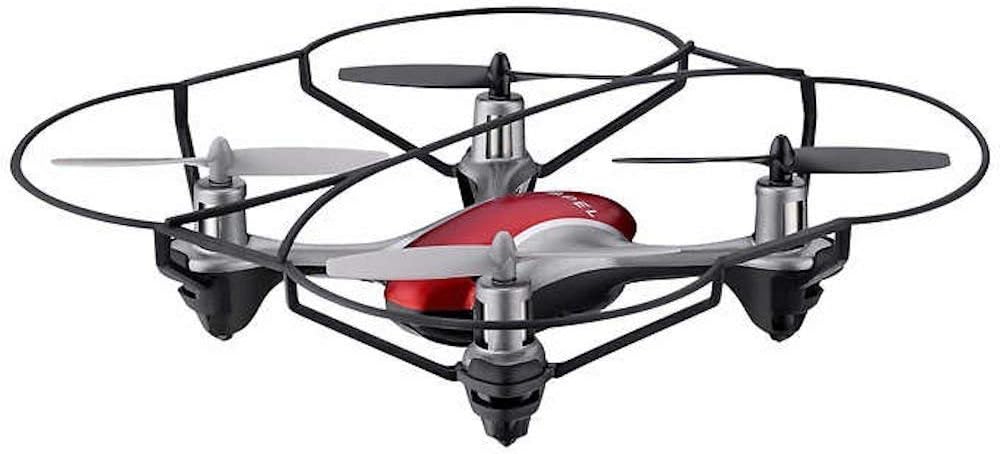
Image: The Propel Zipp Nano 2.0 Drone, showcasinبفضل تصميمها المدمج وواقيات المراوح.
5.2 الإقلاع والهبوط
- اخلع: After pairing, slowly push the left joystick (throttle) up to lift off.
- الهبوط: Slowly pull the left joystick (throttle) down until the drone lands gently.
5.3 تثبيت الارتفاع
The Zipp Nano 2.0 features an air pressure sensor that helps lock altitude in mid-air, making it easier to control and hover stably.
5.4 360-Degree Stunt Rolls
To perform a stunt roll:
- Ensure the drone is flying at a sufficient height (at least 6-8 feet).
- Press the dedicated Stunt Button on the remote control.
- Immediately push the right joystick in the desired direction (forward, backward, left, or right) to execute the roll.

الصورة: زاوية view of the Propel Zipp Nano 2.0 Drone, highlighting its sleek design and protective frame.
6. الصيانة
- تنظيف: Use a soft, dry cloth to clean the drone and remote control. Do not use harsh chemicals or water.
- استبدال المروحة: If propellers become damaged, replace them with the provided spare parts. Carefully remove the damaged propeller and snap the new one into place, ensuring correct orientation.
- تخزين: When not in use, store the drone and remote control in a cool, dry place away from direct sunlight.
7. استكشاف الأخطاء وإصلاحها
| مشكلة | السبب المحتمل | حل |
|---|---|---|
| الطائرة بدون طيار لا تستجيب للتحكم عن بعد. | Not paired, low drone battery, low remote control batteries. | Re-pair the drone and remote. Charge drone battery. Replace remote control batteries. |
| تطير الطائرة بدون طيار بشكل غير منتظم أو تنجرف. | Not calibrated on a level surface, damaged propeller, strong wind. | Ensure drone is placed on a flat surface for pairing. Check for damaged propellers and replace if necessary. Fly in calm conditions. |
| Drone does not lift off. | Low drone battery, propellers not spinning correctly. | Charge drone battery fully. Check for obstructions around propellers. |
8. المواصفات
| ميزة | التفاصيل |
|---|---|
| ماركة | دفع |
| اسم الموديل | Propel 2.4 ghz (Zipp Nano 2.0) |
| تكنولوجيا الاتصال | تردد الراديو (2.4 جيجاهرتز) |
| المدى التشغيلي | حتى 200 قدم |
| جيروسكوب | Built-in 6-axis gyroscopic chip |
| إعدادات السرعة | 3 (Slow, Medium, High) |
| المميزات الخاصة | 360-degree stunt rolls, Altitude Hold, T-Mode for beginners |
| نوع المادة | Plastic, Carbon Fibre |
| أبعاد المنتج | 13.97 × 3.81 × 13.97 سم |
| وزن العنصر | 453.59 غرام (رطل واحد) |
| لون | أحمر |
| مستوى المهارة | مبتدئ |
9. الضمان والدعم
Propel offers unlimited replacement parts for one year from the date of purchase. For warranty claims, technical support, or to order replacement parts, please refer to the contact information provided on the product packaging or the official Propel webموقع.
احتفظ بإيصال الشراء الخاص بك كإثبات للشراء لأغراض الضمان.
Ask a question about this manual
Ask about setup, troubleshooting, compatibility, parts, safety, or missing instructions. Manuals+ will review the question and use this page’s manual context to help answer it.