
1. المقدمة
This manual provides essential information for the safe and effective operation, maintenance, and troubleshooting of the INSIZE ISH-PHB Portable Leeb Hardness Tester. Please read this manual thoroughly before using the device to ensure proper functionality and to prevent damage or injury. Keep this manual for future reference.
2. تعليمات السلامة
Observe the following safety precautions to prevent personal injury and damage to the instrument:
- Always operate the device in a stable and dry environment.
- Do not expose the device to extreme temperatures, humidity, or corrosive substances.
- تجنب إسقاط الجهاز أو تعريضه لصدمات قوية.
- لا تحاول تفكيك الجهاز أو إصلاحه بنفسك. استشر فني صيانة مؤهلًا.
- Ensure the test surface is clean, smooth, and free from oil, rust, or scale for accurate readings.
- Wear appropriate personal protective equipment (PPE) if required by your work environment.
3. محتويات العبوة
Carefully unpack the box and verify that all items are present and undamaged. If any items are missing or damaged, contact your supplier immediately.
- INSIZE ISH-PHB Portable Leeb Hardness Tester main unit
- Impact device (Type D)
- Standard test block
- فرشاة التنظيف
- كابل يو اس بي
- دليل التشغيل
- حقيبة الحمل
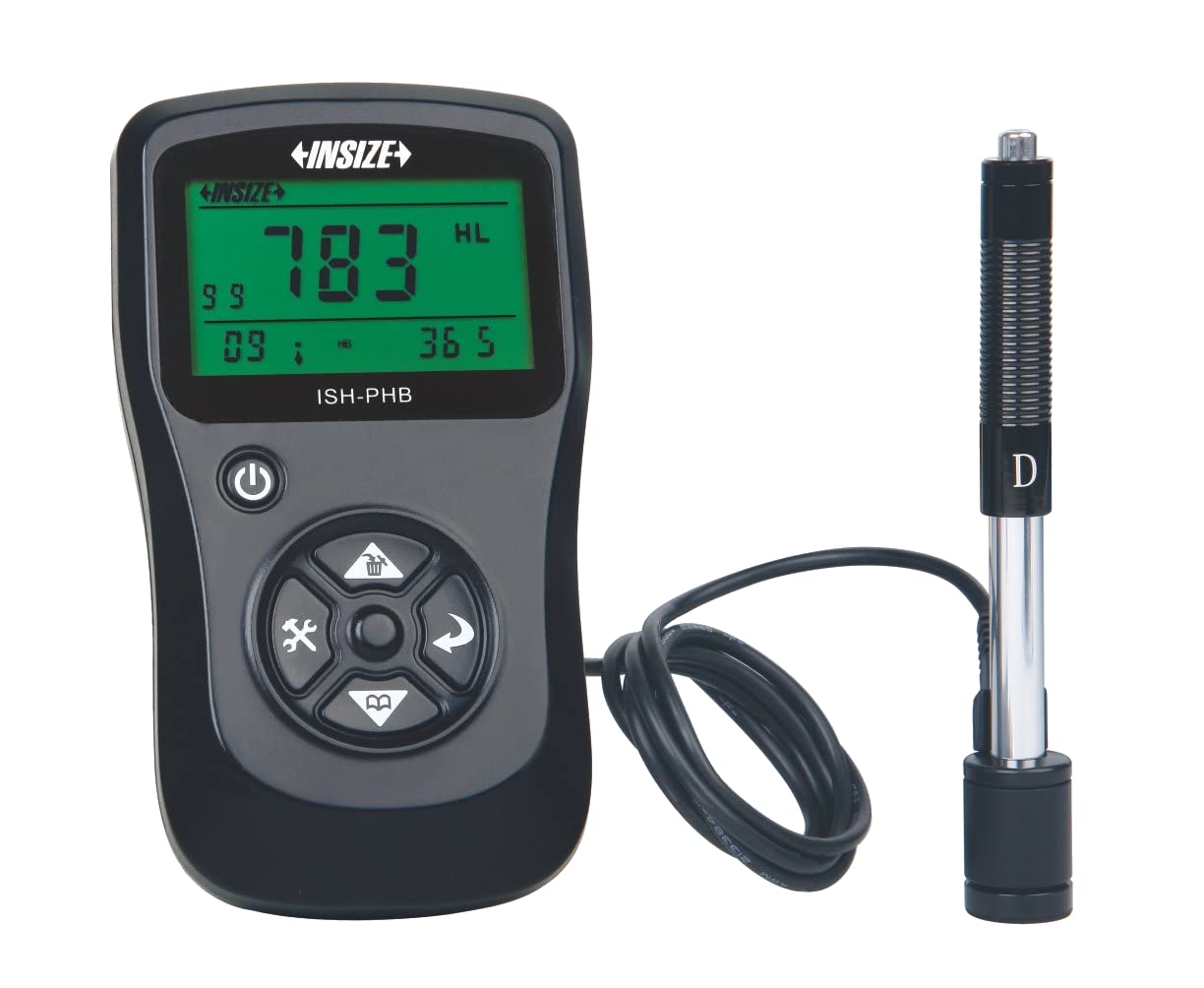
Image showing the main unit of the INSIZE ISH-PHB Portable Leeb Hardness Tester, displaying its screen and control buttons.
4. الإعداد
Follow these steps to prepare your INSIZE ISH-PHB for use:
- شحن البطارية: Connect the device to a power source using the provided USB cable. Allow the battery to fully charge before first use. The charging indicator will show the status.
- Attach Impact Device: Carefully connect the impact device (Type D) to the main unit. Ensure it is securely fastened.
- تشغيل الطاقة: اضغط مع الاستمرار على زر الطاقة حتى تضيء الشاشة.
- Select Material and Hardness Scale: Navigate through the menu using the arrow keys to select the appropriate material (e.g., Steel, Cast Iron) and hardness scale (e.g., HRC, HV, HB) for your test specimen.
- المعايرة (اختياري): For critical measurements, perform a calibration using the standard test block provided. Refer to the 'Calibration' section in the full manual for detailed steps.
5. تعليمات التشغيل
To perform a hardness test:
- Prepare the Test Surface: Ensure the surface of the material to be tested is clean, smooth, and flat. Remove any paint, rust, or scale. The minimum thickness of the test piece should be sufficient to prevent deformation during impact.
- Load the Impact Device: Push the impact body down into the guide tube until it locks into place.
- وضع الجهاز: Place the impact device firmly and perpendicularly onto the test surface. Ensure there is no relative movement between the device and the test piece.
- بدء الاختبار: Press the release button on the impact device. The impact body will strike the surface, and the hardness value will be displayed on the main unit's screen.
- قراءة السجل: Note down the displayed hardness value. For best accuracy, take multiple readings (e.g., 3-5) at different points on the test surface and calculate the average.
- إيقاف التشغيل: بعد الاستخدام، اضغط مع الاستمرار على زر الطاقة لإيقاف تشغيل الجهاز.
6. الصيانة
Regular maintenance ensures the longevity and accuracy of your hardness tester:
- تنظيف: Use the provided cleaning brush to remove any debris from the impact device's guide tube after each use. Wipe the main unit with a soft, dry cloth. Do not use abrasive cleaners or solvents.
- تخزين: Store the device and its accessories in the carrying case in a dry, dust-free environment when not in use. Avoid extreme temperatures.
- العناية بالبطارية: Recharge the battery regularly, even if the device is not in frequent use, to maintain battery health. Do not allow the battery to fully discharge for extended periods.
- معايرة: Periodically check the calibration of the device using the standard test block. If readings deviate significantly, recalibration or service may be required.
7. استكشاف الأخطاء وإصلاحها
راجع الجدول أدناه للتعرف على المشكلات الشائعة وحلولها:
| مشكلة | السبب المحتمل | حل |
|---|---|---|
| الجهاز لا يعمل | بطارية منخفضة أو مستنفدة | قم بشحن البطارية باستخدام كابل USB. |
| قراءات غير دقيقة |
|
|
| Impact device not loading | Debris in guide tube | Clean the guide tube with the provided brush. |
| يظهر على الشاشة رسالة خطأ | عطل داخلي | Power off the device, wait a few seconds, then power on again. If the error persists, contact customer support. |
8. المواصفات
Key technical specifications for the INSIZE ISH-PHB Portable Leeb Hardness Tester:
| ميزة | التفاصيل |
|---|---|
| ماركة | Insize |
| نموذج | ISH-PHB |
| موازين الصلابة | HL، HB، HRB، HRC، HRA، HV، HS |
| جهاز التأثير | Type D (standard) |
| مدى القياس | Varies by material and scale (refer to full technical datasheet) |
| دقة | ±6 HLD (when HL=800) |
| عرض | شاشة LCD مع إضاءة خلفية |
| مزود الطاقة | بطارية ليثيوم أيون قابلة لإعادة الشحن |
| درجة حرارة التشغيل | 0 درجة مئوية إلى 40 درجة مئوية (32 درجة فهرنهايت إلى 104 درجة فهرنهايت) |
| أبعاد | Compact and portable (specific dimensions not provided in source) |
9. الضمان والدعم
INSIZE products are manufactured to high-quality standards and are warranted against defects in materials and workmanship for a period typically specified at the point of purchase. Please retain your proof of purchase for warranty claims.
For technical support, service, or warranty inquiries, please contact your authorized INSIZE distributor or visit the official INSIZE website for contact information. Do not attempt to repair the device yourself, as this may void the warranty.