
مقدمة
شكرا لك على الشراءasing the Max Power MPD125L Karaoke DJ Speaker System. This portable 12-inch speaker system is designed to deliver powerful sound and vibrant LED lighting for your entertainment needs. It features a built-in rechargeable battery, multiple connectivity options including USB, SD, AM/FM radio, and Bluetooth, along with a strong amplifier لتجربة صوتية غامرة.
Please read this manual thoroughly before operating the device to ensure proper use, optimal performance, and to prevent damage.
معلومات السلامة
- لا تعرض الجهاز للمطر أو الرطوبة لتجنب نشوب حريق أو التعرض لصدمة كهربائية.
- لا تفتح الصندوقasinز. لا توجد قطع غيار قابلة للصيانة من قِبل المستخدم. يُرجى إحالة جميع أعمال الصيانة إلى فنيين مؤهلين.
- ضع الوحدة على سطح ثابت ومستوٍ لمنع سقوطها.
- قم بإبقاء الوحدة بعيدًا عن أشعة الشمس المباشرة ومصادر الحرارة والغبار الزائد.
- تأكد من التهوية الجيدة. لا تسد فتحات التهوية.
- استخدم فقط محول الطاقة المرفق مع الوحدة.
- افصل الوحدة أثناء العواصف الرعدية أو عند عدم استخدامها لفترات طويلة.
- تجنب وضع أشياء ثقيلة على سلك الطاقة.
- لا تقم بإدخال أي أشياء في فتحات الوحدة.
محتويات الحزمة
يرجى التأكد من أن جميع العناصر موجودة وفي حالة جيدة:
- Max Power MPD125L Karaoke DJ Speaker System
- ميكروفون لاسلكي
- جهاز التحكم عن بعد اللاسلكي
- محول الطاقة/كابل الشحن
- دليل المستخدم (هذا المستند)
مميزات المنتج
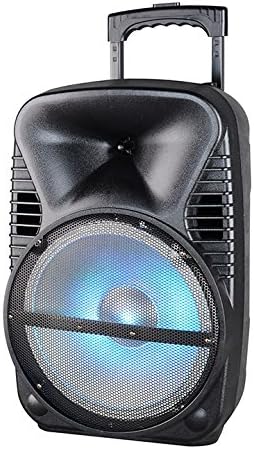
الصورة: الجبهة view of the Max Power MPD125L Karaoke DJ Speaker System. It is a black, portable speaker with a retractable handle on top and wheels at the bottom. The front features a large speaker grille with blue LED lights illuminating the woofer, indicating its active state.
- تصميم محمول: 12-inch speaker with built-in retractable handle and wheels for easy transport.
- صوت قوي: 4000W peak power output for loud and clear sound with good bass.
- بطارية قابلة لإعادة الشحن مدمجة: Provides up to 4 hours of continuous playback. (Battery size: 12V/2.6A)
- LED Dance Lights: Integrated LED lights that flash, transforming any room into a disco club.
- خيارات اتصال متعددة:
- بلوتوث: Wireless streaming from compatible devices (laptops, smartphones).
- فتحة USB: لتشغيل الصوت fileق من محركات أقراص USB.
- فتحة SD: لتشغيل الصوت fileمن بطاقات SD.
- راديو AM/FM: Built-in tuner for radio broadcasts.
- وظيفة الكاريوكي: Includes a wireless microphone for karaoke sessions.
- Full-Function Wireless Remote Control: للتشغيل المريح عن بعد.
- مقاومة: 4 أوم.
- استجابة التردد: 40 هرتز - 20 كيلو هرتز.
يثبت
1. شحن مكبر الصوت
- Locate the DC input port on the speaker (usually on the rear panel).
- Connect the supplied power adapter to the DC input port.
- قم بتوصيل محول الطاقة بمأخذ كهربائي قياسي.
- The charging indicator light (if present) will illuminate, typically red, during charging and turn green when fully charged.
- Allow approximately 4-6 hours for a full charge before first use. The speaker can be used while charging.
2. إعداد الميكروفون اللاسلكي
- Insert appropriate batteries (not included, usually AA) into the wireless microphone.
- Turn on the microphone. It should automatically pair with the speaker.
- Adjust the microphone volume knob on the speaker's control panel to your desired level.
3. إعداد جهاز التحكم عن بعد
- Insert appropriate batteries (not included, usually AAA) into the wireless remote control.
- Point the remote control towards the speaker's IR receiver (usually on the front panel or near the controls) to operate.
تعليمات التشغيل
1. تشغيل/إيقاف التشغيل
Locate the Power switch (usually a rocker switch) on the speaker's control panel. Flip it to the "ON" position to power on the speaker. Flip it to "OFF" to power off.
2. اختيار الوضع
Press the "MODE" button on the control panel or remote control to cycle through available input modes: Bluetooth, USB, SD, FM Radio, AM Radio, AUX (if available).
3. اقتران بلوتوث
- Turn on the speaker and select Bluetooth mode. The speaker will typically announce "Bluetooth Mode" or display "BT" and enter pairing mode (indicated by a flashing Bluetooth indicator).
- On your smartphone, tablet, or laptop, enable Bluetooth and search for new devices.
- Select "MPD125L" (or similar name) from the list of available devices.
- Once paired, the speaker will confirm with an audible tone or a solid Bluetooth indicator light. You can now play audio wirelessly.
4. تشغيل USB/SD
- Insert a USB flash drive or SD card (pre-loaded with MP3 or compatible audio files) في الفتحة المخصصة لها.
- The speaker should automatically switch to USB/SD mode and begin playing the first track. If not, press the "MODE" button to select USB or SD mode.
- Use the Play/Pause, Next Track, and Previous Track buttons on the control panel or remote to navigate.
5. تشغيل راديو AM/FM
- Select FM or AM radio mode using the "MODE" button.
- Press and hold the Play/Pause button (often labeled "SCAN") to automatically scan and save available radio stations.
- Use the Next Track and Previous Track buttons to switch between saved stations.
- Extend the telescopic antenna (if present) for better reception.
6. وظيفة الكاريوكي
Ensure the wireless microphone is powered on and paired. Play your desired music through any input mode (Bluetooth, USB, etc.). Speak or sing into the microphone. Adjust the microphone volume and echo effects (if available) using the dedicated knobs on the control panel.
7. LED Dance Lights
The LED lights typically activate automatically when the speaker is powered on. There may be a dedicated button (e.g., "LIGHT" or "LED") on the control panel or remote to toggle them on/off or change patterns.
8. التحكم في مستوى الصوت
Adjust the master volume using the main volume knob on the speaker's control panel or the volume buttons on the remote control.
صيانة
- تنظيف: Use a soft, dry cloth to wipe the exterior of the speaker. Do not use liquid cleaners or abrasive chemicals.
- تخزين: عند عدم الاستخدام لفترات طويلة، قم بتخزين السماعة في مكان بارد وجاف، بعيدًا عن أشعة الشمس المباشرة ودرجات الحرارة القصوى.
- العناية بالبطارية: To prolong battery life, avoid fully discharging the battery frequently. Recharge the battery at least once every 3 months if not in regular use.
- تهوية: Ensure the speaker's ventilation openings are clear of dust and debris to prevent overheating.
استكشاف الأخطاء وإصلاحها
| مشكلة | السبب المحتمل | حل |
|---|---|---|
| لا يتم تشغيل مكبر الصوت. | نفدت طاقة البطارية. كابل الطاقة غير موصول بشكل صحيح. | Connect the speaker to a power outlet and allow it to charge. Ensure the power cable is securely plugged into both the speaker and the outlet. |
| لا يوجد صوت من مكبر الصوت. | مستوى الصوت منخفض جداً. تم اختيار وضع إدخال غير صحيح. Device not properly connected (Bluetooth/USB/SD). | زيادة مستوى الصوت الرئيسي. Press the "MODE" button to select the correct input. Re-pair Bluetooth device, re-insert USB/SD, or check AUX cable connection. |
| لا يمكن إقران جهاز البلوتوث. | السماعة ليست في وضع الاقتران. الجهاز بعيد جدًا عن مكبر الصوت. تم إيقاف تشغيل البلوتوث على الجهاز. | Ensure speaker is in Bluetooth mode and indicator is flashing. قم بتقريب الجهاز من مكبر الصوت (في حدود 10 أمتار). قم بتمكين البلوتوث على جهازك. |
| الميكروفون لا يعمل. | Microphone is off or batteries are dead. مستوى صوت الميكروفون منخفض جداً. | Turn on the microphone and replace batteries if necessary. Increase the microphone volume knob on the speaker. |
| استقبال الراديو ضعيف. | اشارة ضعيفة. Antenna not extended. | انقل مكبر الصوت إلى منطقة ذات إشارة أفضل. تمديد الهوائي التلسكوبي بالكامل. |
تحديد
| رقم الموديل | MPD125L |
| ماركة | أقصى قوة |
| ذروة انتاج الطاقة | 4000 واط |
| مقاومة | 4 أوم |
| استجابة التردد | 40 هرتز - 20 كيلو هرتز |
| حجم البطارية | 12 فولت / 2.6 أمبير |
| عمر البطارية | تصل إلى 4 ساعة |
| أبعاد المنتج (الطول × العرض × الارتفاع) | 33.02 x 38.1 x 58.42 cm (13 x 15 x 23 inches) |
| وزن المنتج | 15.88 كجم (35 رطل) |
| الأجهزة المتوافقة | الكمبيوتر المحمول والهاتف الذكي |
| نوع الموصل | USB |
| رمز المنتج الموحد | 703510623201 |
الضمان والدعم
للحصول على معلومات الضمان والدعم الفني، يُرجى مراجعة الوثائق المُقدمة عند الشراء أو التواصل مع التاجر. احتفظ بإيصال الشراء لأي مطالبات تتعلق بالضمان.
For further assistance or inquiries, please visit the official MAX POWER webالموقع أو الاتصال بقسم خدمة العملاء.