
1. المقدمة
شكرا لك على الشراءasing the BYINTEK BT140 WiFi Projector. This manual provides essential information for setting up, operating, and maintaining your projector. Please read it thoroughly before use to ensure proper functionality and to extend the lifespan of your device.
2. معلومات السلامة
لتجنب الحريق أو الصدمة الكهربائية أو الإصابة، يرجى مراعاة احتياطات السلامة التالية:
- لا تنظر مباشرة إلى عدسة جهاز العرض عندما يكون الضوءamp الضوء الساطع مضاء. قد يتسبب الضوء الشديد في تلف العين.
- Ensure proper ventilation. Do not block ventilation openings. Overheating can damage the projector.
- ضع جهاز العرض على سطح مستوٍ وثابت لمنعه من السقوط.
- أبقِ جهاز العرض بعيدًا عن الماء والرطوبة والمواد القابلة للاشتعال.
- استخدم فقط محول الطاقة المرفق مع جهاز العرض.
- لا تحاول إصلاح جهاز العرض بنفسك. قم بإحالة جميع أعمال الصيانة إلى فنيين مؤهلين.
- افصل جهاز العرض عن مأخذ الطاقة أثناء العواصف الرعدية أو عند عدم استخدامه لفترات طويلة.
3. محتويات العبوة
يرجى التأكد من وجود جميع العناصر:
- BYINTEK BT140 Projector
- كابل الطاقة
- جهاز التحكم عن بعد
- كبل AV
- دليل المستخدم (هذا المستند)
Note: Specific accessories may vary slightly depending on the region or retailer.
4. انتهى المنتجview
تعرّف على مكونات جهاز العرض وواجهاته.
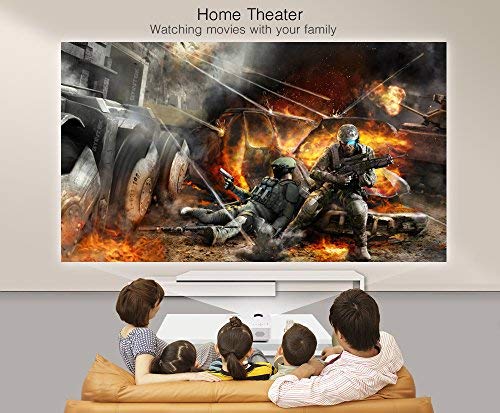
الصورة: الجبهة view of the BYINTEK BT140 Projector, showing the lens and ventilation grilles.
الواجهات:
- HDMI: Connect to devices like laptops, Blu-ray players, gaming consoles.
- USB: قم بتوصيل محركات أقراص USB لتشغيل الوسائط.
- فتحة بطاقة SD: أدخل بطاقات SD لتشغيل الوسائط.
- من: Connect to older devices using the included AV cable.
- VGA: Connect to computers with a VGA output.
- الصوت خارج: قم بتوصيل مكبرات الصوت الخارجية أو سماعات الرأس.
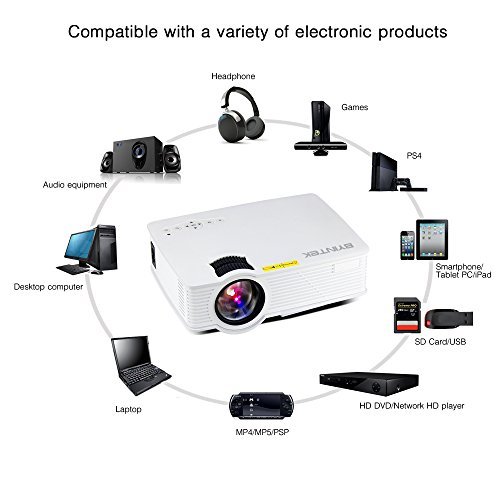
Image: Diagram illustrating various devices compatible with the BYINTEK BT140 Projector, including laptops, smartphones, tablets, gaming consoles (PS4, PSP), desktop computers, headphones, audio equipment, and HD media players, connected via HDMI, USB, SD, AV, and VGA ports.
5. الإعداد
5.1 التنسيب
Place the projector on a stable surface. The recommended projection distance is 1.5 to 2.5 meters for an optimal screen size of 50 to 80 inches. The projector supports image sizes from 34 to 100 inches.
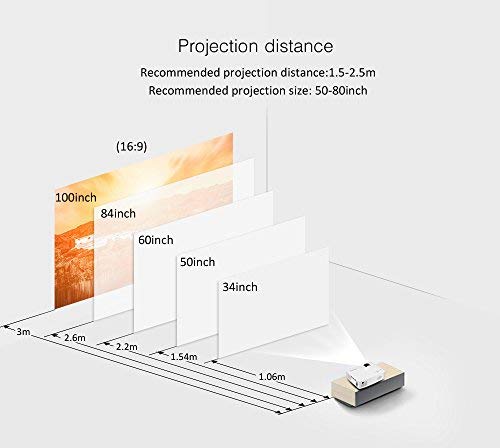
Image: Diagram showing recommended projection distances and corresponding screen sizes for the BYINTEK BT140 Projector, ranging from 34 inches at 1.06m to 100 inches at 3m.
5.2 توصيل الطاقة
- قم بتوصيل كابل الطاقة بمنفذ إدخال الطاقة الخاص بجهاز العرض.
- قم بتوصيل الطرف الآخر من كابل الطاقة بمأخذ الحائط.
5.3 توصيل الأجهزة
- HDMI: Connect an HDMI cable from your source device (e.g., laptop, game console) to the projector's HDMI port.
- يو إس بي/إس دي: Insert a USB drive or SD card into the respective port for direct media playback.
- AV/VGA: Use the appropriate cable to connect older devices.
5.4 تعديل التركيز
قم بتدوير حلقة التركيز الموجودة على عدسة جهاز العرض حتى تصبح الصورة المعروضة واضحة وحادة.
5.5 تصحيح الانحراف
If the projected image appears trapezoidal, adjust the keystone correction dial (usually located near the lens) to square the image. The projector supports vertical keystone correction of ±15 degrees.
5.6 Wireless Connection (Airplay/Miracast)
The BT140plus model includes a built-in wireless push module supporting Airplay and Miracast functionality for wireless connection to smartphones, tablets, and iPads. Refer to the on-screen instructions for pairing your device.
6. تعليمات التشغيل
6.1 تشغيل/إيقاف التشغيل
- تشغيل الطاقة: اضغط على زر الطاقة الموجود بجهاز العرض أو جهاز التحكم عن بُعد.
- إيقاف التشغيل: اضغط على زر التشغيل مرة أخرى. أكد إيقاف التشغيل إذا طُلب منك ذلك.
6.2 اختيار مصدر الإدخال
Use the "Source" button on the remote control or the projector's control panel to cycle through available input sources (HDMI, USB, SD, AV, VGA, Wireless).
6.3 تشغيل الوسائط (USB/SD)
When a USB drive or SD card is inserted, the projector's multimedia interface will typically appear. Navigate through folders and select your desired media file (videos, photos, music) using the remote control.
- تنسيقات الفيديو المدعومة: RMVB/RM (Realvideo2.0/3.0/4.0), AVI (Xvid/H264), FLV (Sorenson H.263), MOV (H264), MP4 (MPEG4, AVC), MPG (MPG1)
- تنسيقات الصوت المدعومة: MP3, WMA, AAC, AC3
7. الصيانة
7.1 تنظيف العدسة
Use a soft, lint-free cloth or lens cleaning paper to gently wipe the projector lens. Avoid using abrasive cleaners or excessive force, which can scratch the lens.
7.2 تنظيف هيكل جهاز العرض وفتحات التهوية
Wipe the projector's exterior with a soft, dry cloth. Use a small brush or compressed air to clear dust from the ventilation openings to ensure proper airflow and prevent overheating.
7.3 لترamp حياة
The BYINTEK BT140 uses an LED lamp بعمر افتراضي يقدر بـ 20,000 ساعة، مما يقلل بشكل كبير من الحاجة إلىamp replacement compared to conventional lamps.
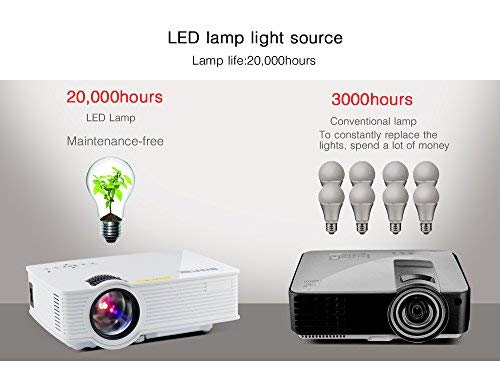
Image: Comparison showing the BYINTEK BT140's LED lamp with 20,000 hours lifespan versus conventional lamps with 3,000 hours lifespan, highlighting the maintenance-free aspect of LED technology.
8. استكشاف الأخطاء وإصلاحها
إذا واجهت مشكلات مع جهاز العرض الخاص بك، فراجع المشكلات والحلول الشائعة التالية:
| مشكلة | السبب المحتمل / الحل |
|---|---|
| لا توجد صورة على الشاشة |
|
| الصورة ضبابية |
|
| الصورة شبه منحرفة |
|
| لا يوجد صوت |
|
| جهاز التحكم عن بعد لا يعمل |
|
9. المواصفات
Below are the technical specifications for the BYINTEK BT140 Projector:
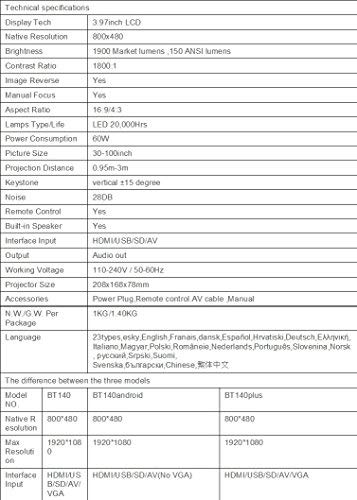
Image: Table detailing the technical specifications of the BYINTEK BT140 Projector, including display tech, resolution, brightness, contrast, aspect ratio, lamp life, power consumption, and interface inputs.
| ميزة | التفاصيل |
|---|---|
| تكنولوجيا العرض | شاشة LCD مقاس 3.97 بوصة |
| الدقة الأصلية | 800 × 480 |
| الحد الأقصى لدقة العرض | 1920 x 1080 (Support 1080P) |
| سطوع | 1900 Lumens (150 ANSI lumens) |
| نسبة التباين | 1800:1 |
| عكس الصورة | نعم |
| التركيز اليدوي | نعم |
| نسبة العرض إلى الارتفاع | 16:9 / 4:3 |
| Lamp Type / Life | الصمام، 20,000 ساعة |
| استهلاك الطاقة | 70 واط |
| حجم الصورة | 34-100 بوصة |
| مسافة الإسقاط | 0.95 متر - 3 متر |
| تصحيح الانحراف | عمودي ± 15 درجة |
| مستوى الضوضاء | 28 ديسيبل |
| جهاز التحكم عن بعد | نعم |
| مكبر صوت مدمج | نعم |
| مدخلات الواجهة | HDMI / USB / SD / AV / VGA |
| مخرج الصوت | منفذ إخراج الصوت |
| العمل المجلدtage | 110-240V / 50-60Hz |
| حجم العارض | 208 × 168 × 78 مم |
| الوزن الصافي | 950 Grams (1KG N.W./G.W. Per Package) |
| تكنولوجيا الاتصال | Wi-Fi (for Airplay/Miracast) |
| الأجهزة المتوافقة | كمبيوتر محمول، هاتف ذكي، جهاز لوحي |
10. الضمان والدعم
BYINTEK products are designed for reliability and performance. For warranty information or technical support, please refer to the warranty card included with your product or contact BYINTEK customer service through their official webالموقع أو بائع التجزئة الخاص بك.
لمزيد من المساعدة، يمكنك زيارة BYINTEK Store on Amazon.