
Thomson WHP5327
دليل مستخدم سماعات التلفزيون اللاسلكية Thomson WHP5327
الموديل: WHP5327
مقدمة
This manual provides comprehensive instructions for the setup, operation, and maintenance of your Thomson WHP5327 Wireless TV Headphones. Designed for comfortable, high-quality audio listening from various sources like TVs, Hi-Fi systems, smartphones, tablets, and laptops, these over-ear headphones offer a wireless range of up to 20 meters and come with a convenient charging station.
معلومات السلامة
يرجى قراءة جميع تعليمات السلامة بعناية قبل استخدام المنتج. احتفظ بهذا الدليل للرجوع إليه مستقبلًا.
- Do not expose the headphones or charging station to extreme temperatures, humidity, or direct sunlight.
- تجنب إسقاط الجهاز أو تعريضه لصدمات قوية.
- لا تحاول تفكيك المنتج أو تعديله. سيؤدي ذلك إلى إلغاء الضمان.
- استخدم فقط محول الطاقة والكابلات المتوفرة.
- Prolonged listening at high volume levels can cause hearing damage. Adjust volume to a comfortable level.
- يحفظ بعيدًا عن متناول الأطفال.
محتويات الحزمة
تأكد من وجود جميع العناصر في العبوة:
- 1x Thomson WHP5327 Wireless TV Headphones
- 1x Charging Station / Transmitter
- 1 × محول الطاقة
- 2x Rechargeable Batteries (AA)
- 3x Audio Cables (e.g., 3.5mm Jack, RCA)
- 2x Audio Adapters (e.g., 6.3mm adapter)
- 1 × دليل المستخدم
المنتج انتهىview
Familiarize yourself with the components of your wireless headphone system.
سماعات الرأس

الصورة: الجانب view of the Thomson WHP5327 headphones, highlighting the integrated volume control and power button on the earcup.
- عقال قابل للتعديل: للحصول على ملاءمة مريحة.
- وسادات أذن مبطنة: Provide comfort during extended listening sessions.
- التحكم في مستوى الصوت: Integrated on the earcup for easy adjustment.
- زر/مؤشر الطاقة: To turn the headphones on/off and show status.
- شحن جهات الاتصال: Located on the bottom of the headband for charging on the station.
- مقبس صوت 3.5 ملم: For optional wired connection to devices (cable may be required).
محطة شحن / جهاز إرسال
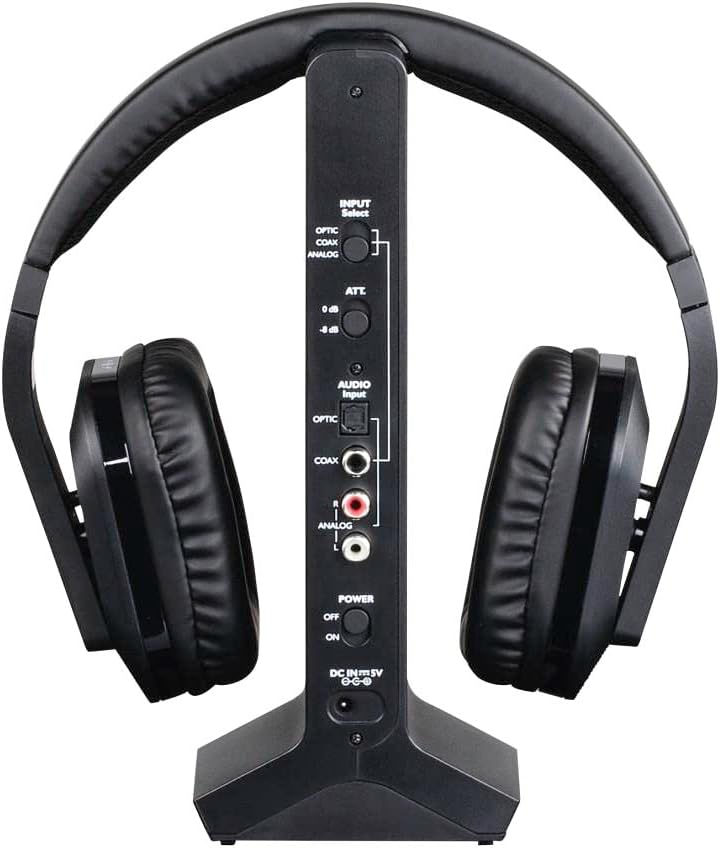
الصورة: الخلفية view of the Thomson WHP5327 charging station, displaying the various audio input ports (Optical, Coaxial, Analog) and power connection.
- Headphone Cradle: For storing and charging the headphones.
- مؤشر الشحن: ضوء يشير إلى حالة الشحن.
- مؤشر الطاقة: Light indicating the station is powered on.
- مفتاح تحديد الإدخال: To choose between Optical, Coaxial, or Analog audio inputs.
- Audio Input Ports: Optical, Coaxial, and Analog (RCA) inputs for connecting to audio sources.
- Power Input (DC IN 5V): لتوصيل محول الطاقة.
- مفتاح التشغيل: To turn the charging station on/off.
يثبت
1. شحن سماعات الرأس
- Insert the provided rechargeable AA batteries into the headphone earcups, ensuring correct polarity.
- Connect the power adapter to the "DC IN 5V" port on the charging station and plug it into a wall outlet. The Power indicator on the station will light up.
- Place the headphones onto the charging station. Ensure the charging contacts align. The "CHARGE" indicator on the station will light up, indicating charging is in progress.
- Allow approximately 8 hours for the initial full charge. Subsequent charges may take less time.

Image: The Thomson WHP5327 headphones resting on their charging station, ready for use or charging.
2. Connecting the Charging Station to an Audio Source
The charging station acts as the transmitter. Choose the appropriate connection method for your audio source (TV, Hi-Fi, etc.).
- Optical Digital Audio (Recommended for TVs):
Connect an optical audio cable (not always included, check package contents) from your TV's "Optical Out" or "Digital Audio Out (Optical)" port to the "OPTIC" input on the charging station. Set the "INPUT Select" switch on the station to "OPTIC".
- الصوت الرقمي المحوري:
Connect a coaxial audio cable from your audio source's "Coaxial Out" port to the "COAX" input on the charging station. Set the "INPUT Select" switch on the station to "COAX".
- Analog Audio (RCA or 3.5mm Jack):
Use the provided RCA audio cable to connect your audio source's "Audio Out" (red and white RCA jacks) to the "ANALOG" RCA inputs on the charging station. If your source has a 3.5mm headphone jack, use the provided 3.5mm to RCA adapter cable. Set the "INPUT Select" switch on the station to "ANALOG".
Ensure the power switch on the charging station is set to "ON" after connecting the audio source.
تعليمات التشغيل
تشغيل/إيقاف
- To turn on the headphones, press and hold the Power button on the earcup until the indicator light illuminates.
- To turn off the headphones, press and hold the Power button again until the indicator light turns off.
التحكم في مستوى الصوت
Adjust the listening volume using the integrated volume control dial/buttons located on the earcup of the headphones.

Image: A person comfortably wearing the Thomson WHP5327 headphones while watching television, demonstrating typical usage.
الإغلاق التلقائي
The transmitter and headphones feature an automatic shut-off function. If no audio signal is detected for approximately 5 minutes, both the transmitter and headphones will automatically power down to conserve battery life.
لاسلكي المدى
The Thomson WHP5327 headphones offer a wireless range of up to 20 meters (approximately 65 feet) from the charging station/transmitter. Optimal range may vary depending on environmental factors such as walls, obstacles, and interference from other wireless devices.

Image: A diagram illustrating the wireless range between the headphones and the base unit, indicating a typical operational distance of 10-15 meters.
اتصال سلكي (اختياري)
While primarily designed for wireless use, the WHP5327 headphones can also be used with a wired connection. Connect a 3.5mm audio cable (not always included) from your audio source (e.g., smartphone, tablet, laptop) to the 3.5mm audio jack on the headphone earcup. This allows for direct audio playback without the need for the charging station/transmitter.

Image: A person using the Thomson WHP5327 headphones connected via a cable to a smartphone, demonstrating the optional wired listening mode.
صيانة
- تنظيف: Use a soft, dry cloth to clean the headphones and charging station. Do not use liquid cleaners or abrasive materials.
- استبدال البطارية: The headphones use rechargeable AA batteries. If the battery life significantly decreases, replace them with new rechargeable AA batteries of the same type and capacity. Ensure correct polarity when inserting.
- تخزين: When not in use, store the headphones on the charging station to keep them charged and ready. If storing for an extended period, ensure batteries are fully charged and store in a cool, dry place.
استكشاف الأخطاء وإصلاحها
| مشكلة | السبب المحتمل | حل |
|---|---|---|
| لا يوجد صوت من سماعات الرأس. | Headphones not turned on or not charged. Transmitter not powered or not connected to audio source. Incorrect input selected on transmitter. مستوى صوت المصدر الصوتي منخفض جدًا أو مكتوم. | Ensure headphones are charged and turned on. Check power connection to transmitter and ensure it's ON. Verify audio cable connection from source to transmitter. Select correct input (Optical, Coaxial, Analog) on transmitter. Increase volume on audio source and headphones. |
| الصوت مشوه أو متقطع. | خارج النطاق. التداخل من الأجهزة اللاسلكية الأخرى. Low battery on headphones. | اقترب أكثر من جهاز الإرسال. Move transmitter away from other electronic devices (Wi-Fi routers, cordless phones). Recharge headphones. |
| سماعات الرأس لا تشحن. | Headphones not properly seated on charging station. Charging station not powered. البطاريات المعيبة. | Ensure headphones are correctly placed on the station, making good contact. تحقق من توصيل محول الطاقة ومقبس الحائط. استبدل البطاريات إذا لم تعد تحمل شحنة. |
| Automatic shut-off occurs too quickly. | No audio signal or very low audio signal from source. | Increase the volume output from your audio source (e.g., TV). |
تحديد
| ميزة | التفاصيل |
|---|---|
| نموذج | WHP5327 |
| يكتب | Over-Ear, Circum-Aural, Wireless |
| لون | أسود |
| مادة | بلاستيك |
| الانتقال | تردد الراديو (RF) |
| تردد الناقل | 2400 ميجا هرتز |
| استجابة التردد | 20 هرتز - 22 كيلو هرتز |
| مقاومة | 24 أوم |
| حساسية | 120 ديسيبل |
| إشارة إلى نسبة الضوضاء | 80 ديسيبل |
| Distortion Rate (max.) | 1% |
| لاسلكي المدى | حتى 20 م (65 قدم) |
| Battery Life (average volume) | تصل إلى 8 ساعة |
| مصدر الطاقة | 2x AA Rechargeable Batteries (included) |
| مداخل الصوت (جهاز الإرسال) | Optical, Coaxial, Analog (RCA) |
| وزن | 1.44 رطل (حوالي 0.65 كجم) |
الضمان والدعم
Thomson products are designed and manufactured to the highest quality standards. This product is covered by a limited warranty against defects in materials and workmanship. For detailed warranty terms and conditions, please refer to the warranty card included in your package or visit the official Thomson webموقع.
For technical support, troubleshooting assistance, or spare parts inquiries, please contact Thomson customer service. Contact information can typically be found on the product packaging or the official Thomson support webموقع.
يرجى الاحتفاظ بإثبات الشراء الخاص بك لمطالبات الضمان.
Ask a question about this manual
Ask about setup, troubleshooting, compatibility, parts, safety, or missing instructions. Manuals+ will review the question and use this page’s manual context to help answer it.