
1. المقدمة
This manual provides essential information for the safe and effective operation, setup, and maintenance of your BMC RESmart GII Auto CPAP System E-20A-H with Humidifier. Please read this manual thoroughly before using the device and retain it for future reference. This device is intended for the treatment of Obstructive Sleep Apnea (OSA).
2. معلومات السلامة
تحذيرات مهمة للسلامة:
- Always disconnect the device from the power supply before cleaning or performing any maintenance.
- لا تغمر الجهاز في الماء أو أي سائل آخر.
- Use only accessories and parts recommended by BMC.
- Keep the device away from direct sunlight, heat sources, and sharp objects.
- Consult your physician or healthcare provider if you experience any unusual symptoms or discomfort during use.
- هذا الجهاز غير مخصص لدعم الحياة.
3. انتهى المنتجview
The BMC RESmart GII Auto CPAP System E-20A-H is an intelligent device designed for the treatment of Obstructive Sleep Apnea. It features an integrated humidifier for enhanced comfort.
المكونات الرئيسية:
- الوحدة الرئيسية: Houses the motor, control electronics, and display.
- جهاز الرطوبة "تنقية الجو": Integrated unit with dual water chambers for efficient humidification.
- شاشة إل سي دي 3.5 بوصة: Provides real-time information and access to settings.
- مقبض التحكم: للتنقل بين القوائم وضبط الإعدادات.
- مخرج الهواء: Connects to the CPAP tubing.
- مدخل الطاقة: لتوصيل محول الطاقة.
- فتحة بطاقة SD: For compliance data storage and retrieval (iCode II).
- SpO2 Kit Port (Optional): For real-time blood oxygen saturation and pulse rate monitoring.
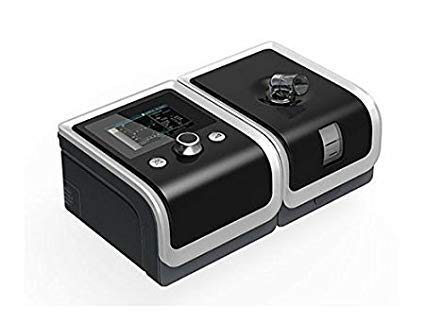
An image showing the BMC RESmart GII Auto CPAP device, featuring its main unit, control knob, and integrated humidifier. The device is black with a clear humidifier chamber visible.
4. الإعداد
4.1 فك التعبئة
- قم بإزالة جميع المكونات بعناية من العبوة.
- افحص الجهاز وملحقاته بحثًا عن أي علامات تلف. لا تستخدمه إذا كان تالفًا.
4.2 توصيل الطاقة
- Connect the power adapter to the power inlet on the back of the device.
- قم بتوصيل سلك الطاقة بمأخذ كهربائي مناسب.
4.3 Filling the Humidifier
- Open the humidifier chamber by sliding or lifting the cover.
- Fill the water chamber with distilled water up to the maximum fill line. Do not overfill.
- Close the humidifier chamber securely.
4.4 Connecting Tubing and Mask
- Connect one end of the CPAP tubing to the air outlet on the device.
- Connect the other end of the tubing to your prescribed CPAP mask.
- Fit the mask comfortably and securely according to its own instructions.
5. تعليمات التشغيل
5.1 بدء العلاج
- Ensure the device is properly set up and connected.
- ضع قناعك.
- Press the Start/Stop button (usually the control knob) to begin therapy. The device will automatically start delivering air.
5.2 ضبط الإعدادات
Use the control knob to navigate the menu on the 3.5-inch LCD display. Press the knob to select an option and rotate to adjust values.
- نطاق الضغط: 4-20 cm H2O (Auto CPAP adjusts automatically within this range).
- Ramp وقت: Adjusts the time (0-60 minutes) for the pressure to gradually increase to the prescribed level.
- Humidification Level: Select from Off or levels 1-5 to control the humidity output.
- Reslex: Pressure relief feature (Off/1/2/3) for exhalation comfort.
- تشغيل / إيقاف تلقائي: Can be enabled or disabled (Off by default).
5.3 إيقاف العلاج
Press the Start/Stop button again to end therapy. The device will power down.
5.4 iCode II Data Retrieval
Compliance data is encoded by a QR code displayed on the device's screen. Use a compatible application to scan the QR code for quick data retrieval and monitoring.
6. الصيانة
Regular cleaning and maintenance are crucial for the optimal performance and longevity of your device.
6.1 التنظيف اليومي
- Humidifier Water Chamber: Empty any remaining water and rinse with distilled water. Allow to air dry.
- قناع: Wipe down the mask cushion with a damp cloth or specialized CPAP wipes.
6.2 التنظيف الأسبوعي
- Humidifier Water Chamber: Wash with mild soap and warm water. Rinse thoroughly and allow to air dry completely.
- أنابيب CPAP: Wash with mild soap and warm water. Rinse thoroughly and hang to air dry.
- فلتر الهواء: Inspect the reusable air filter (if applicable). If dirty, rinse under running water and allow to air dry. Replace disposable filters as recommended.
6.3 العناية العامة
- امسح الجزء الخارجي من الجهاز بالإعلانamp cloth. Do not use abrasive cleaners or immerse the device.
- Replace air filters regularly as per manufacturer recommendations or if visibly dirty.
7. استكشاف الأخطاء وإصلاحها
إذا واجهت أي مشكلات، راجع المشكلات والحلول الشائعة التالية:
| مشكلة | السبب المحتمل | حل |
|---|---|---|
| لا يوجد طاقة | تم فصل سلك الطاقة؛ تم فصل الطاقةtage | Check power connections; Restore power supply |
| Air leak from mask | Mask not fitted correctly; Mask worn out | Adjust mask straps; Replace mask cushion or mask |
| جفاف الفم/الحلق | Humidifier off or set too low; Water chamber empty | Increase humidification level; Refill water chamber |
| الجهاز صاخب | Air filter dirty or blocked; Device on an uneven surface | Clean or replace air filter; Place device on a stable, flat surface |
| Pressure feels too high/low | Incorrect pressure setting; Ramp feature active | Consult your physician for pressure adjustments; Wait for ramp لإكمال |
If the problem persists, contact your healthcare provider or the manufacturer's customer support.
8. المواصفات
| ميزة | مواصفة |
|---|---|
| نموذج | E-20A-H |
| وضع | CPAP / Auto |
| نطاق الضغط | 4-20 سم H2O |
| Pressure Increment | 0.5 سم ماء |
| Ramp وقت | 0-60 دقائق |
| ريسليكس | إيقاف / 1/2/3 |
| مستوى الصوت | <30 ديسيبل |
| Humidification Levels | إيقاف / 1-5 |
| عرض | شاشة LCD مقاس 3.5 بوصة |
| الأبعاد (الطول × العرض × الارتفاع) | 170x196x118mm (device) / 290x196x134mm (with H60 humidifier) |
| وزن | <1.5kg (device) / <2.5kg (with H60 humidifier) |
| مزود الطاقة | Input Range 100-240V AC, 50/60 Hz, 2.0 A max |
| تخزين البيانات | SD Card (iCode II) |
| بلد المنشأ | الصين |
9. الضمان والدعم
For warranty information, please refer to the documentation provided with your purchase or contact your retailer. For technical support, service, or questions regarding your BMC RESmart GII Auto CPAP System, please contact the seller or the manufacturer directly.