
1. المقدمة
This manual provides detailed instructions for the Symcode MJ-2030-W Barcode Scanner. This device offers both 2.4GHz wireless and USB 2.0 wired connectivity, designed for efficient and reliable barcode scanning in various environments. Please read this manual thoroughly before operating the scanner to ensure proper use and to maximize its performance.
2. انتهى المنتجview
The Symcode MJ-2030-W is a versatile handheld laser barcode scanner. Key features include:
- الاتصال المزدوج: Supports both 2.4GHz wireless and USB 2.0 wired connections.
- نطاق ممتد: Effective wireless communication up to 200 meters outdoors and 100 meters indoors.
- عمر بطارية طويل: Equipped with a 2000mAh rechargeable battery, providing extended operation.
- وضعين للتشغيل: Instant upload and storage modes for flexible data handling.
- Customizable Scanning: Supports prefix/suffix settings and character manipulation.
- تصميم متين: Features a shock-resistant silicone casing (IP54 rated) for enhanced protection.
3. الإعداد
3.1 محتويات العبوة
قبل البدء، تأكد من وجود جميع العناصر في العبوة:
- Symcode MJ-2030-W Barcode Scanner
- Mini USB Receiver (2.4GHz wireless dongle)
- كابل USB (للشحن والاتصال السلكي)
- دليل المستخدم (هذا المستند)
3.2 توصيل الماسح الضوئي
يوفر الماسح الضوئي طريقتين أساسيتين للاتصال:
اتصال لاسلكي 3.2.1 2.4 جيجاهرتز
- Insert the mini USB receiver into an available USB 2.0 port on your computer.
- Turn on the barcode scanner. It will automatically pair with the receiver.
- A successful connection is indicated by a specific sound or LED indicator on the scanner.

Figure 1: The reliable mini USB receiver for wireless connection.

Figure 2: Scanner in use with 2.4GHz wireless connection.
3.2.2 اتصال سلكي عبر USB
- قم بتوصيل أحد طرفي كابل USB المرفق بمنفذ USB الخاص بالماسح الضوئي.
- قم بتوصيل الطرف الآخر من كابل USB بمنفذ USB 2.0 متاح على جهاز الكمبيوتر الخاص بك.
- سيتم التعرف على الماسح الضوئي كجهاز لوحة مفاتيح HID، ولا يلزم عادةً وجود برامج تشغيل إضافية.
4. تعليمات التشغيل
4.1 المسح الأساسي
To scan a barcode, aim the laser beam at the center of the barcode and press the trigger button. A successful scan is usually indicated by a beep and/or a green LED light.
4.2 أوضاع تحميل البيانات
The scanner supports two modes for uploading scanned data:
4.2.1 وضع التحميل الفوري
In this mode, scanned barcodes are immediately transmitted to the connected computer. This is suitable for real-time data entry.
4.2.2 وضع التخزين
When the scanner is out of range of the receiver or disconnected, it can store scanned barcodes internally. The scanner supports storing approximately 1000 barcodes in offline memory. To upload stored data, reconnect the scanner to your computer (either wirelessly or via USB) and scan the specific 'Upload Data' barcode (refer to the programming guide for this barcode, if provided). The stored data will then be transmitted to your computer.
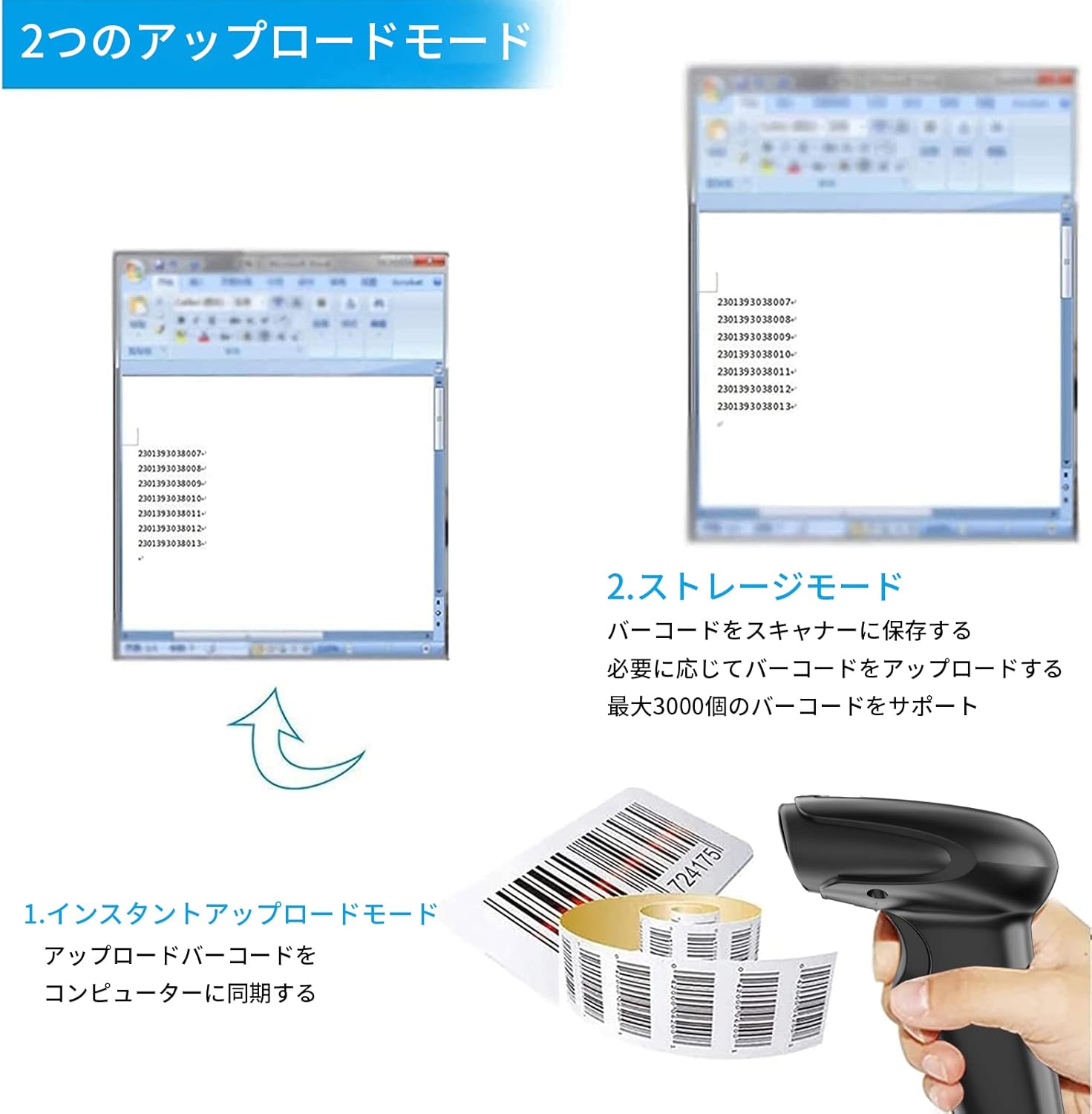
الشكل 3: توضيح لأوضاع التحميل والتخزين الفوري.
4.3 Programmable Barcodes
The Symcode MJ-2030-W scanner allows for customization of barcode data output:
- إعدادات البادئة واللاحقة: You can configure the scanner to add a specific prefix or suffix to each scanned barcode data.
- Character Insertion/Deletion: Specific characters can be inserted or deleted from the scanned data.
Refer to the separate programming guide (if included) or the manufacturer's website for detailed instructions on how to program these settings by scanning specific configuration barcodes.

Figure 4: Scanner demonstrating programmable barcode features.
5. البطارية والشحن
The scanner is equipped with a 2000mAh rechargeable battery. For optimal performance, ensure the battery is fully charged before first use.
- وقت الشحن: حوالي 3-4 ساعات للشحن الكامل.
- مدة التشغيل: A full charge can provide up to 12,000 hours of standby time or approximately 74,000 scans.
- طريقة الشحن: Connect the scanner to a computer or a USB power adapter using the provided USB cable.

Figure 5: Battery specifications and shock-resistant design.
6. الصيانة
- تنظيف: Use a soft, dry cloth to clean the scanner's exterior. For the scanning window, use a soft, lint-free cloth slightly dampيُنظف بالماء أو بمحلول تنظيف خفيف. تجنب استخدام المنظفات الكاشطة أو المذيبات.
- تخزين: قم بتخزين الماسح الضوئي في مكان بارد وجاف بعيدًا عن أشعة الشمس المباشرة ودرجات الحرارة القصوى.
- متانة: The scanner features a black silicone protective cover with IP54 rating, designed to protect the glass window from scratches and the unit from drops up to 6.56 feet (2 meters).
7. استكشاف الأخطاء وإصلاحها
7.1 الماسح الضوئي لا يستجيب
- Ensure the scanner is turned on and fully charged.
- For wireless connection, verify the mini USB receiver is securely plugged into the computer and the scanner is within range. Try re-pairing if necessary (refer to the programming guide for pairing instructions).
- For wired connection, ensure the USB cable is properly connected to both the scanner and the computer. Try a different USB port.
7.2 Barcodes Not Scanning
- Ensure the barcode is clear, undamaged, and well-lit.
- اضبط المسافة والزاوية بين الماسح الضوئي والباركود.
- Check if the scanner is in the correct operating mode (e.g., not in a configuration mode).
7.3 Unexpected Sound Volume
If the scanner's beep volume is too loud or too quiet, refer to the programming guide for specific barcodes that allow adjustment of the sound settings.
7.4 Missing Components
If any components, such as the receiver or a programming code sheet, are missing from your package, please contact customer support immediately.
8. المواصفات
| ميزة | مواصفة |
|---|---|
| ماركة | رمز الرمز |
| رقم الموديل | MJ-2030-W |
| لون | أبيض |
| أبعاد | 17.53 × 8.38 × 11.43 سم |
| وزن | 280.66 جرام |
| مصدر الطاقة | تعمل بالبطارية |
| تكنولوجيا الاتصال | لاسلكي بتردد 2.4 جيجاهرتز، كابل USB |
| سعة البطارية | 2000 مللي أمبير |
| نطاق لاسلكي (خارجي) | حتى 200 متر |
| نطاق لاسلكي (داخلي) | حتى 100 متر |
| سعة التخزين | Approx. 1000 barcodes (offline mode) |
| مقاومة السقوط | حتى 6.56 قدم (2 أمتار) |
| تصنيف الحماية | IP54 |

Figure 6: Wireless transmission distance capabilities.
9. الضمان والدعم
Symcode products are designed for reliability and performance. For warranty information, technical support, or service inquiries, please refer to the contact information provided with your purchase or visit the official Symcode website. Please have your product model number (MJ-2030-W) and purchase details ready when contacting support.