
1. المقدمة وما فوقview
The AULA Excalibur 109R is a one-handed mechanical gaming keyboard designed for enhanced gaming performance. It features customizable RGB LED backlighting, blue mechanical switches for tactile feedback, and programmable macro keys. The ergonomic design includes a removable wrist rest for comfort during extended use.
تتضمن الميزات الرئيسية ما يلي:
- Customizable RGB LED Backlight with 5 pre-programmed modes and user-defined profiles.
- 8 programmable keys for macros and hotkeys.
- Durable Blue Mechanical Switches with an ultra-long lifetime of up to 50 million clicks.
- Ergonomic design with a removable wrist rest to reduce fatigue.
- 100% Anti-Ghosting with all Key Roll-over on USB.
- Compatibility with Windows XP, Vista, 7, 8, 10, and MAC OS X.
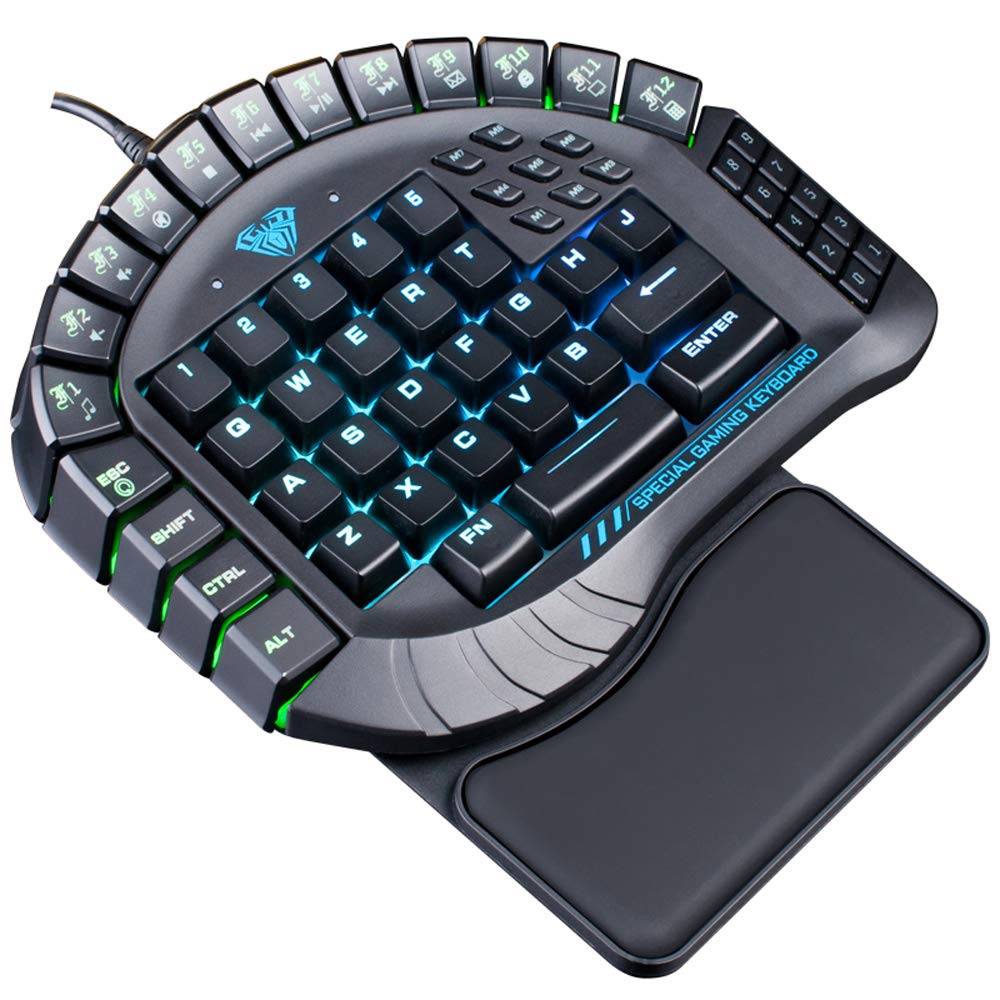
الشكل 1: من أعلى إلى أسفل view of the AULA Excalibur 109R keyboard with RGB backlighting active.
2. تعليمات الإعداد
2.1 توصيل لوحة المفاتيح
The AULA Excalibur 109R keyboard is a plug-and-play device. Connect the USB connector from the keyboard directly to an available USB port on your computer. No additional drivers are typically required for basic functionality on supported operating systems.
2.2 تركيب مسند المعصم
For enhanced ergonomic comfort, attach the removable wrist rest to the keyboard. Align the wrist rest with the bottom edge of the keyboard and secure it into place. The wrist rest is designed to provide support during long gaming sessions.

الشكل 2: الصورة عن قرب view of the ergonomic, removable wrist rest.
3. تعليمات التشغيل
3.1 تخصيص الإضاءة الخلفية RGB
The keyboard features customizable RGB backlighting. It comes with 5 pre-programmed lighting modes. You can also create and save 5 customized backlighting profiles. Refer to the included software or the manufacturer's website for detailed instructions on customizing lighting effects and profiles.

الشكل 3: لوحة المفاتيح المعروضةasing dynamic RGB backlighting.
3.2 برمجة مفتاح الماكرو
The AULA Excalibur 109R includes 8 independent macro keys and 10 hotkeys accessible via the Fn key. These keys can be programmed to execute complex commands or sequences with a single press. Programming is typically done through the dedicated software provided with the keyboard or available for download from the manufacturer's official website. Consult the software's user interface for specific programming steps.
3.3 وضع السكون
To conserve power, the keyboard will automatically enter sleep mode after 10 minutes of inactivity. To reactivate the keyboard, simply press any key.
Video 1: Demonstration of the AULA Excalibur 109R keyboard's RGB backlighting and key responsiveness. This video illustrates the dynamic lighting effects and the tactile feedback of the mechanical keys.
4. الصيانة
4.1 التنظيف
لتنظيف لوحة المفاتيح، استخدم قطعة قماش ناعمة وجافة. أما للأوساخ المستعصية، فاستخدم قطعة قماش مبللة قليلاً.amp cloth with mild soap can be used, ensuring no liquid enters the key switches or internal components. Avoid using harsh chemicals or abrasive cleaners.
4.2 Liquid Spill Precaution
Keep the device away from liquids and chemicals. In the event of a liquid spill, immediately unplug the keyboard. The keyboard is designed with drainage holes at the bottom. Deploy the keyboard feet to allow any liquid to drain out. Allow the keyboard to dry completely before reconnecting it.

الشكل 4: الجانب السفلي view of the keyboard, highlighting the drainage holes for liquid spills.
5. استكشاف الأخطاء وإصلاحها
5.1 لوحة المفاتيح لا تستجيب
- تأكد من توصيل كابل USB بشكل آمن بكل من لوحة المفاتيح والكمبيوتر.
- حاول توصيل لوحة المفاتيح بمنفذ USB مختلف على جهاز الكمبيوتر الخاص بك.
- If the keyboard is in sleep mode, press any key to reactivate it.
- اختبر لوحة المفاتيح على جهاز كمبيوتر آخر لتحديد ما إذا كانت المشكلة في لوحة المفاتيح أو في إعدادات الكمبيوتر.
5.2 مشاكل الإضاءة الخلفية
- Verify that the keyboard's lighting functions are enabled. Refer to the operating instructions for backlight customization.
- إذا كنت تستخدم برنامجًا مخصصًاfiles, ensure they are correctly loaded via the software.
- Ensure the keyboard's software/drivers are up to date, if applicable, as they control advanced lighting features.
5.3 Macro Key Malfunction
- Confirm that the macro keys have been programmed correctly using the dedicated software.
- Check for any conflicts with other software or system settings that might interfere with macro execution.
- Ensure the software is running in the background if required for macro functionality.
6. المواصفات
| ميزة | التفاصيل |
|---|---|
| ماركة | أولا |
| رقم الموديل | 109ر |
| تكنولوجيا الاتصال | سلكي (USB) |
| وصف لوحة المفاتيح | ألعاب، ميكانيكية |
| نوع المفتاح | المفاتيح الزرقاء |
| عدد المفاتيح | 60 |
| قوة رئيسية | 60 ± 10g |
| Key Route | 4.0 ملم |
| تصنيف المجلدtagهـ / الحالية | تيار مستمر 5 فولت |
| Product Dimensions (without wrist rest) | 8.4"(L) x 7.28"(W) x 1.89"(H) ± 0.02 inch |
| Product Dimensions (with wrist rest) | 8.4"(L) x 9.69"(W) x 1.89"(H) ± 0.02 inch |
| لوحة المفاتيح الوزن | 1.1 رطل (حوالي 0.5 كجم) |
| مادة | بلاستيك |
| توافق نظام التشغيل | Windows Vista/7/8/10, MAC OS X |
| المميزات الخاصة | Macro, Customizable RGB Backlight, Anti-Ghosting |
7. معلومات الضمان
This AULA Excalibur 109R keyboard comes with a ضمان لمدة 30 يومًا from the date of purchase. This warranty covers manufacturing defects and malfunctions under normal use. It does not cover damage caused by misuse, accidents, unauthorized modifications, or improper maintenance. Please retain your proof of purchase for warranty claims.
8. الدعم
For further assistance, technical support, or warranty inquiries, please contact AULA customer service. Refer to the product packaging or the official AULA webالموقع الإلكتروني للاطلاع على تفاصيل الاتصال وموارد الدعم الإضافية.