
ريي RK202
Rii RK202 Gaming Keyboard User Manual
الموديل: RK202
1. المقدمة
The Rii RK202 Gaming Keyboard is designed to provide an enhanced experience for both gaming and general typing. It features a full-size layout with 105 keys, multi-color LED backlighting, and dedicated multimedia functions. This manual provides detailed instructions for setup, operation, maintenance, and troubleshooting to ensure optimal performance and longevity of your keyboard.
2. الإعداد
2.1 محتويات العبوة
- Rii RK202 Gaming Keyboard (with integrated USB cable)
2.2 توصيل لوحة المفاتيح
- Locate an available USB port on your computer, laptop, gaming console (PS4, Xbox One), Smart TV, or other compatible device.
- Insert the USB connector of the Rii RK202 keyboard firmly into the USB port.
- لوحة المفاتيح جاهزة للاستخدام فورًا. سيقوم نظام التشغيل لديك تلقائيًا باكتشاف برامج التشغيل اللازمة وتثبيتها. عادةً، لا يتطلب الأمر تثبيت أي برامج إضافية.
The keyboard is compatible with Windows 95/98/XP/2000/ME/VISTA/7/8/9/10, Google Android TV Box, HTPC, IPTV, Mac OS (with limited backlight functionality), Chrome OS, and all versions of Raspberry Pi.

Image: The Rii RK202 Gaming Keyboard connected to a device via its integrated USB cable.
3. تعليمات التشغيل
3.1 وظائف لوحة المفاتيح الأساسية
The Rii RK202 features a standard QWERTY layout with 105 keys, including a numeric keypad and function keys (F1-F12). It supports 19-key anti-ghosting for accurate input during fast-paced gaming.
3.2 مفاتيح الوسائط المتعددة
تتضمن لوحة المفاتيح وظائف وسائط متعددة مخصصة يمكن الوصول إليها عبر Fn key combined with the F-keys. These shortcuts allow quick control over media playback and system functions.

Image: A visual guide to the multimedia functions (Fn + F1-F12) on the Rii RK202 keyboard.
- الجبهة الوطنية + F1: مشغل الموسيقى
- الجبهة الوطنية + F2: خفض الصوت
- الجبهة الوطنية + F3: رفع الصوت
- الجبهة الوطنية + F4: صامت
- الجبهة الوطنية + F5: أوقف التشغيل
- الجبهة الوطنية + F6: المسار السابق
- الجبهة الوطنية + F7: تشغيل/إيقاف مؤقت
- الجبهة الوطنية + F8: المسار التالي
- الجبهة الوطنية + F9: بريد إلكتروني
- الجبهة الوطنية + F10: Web الصفحة الرئيسية
- الجبهة الوطنية + F11: قفل الكمبيوتر
- الجبهة الوطنية + F12: آلة حاسبة
3.3 التحكم في الإضاءة الخلفية
The Rii RK202 keyboard features 7-color LED backlighting with adjustable brightness and various lighting modes.

Image: A visual guide to controlling the LED backlight, including brightness adjustment and mode changes.
- Turn Backlight ON/OFF: يضعط الجبهة الوطنية + * (asterisk key, located near the right Shift key).
- ضبط السطوع: يضعط الجبهة الوطنية + صفحة to increase brightness (4 levels). Press الجبهة الوطنية + PgDn لتقليل السطوع.
- تغيير وضع الإضاءة: يضعط Fn + Light Bulb Key (located next to the right Shift key) to cycle through static color, breathing mode, and off.
ملحوظة: The backlight function is not supported on MacOS systems.
3.4 وضع السكون التلقائي
To conserve energy, the keyboard will automatically enter a sleep mode if there is no interaction for approximately 10 minutes. The backlight will turn off. To reactivate the keyboard, simply press any key, and it will return to operational mode.
3.5 Integrated Smartphone Holder
The keyboard features a built-in slot designed to hold a smartphone, providing convenient access to your device while using the keyboard.
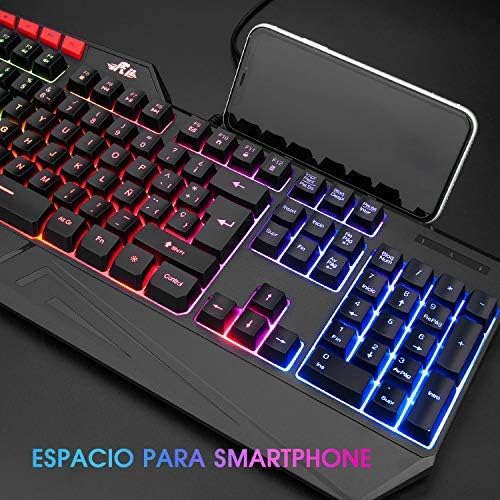
Image: The Rii RK202 keyboard featuring its integrated smartphone holder, with a phone placed in the slot.
4. الصيانة
4.1 تنظيف لوحة المفاتيح
- افصل لوحة المفاتيح عن جهازك قبل التنظيف.
- Use a soft, dry, lint-free cloth to gently wipe the surface of the keys and the keyboard body.
- For stubborn dirt or grime, lightly dampen the cloth with water or a mild, non-abrasive cleaning solution. Ensure the cloth is not dripping wet.
- Avoid spraying cleaning solutions directly onto the keyboard. Do not allow any liquid to seep into the key switches or internal components.
- استخدم الهواء المضغوط لإزالة الغبار والحطام من بين المفاتيح.
- Ensure the keyboard is completely dry before reconnecting it to your device.
4.2 العناية العامة
- Avoid exposing the keyboard to extreme temperatures, direct sunlight, or high humidity.
- Do not drop or subject the keyboard to strong impacts.
- Keep liquids away from the keyboard to prevent damage.
5. استكشاف الأخطاء وإصلاحها
5.1 لوحة المفاتيح لا تستجيب
- التحقق من اتصال USB: Ensure the USB cable is securely plugged into both the keyboard and the device. Try unplugging and re-plugging the cable.
- جرب منفذ USB مختلفًا: Connect the keyboard to a different USB port on your device.
- اختبار على جهاز آخر: If possible, test the keyboard on another computer or compatible device to determine if the issue is with the keyboard or your original device.
- إعادة تشغيل الجهاز: أعد تشغيل الكمبيوتر أو الجهاز.
5.2 الإضاءة الخلفية لا تعمل
- تفعيل الإضاءة الخلفية: Ensure the backlight is turned on by pressing الجبهة الوطنية + *.
- ضبط السطوع: قم بزيادة السطوع باستخدام الجبهة الوطنية + صفحة.
- Check Lighting Mode: التنقل بين أوضاع الإضاءة باستخدام Fn + Light Bulb Key.
- التوافق مع نظام التشغيل MacOS: Remember that backlight functionality is not supported on MacOS systems.
5.3 Specific Keys Not Registering
- تنظيف أسفل المفاتيح: Use compressed air to remove any debris or dust that might be lodged under the unresponsive keys.
- صراع البرمجيات: Check if any recently installed software or drivers are causing conflicts.
- If the issue persists after trying these steps, contact customer support for further assistance.
6. المواصفات
| ميزة | التفاصيل |
|---|---|
| رقم الموديل | آر كيه 202 |
| الأبعاد (الطول × العرض × الارتفاع) | 47.5 x 21.49 x 3 cm (18.7 x 8.46 x 1.18 inches) |
| وزن | 840 جرام (1.85 رطل) |
| الاتصال | USB سلكي |
| عدد المفاتيح | 105 مفاتيح |
| مكافحة التظليل | 19 مفاتيح |
| الإضاءة الخلفية | 7-color LED with adjustable brightness and modes |
| مادة | بلاستيك ايه بي اس |
| عمر المفتاح | ما يصل إلى 50 ملايين نقرة |
| التوافق | Windows (95/98/XP/2000/ME/VISTA/7/8/9/10), PC, Laptop, Google Android TV Box, HTPC, IPTV, Smart TV, Mac OS (limited backlight), Chrome OS, Raspberry Pi |
7. معلومات الضمان
Please refer to the warranty policy provided by your retailer or the manufacturer's official website for detailed information regarding warranty coverage, terms, and conditions. Keep your proof of purchase for any warranty claims.
8. دعم العملاء
For technical assistance, troubleshooting not covered in this manual, or other inquiries, please visit the official Rii website or contact your point of purchase. Ensure you have your product model number (RK202) available when seeking support.
Ask a question about this manual
Ask about setup, troubleshooting, compatibility, parts, safety, or missing instructions. Manuals+ will review the question and use this page’s manual context to help answer it.