
Galaxy Audio PA6BT
Galaxy Audio PA6BT Powered Hot Spot Monitor Speaker with Bluetooth User Manual
Model: PA6BT
1. المقدمة
This manual provides comprehensive instructions for the setup, operation, and maintenance of your Galaxy Audio PA6BT Powered Hot Spot Monitor Speaker with Bluetooth. Please read this manual thoroughly before using the device to ensure proper functionality and to prevent damage.
The Galaxy Audio PA6BT is a 6-inch, 170-watt, 2-way powered monitor speaker designed for various audio applications, featuring integrated Bluetooth connectivity for wireless audio streaming.

الشكل 1: الجبهة بزاوية view of the Galaxy Audio PA6BT monitor, highlighting its compact design and the integrated control panel.
2. تعليمات السلامة الهامة
- اقرأ هذه التعليمات.
- احتفظ بهذه التعليمات.
- انتبه لكل التحذيرات.
- اتبع جميع التعليمات.
- لا تستخدم هذا الجهاز بالقرب من الماء.
- نظف فقط بقطعة قماش جافة.
- لا تسد أي فتحات تهوية. ثبّت المنتج وفقًا لتعليمات الشركة المصنعة.
- لا تقم بالتثبيت بالقرب من أي مصادر للحرارة مثل المشعات أو فتحات التدفئة أو المواقد أو أي أجهزة أخرى (بما في ذلك ampالمُضخِّمات) التي تنتج الحرارة.
- لا تفسد الغرض من السلامة في القابس المستقطب أو القابس الأرضي. يحتوي القابس المستقطب على شفرتين إحداهما أوسع من الأخرى. يحتوي القابس الأرضي على شفرتين وشوكة تأريض ثالثة. يتم توفير الشفرة العريضة أو الشوكة الثالثة لسلامتك. إذا لم يكن القابس المرفق مناسبًا للمأخذ الخاص بك، فاستشر كهربائيًا لاستبدال المنفذ القديم.
- احمِ سلك الطاقة من أن يدوس عليه أحد أو يضغط عليه، وخاصةً عند المقابس ومنافذ التوصيل الكهربائية ونقطة خروجها من الجهاز.
- استخدم فقط المرفقات/الملحقات المحددة من قبل الشركة المصنعة.
- استخدم فقط مع العربة أو الحامل أو الحامل ثلاثي القوائم أو الحامل أو الطاولة المحددة من قبل الشركة المصنعة أو المباعة مع الجهاز. عند استخدام العربة، توخ الحذر عند تحريك مجموعة العربة/الجهاز لتجنب الإصابة نتيجة الانقلاب.
- افصل هذا الجهاز أثناء العواصف الرعدية أو عند عدم استخدامه لفترات طويلة من الزمن.
- أحل جميع أعمال الصيانة إلى موظفي الصيانة المؤهلين. يلزم إجراء الصيانة عند تعرض الجهاز للتلف بأي شكل من الأشكال، مثل تلف سلك مصدر الطاقة أو القابس، أو انسكاب السوائل أو سقوط الأشياء داخل الجهاز، أو تعرض الجهاز للمطر أو الرطوبة، أو عدم تشغيله بشكل طبيعي، أو سقوطه.
- تحذير: To reduce the risk of fire or electric shock, do not expose this apparatus to rain or moisture. Do not open the unit; there are no user-serviceable parts inside.
3. الميزات الرئيسية
- انتاج الطاقة: 170 Watts for robust sound delivery.
- استجابة التردد: 80Hz - 18kHz for a wide audio spectrum.
- نظام مكبر الصوت ثنائي الاتجاه: Features a 6.5" Neodymium High Power Woofer and a 1.5" High Efficiency Tweeter.
- القنوات المزدوجة: Two independent input channels with individual volume controls.
- مدخلات متعددة الاستخدامات: Channel 1 offers XLR and 1/4" inputs. Channel 2 offers XLR, 1/4", and an additional 1/8" line input.
- الاتصال عبر البلوتوث: Integrated Bluetooth technology with its own volume control for wireless audio streaming.
- XLR Pass-Through: Allows independent control of microphones without affecting the signal sent to a main PA system.
- مفتاح تخفيف الصوت -20 ديسيبل: On each XLR input to accommodate high-level signals without distortion.
- 3 نطاقات EQ: Adjustable Low, Mid, and High frequency controls for sound shaping.
- الضاغط/المحدد: Built-in 18dB circuit with Compressor and Clip LEDs to smooth transient peaks and protect speakers.
- خيارات التركيب: Designed for mounting on most mic stands, includes an MSA-1 stand adaptor.
4. محتويات العبوة
يرجى التحقق من محتويات العبوة عند فتحها للتأكد من وجود جميع العناصر:
- Galaxy Audio PA6BT Powered Hot Spot Monitor Speaker
- MSA-1 Stand Adaptor
- كبل الطاقة IEC
- دليل المستخدم (هذا المستند)
5. الضوابط والتوصيلات
5.1 ضوابط اللوحة الأمامية

الشكل 2: الجبهة view of the Galaxy Audio PA6BT monitor, showing the speaker grille, tweeter, and control panel with knobs and LEDs.
- الصمام PWR: يضيء عند تشغيل الوحدة.
- LOW, MID, HI Knobs: 3-band equalizer controls to adjust bass, midrange, and treble frequencies.
- مقطع LED: Indicates when the input signal is too high, potentially causing distortion. Reduce input volume if this LED illuminates frequently.
- COMP LED: Indicates when the built-in compressor/limiter circuit is active, smoothing out transient peaks.
- CHAN 1 Knob: Volume control for Channel 1 input.
- CHAN 2 Knob: Volume control for Channel 2 input.
- BT VOL Knob: Volume control for the Bluetooth audio input.
5.2 اتصالات اللوحة الخلفية
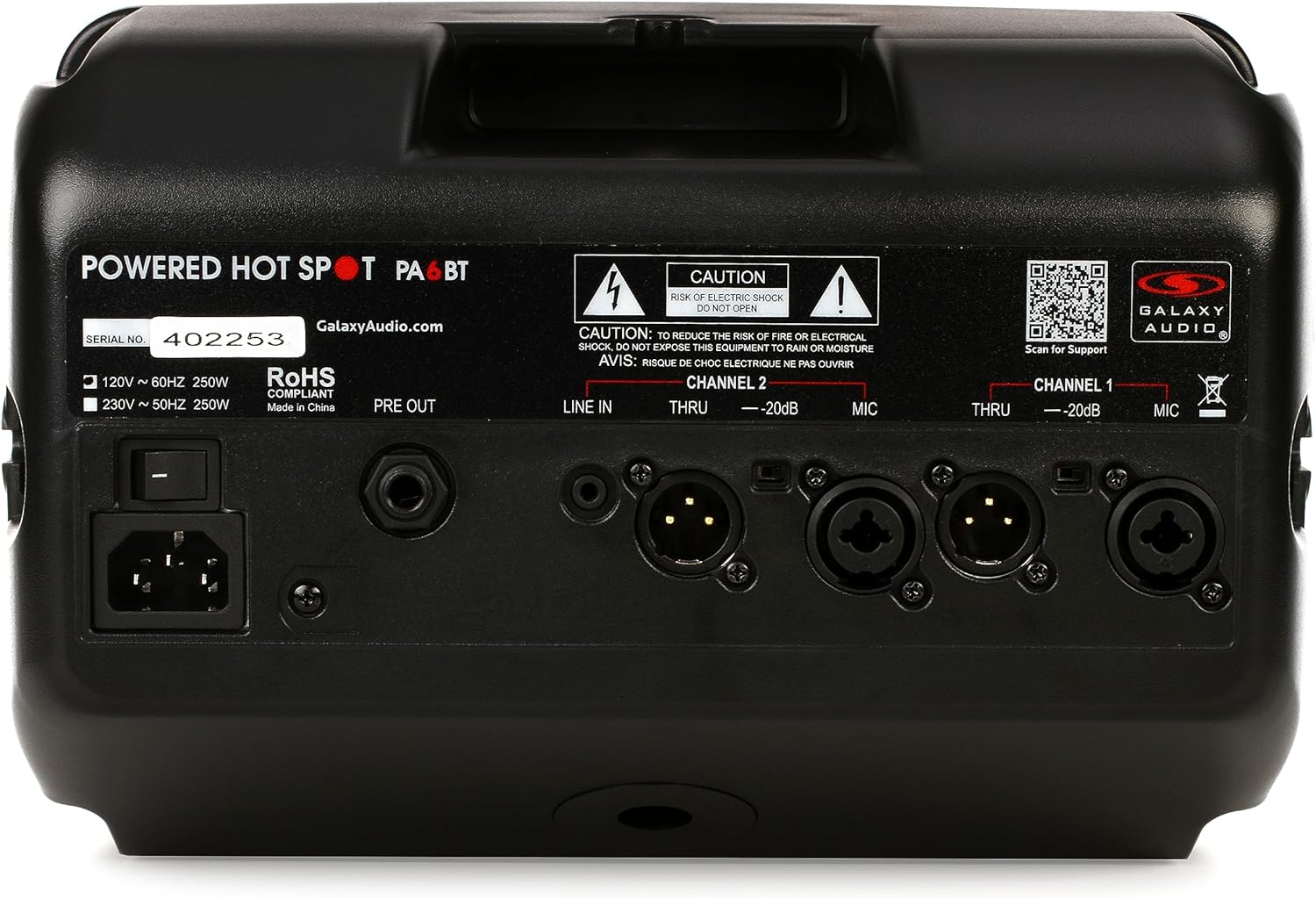
الشكل 3: خلفي view of the Galaxy Audio PA6BT monitor, displaying the power input, serial number, and various audio input/output connections for Channel 1 and Channel 2.
- مفتاح التشغيل: يقوم بتشغيل الوحدة أو إيقاف تشغيلها.
- مدخل طاقة IEC: Connects the included IEC power cable to an AC power source.
- ما قبل الخروج: Line-level output for sending the mixed signal to another powered speaker or a main PA system.
- Channel 2 Inputs:
- LINE IN (1/8"): Stereo or mono input for connecting devices like MP3 players, smartphones, or laptops.
- THRU (XLR): XLR pass-through for Channel 2, allowing the input signal to be sent to another device without processing.
- -20dB Pad (Switch): Reduces the input sensitivity by 20dB for high-level signals.
- MIC (XLR/1/4" Combo): Combo jack for connecting microphones (XLR) or line-level instruments (1/4").
- Channel 1 Inputs:
- THRU (XLR): XLR pass-through for Channel 1.
- -20dB Pad (Switch): Reduces the input sensitivity by 20dB for high-level signals.
- MIC (XLR/1/4" Combo): Combo jack for connecting microphones (XLR) or line-level instruments (1/4").
6. دليل الإعداد
- فك الوحدة: Carefully remove the PA6BT from its packaging and inspect for any signs of damage.
- الموقع:
- For personal monitoring, mount the PA6BT onto a standard microphone stand using the included MSA-1 stand adaptor. Ensure the stand is stable.
- Alternatively, place the unit on a stable, flat surface such as a table or stage floor.
- Initial Control Settings: Before connecting power, ensure all volume knobs (CHAN 1, CHAN 2, BT VOL) are turned completely counter-clockwise (minimum). Set the LOW, MID, and HI EQ knobs to their center (flat) positions.
- توصيل الطاقة: Connect the supplied IEC power cable to the IEC inlet on the rear panel of the PA6BT, then plug the other end into a suitable AC power outlet.
- تشغيل الطاقة: Flip the Power Switch on the rear panel to the "ON" position. The PWR LED on the front panel should illuminate.
7. تعليمات التشغيل
7.1 توصيل مصادر الصوت
- Microphones/Instruments (XLR/1/4" Combo Jacks):
- Connect your microphone or instrument to either the Channel 1 or Channel 2 MIC input.
- If using a high-output source, engage the -20dB Pad switch for that channel to prevent input clipping.
- Slowly increase the corresponding CHAN 1 or CHAN 2 volume knob until the desired level is reached. Monitor the CLIP LED; if it flashes frequently, reduce the input volume or engage the -20dB pad.
- Line-Level Devices (1/8" LINE IN - Channel 2 only):
- Connect your smartphone, tablet, or other line-level audio device to the 1/8" LINE IN jack on Channel 2.
- Adjust the BT VOL knob to control the volume of this input.
7.2 Bluetooth Pairing and Operation
- Ensure the PA6BT is powered on.
- Activate Bluetooth on your audio device (e.g., smartphone, tablet).
- بحث عن available Bluetooth devices. The PA6BT should appear as "Galaxy Audio PA6BT".
- Select "Galaxy Audio PA6BT" to pair. A confirmation tone may sound from the speaker.
- Once paired, play audio from your device. Adjust the BT VOL knob on the PA6BT to control the playback volume.
7.3 استخدام المعادل (EQ)
The LOW, MID, and HI knobs allow you to tailor the sound to your preference or acoustic environment:
- قليل: Adjusts the bass frequencies. Turn clockwise to boost bass, counter-clockwise to cut.
- منتصف: Adjusts the midrange frequencies. Turn clockwise to boost mids, counter-clockwise to cut. This is often used to enhance vocal clarity.
- أهلاً: Adjusts the treble frequencies. Turn clockwise to boost highs, counter-clockwise to cut.
7.4 Compressor/Limiter
The PA6BT features a built-in 18dB compressor/limiter. This circuit automatically reduces the dynamic range of the audio signal, preventing sudden loud peaks from distorting the sound and protecting the speakers from damage. The COMP LED illuminates when the compressor/limiter is active.
7.5 XLR Pass-Through (THRU)
The XLR THRU outputs on both channels allow you to send the unprocessed input signal from that channel to another device, such as a main mixing console or another powered speaker. This is useful for creating a separate monitor mix without affecting the main house sound.
8. الصيانة
- تنظيف: استخدم قطعة قماش ناعمة وجافة لتنظيف الجزء الخارجي من الجهاز. تجنب استخدام المنظفات السائلة أو المذيبات، لأنها قد تُتلف الطلاء أو المكونات الداخلية.
- تخزين: When not in use for extended periods, store the PA6BT in a cool, dry place, away from direct sunlight and extreme temperatures.
- تهوية: تأكد من عدم انسداد فتحات التهوية لمنع ارتفاع درجة الحرارة.
- الخدمة: Refer all servicing to qualified service personnel. Do not attempt to open the unit or perform repairs yourself.
9. استكشاف الأخطاء وإصلاحها
| مشكلة | السبب المحتمل | حل |
|---|---|---|
| لا يوجد طاقة (مصباح LED للطاقة مطفأ) | كابل الطاقة غير موصول؛ مفتاح الطاقة مطفأ؛ مأخذ الطاقة معطل. | تأكد من توصيل كابل الطاقة بإحكام. شغّل مفتاح الطاقة. اختبر مأخذ الطاقة بجهاز آخر. |
| لا يوجد مخرج صوت | Volume knobs too low; Input source not connected or muted; Incorrect input selected; Faulty cable. | Increase CHAN 1, CHAN 2, or BT VOL. Check input source connection and volume. Ensure correct input is used. Test with a different cable. |
| Distorted sound / CLIP LED flashing | Input signal too high; EQ settings extreme. | Reduce the volume of the input source. Engage the -20dB Pad switch for the affected channel. Adjust EQ knobs to a more neutral position. |
| البلوتوث غير مقترن | PA6BT not in pairing mode; Device too far; Interference; Previously paired with another device. | Ensure PA6BT is powered on. Move device closer. Turn off other Bluetooth devices. Forget PA6BT from your device's Bluetooth list and try pairing again. |
| صدى (صوت عواء) | Microphone too close to speaker; Microphone gain too high; Speaker pointed directly at microphone. | Reposition the microphone and speaker. Reduce microphone gain. Adjust EQ settings (especially MID/HI). |
10. المواصفات

Figure 4: Diagram showing the dimensions of the Galaxy Audio PA6BT monitor: 12 inches deep, 7 inches wide, and 12 inches high.
| ميزة | التفاصيل |
|---|---|
| نموذج | PA6BT |
| انتاج الطاقة | 170 واط |
| استجابة التردد | 80 هرتز - 18 كيلو هرتز |
| نوع السماعة | 2-Way: 6.5" Neodymium Woofer, 1.5" Tweeter |
| المدخلات | Channel 1: XLR/1/4" Combo; Channel 2: XLR/1/4" Combo, 1/8" Line In |
| المخرجات | PRE OUT (Line Level), XLR THRU (Channel 1 & 2) |
| الاتصال اللاسلكي | بلوتوث |
| معادلة | 3 نطاقات (منخفض، متوسط، عالي) |
| Dynamic Processing | Built-in 18dB Compressor/Limiter |
| الأبعاد (الارتفاع × العرض × العمق) | 12 بوصة × 7 بوصة × 12 بوصة (تقريبًا) |
| وزن العنصر | 8.21 رطل |
| المكونات المضمنة | MSA-1 stand adaptor, IEC power cable |
| مصدر الطاقة | كهرباء سلكية |
| لون | أسود |
11. الضمان والدعم
11.1 الضمان المحدود
The Galaxy Audio PA6BT is covered by a limited warranty. For specific terms, conditions, and duration of the warranty, please refer to the warranty card included with your product or visit the official Galaxy Audio webالموقع. احتفظ بإثبات الشراء الخاص بك لتقديم مطالبات الضمان.
11.2 دعم العملاء
For technical assistance, troubleshooting beyond this manual, or service inquiries, please contact Galaxy Audio customer support. You can find contact information and additional resources on the official Galaxy Audio webموقع:
Ask a question about this manual
Ask about setup, troubleshooting, compatibility, parts, safety, or missing instructions. Manuals+ will review the question and use this page’s manual context to help answer it.