
1. المقدمة
The AVerMedia AM310 is a plug-and-play USB microphone designed for high-quality audio recording. It is suitable for various applications including podcasting, streaming, gaming, and vocal performances. This manual provides detailed instructions for setting up, operating, and maintaining your AM310 microphone to ensure optimal performance.

Figure 1: AVerMedia AM310 USB Microphone
2. انتهى المنتجview
2.1 الميزات الرئيسية
- Driver-Free and Plug-and-Play: Easy setup on PC or Mac without additional driver installation.
- Cardioid Condenser Microphone: Records sound sources directly in front of the microphone, providing detailed and clear audio.
- مقبس سماعة رأس مقاس 3.5 ملم: Allows real-time audio monitoring or playback of computer audio.
- الضوابط المتكاملة: Features a volume knob and mute button for convenient audio management.
2.2 مكونات
Familiarize yourself with the main components of your AM310 microphone:

Figure 2: Labeled components of the AM310 USB Microphone
- مؤشر LED: Displays microphone status (Blue: Powered on, Red: Muted).
- مقبض حجم سماعة الرأس: يضبط مستوى الصوت لسماعات الرأس المتصلة.
- جبل: Connects the microphone to the base or other compatible stands.
- Base and Shaft: Provides stable support for the microphone.
- Headphone Mode Switch: Toggles between PC Audio Playback and Microphone Monitoring.
- مقبس سماعة رأس مقاس 3.5 ملم: Output for connecting headphones.
3. الإعداد
The AVerMedia AM310 is designed for quick and easy setup. Follow these steps to get started:
- Assemble the Microphone: Attach the microphone unit to the provided base and shaft. Ensure it is securely fastened.
- الاتصال بجهاز الكمبيوتر: Plug the USB cable from the AM310 microphone into an available USB port on your PC or Mac. The microphone is driver-free and will be automatically recognized by your operating system.
- توصيل سماعات الرأس (اختياري): If you wish to monitor your audio, plug your 3.5mm headphones into the headphone jack on the microphone.
- حدد كجهاز إدخال: In your computer's sound settings, select the AVerMedia AM310 as your default audio input device.

Figure 3: Connection diagram for AM310 USB Microphone

Figure 4: AM310 compatibility with Mac and Windows operating systems
3.1 دليل فيديو الإعداد
For a visual guide on setting up and using your AVerMedia AM310 microphone, please watch the official product video below.
Video 1: AVerMedia AM310 USB Microphone Overview والإعداد
4. تعليمات التشغيل
4.1 Adjusting Volume and Muting
The AM310 features an integrated volume knob and mute button for easy control:
- مقبض الصوت: Rotate the knob to adjust the headphone output volume.
- زر كتم الصوت: Press the knob to mute or unmute the microphone. The LED indicator will change from blue (powered on) to red (muted) when activated.

Figure 5: Volume knob and LED indicator
4.2 مراقبة سماعات الرأس
The 3.5mm headphone jack allows you to monitor your audio in two modes:
- PC Audio Playback: Slide the switch to the 'PC' position to hear audio playing from your computer through your headphones.
- مراقبة الميكروفون: Slide the switch to the 'MONITOR' position to hear your own voice in real-time through your headphones, which is useful for adjusting your speaking volume and clarity.

Figure 6: Headphone mode switch (PC/Monitor)

Figure 7: User utilizing the AM310 for streaming with headphones
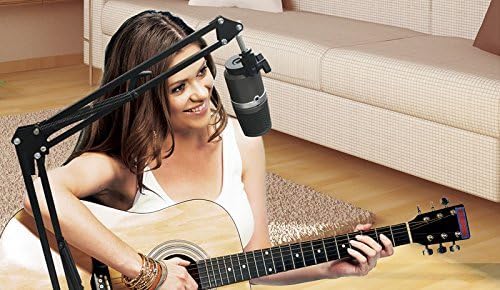
Figure 8: User recording music with the AM310 microphone
5. المواصفات
Below are the technical specifications for the AVerMedia AM310 USB Microphone:
| ميزة | مواصفة |
|---|---|
| يكتب | Uni-directional Condenser Microphone |
| النمط القطبي | قلبي الشكل |
| Sampمعدل جنيه | 48 كيلو هرتز |
| معدل البت | 16 بت |
| الطاقة المطلوبة | أوسب (5 فولت تيار مستمر) |
| حساسية | -60 ± 5 dB (at 1 kHz) |
| استجابة التردد | 20-20,000 هرتز |
| حساسية الصوت | 60 ديسيبل |
| مقاومة | 600 أوم |
| إشارة إلى نسبة الضوضاء | 80 ديسيبل |
| منصة الأجهزة | PC |
| عدد القنوات | 1 |
| تكنولوجيا الاتصال | USB |
| نوع الموصل | USB |
| وزن العنصر | 1.03 رطل |
| أبعاد المنتج | 10 × 4 × 6 بوصة |
| مادة | الألومنيوم |
6. استكشاف الأخطاء وإصلاحها
If you encounter issues with your AVerMedia AM310 microphone, please refer to the following common troubleshooting steps:
- No Sound Input:
- Ensure the microphone is securely plugged into a USB port.
- Verify that the AM310 is selected as the default input device in your computer's sound settings.
- Check if the microphone is muted (red LED indicator). Press the volume knob to unmute.
- Try a different USB port or a different computer to isolate the issue.
- حجم منخفض:
- Adjust the input gain for the microphone in your computer's sound settings or recording software.
- Ensure you are speaking directly into the front of the microphone, as it has a cardioid polar pattern.
- تشويش أو ضوضاء:
- Ensure the USB cable is not damaged and is properly connected.
- Avoid placing the microphone near sources of electromagnetic interference (e.g., power cables, unshielded electronics).
- Consider using a pop filter to reduce plosive sounds and a shock mount to minimize vibrations.
- مشاكل مراقبة سماعات الرأس:
- Check the headphone volume knob on the microphone.
- Verify the Headphone Mode Switch is set to the desired position (PC or MONITOR).
- Ensure your headphones are fully plugged into the 3.5mm jack.
7. الصيانة
To ensure the longevity and optimal performance of your AVerMedia AM310 USB Microphone, follow these maintenance guidelines:
- تنظيف: Use a soft, dry cloth to clean the exterior of the microphone. Avoid using liquid cleaners or solvents, as they may damage the finish or internal components.
- تخزين: عند عدم الاستخدام، قم بتخزين الميكروفون في مكان بارد وجاف بعيدًا عن أشعة الشمس المباشرة ودرجات الحرارة القصوى.
- التعامل: Handle the microphone with care. Avoid dropping it or subjecting it to strong impacts, which can damage the sensitive internal components.
- العناية بالكابلات: لا تثنِ أو تضغط على كابل USB بشكل مفرط. أمسك دائمًا بالقابس، وليس بالكابل، عند فصله.
8. الضمان والدعم
For warranty information, technical support, or further assistance with your AVerMedia AM310 USB Microphone, please visit the official AVerMedia webالموقع أو الاتصال بخدمة دعم العملاء الخاصة بهم.
يمكنك العثور على مزيد من المعلومات وموارد الدعم في AVerMedia Store.