
AIBOO YK-300000197
AIBOO Linkable Under Cabinet LED Lighting System User Manual
الموديل: YK-300000197
1. المقدمة
This manual provides comprehensive instructions for the installation, operation, and maintenance of your AIBOO Linkable Under Cabinet LED Lighting System. This system features hardwired 12V slim aluminum dimmable puck lights with a wireless controller, designed for ambiance lighting in various indoor settings. Please read this manual thoroughly before installation and use.
2. معلومات هامة حول السلامة
- السلامة الكهربائية: This product is designed for 110V/120Vac input and requires hardwiring. Installation should be performed by a qualified electrician or an individual with intermediate knowledge of electrical wiring to prevent electric shock or fire hazards. Ensure power is disconnected at the circuit breaker before any installation or maintenance.
- No Wall Plug: This system does NOT include a wall plug power adapter. It is intended for direct wiring into your electrical system.
- للاستخدام الداخلي فقط: This lighting system is designed for indoor use in dry locations. Do not expose to moisture or water.
- تهوية: Ensure adequate ventilation around the LED driver to prevent overheating.
- توافق المكونات: Use only the components provided or specified by AIBOO. Using incompatible parts may damage the system or pose a safety risk.
3. محتويات العبوة
تأكد من تضمين جميع العناصر المدرجة أدناه في الحزمة الخاصة بك:
- LED Puck Lights (6 units)
- RF Wireless Remote Control (1 unit)
- LED Controller (1 unit)
- 12V 1A Hardwired LED Driver (Power Adapter) (1 unit)
- 5ft Extension Cords (2 units)
- 6-Way Splitter (1 unit)
- Mounting Stickers (12 units)
- براغي تثبيت (12 وحدات)

4. مواصفات المنتج
| ماركة | ايبو |
| رقم الموديل | YK-300000197 |
| لون فاتح | 6000K ضوء النهار الأبيض |
| مادة | Metal (Puck Light Housing), Plastic (Shade) |
| Puck Light Dimensions | 2.36 بوصة طول × 2.36 بوصة عرض × 0.31 بوصة ارتفاع (6 سم × 6 سم × 0.8 سم) |
| مصدر الطاقة | كهرباء سلكية (موصولة مباشرة بالأسلاك) |
| المجلدtage | 12 Volts (DC output from driver) |
| نوع مصدر الضوء | قاد |
| سطوع | 1200 Lumens (Total for 6 lights) |
| المميزات الخاصة | Dimmable, Linkable, Remote Control |
| طريقة التحكم | جهاز التحكم عن بعد اللاسلكي RF |
| رمز المنتج الموحد | 712411875756 |

5. الإعداد والتثبيت
Before beginning installation, ensure the main power supply to the installation area is turned off at the circuit breaker.
5.1 مخطط الأسلاكview

5.2 Hardwired Power Adapter Connection
The system includes a hardwired power adapter (LED Driver) designed to connect directly to a 110V/120Vac circuit. This adapter converts AC power to 12V DC for the LED lights. A wall plug is not included.
- قم بإيقاف تشغيل الطاقة عند قاطع الدائرة الرئيسي.
- Connect the input wires of the LED driver to your 110V/120Vac circuit wiring. Ensure proper polarity (live to live, neutral to neutral, ground to ground) according to local electrical codes.
- Secure all connections with appropriate wire connectors.
5.3 Connecting the Puck Lights
The puck lights can be connected in two primary configurations: Series Connection or Parallel Connection.
5.3.1 سلسلة الاتصال
In a series connection, the puck lights are linked one after another. This method is suitable for linear installations where lights are spaced evenly in a line.

- Connect the LED controller to the output of the hardwired LED driver.
- Connect the first puck light to the LED controller.
- Connect the subsequent puck lights to each other using their integrated cables.
- Use extension cords if additional length is required between lights.
5.3.2 اتصال متوازي
For installations requiring lights to branch out from a central point, the 6-way splitter allows for parallel connection.
- Connect the LED controller to the output of the hardwired LED driver.
- Connect the 6-way splitter to the LED controller.
- Connect individual puck lights to the available ports on the 6-way splitter.
- Use extension cords if additional length is required for individual lights.
5.4 Mounting the Puck Lights
The puck lights can be mounted using either the provided screws or adhesive stickers.
- إعداد السطح: Ensure the mounting surface is clean, dry, and smooth.
- التثبيت اللاصق: Peel the backing from the adhesive sticker and firmly press the puck light onto the desired surface. Hold for 30 seconds to ensure a strong bond.
- تصاعد المسمار: Use the provided screws to secure the puck lights to the surface. Pre-drilling pilot holes may be necessary depending on the material.
6. تعليمات التشغيل
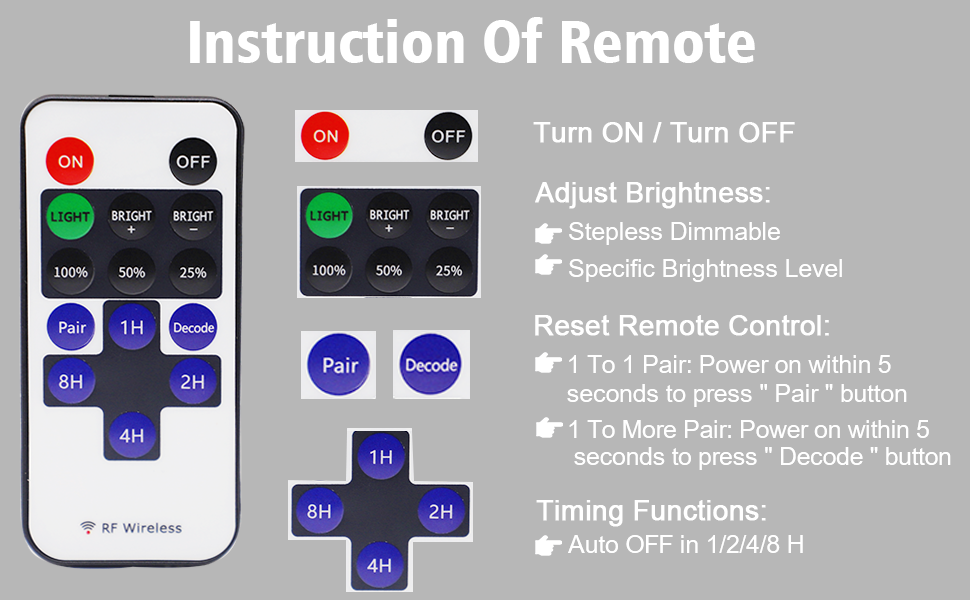
The AIBOO LED Lighting System is controlled by an RF wireless remote control.
6.1 وظائف التحكم عن بعد

- تشغيل/إيقاف: اضغط على ON زر لتشغيل الأضواء، و عن زر لإيقاف تشغيلها.
- ضبط السطوع:
- يضعط LIGHT + or LIGHT - to gradually increase or decrease brightness (stepless dimming).
- استخدم 100%, 50%, 25% أزرار لضبط السطوع السريع.
- الاقتران: To pair the remote with the controller, press the زوج button within 5 seconds of powering on the lights until the lights flicker.
- Decoding (1 to More Pair): To pair one remote with multiple controllers, press the فك الشفرة button within 5 seconds of powering on the lights until the lights flicker.
- وظائف التوقيت: يضعط 1H, 2H, 4H، أو 8H to set the lights to automatically turn off after 1, 2, 4, or 8 hours, respectively.


7. الصيانة
The AIBOO LED Lighting System requires minimal maintenance.
- تنظيف: Ensure the lights are off and cool before cleaning. Wipe the puck lights and controller with a soft, dry cloth. Do not use abrasive cleaners or solvents.
- تقتيش: Periodically check all connections for tightness and inspect cables for any signs of damage.
- استبدال البطارية: The remote control requires 1 CR2 battery. Replace the battery when the remote's range decreases or it stops responding.
8. استكشاف الأخطاء وإصلاحها
If you encounter issues with your AIBOO LED Lighting System, refer to the following common problems and solutions:
| مشكلة | السبب المحتمل | حل |
|---|---|---|
| الأضواء لا تعمل. | No power to the LED driver; Remote control battery is dead; Remote not paired; Loose connections. | Check circuit breaker. Replace remote battery. Re-pair remote (see Section 6.1). Verify all cable connections are secure. |
| Lights are flickering or strobing. | Too many lights connected to a single power supply; Faulty power supply. | Ensure no more than 6 lights are connected to one power supply. If flickering persists, inspect the power supply for signs of damage (e.g., warped casing, discoloration). A damaged power supply may need replacement. |
| جهاز التحكم عن بعد لا يستجيب. | Remote control battery is dead; Remote is out of range; Remote is not paired with the controller. | Replace the CR2 battery in the remote. Move closer to the LED controller. Re-pair the remote with the controller (see Section 6.1). |
| Lights do not dim or respond to brightness controls. | Remote not paired correctly; Controller malfunction. | Re-pair the remote (see Section 6.1). If the issue persists, contact customer support. |
9. معلومات الضمان
AIBOO products are manufactured to high-quality standards. For specific warranty details regarding your Linkable Under Cabinet LED Lighting System, please refer to the warranty card included with your purchase or visit the official AIBOO webالموقع. احتفظ بإيصال الشراء الخاص بك كإثبات للشراء في حالة وجود أي مطالبات بالضمان.
10. دعم العملاء
For technical assistance, troubleshooting, or product inquiries, please contact AIBOO customer support.
- U.S. Live Customer Support: Monday - Friday, 9 AM - 5 PM (EST)
- الموارد المتاحة على الإنترنت: قم بزيارة AIBOO Store on Amazon لمزيد من المعلومات والدعم حول المنتج.

Ask a question about this manual
Ask about setup, troubleshooting, compatibility, parts, safety, or missing instructions. Manuals+ will review the question and use this page’s manual context to help answer it.