
1. تعليمات السلامة الهامة
Please read all instructions carefully before using this projector. Keep this manual for future reference.
- لا تسد فتحات التهوية. تأكد من وجود تدفق هواء كافٍ حول جهاز العرض.
- لا تعرض جهاز العرض للمطر أو الرطوبة لتجنب نشوب حريق أو حدوث صدمة كهربائية.
- تجنب النظر مباشرة إلى عدسة جهاز العرض عندما يكون lamp يتم تشغيله، لأن الضوء الساطع يمكن أن يسبب تلفًا للعين.
- استخدم فقط محول الطاقة المرفق مع جهاز العرض.
- ضع جهاز العرض على سطح مستوٍ وثابت لمنعه من السقوط.
- Do not attempt to open or service the projector yourself. Refer all servicing to qualified personnel.
2. انتهى المنتجview
2.1 مكونات جهاز العرض
Familiarize yourself with the various parts of your UNIC UC36 projector.
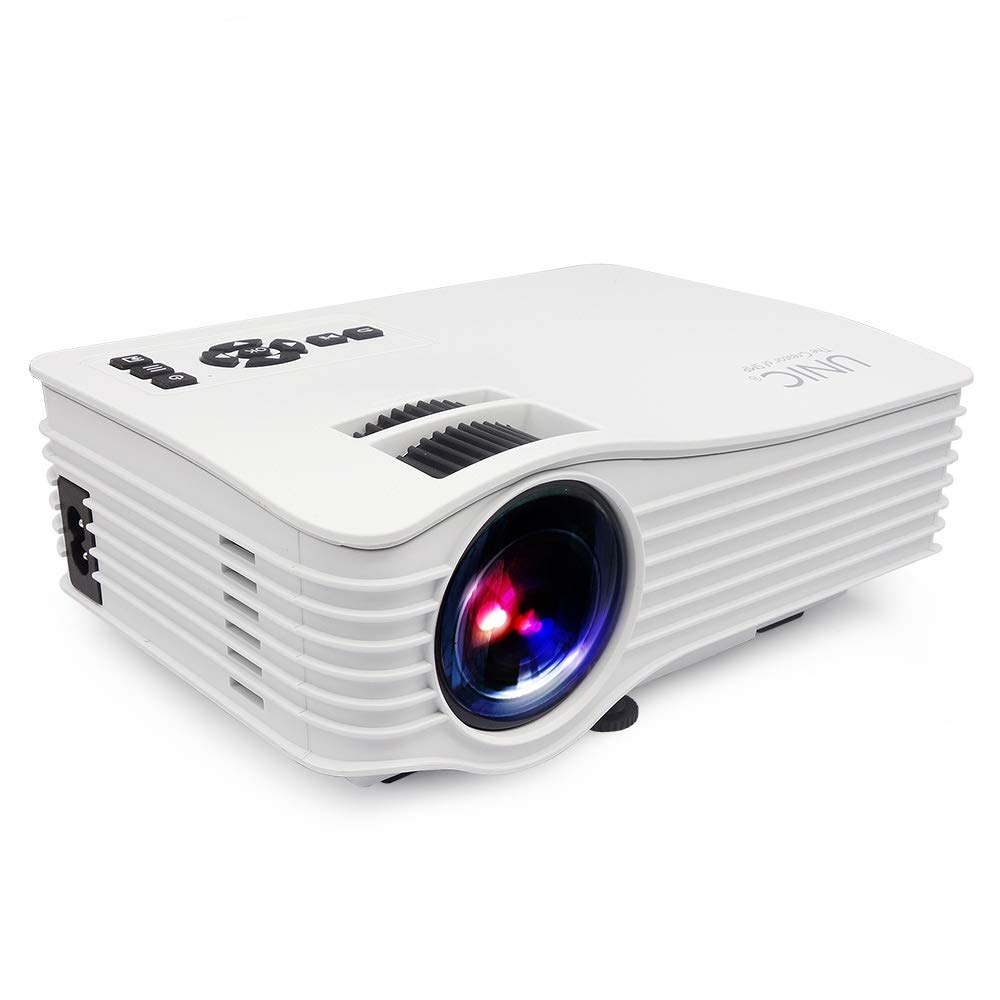
صورة: أمام view of the UNIC UC36 Mini LED Portable Projector, showing the lens and overall compact design.
ضوابط اللوحة العلوية

صورة: قمة view of the UNIC UC36 projector, highlighting the control panel. This includes buttons for Menu, Signal Source, Power On/Off, directional navigation (Up/Down/Left/Right/OK), Exit/Return, and Play/Pause. Below the control panel are the Focus and Keystone adjustment wheels.
منافذ التوصيل

صورة: جانب view of the UNIC UC36 projector, detailing the input/output ports. From left to right, these include a 3.5mm earphone jack, AV input, HDMI port, USB port, 5V USB power output, SD card slot, and IR receiver.
ضبط التركيز والتركيز

صورة: الجانب القريب view of the UNIC UC36 projector, showing the two adjustment wheels for focus and keystone correction, located near the lens.
مخطط التوصيل

صورة: Diagram illustrating various devices that can be connected to the UNIC UC36 projector, including U disk, TV Box, Camera, Computer, HD Player, PS4, Laptop, and DVD player, demonstrating its versatile input options.
3. الإعداد
3.1 توصيل الطاقة
- قم بتوصيل كابل الطاقة بمنفذ إدخال الطاقة الخاص بجهاز العرض.
- قم بتوصيل الطرف الآخر من كابل الطاقة بمأخذ كهربائي قياسي (100-240 فولت، 50/60 هرتز).
3.2 توصيل مصادر الإدخال
The UC36 projector supports multiple input sources:
- HDMI: Connect an HDMI cable from your device (e.g., laptop, gaming console, Blu-ray player) to the projector's HDMI port.
- USB: أدخل ذاكرة فلاش USB في منفذ USB لتشغيل الوسائط مباشرةً.
- من: Use the provided AV cable to connect to devices with AV output (e.g., older DVD players, set-top boxes).
- بطاقة SD: Insert an SD card into the SD card slot for direct media playback.
- مخرج الصوت: Connect external speakers or headphones to the 3.5mm earphone jack for enhanced audio.
3.3 وضع جهاز العرض
Place the projector on a stable, flat surface. Ensure the projection distance is between 1.07m and 3.8m to achieve a screen size of 34 to 130 inches.
3.4 ضبط التركيز والانحراف
- ركز: Rotate the focus wheel (the larger wheel) until the projected image is clear and sharp.
- كيستون: If the projected image appears trapezoidal (wider at the top or bottom), rotate the keystone correction wheel (the smaller wheel) to adjust the image geometry until it is rectangular.
4. تعليمات التشغيل
4.1 تشغيل/إيقاف التشغيل
- تشغيل الطاقة: Press the 'On/Off' button on the top panel or the remote control. The indicator light will turn on.
- إيقاف التشغيل: Press the 'On/Off' button again. Allow the projector to cool down before unplugging it.
4.2 اختيار المصدر
After powering on, press the 'Signal Source' button on the top panel or the remote control to cycle through available input sources (HDMI, USB, AV, SD). Select the desired input source.
4.3 تصفح القائمة
Press the 'Menu' button to access the projector's settings. Use the directional arrows (Up/Down/Left/Right) to navigate through options and 'OK' to confirm selections. Press 'Exit/Return' to go back or exit the menu.
4.4 تشغيل الوسائط (USB/SD)
When a USB drive or SD card is inserted and selected as the source, the projector will display a file browser. Navigate to your desired media file (videos, photos, music, text) and press 'OK' to play. Use 'Play/Pause' for media control.
5. الصيانة
5.1 تنظيف العدسة
Use a soft, lint-free cloth or lens cleaning paper to gently wipe the projector lens. Do not use abrasive cleaners or excessive force, as this can scratch the lens.
5.2 تنظيف جسم جهاز العرض
امسح الجزء الخارجي من جهاز العرض بقطعة قماش ناعمة وجافة. لإزالة الأوساخ المستعصية، استخدم منظفًا خفيفًا.amp يمكن استخدام قطعة قماش، ثم قطعة قماش جافة. تجنب استخدام المنظفات الكيميائية.
5.3 لترamp حياة
الصمام لamp in your UC36 projector has an estimated life of 20,000 hours (minimum). This means the lamp is designed to last for a significant period under normal usage conditions and typically does not require replacement.
6. استكشاف الأخطاء وإصلاحها
- لا توجد صورة:
- تأكد من تشغيل جهاز العرض وتوصيل كابل الطاقة بشكل آمن.
- تأكد من تحديد مصدر الإدخال الصحيح.
- Check the connection cable (HDMI, AV) between the projector and the source device.
- صورة ضبابية:
- Adjust the focus wheel until the image is sharp.
- Ensure the projection distance is within the recommended range (1.07m - 3.8m).
- الصورة شبه منحرفة:
- Adjust the keystone correction wheel to square the image.
- لا يوجد صوت:
- تحقق من إعدادات مستوى الصوت على كل من جهاز العرض وجهاز المصدر.
- Ensure external speakers or headphones are properly connected to the 3.5mm earphone jack if used.
- If using HDMI, ensure the source device is sending audio through HDMI.
7. المواصفات
| نموذج | UC36 |
| نظام الصورة | شاشة الكريستال السائل |
| Lamp | قاد |
| سطوع | 150 لومن (150 لومن ANSI) |
| نسبة التباين | 500:1 |
| الدقة الأصلية | 640x480p |
| ماكس دعم القرار | 1920x1080p (Full HD via HDMI) |
| منافذ الإدخال | AV, USB, SD, HDMI, IR |
| منافذ الإخراج | 3.5mm Earphone, 5V USB Power |
| Lamp حياة | 20,000 ساعات (الحد الأدنى) |
| Projecting Distance | 1.07m - 3.8m (3.5 feet - 3.8 meters) |
| Projecting Size | 34 - 130 بوصة |
| نسبة العرض إلى الارتفاع | 4:3 / 16:9 |
| مزود الطاقة | 100-240 فولت، 50/60 هرتز |
| استهلاك الطاقة | 50 وات (الحد الأقصى) |
| الوزن الصافي | 0.85 كيلوجرام |
| أبعاد | 190 × 132 × 69 ملم |
8. الضمان والدعم
8.1 معلومات الضمان
This UNIC UC36 projector comes with a 1-year complete warranty from the date of purchase. Please retain your proof of purchase for warranty claims. The warranty covers manufacturing defects and malfunctions under normal use.
8.2 دعم العملاء
For technical assistance, troubleshooting, or warranty inquiries, please contact UNIC customer support. Refer to the contact information provided with your purchase documentation or visit the official UNIC webموقع.