
1. المقدمة
Thank you for choosing the Stryker SR-94HPC 10 Meter Radio. This compact and powerful radio is designed for reliable communication, featuring AM/FM modulation, a full-color TFT display, and robust construction. This manual provides essential information for the proper setup, operation, and maintenance of your SR-94HPC radio to ensure optimal performance and longevity.
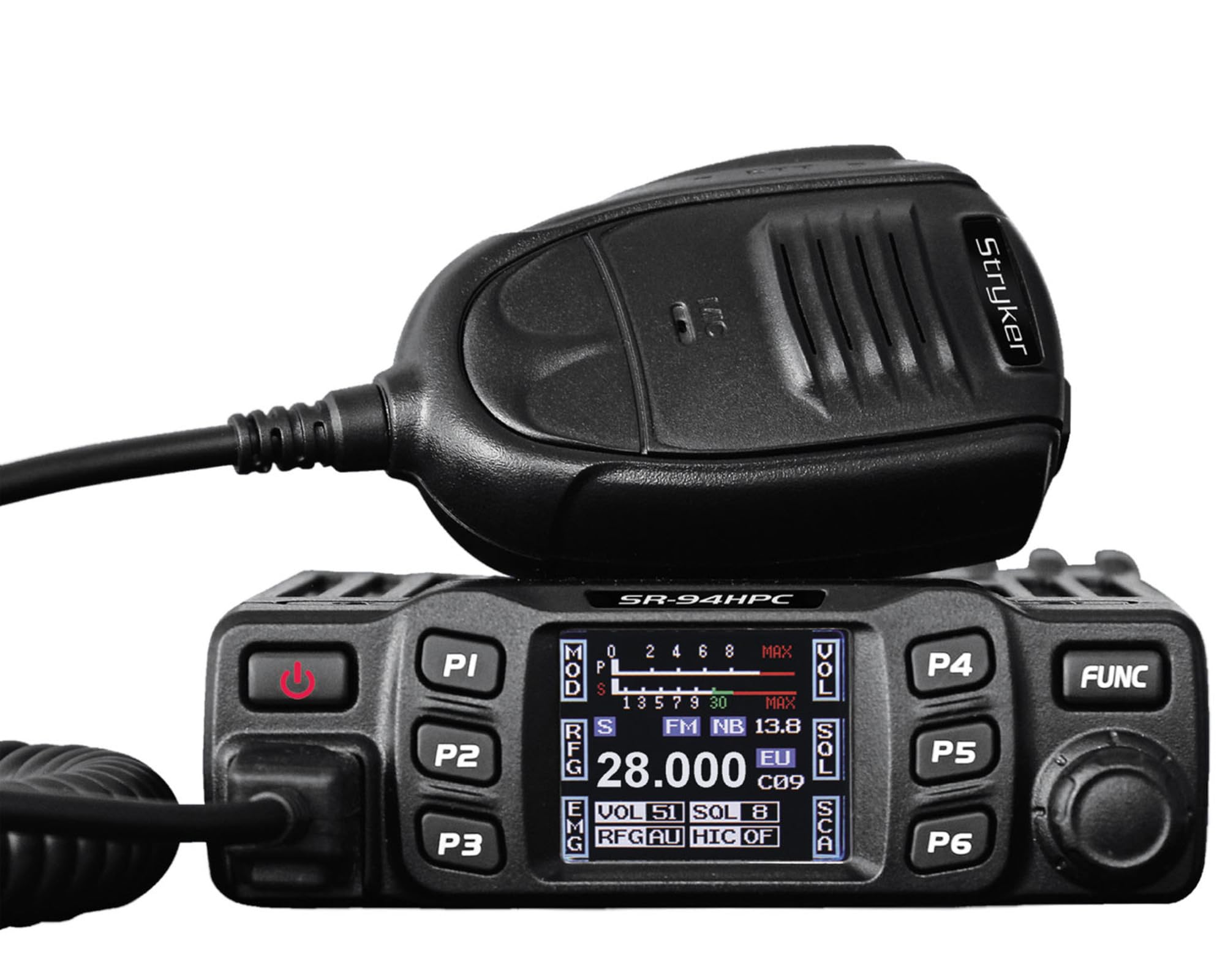
Figure 1: Stryker SR-94HPC 10 Meter Radio. This image shows the compact design of the radio, featuring its front panel with controls and the full-color TFT display.
2. معلومات هامة حول السلامة
Please read and understand all safety instructions before operating the radio. Failure to do so may result in injury, damage to the radio, or voiding the warranty.
- مصدر الطاقة: Connect the radio only to a 12V or 24V DC power source as specified. Incorrect voltagقد يؤدي ذلك إلى تلف الوحدة.
- الهوائي: Always connect a properly tuned antenna before transmitting. Transmitting without an antenna or with a poorly tuned antenna can cause damage to the radio's final transistors.
- تبديد الحرارة: Ensure adequate ventilation around the radio, especially the heat sink, to prevent overheating during prolonged transmission.
- التعرض للماء: While the radio has some water resistance, avoid direct exposure to water or extreme moisture.
- سلامة القيادة: Do not operate the radio in a manner that distracts you from driving. Prioritize road safety.
- تحذير بشأن الاقتراح 65: قد يُعرِّضك هذا المنتج لمواد كيميائية معروفة في ولاية كاليفورنيا بأنها تُسبب السرطان والعيوب الخلقية أو غيرها من الأضرار التناسلية. لمزيد من المعلومات، يُرجى زيارة www.P65Warnings.ca.gov.
3. محتويات العبوة
تأكد من وجود جميع العناصر في العبوة:
- Stryker SR-94HPC 10 Meter Radio Unit
- ميكروفون
- كابل الطاقة
- تركيب القوس والأجهزة
- دليل المستخدم (هذا المستند)
4. الضوابط والوظائف
The SR-94HPC features a user-friendly interface with a full-color TFT display and intuitive controls. Familiarize yourself with the following:
- Full-Color TFT Display: Shows frequency, voltage, S units, functions, and other operational data. The display is designed for clarity and ease of reading while driving.
- Channel Selector/Encoder: Used to change channels and navigate menu options.
- التحكم في مستوى الصوت: يضبط مستوى إخراج الصوت.
- السيطرة على Squelch: يزيل الضوضاء الخلفية عند عدم وجود إشارة.
- زر الوضع: يُبدّل بين وضعَي تعديل AM و FM.
- أزرار الوظائف: Access various radio features and settings. Refer to the on-screen menu for specific functions.
- موصل الميكروفون: Front-panel connection for the supplied microphone.
- زر الضغط للتحدث (PTT): Located on the microphone, used to transmit.
5. الإعداد
Follow these steps for initial setup of your SR-94HPC radio:
- التركيب: Securely mount the radio using the provided bracket and hardware in a location that allows for good ventilation and easy access to controls. Ensure the wrap-around cast aluminum heat sink has clear airflow.
- اتصال الهوائي: Connect a 10-meter antenna with a UHF, SO-239 connector to the antenna port on the rear of the radio. Ensure the antenna is properly tuned for the 28.000 ~ 29.700MHz frequency range to prevent damage to the radio.
- توصيل الطاقة: Connect the supplied power cable to the radio's power input. Connect the other end to a stable 12V or 24V DC power source in your vehicle or base station. Observe correct polarity (red to positive, black to negative).
- اتصال الميكروفون: Plug the microphone into the dedicated microphone jack on the front panel of the radio.
- التشغيل الأولي: Once all connections are secure, turn on the radio. The TFT display should illuminate, showing the current operating status.
6. تعليمات التشغيل
This section details the basic operation of your Stryker SR-94HPC radio.
6.1 تشغيل/إيقاف التشغيل
Press and hold the power button (usually integrated with the volume knob or a dedicated button) to turn the radio on or off. A quick tap of the power button may mute the audio.
6.2 اختيار القناة
Rotate the Channel Selector knob to change the operating frequency or channel. The selected channel will be displayed on the TFT screen.
6.3 Modulation Mode
Press the Mode button to toggle between AM (Amplitude Modulation) and FM (Frequency Modulation) modes. The active mode will be indicated on the display.
6.4 Volume and Squelch Adjustment
- مقدار: Adjust the Volume knob to your desired listening level.
- سحق: Rotate the Squelch knob clockwise until background noise disappears. Rotate counter-clockwise to hear weaker signals. The SR-94HPC may also feature an automatic squelch control (ASC) setting, which can be adjusted via the menu.
6.5 ناقل الحركة
To transmit, press and hold the PTT button on the microphone. Speak clearly into the microphone. Release the PTT button to receive. Ensure the antenna is properly connected and tuned before transmitting to avoid damage.
6.6 عرض المعلومات
The full-color TFT display provides real-time information, including:
- Frequency/Channel: Current operating frequency or channel number.
- المجلدtage: حجم الإدخالtage to the radio.
- S Units: Signal strength indicator for received signals.
- انتاج الطاقة: Indication of transmitted power.
- معدل الموجة الدائمة: Standing Wave Ratio, indicating antenna tuning efficiency.
7. الصيانة
Proper maintenance ensures the longevity and reliable operation of your SR-94HPC radio.
- تنظيف: Use a soft, dry cloth to clean the radio's exterior and display. Avoid abrasive cleaners or solvents.
- نظام الهوائي: Regularly check your antenna and coaxial cable for damage. Periodically verify your antenna's SWR (Standing Wave Ratio) to ensure efficient power transfer and prevent damage to the radio. An SWR meter can be used for this purpose.
- تقليل الحرارة: Ensure the wrap-around cast aluminum heat sink on the rear of the radio remains free of obstructions to allow for proper heat dissipation, especially during high-power transmissions.
- الاتصالات: قم بفحص جميع توصيلات الكابلات (الطاقة، الهوائي، الميكروفون) بشكل دوري للتأكد من أنها آمنة وخالية من التآكل.
8. استكشاف الأخطاء وإصلاحها
If you encounter issues with your SR-94HPC, refer to the following common problems and solutions:
| مشكلة | السبب المحتمل | حل |
|---|---|---|
| الراديو لا يعمل. | No power connection; incorrect voltagهـ؛ فتيل محترق. | Check power cable connections; verify 12V/24V DC source; inspect and replace fuse if necessary. |
| لا يوجد صوت من مكبر الصوت. | Volume too low; squelch set too high; speaker disconnected. | Increase volume; decrease squelch; check speaker connection. |
| "Error" message on display during transmission. | High SWR (Standing Wave Ratio); antenna not connected or poorly tuned. | Check antenna connection; tune antenna using an SWR meter. Do not transmit until SWR is acceptable. |
| Poor transmission or reception range. | Antenna issues; environmental interference; low power setting. | Verify antenna tuning and condition; check for local interference; ensure power output is set correctly. |
If the problem persists after attempting these solutions, please contact Stryker customer support for assistance.
9. المواصفات
Detailed technical specifications for the Stryker SR-94HPC 10 Meter Radio:
| ميزة | مواصفة |
|---|---|
| وضع التعديل | ص/فم |
| نطاق التردد | 28.000 ~ 29.700MHz (FM), 28.000 ~ 29.700MHz (AM) |
| التسامح الترددي | ±5.0 جزء في المليون |
| حجم الإدخالtage | 12V / 24V العاصمة |
| التحكم بالتردد | مركب PLL |
| نطاق درجة حرارة التشغيل | من -4 درجة فهرنهايت إلى +131 درجة فهرنهايت (من -20 درجة مئوية إلى +55 درجة مئوية) |
| موصل هوائي | UHF ، SO-239 |
| انتاج الطاقة | 4 Watts FM/AM / 10 Watts AM/FM (PEP up to 45+ watts) |
| تداخل الإرسال | Inferior to 4nW (-54dBm) |
| استجابة التردد | 300-3000 هرتز |
| تشويه الإشارة المعدلة | Inferior to 5% |
| معاوقة الخرج | 50 أوم |
| رفض الصورة | 70 ديسيبل |
| رفض القناة المجاورة | 60 ديسيبل |
| ترددات IF | 1st: 10.695MHz, 2nd: 455KHz |
| الأبعاد (العرض × العمق × الارتفاع) | 4.88 بوصة × 6.42 بوصة × 1.54 بوصة (12.4 سم × 16.3 سم × 3.9 سم) |
| وزن | حوالي 1.48 رطل (0.67 كجم) |
| المميزات الخاصة | Backlit Keys, Full-color TFT Display |
10. الضمان والدعم
Stryker Radios are manufactured to high-quality standards. For warranty information, please refer to the warranty card included with your product or visit the official Stryker Radios webالموقع. احتفظ بإيصال الشراء كإثبات للشراء.
For technical support, troubleshooting assistance beyond this manual, or service inquiries, please contact Stryker customer support through their official channels. Contact information can typically be found on the manufacturer's webموقع.