
مقدمة
This manual provides comprehensive instructions for the setup, operation, and maintenance of your GPX Digital AM/FM Clock Radio, model C224B. Please read this manual thoroughly before using the device to ensure proper functionality and to maximize your user experience. Keep this manual for future reference.
المنتج انتهىview
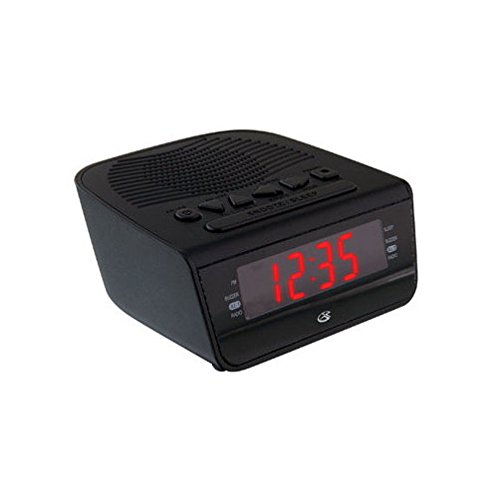
الشكل 1: أمام view of the GPX Digital AM/FM Clock Radio. This image shows the compact black unit with its digital display and control buttons.
The GPX Digital AM/FM Clock Radio (C224B) is designed for reliable timekeeping and audio entertainment. Key features include a clear multi-display clock, AM/FM radio tuner, dual alarm functionality, and a battery backup option to ensure continuous operation during power interruptions. Its compact and modern design makes it suitable for various indoor settings.
يثبت
1. فك التعبئة
Carefully remove the clock radio from its packaging. Ensure all components are present: the clock radio unit and the power adapter.
2. توصيل الطاقة
- Plug the power adapter into the DC input jack located on the back of the clock radio.
- Plug the other end of the power adapter into a standard wall outlet (AC 120V, 60Hz).
- ستضيء الشاشة، مما يشير إلى أن الوحدة تتلقى الطاقة.
3. تركيب نظام احتياطي للبطارية (اختياري)
للحصول على طاقة احتياطية أثناءtages, install batteries (not included).
- حدد مكان حجرة البطارية في الجزء السفلي من الوحدة.
- افتح غطاء حجرة البطارية.
- Insert the required batteries (e.g., 2 x AAA, check unit for specific type) according to the polarity markings (+ and -).
- أغلق غطاء حجرة البطارية جيدًا.
ملحوظة: Batteries are for backup only and will not power the display or radio functions continuously. They preserve time and alarm settings during a power interruption.
تعليمات التشغيل
1. ضبط الوقت
- اضغط مع الاستمرار على الوقت المحدد اضغط على الزر حتى تومض الشاشة.
- استخدم ساعة و دقيقة أزرار لضبط الوقت.
- يضعط الوقت المحدد مرة أخرى للتأكيد والخروج من وضع ضبط الوقت.
2. ضبط المنبهات (المنبه 1 والمنبه 2)
This unit features dual alarms, allowing you to set two independent wake-up times.
- اضغط مع الاستمرار على مجموعة الإنذار 1 (أو مجموعة الإنذار 2اضغط على الزر حتى يومض وقت التنبيه.
- استخدم ساعة و دقيقة buttons to adjust the desired alarm time.
- يضعط مجموعة الإنذار 1 (أو مجموعة الإنذار 2) again to confirm the time.
- Immediately after confirming the time, use the وضع التنبيه button to select the alarm source: صفارة or راديو.
- The alarm icon (e.g., ال1 or ال2) will appear on the display, indicating the alarm is active.
To turn off an alarm, press the corresponding المنبه 1 تشغيل/إيقاف (أو المنبه 2 تشغيل/إيقاف) button. The alarm icon will disappear.
3. تشغيل راديو AM/FM
- اضغط على تشغيل/إيقاف تشغيل الراديو زر لتشغيل الراديو.
- اضغط على فرقة زر للتبديل بين نطاقات AM وFM.
- استخدم لحن + or لحن - أزرار لضبط المحطة المطلوبة يدويًا.
- To automatically scan for the next available station, press and hold لحن + or لحن - لبضعة ثواني.
- اضبط مستوى الصوت باستخدام ملف حجم + or مقدار - أزرار.
- لإيقاف تشغيل الراديو ، اضغط على تشغيل/إيقاف تشغيل الراديو الزر مرة أخرى.
4. وظيفة الغفوة
عندما يصدر صوت التنبيه، اضغط على غفوة اضغط على الزر لكتم صوت المنبه مؤقتًا لمدة تسع دقائق تقريبًا. سيعود المنبه للرنين بعد انتهاء فترة الغفوة.
5. وظيفة النوم
تتيح وظيفة وضع السكون تشغيل الراديو لفترة زمنية محددة قبل إيقاف تشغيله تلقائيًا.
- أثناء تشغيل الراديو، اضغط على ينام اضغط على الزر بشكل متكرر للتنقل بين أوقات النوم المتاحة (على سبيل المثال، 90، 60، 30، 15 دقيقة، إيقاف التشغيل).
- سيتم إيقاف تشغيل الراديو تلقائيًا بعد الوقت المحدد.
صيانة
1. التنظيف
To clean the unit, wipe the exterior with a soft, slightly damp cloth. Do not use abrasive cleaners or solvents, as these may damage the finish. Ensure the unit is unplugged before cleaning.
2. استبدال البطارية
If the battery backup function is not working, or if the unit loses time during a power outage, the backup batteries may need replacement. Follow the "Battery Backup Installation" steps in the Setup section to replace them.
استكشاف الأخطاء وإصلاحها
| مشكلة | السبب المحتمل | حل |
|---|---|---|
| الوحدة لا تعمل بالطاقة. | محول الطاقة غير متصل أو المنفذ معيب. | تأكد من توصيل محول الطاقة بالجهاز بشكل صحيح وبمأخذ كهربائي يعمل. جرب مأخذاً كهربائياً آخر. |
| لا يصدر صوت الإنذار. | لم يتم ضبط المنبه، أو أن مستوى صوت المنبه منخفض للغاية، أو أن المنبه مطفأ. | Verify alarm time and source (buzzer/radio) are set correctly. Ensure alarm is activated (icon visible). Increase radio volume if alarm source is radio. |
| استقبال راديو ضعيف. | إشارة ضعيفة أو تداخل. | Adjust the position of the unit or the antenna (if external). Move away from other electronic devices that may cause interference. |
| الوقت/الإعدادات المفقودة بعد انقطاع الطاقةtage. | البطاريات الاحتياطية ميتة أو غير مثبتة. | Install fresh backup batteries or replace existing ones. |
تحديد
- نموذج: سي224ب
- مصدر الطاقة: AC 120V, 60Hz (main); Battery Powered (backup)
- نوع العرض: شاشة عرض رقمية LED
- نطاقات الراديو: ص/فم
- الأبعاد (تقريبًا): 5.12 بوصة عرض × 5.12 بوصة ارتفاع
- الوزن تقريبا.): 3 رطل
- لون: أسود
- مادة: بلاستيك
الضمان والدعم
For warranty information or technical support, please refer to the warranty card included with your product or visit the official GPX website. Do not attempt to repair this unit yourself, as this may void your warranty.
GPX الرسمي Webموقع: www.gpx.com