
1. المقدمة
This manual provides essential instructions for the installation, operation, maintenance, and troubleshooting of your APC Smart-UPS SRT 3000VA RM 230V (SRT3000RMXLI). This Uninterruptible Power Supply (UPS) is designed to provide high-density, true double-conversion online power protection for critical electronic equipment, including servers, voice/data networks, medical labs, and light industrial applications. Please read this manual thoroughly before installing or operating the UPS to ensure proper and safe usage.
2. معلومات السلامة
Observe all warnings and operating instructions in this manual. Failure to do so may result in injury or equipment damage. This UPS contains hazardous voltages. Do not attempt to disassemble the unit. There are no user-serviceable parts inside.
السلامة العامة
- تم تصميم جهاز UPS هذا للاستخدام الداخلي فقط.
- لا تقم بتشغيل جهاز UPS هذا في ضوء الشمس المباشر، أو في حالة ملامسة السوائل، أو في مكان يوجد فيه غبار أو رطوبة زائدة.
- Ensure the ventilation openings on the UPS are not blocked. Maintain adequate clearance around the unit for proper airflow.
- Connect the UPS power cable directly to a grounded wall outlet. Do not use extension cords or surge suppressors.
سلامة البطارية
- Batteries are heavy. Remove the battery module before installing the UPS in a rack or tower configuration.
- Battery service should be performed or supervised by personnel knowledgeable of batteries and the required precautions.
- لا تتخلص من البطاريات بإلقائها في النار، فقد تنفجر البطاريات.
- لا تفتح البطاريات أو تعبث بها. فالإلكتروليت المتسرب منها يضر بالجلد والعينين وقد يكون سامًا.
- استبدل البطاريات بنفس النوع والعدد من البطاريات التي تم تركيبها في الأصل.
3. محتويات العبوة
Carefully unpack the unit and inspect for shipping damage. If any damage is found, notify the carrier and dealer. The package should contain the following items:
- APC Smart-UPS SRT 3000VA RM 230V (SRT3000RMXLI) unit
- Battery module (may be pre-installed or separate)
- Rack-mounting hardware (rails, brackets)
- Tower stand (for tower configuration)
- كابل اتصال USB
- كابل الاتصال التسلسلي
- قرص توثيقي
- Safety information and warranty guide
4. انتهى المنتجview
The APC Smart-UPS SRT 3000VA RM 230V is a high-performance Uninterruptible Power Supply designed to protect your critical equipment from power disturbances. It features a rack/tower convertible form factor for flexible deployment.
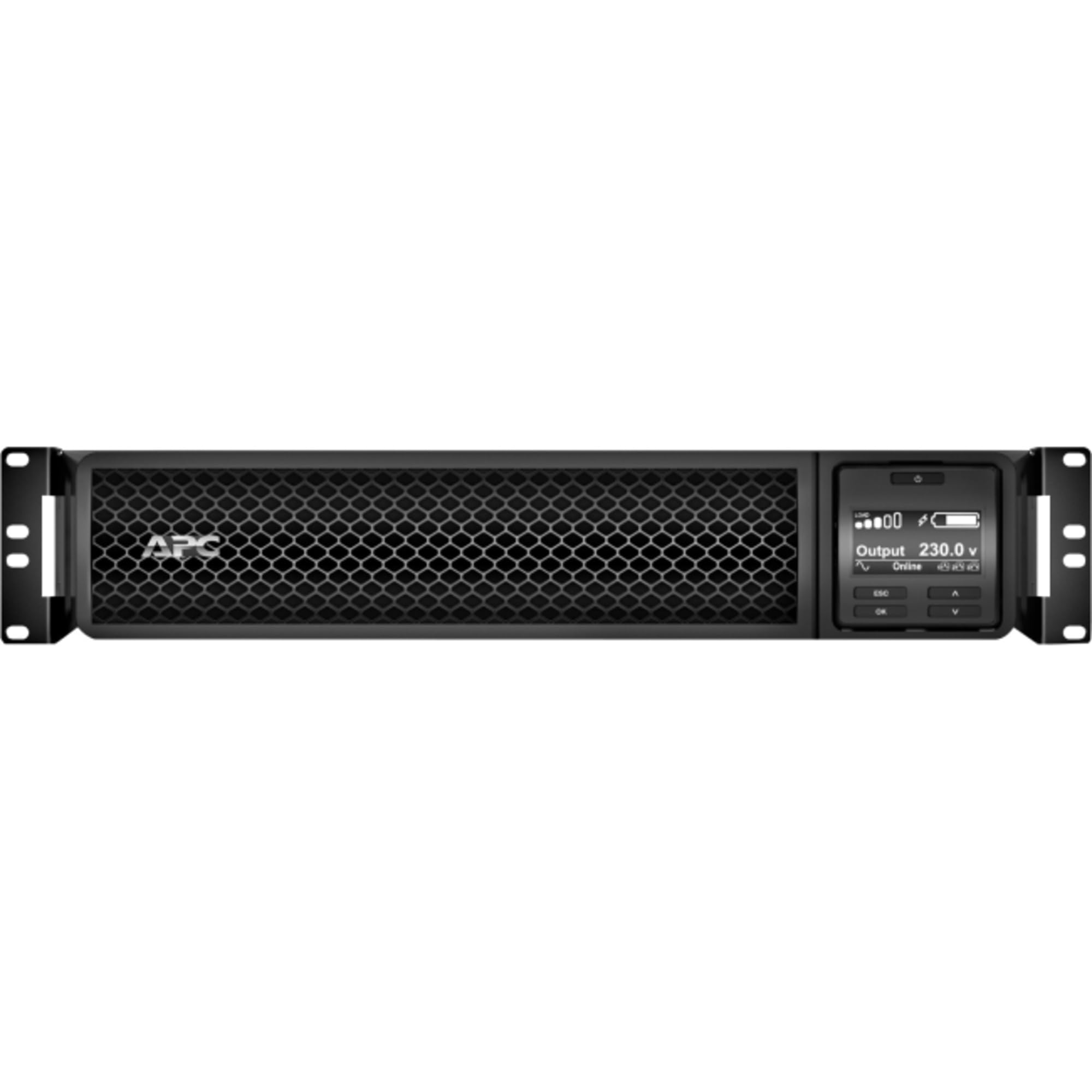
الشكل 1: الجبهة view of the APC Smart-UPS SRT 3000VA RM 230V. This image displays the front panel with the LCD display, control buttons, and ventilation grilles.
المكونات الرئيسية
- Front Panel LCD Display: Provides real-time status information, configuration options, and alarm notifications.
- أزرار التحكم: Used to navigate the LCD menu, power on/off the UPS, and perform self-tests.
- وحدة البطارية: Provides backup power during outages. Hot-swappable for easy replacement.
- موصل طاقة الإدخال: Connects the UPS to the utility power source.
- Output Receptacles (IEC 320): Provide protected power to connected equipment.
- Communication Ports (USB, Serial): For connecting to a computer or network management card for monitoring and control.
- منفذ EPO (إيقاف تشغيل الطاقة في حالات الطوارئ): Allows for remote emergency shutdown of the UPS.
5. الإعداد
Follow these steps for initial setup of your UPS.
الخطوة 1: اختر موقعًا
- Place the UPS on a sturdy, level surface or install it in a standard 19-inch rack.
- تأكد من أن درجة الحرارة المحيطة تتراوح بين 0 درجة مئوية و40 درجة مئوية (32 درجة فهرنهايت و104 درجة فهرنهايت).
- Maintain at least 10 cm (4 inches) of clearance at the front and rear of the unit for proper ventilation.
Step 2: Install the Battery Module
If the battery module is not pre-installed, slide it into the battery bay until it clicks into place. Connect the battery cables as indicated by the labels.
Step 3: Connect to Utility Power
- Connect the UPS input power cord to a grounded 230V AC outlet.
- The UPS will perform a self-test and the LCD display will illuminate.
الخطوة 4: توصيل المعدات
- Connect your critical equipment (servers, network devices, etc.) to the output receptacles on the rear of the UPS.
- Ensure the total load does not exceed the UPS capacity (3000VA / 2700W).
Step 5: Connect Communication Cables (Optional)
- قم بتوصيل كابل USB أو الكابل التسلسلي من جهاز UPS بجهاز الكمبيوتر أو الخادم الخاص بك للمراقبة وإمكانية إيقاف التشغيل بسلاسة.
- Install the PowerChute software (available from APC website) on your computer for advanced management.
6. تشغيل جهاز UPS
تشغيل UPS
Press and hold the power button on the front panel until you hear a beep. The UPS will start up and provide power to connected equipment.
Powering Off the UPS
Press and hold the power button until the UPS shuts down. Ensure all connected equipment is safely shut down before powering off the UPS.
LCD Display and Navigation
The LCD display provides detailed information about the UPS status, battery charge, load level, and various settings. Use the navigation buttons (up, down, enter, escape) to browse through the menus and adjust settings.
اختبار ذاتي
Regularly perform a self-test to ensure the UPS battery and internal components are functioning correctly. This can typically be initiated via the LCD menu or PowerChute software.
7. الصيانة
استبدال البطارية
The UPS batteries have a typical lifespan of 3-5 years. The UPS will indicate when the batteries need replacement. Refer to the safety information before attempting battery replacement. Use only APC-approved replacement battery modules (APCRBC152).
تنظيف
Clean the exterior of the UPS with a soft, damp cloth. Do not use solvents or abrasive cleaners. Ensure ventilation openings are free from dust and debris.
الاعتبارات البيئية
Store the UPS in a cool, dry place when not in use. Avoid extreme temperatures and humidity, which can shorten battery life.
8. استكشاف الأخطاء وإصلاحها
يقدم هذا القسم حلولاً للمشاكل الشائعة التي قد تواجهها مع جهاز UPS الخاص بك.
| مشكلة | السبب المحتمل | حل |
|---|---|---|
| لا يعمل جهاز UPS | No utility power; Battery not connected; UPS fault | Check power outlet; Ensure battery cables are connected; Contact APC support if fault persists. |
| يصدر جهاز UPS صوت تنبيه متواصل | يعمل على طاقة البطارية؛ حمل زائد؛ انخفاض مستوى البطارية | Check utility power; Reduce connected load; Allow battery to recharge. |
| البطارية لا تشحن | Battery disconnected; Battery fault; Internal fault | Verify battery connection; Replace battery if faulty; Contact APC support. |
| تفقد المعدات المتصلة الطاقة | UPS overload; Battery depleted; UPS fault | Reduce load; Allow battery to recharge; Contact APC support. |
9. المواصفات
Detailed technical specifications for the APC Smart-UPS SRT 3000VA RM 230V (SRT3000RMXLI).
| ميزة | التفاصيل |
|---|---|
| رقم الموديل | SRT3000RMXLI |
| ماركة | مؤتمر القمة العربي |
| سعة | 3000 فولت أمبير / 2700 واط |
| حجم الإدخالtage | 230 فولت |
| حجم الإخراجtage | 230 فولت |
| عامل الشكل | Rack/Tower Convertible (2U) |
| نوع البطارية | حمض الرصاص |
| Typical Runtime (Full Load) | حوالي 4 دقيقة |
| عدد المنافذ | 8 × IEC 320 C13، 2 × IEC 320 C19 |
| منافذ الاتصالات | USB, Serial (RJ45), SmartSlot |
| الأبعاد (الارتفاع × العرض × العمق) | 8.5 سم × 43.2 سم × 63.5 سم (3.35 بوصة × 17.0 بوصة × 25.0 بوصة) |
| وزن | 31.3 كجم (69 رطل) |
| لون | أسود |
10. الضمان والدعم
معلومات الضمان
APC provides a standard warranty for this product. Please refer to the warranty card included in your package or visit the official APC webللاطلاع على شروط وأحكام الضمان التفصيلية الخاصة بمنطقتك، يُرجى الاحتفاظ بإيصال الشراء لتقديم مطالبات الضمان.
الدعم الفني
For technical assistance, troubleshooting beyond this manual, or to inquire about replacement parts, please contact APC customer support. Support contact information can typically be found on the APC website or in the documentation provided with your unit. When contacting support, please have your model number (SRT3000RMXLI) and serial number ready.