
1. المقدمة
The KERUI G18 is a sophisticated wireless GSM home alarm system designed to provide comprehensive security for your property. This system integrates a main control panel with various wireless sensors and remote controls, offering robust protection against intrusions. It utilizes GSM technology for remote communication, allowing you to monitor and control your home security from anywhere.
2. انتهى المنتجview
2.1. مكونات النظام
The KERUI G18 system typically includes the following components:
- 1 x Control Panel / Control Unit: The central hub of the alarm system.
- 8 x Wireless Door/Window Sensors: Detect opening and closing of doors and windows.
- 3 x PIR Motion Detectors: Detect movement within a designated area.
- 4 x Curtain PIR Motion Detectors: Specialized motion detectors for narrow, vertical detection zones.
- 4 x Remote Controls: For arming, disarming, and emergency functions.
- 1 x Outdoor Siren: Provides an audible alarm when triggered.
- 1 x EU Power Adapter: For the alarm panel.
- 1 x English Manual: (This document).
2.2. الميزات الرئيسية
- Automatic Dialing and SMS: Calls and sends SMS to 6 designated phone numbers sequentially upon security breach.
- قدرة عالية: Supports up to 150 wireless sensors and 150 remote controls.
- 99 Zones with 8 Attributes: Choose from Normal, Home Arming, Intelligent, Emergency, Closed, Chime, Welcome, and Senior Help zone types. Intelligent zones require two triggers within 30 seconds, suitable for homes with pets.
- التسليح/نزع السلاح المجدول: Program up to 4 groups for automatic arming and disarming.
- Tamper Switch and Memory Function: متكامل tamper switch protects the panel from unauthorized removal.
- Custom Voice Message: Record a 10-second personalized message.
- بطارية احتياطية: The main panel includes a rechargeable lithium backup battery providing 6-8 hours of operation during power outagإِسْ
- Custom Access Code: A personalized code locks the panel and is required to disarm the alarm.
- المراقبة عن بعد: Intercom function allows remote monitoring and two-way communication via phone.
- Configurable Delays: Arm delay (time to exit) and alarm delay (time to enter code before siren sounds).
- نظام قابل للتوسيع: Compatible with RFID keypads and wireless sirens.
- التحكم في تطبيقات الهاتف المحمول: Free "G18 Alarm System" mobile app for remote control (arming, disarming, zone settings) via a standard 2G GSM SIM card.
- بدون رسوم شهرية: A self-monitored system without recurring costs.
3. دليل الإعداد
3.1. Main Control Panel Overview

الشكل 1: KERUI G18 Control Panel with labeled components. Key components include the ON/OFF switch, power port, wired siren jack, SIM card slot, microphone, keypad, and menu buttons. The tamper switch is located on the back.
- مفتاح تشغيل / إيقاف: Located on the side to power the unit.
- Power Port (DC 5V): يربط محول الطاقة.
- مقبس صفارة الإنذار السلكي: For connecting an optional wired siren.
- فتحة بطاقة SIM: Insert your 2G GSM SIM card here.
- ميك: Built-in microphone for intercom function.
- لوحة المفاتيح: Numeric keys (0-9) for code entry.
- Arm/Home Arm Button: To arm the system or set home arm mode.
- زر نزع السلاح: To disarm the system.
- زر الرجوع: To navigate menus.
- زر الدخول: لتأكيد الاختيارات.
- زر القائمة: To access system settings.
- Tampإيه التبديل: On the back, triggers an alarm if the panel is removed from its mounting.
3.2. إدخال بطاقة SIM
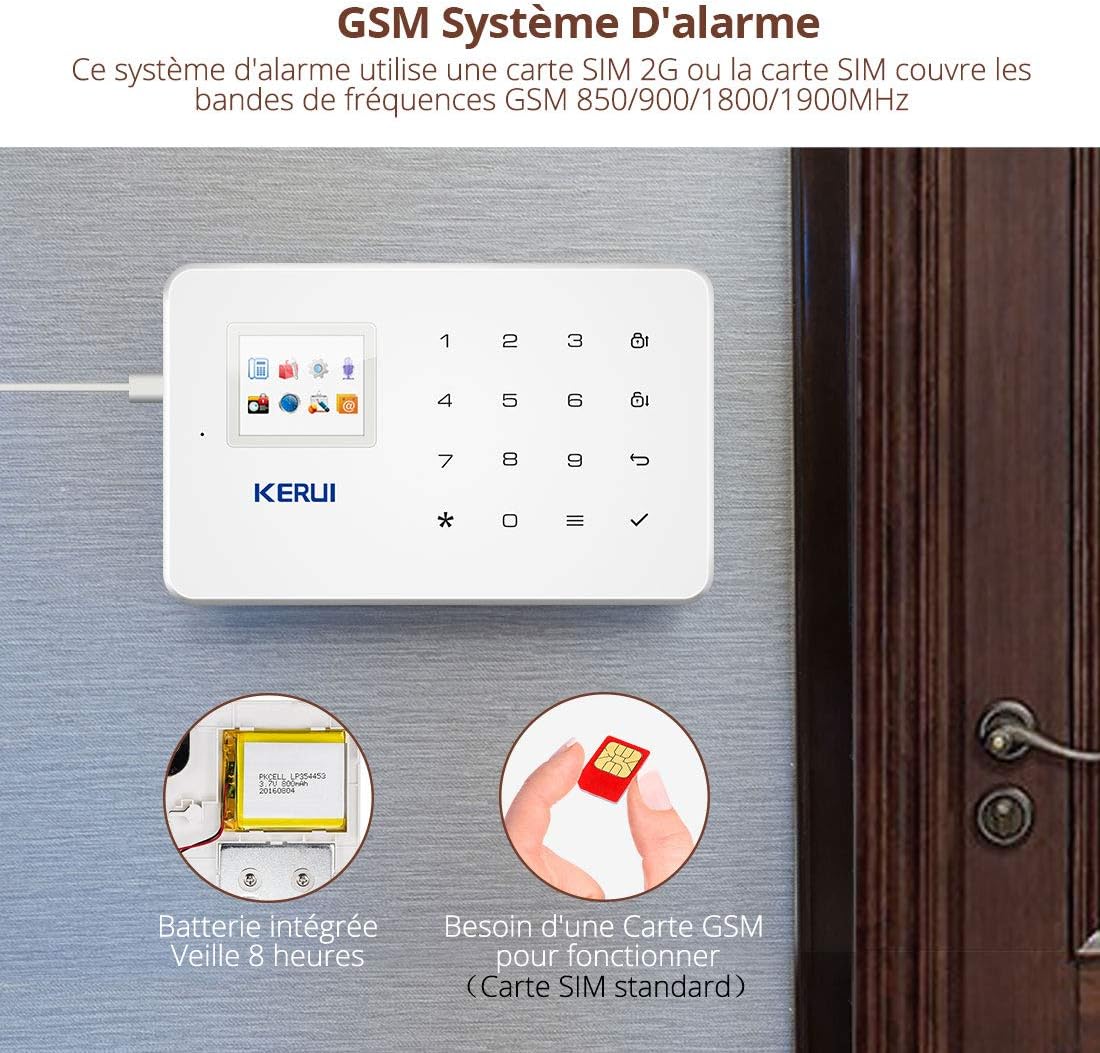
الشكل 2: The KERUI G18 system requires a standard 2G GSM SIM card for remote communication. The image also shows the integrated backup battery.
- Ensure the control panel is powered off.
- Locate the SIM card slot on the side of the panel (refer to Figure 1).
- Insert a standard 2G GSM SIM card into the slot. Ensure the SIM card has sufficient credit for calls and SMS.
- Power on the control panel. The system will automatically detect the SIM card.
ملحوظة: Only 2G GSM SIM cards are supported. Ensure your chosen SIM card provider offers 2G GSM service in your area.
3.3. Powering the Control Panel
- Connect the EU power adapter to the DC 5V power port on the control panel.
- قم بتوصيل المحول بمأخذ حائط قياسي.
- Flip the ON/OFF switch to the "ON" position. The panel will power on and display its status.
3.4. تركيب أجهزة الاستشعار
All sensors are wireless and typically come pre-paired or can be easily paired with the main panel. Refer to the specific sensor's mini-manual for battery installation and pairing instructions if needed.
- أجهزة استشعار الأبواب والنوافذ: Mount one part on the door/window frame and the other on the moving part, ensuring they are aligned and within 1cm of each other when closed.
- أجهزة استشعار الحركة بالأشعة تحت الحمراء السلبية: Install in corners of rooms or hallways, ensuring a clear line of sight to the area you wish to monitor. Avoid placing near heat sources or direct sunlight.
- Curtain PIR Motion Detectors: Ideal for protecting specific vertical areas like windows or doorways.
مهم: Do not install door sensors on metal doors, as this may affect wireless signal transmission.

الشكل 3: The KERUI G18 system is expandable, supporting various 1527 series detectors and up to 99 detectors and remote controls, including door sensors, motion detectors, and cameras.
3.5. Mobile App Installation
Download the "G18 Alarm System" app from your smartphone's app store (available for both Android and iOS). Follow the in-app instructions to connect your alarm panel to the app using the SIM card number.
4. تعليمات التشغيل
4.1. تسليح النظام وتعطيله
The system can be armed or disarmed using the control panel, remote controls, or the mobile app.
- الذراع (وضع بعيد): Activates all sensors. Press the ذراع button on the panel or remote, or select "Arm" in the app.
- الذراع الرئيسية (وضع البقاء): Activates perimeter sensors (e.g., door/window sensors) while allowing free movement inside. Press the الرئيسية الذراع button on the panel or remote, or select "Home Arm" in the app.
- نزع السلاح: Deactivates all sensors. Enter your access code on the panel and press نزع السلاح، أو اضغط على نزع السلاح button on the remote, or select "Disarm" in the app.

الشكل 4: The mobile app provides remote control over the alarm system, allowing users to arm, disarm, and adjust settings from their smartphone.
4.2. Scheduled Arming/Disarming
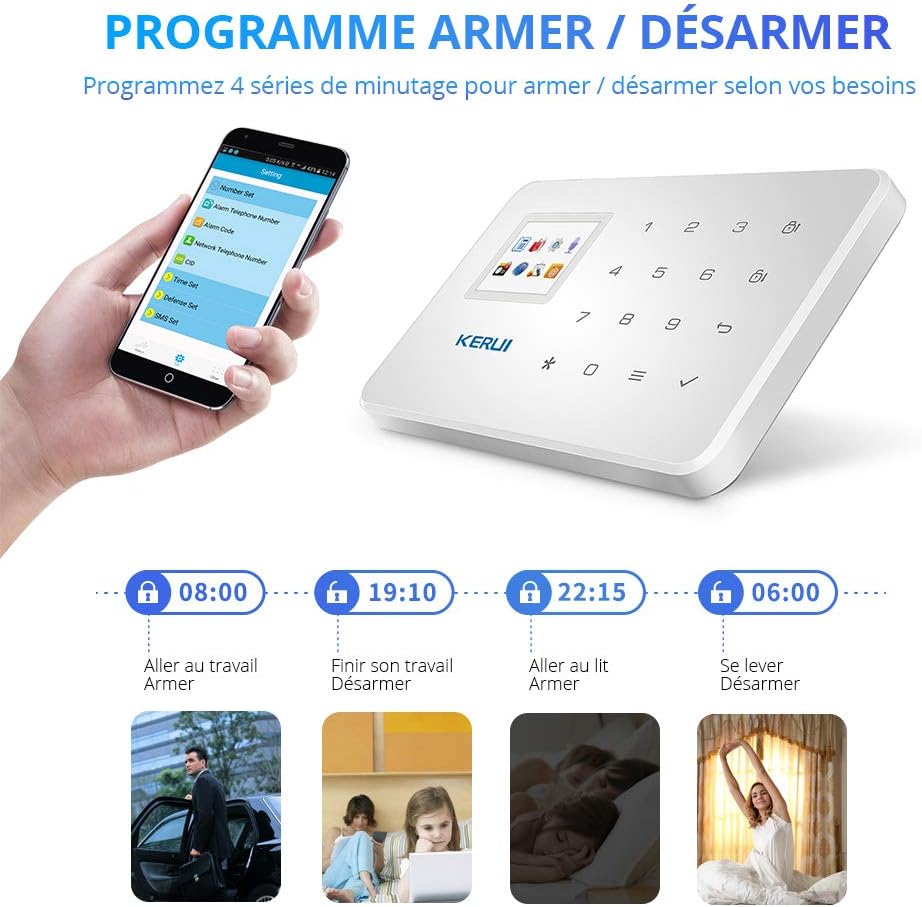
الشكل 5: The system allows programming up to 4 timed schedules for automatic arming and disarming, adapting to your daily routine.
You can set up to 4 daily schedules for the system to automatically arm or disarm. Access this feature through the control panel's menu or the mobile app's settings. Follow the on-screen prompts to set desired times for each schedule.
4.3. Zone Attributes
Each of the 99 zones can be assigned one of 8 attributes:
- طبيعي: Triggers an immediate alarm when activated.
- Home Arming: Active only when the system is in Home Arm mode.
- ذكي: Requires two triggers within 30 seconds to activate the alarm, reducing false alarms from pets.
- طارئ: Always active, triggers an alarm regardless of arming status.
- مغلق: Zone is disabled.
- الرنين: Plays a chime sound when triggered, without activating the alarm.
- مرحباً: Plays a welcome sound when triggered.
- Senior Help: Designed for elderly assistance, can trigger specific alerts.
Configure zone attributes via the control panel's menu or the mobile app.
4.4. المراقبة عن بعد والاتصال الداخلي
When an alarm is triggered, the system will call your pre-set phone numbers. You can answer the call to listen in on the premises or engage in two-way communication through the panel's microphone and speaker. You can also remotely disarm the system during the call.
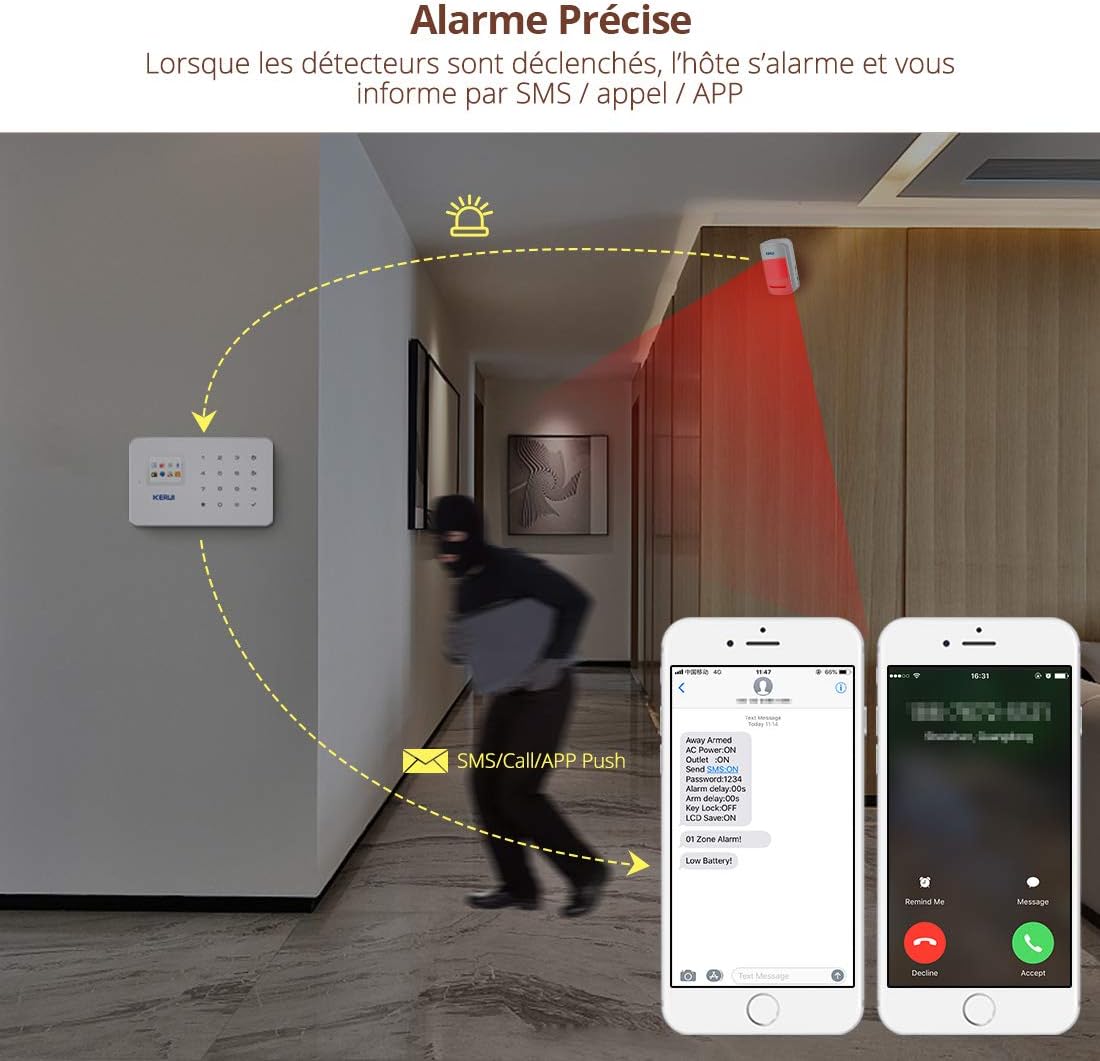
الشكل 6: When detectors are triggered, the host alarms and notifies you via SMS, call, or app push notification, providing precise alarm information.
4.5. Recording a Custom Voice Message
The system allows you to record a 10-second voice message that will play when the system calls a designated number during an alarm event. Access the recording function through the control panel's menu and follow the instructions.
5. الصيانة
- استبدال بطارية الاستشعار: Wireless sensors are powered by batteries (e.g., 23A 12V for door sensors, AAA for PIR detectors). Replace batteries when the low battery indicator appears on the control panel or app.
- Main Panel Backup Battery: The integrated lithium battery provides backup power. If the panel frequently runs on backup power, ensure the main power adapter is securely connected and functioning.
- SIM Card Credit: Regularly check the credit balance of your GSM SIM card to ensure uninterrupted call and SMS notification services.
- تنظيف: Gently wipe the control panel and sensors with a soft, dry cloth. Avoid using abrasive cleaners or solvents.
6. استكشاف الأخطاء وإصلاحها
| مشكلة | السبب المحتمل | حل |
|---|---|---|
| لا يتم تشغيل النظام. | Power adapter disconnected or faulty; ON/OFF switch off. | Check power adapter connection and wall outlet. Ensure ON/OFF switch is in the "ON" position. |
| No SMS/Call notifications. | No SIM card; SIM card out of credit; 2G GSM network unavailable; incorrect phone numbers programmed. | Ensure SIM card is inserted and has credit. Verify 2G GSM coverage. Check programmed phone numbers in settings. |
| Sensors not triggering alarm. | Sensor battery low/dead; sensor out of range; sensor not paired; zone attribute set to "Closed" or "Chime". | Replace sensor batteries. Relocate sensor closer to the panel. Re-pair sensor if necessary. Check zone attribute settings. |
| إنذارات كاذبة. | PIR sensor placed near heat source/direct sunlight; pet interference; sensitive zone settings. | Relocate PIR sensors. Use "Intelligent" zone attribute for areas with pets. Adjust sensor sensitivity if possible. |
| Mobile app not connecting. | Incorrect panel ID/SIM number; network issues on phone or panel. | Verify panel ID and SIM number in the app. Check phone's internet connection and panel's GSM signal. |
7. المواصفات
- ماركة: كيروي
- رقم الموديل: جي18
- مصدر الطاقة: Wireless (Main panel: DC 5V adapter with 6-8 hour lithium backup battery; Sensors: Battery operated)
- الأجهزة المتوافقة: الهاتف الذكي والكمبيوتر اللوحي
- تقنية الاتصال: IR (for some sensors), GSM (for main panel communication)
- النوع المحذر: Audio, Motion, SMS, Call
- المجلدtage: 12 Volts (for certain components, main adapter is 5V)
- رمز المنتج العالمي: 611801438338
- سعة المستشعر اللاسلكي: حتى 99
- قدرة التحكم عن بعد: حتى 150
- سعة المنطقة: 99 zones with 8 configurable attributes
- SIM Card Requirement: Standard 2G GSM (not included)
- Wireless Transmission Distance (Open Space):
- Motion Sensor: 150m
- Door Sensor: 100m
- Remote Control: 100m
8. الضمان والدعم
KERUI provides free lifetime technical support and friendly customer service for the G18 alarm system. For assistance, please contact KERUI customer support through their official channels or the retailer where the product was purchased.