
1. المقدمة
Thank you for choosing the Westward 21LP31 Electronic Measuring Wheel. This manual provides essential information for the safe and efficient operation, setup, and maintenance of your measuring wheel. Please read this manual thoroughly before use and retain it for future reference.
2. معلومات السلامة
Always observe basic safety precautions when using this product to reduce the risk of injury or damage. This device is designed for measuring distances on various surfaces. Do not use it for purposes other than its intended use.
- احرص على إبقاء عجلة القياس نظيفة وخالية من الحطام.
- Store the device in a dry, protected environment when not in use.
- Avoid exposing the electronic components to extreme temperatures or moisture.
- لا تحاول تفكيك الجهاز أو تعديله، لأن ذلك قد يبطل الضمان ويسبب تلفاً.
- Ensure the handle is securely locked in place before operation.
3. محتويات العبوة
تأكد من وجود جميع العناصر في العبوة:
- Westward 21LP31 Electronic Measuring Wheel Unit
- دليل التعليمات (هذا الدليل)
4. مواصفات المنتج
The Westward 21LP31 Electronic Measuring Wheel is designed for accurate distance measurement with the following key features:
- قطر العجلة: 12-1/2 inches (Spoked wheel)
- محيط العجلة: 3.3 قدم
- نطاق القياس: حتى 9999.99 أمتار
- وحدات القياس: Feet (ft.), inches (in.), meters (m), centimeters (cm)
- مقبض: Pistol-style handle with integrated counter, telescopic shaft, and quick snap cam lock. Extends to 40-3/8 inches.
- عرض: Screen panel with backlit power on/off function.
- الوظائف: Reading Clear, Reading Hold, 4 Memory storage slots.
- بناء: ABS frame with TPE rubber tire.
- قوة: Requires (2) AAA Alkaline Batteries.
- إضافي: Folded stand for stability.
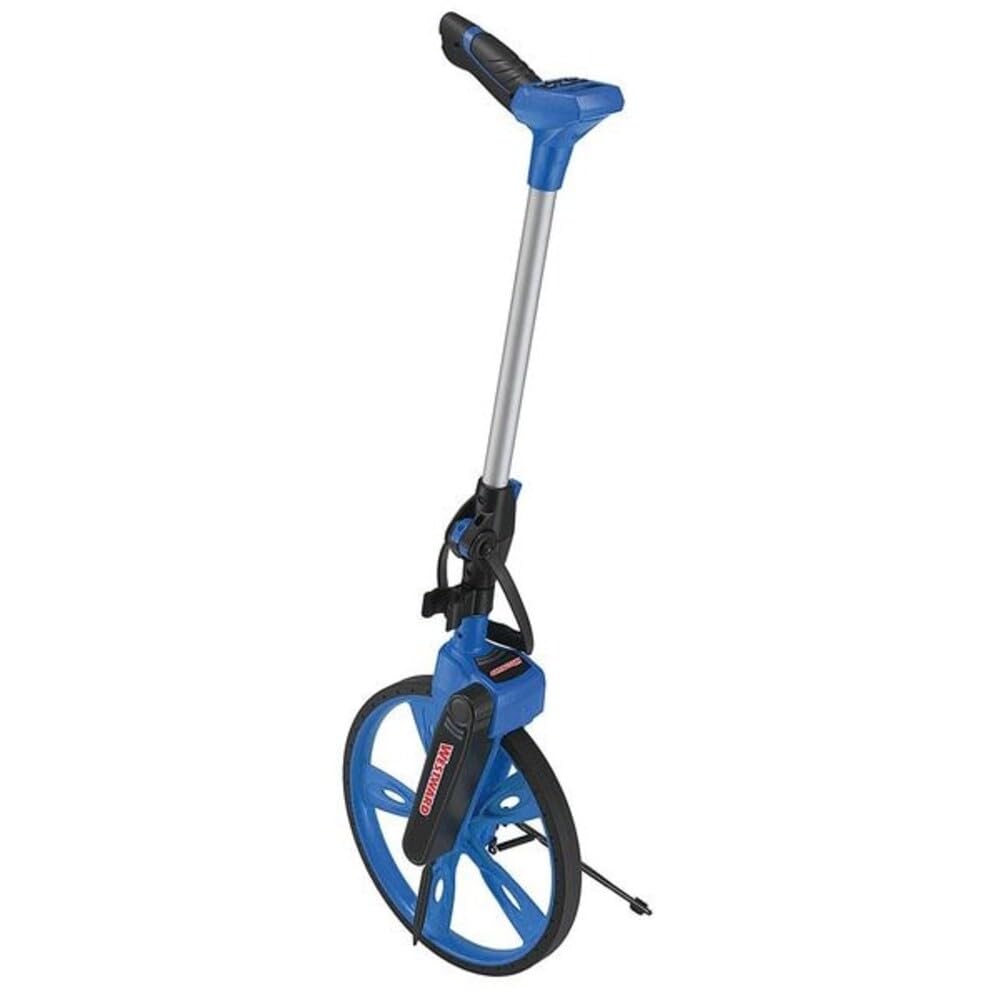
Figure 1: Westward 21LP31 Electronic Measuring Wheel. This image shows the measuring wheel with its telescopic handle extended, featuring the digital display and pistol-style grip.
5. الإعداد
5.1 تركيب البطارية
- Locate the battery compartment, typically on the handle or display unit.
- افتح غطاء حجرة البطارية.
- أدخل بطاريتين قلويتين من نوع AAA، مع التأكد من صحة القطبية (+/-).
- أغلق غطاء حجرة البطارية جيدًا.
5.2 Handle Assembly and Extension
- Unfold the measuring wheel stand, if applicable, to stabilize the unit.
- Locate the quick snap cam lock on the telescopic shaft.
- Open the cam lock and extend the handle to a comfortable operating height (up to 40-3/8 inches).
- Securely close the cam lock to fix the handle in position. Ensure the handle is firm and does not wobble.
6. تعليمات التشغيل
6.1 تشغيل/إيقاف التشغيل
اضغط على قوة button on the display panel to turn the unit on or off. The display is backlit for visibility in various lighting conditions.
6.2 Selecting Measuring Units
The device supports measurement in feet (ft.), inches (in.), meters (m), and centimeters (cm). Refer to the display panel buttons to cycle through and select your desired unit of measurement before starting a measurement.
6.3 أخذ القياس
- Ensure the unit is powered on and the desired measuring unit is selected.
- ضع العجلة عند نقطة البداية للقياس.
- Roll the wheel along the path to be measured. The digital display will show the accumulated distance.
- For accurate readings, maintain a straight path and consistent pressure on the handle.
- When you reach the end point, stop rolling the wheel. The final measurement will be displayed.
6.4 Reading Clear Function
اضغط على واضح button to reset the current measurement to zero. This prepares the device for a new measurement.
6.5 وظيفة تعليق القراءة
اضغط على يمسك button to temporarily freeze the current reading on the display. This is useful for recording measurements before clearing the display. Press يمسك again to resume live measurement or clear the reading.
6.6 وظيفة الذاكرة
The device features 4 memory slots to store measurements. Consult the display panel for buttons labeled ذاكرة or similar. Typically, you would:
- Complete a measurement.
- اضغط على يحفظ or ميم button to store the current reading into an available memory slot.
- يستخدم يتذكر or ميم ل view القياسات المخزنة.
- Follow on-screen prompts or refer to specific button labels for clearing individual memory slots or all memories.
7. الصيانة
7.1 التنظيف
Regularly clean the measuring wheel to ensure optimal performance and longevity.
- Wipe the wheel and frame with a damp قطعة قماش لإزالة الأوساخ والحطام.
- Avoid using abrasive cleaners or solvents that could damage the ABS frame or TPE rubber tire.
- Keep the display panel clean and dry.
7.2 التخزين
When not in use, store the measuring wheel in a cool, dry place, away from direct sunlight and extreme temperatures. The telescopic shaft can be collapsed for compact storage.
7.3 استبدال البطارية
Replace batteries when the display indicates low power or when the unit fails to power on. Always use fresh AAA alkaline batteries.
8. استكشاف الأخطاء وإصلاحها
- مشكلة: لا يتم تشغيل العرض.
- حل: Check battery installation. Ensure batteries are inserted with correct polarity. Replace with fresh AAA alkaline batteries.
- مشكلة: قياسات غير دقيقة.
- حل: Ensure the wheel is clean and free of debris that could affect its rotation. Roll the wheel in a straight line. Verify the selected unit of measurement.
- مشكلة: Handle is wobbly after extension.
- حل: Ensure the quick snap cam lock is fully closed and secured after extending the telescopic shaft.
9. المواصفات
| يصف | قيمة |
|---|---|
| رقم الموديل | 21LP31 |
| ماركة | Westward |
| قطر العجلة | 12-1/2 بوصة |
| محيط العجلة | 3.3 قدم |
| مدى القياس | 9999.99 متر |
| وحدات القياس | ft., in., m, cm |
| Handle Extended Length | 40-3/8 بوصة |
| مادة الإطار | نظام ABS |
| مادة الإطارات | TPE Rubber |
| Product Dimensions (L x W x D, folded) | 27 بوصة × 12-5/8 بوصة × 4-1/2 بوصة |
| الوزن الصافي | 3.48 رطل. |
| أبعاد العبوة (الطول × العرض × الارتفاع) | 12.87 × 6.85 × 20.55 بوصة |
| الوزن المعبأ | 6 رطل |
| مصدر الطاقة | (2) AAA Alkaline Batteries |
| بلد الصنع | تايوان |
10. الضمان والدعم
Westward products are manufactured to high-quality standards. For specific warranty information, please refer to the warranty card included with your purchase or contact Westward customer support. Keep your purchase receipt as proof of purchase.
For technical assistance or inquiries, please visit the official Westward webيمكنك زيارة موقعهم الإلكتروني أو الاتصال بقسم خدمة العملاء. تتوفر معلومات الاتصال عادةً على عبوة المنتج أو على موقع الشركة المصنعة. webموقع.