
مقدمة
This manual provides comprehensive instructions for the setup, operation, and maintenance of your UNIVERSAL REMOTE X-8. This remote control is designed to operate up to 200 different audio/video devices from various manufacturers. Please read this manual thoroughly before using your new remote control to ensure proper functionality and to maximize your user experience.
يثبت
1. تركيب البطارية
The UNIVERSAL REMOTE X-8 requires batteries for operation. Ensure you use the correct type and insert them with the correct polarity.
- افتح غطاء حجرة البطارية في الجزء الخلفي من جهاز التحكم عن بعد.
- Insert the required batteries (e.g., 2 x AAA or 2 x AA, specific type not provided in JSON, but typically standard batteries for universal remotes) according to the polarity indicators (+ and -) inside the compartment.
- أغلق غطاء حجرة البطارية جيدًا.
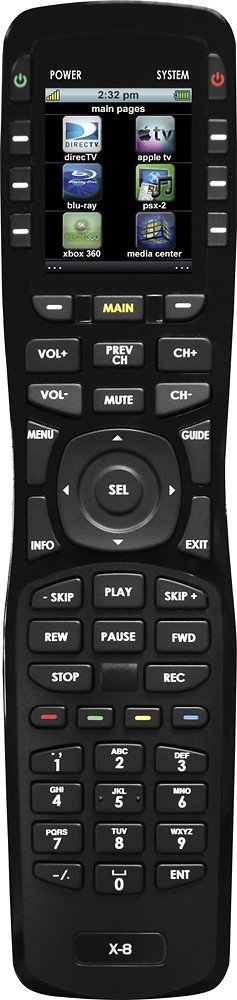
Image: The UNIVERSAL REMOTE X-8, showing the general design. The battery compartment is typically located on the rear of the device.
2. Device Code Programming
To control your devices, you must program the remote with the correct device codes. Refer to the code list provided with your remote (not included in this digital manual) or use the auto-search function.
2.1 إدخال رمز مباشر
- قم بتشغيل الجهاز الذي ترغب في برمجته (مثل التلفزيون أو مشغل أقراص DVD).
- اضغط مع الاستمرار على تعيين button (or equivalent) on the remote until the indicator light illuminates.
- Press the device button (e.g., TV, دي في دي) for the device you are programming. The indicator light will flash.
- Enter the 4-digit code for your device's brand from the code list. The indicator light should turn off.
- وجّه جهاز التحكم عن بُعد نحو الجهاز واضغط على زر التشغيل. قوة button. If the device turns off, the code is correct. If not, repeat the process with the next code for your brand.
2.2 البحث التلقائي عن الأكواد
- قم بتشغيل الجهاز الذي ترغب في برمجته.
- اضغط مع الاستمرار على تعيين اضغط على الزر حتى يضيء ضوء المؤشر.
- Press the device button (e.g., TV, دي في دي) for the device you are programming.
- اضغط على قوة button repeatedly (or CH+) until your device turns off. This may take several minutes as the remote cycles through codes.
- بمجرد إيقاف تشغيل الجهاز، اضغط فوراً على تعيين زر لحفظ الكود.
تشغيل جهاز التحكم عن بعد الخاص بك
1. الوظائف الأساسية
- اختيار الجهاز: اضغط على زر الجهاز المناسب (على سبيل المثال، TV, دي في دي, سي بي إل) to select the device you wish to control. The indicator light will illuminate briefly.
- تشغيل/إيقاف التشغيل: اضغط على قوة زر لتشغيل الجهاز المحدد أو إيقاف تشغيله.
- التحكم في مستوى الصوت: استخدم المجلد+ و المجلد- buttons to adjust the volume. The كتم الصوت button will silence the audio.
- التحكم في القناة: استخدم CH+ و CH- buttons to change channels. Enter specific channel numbers using the numeric keypad.
- الإدخال / المصدر: اضغط على مدخل or مصدر button to cycle through available input sources on your TV or receiver.
2. Advanced Functions (Macro Programming)
The UNIVERSAL REMOTE X-8 may support macro programming, allowing a sequence of commands to be executed with a single button press. Refer to the full product manual (if available) for detailed instructions on macro setup, as this functionality can vary significantly between universal remote models.
صيانة
1. التنظيف
- امسح جهاز التحكم عن بعد بقطعة قماش ناعمة وجافة.
- بالنسبة للأوساخ العنيدة، قم بإزالة الأوساخ برفق.ampبلّل قطعة القماش بالماء أو بمنظف خفيف غير كاشط. لا ترش المنظف مباشرة على جهاز التحكم عن بعد.
- Avoid using harsh chemicals, solvents, or abrasive cleaning pads, as these can damage the remote's finish and buttons.
2. استبدال البطارية
If the remote's indicator light does not illuminate or if commands become unresponsive, the batteries may need replacement. Follow the battery installation steps outlined in the قسم الإعداد.
استكشاف الأخطاء وإصلاحها
| مشكلة | السبب المحتمل | حل |
|---|---|---|
| Remote does not operate any device. | Batteries are dead or incorrectly inserted. No device is selected. Remote is not programmed. | Check and replace batteries. Press the desired device button (e.g., TV, DVD). Reprogram the remote for your devices. |
| Remote operates some functions but not others. | تمت برمجة رمز الجهاز بشكل غير صحيح. | Try programming a different code for your device's brand from the code list. |
| لا يضيء مؤشر الضوء. | البطاريات الميتة. | استبدال البطاريات. |
| جهاز التحكم عن بعد لا يستجيب. | Obstruction between remote and device. Remote is too far from device. | Ensure a clear line of sight. Move closer to the device. |
تحديد
- نموذج: إكس-8
- ماركة: تحكم عالمى
- سعة الجهاز: حتى 200 أجهزة
- تقنية الاتصال: الأشعة تحت الحمراء (IR)
- الأجهزة المتوافقة: Home Theater components (TVs, DVD/Blu-ray players, Cable/Satellite boxes, Audio Receivers, etc.)
- نوع تحكم: التحكم بالأزرار
- نوع البطارية: Lithium (Note: Specific battery format for user replacement may vary; refer to physical product for details.)
- ASIN: B01M0EX6TP
- GTIN/UPC: 656787100886
الضمان والدعم
For warranty information and technical support, please refer to the documentation included with your purchase or visit the official UNIVERSAL REMOTE webالموقع. احتفظ بإثبات الشراء الخاص بك لتقديم مطالبات الضمان.
This product is covered by a 30-day money-back guarantee from the seller, as per the product description. For issues beyond this period, please contact the manufacturer directly.