
مقدمة
The JAM Voice is a versatile portable speaker designed for audio playback via Wi-Fi and Bluetooth connectivity. It integrates with Amazon Alexa Voice Service, allowing for voice commands and interaction. The speaker is rechargeable and can be paired with other JAM Wi-Fi speakers for a multi-room audio experience. Control is managed through the free JAM app.
محتويات الحزمة
- JAM Voice Alexa Voice Service Enabled Speaker
- سلك شحن USB
المتحدث أكثرview

الشكل 1: واجهة بزاوية view of the JAM Voice speaker. This image shows the speaker from a slight angle, highlighting the top grille with the 'jam' logo and the accessible control buttons on the front for volume and playback.

الشكل 2: الجبهة المباشرة view of the JAM Voice speaker. This image provides a straight-on perspective of the speaker, clearly showing the top grille and the control panel with its buttons.
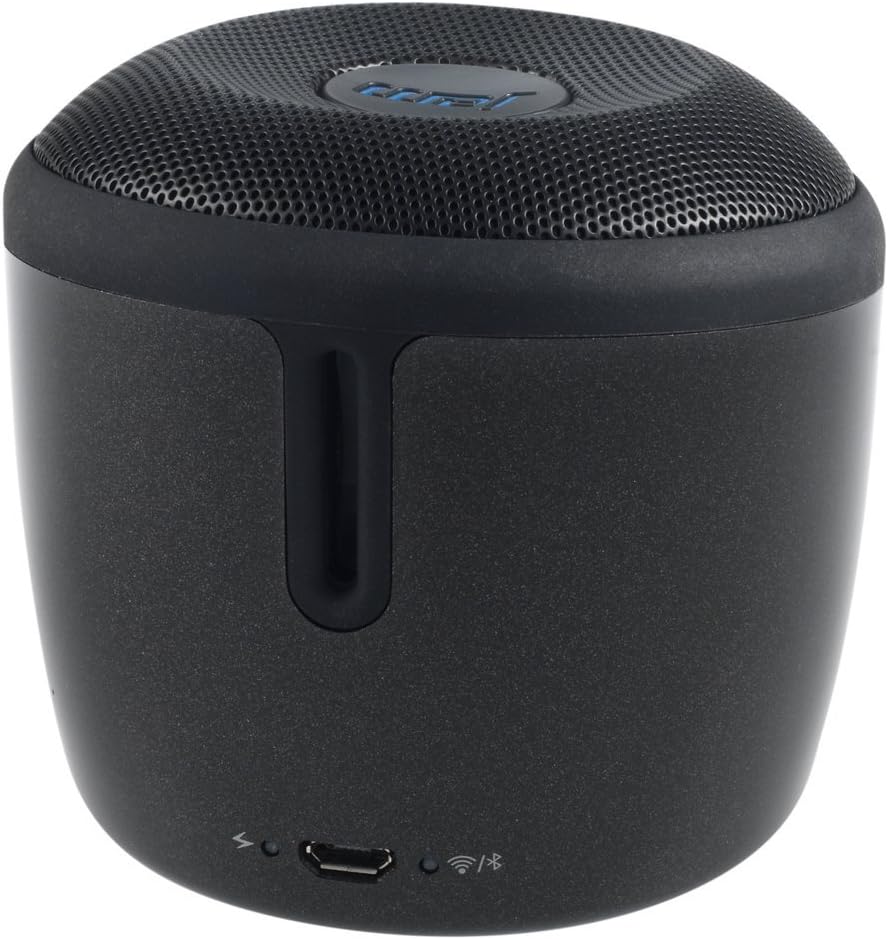
الشكل 3: مؤخرة view of the JAM Voice speaker. This image highlights the back of the speaker, including the micro USB charging port, a power indicator light, a Wi-Fi status indicator, and a Bluetooth status indicator.
يثبت
1. شحن مكبر الصوت
Before initial use, fully charge the JAM Voice speaker. Connect the supplied USB charging cord to the micro USB port on the back of the speaker and to a USB power source (e.g., computer USB port or USB wall adapter). The charging indicator light will show the charging status. A full charge provides up to 4 hours of playtime.
2. Installing the JAM App
The JAM app is required for Wi-Fi setup and advanced control features. Download the free JAM app from your device's app store (e.g., Apple App Store for iOS or Google Play Store for Android).
3. اتصال شبكة Wi-Fi
- Ensure your JAM Voice speaker is powered on.
- Open the JAM app on your smartphone or tablet.
- Follow the in-app instructions to connect your speaker to your home Wi-Fi network. This process typically involves selecting your Wi-Fi network and entering the password.
- Once connected, the Wi-Fi indicator light on the speaker will illuminate steadily.
4. اقتران بلوتوث
To use the speaker via Bluetooth:
- Press and hold the Bluetooth button on the speaker until the Bluetooth indicator light begins to flash, indicating pairing mode.
- On your device (smartphone, tablet, etc.), go to the Bluetooth settings and select "JAM Voice" from the list of available devices.
- Once paired, the Bluetooth indicator light on the speaker will illuminate steadily.
تعليمات التشغيل
1. تشغيل/إيقاف التشغيل
Press and hold the power button (location not specified in data, assuming standard placement) for a few seconds to turn the speaker on or off.
2. Amazon Alexa Voice Service
To activate Alexa, tap the designated Alexa button on the speaker. Once activated, you can ask questions or issue commands, such as "What's the weather?" or "Play music." Ensure the speaker is connected to Wi-Fi for Alexa functionality.
3. بث الموسيقى
- عبر الواي فاي: Use the JAM app to connect to streaming services like TuneIn, iHeartRadio, Spotify, and Tidal. You can also ask Alexa to stream music from supported services.
- عبر البلوتوث: Once paired with a device, play audio directly from your device's music library or streaming apps.
4. إقران مكبرات صوت متعددة
The JAM Voice speaker can be paired with other JAM Voice speakers or any speaker in the JAM Wi-Fi lineup for a synchronized audio experience. Use the JAM app to group speakers, adjust individual volumes, or set up stereo sound (left/right channels).
Note: When grouped for multi-room or stereo playback, Alexa voice service may only be active on the designated master speaker.
5. عناصر التحكم
- مقدار: Use the volume buttons on the speaker or control via the JAM app/connected device.
- التشغيل: Use the play/pause and skip track buttons on the speaker or control via the JAM app/connected device.
صيانة
1. التنظيف
Wipe the speaker with a soft, dry cloth. Do not use liquid cleaners or abrasive materials, as they may damage the finish or internal components. Ensure no moisture enters the ports.
2. العناية بالبطارية
To prolong battery life, avoid fully discharging the speaker frequently. Recharge the speaker when the battery is low. If storing the speaker for an extended period, charge it to approximately 50% every few months.
استكشاف الأخطاء وإصلاحها
| مشكلة | حل |
|---|---|
| لا يتم تشغيل مكبر الصوت. | Ensure the speaker is charged. Connect it to a power source using the USB charging cord. |
| لا يمكن الاتصال بشبكة Wi-Fi. |
|
| لا يمكن الاقتران عبر البلوتوث. |
|
| اليكسا لا تستجيب. |
|
| Speaker turns off unexpectedly. | The speaker may have an auto-off feature to conserve battery. Ensure it is sufficiently charged. If connected to power, check the power source. |
تحديد
| رقم الموديل | HX-P590BK |
| تكنولوجيا الاتصال | بلوتوث ، واي فاي |
| وضع إخراج الصوت | ستيريو |
| مصدر الطاقة | تعمل بالبطارية |
| وقت اللعب | تصل إلى 4 ساعة |
| طريقة التحكم | الصوت والتطبيق |
| أبعاد | 3 × 3 × 3 بوصة |
| وزن العنصر | 9.8 أونصة (0.61 رطل) |
| المكونات المضمنة | Jam Voice Alexa Voice Service Enabled Speaker, USB Charging Cord |
| الأجهزة المتوافقة | الكمبيوتر المحمول، الهاتف الذكي، الجهاز اللوحي، التلفزيون |
| نوع السماعة | محمول |
معلومات الضمان
يأتي هذا المنتج مع ضمان محدود. For detailed information regarding the terms, conditions, and duration of your warranty, please refer to the documentation included with your purchase or visit the official Jam Audio webالموقع. احتفظ بإثبات الشراء الخاص بك لتقديم مطالبات الضمان.
يدعم
For further assistance, technical support, or frequently asked questions, please visit the official Jam Audio support website. You may also find helpful resources within the JAM app.
Jam Audio Official Webموقع: www.jamaudio.com.