
مقدمة
شكرا لك على الشراءasing the QUMOX L165U 2.4GHz Wireless Gamepad. This high-quality game controller is designed for use with PC and Android devices, offering a reliable 2.4GHz wireless connection for an enhanced gaming experience. Please read this manual carefully to ensure proper setup and operation of your new gamepad.

Figure 1: QUMOX L165U Gamepad with included USB adapter and OTG connection kit.
محتويات الحزمة
تأكد من وجود جميع العناصر في الحزمة الخاصة بك:
- 1x QUMOX L165U Gamepad
- 1x 2.4GHz USB Wireless Adapter
- 1x OTG Connection Kit (Micro USB to USB-A adapter)
يثبت
1. تركيب البطارية
The QUMOX L165U Gamepad is powered by 2 AAA batteries (not included). To install the batteries:
- حدد مكان حجرة البطارية في الجزء الخلفي من وحدة التحكم بالألعاب.
- حرك غطاء البطارية لفتحه.
- أدخل 2 بطاريات AAA، مع التأكد من القطبية الصحيحة (+/-).
- أغلق غطاء البطارية بشكل محكم.

Figure 2: Open battery compartment for AAA battery installation.
2. الاتصال بجهاز الكمبيوتر
- Plug the 2.4GHz USB Wireless Adapter into an available USB port on your PC.
- Turn on the gamepad by pressing the 'START' button. The gamepad will automatically attempt to connect.
- The PC should recognize the gamepad and install necessary drivers automatically.
- If the gamepad does not connect, press the 'MODE' button on the gamepad to cycle through connection modes until it is recognized by your PC.
3. Connecting to an Android Device (with OTG support)
- Connect the OTG Connection Kit to your Android device's Micro USB port.
- Plug the 2.4GHz USB Wireless Adapter into the USB-A end of the OTG Connection Kit.
- Turn on the gamepad by pressing the 'START' button. The gamepad will automatically attempt to connect.
- Your Android device should recognize the gamepad.
- If the gamepad does not connect, press the 'MODE' button on the gamepad to cycle through connection modes until it is recognized by your Android device.
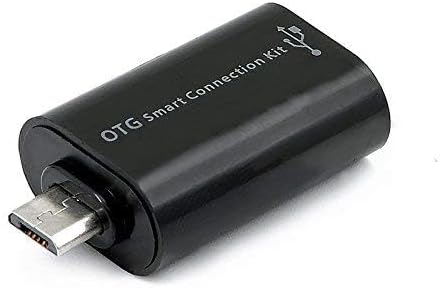
Figure 3: OTG Connection Kit for Android device connectivity.
تعليمات التشغيل
Once connected, your QUMOX L165U Gamepad is ready for use. The layout is standard for most game controllers.
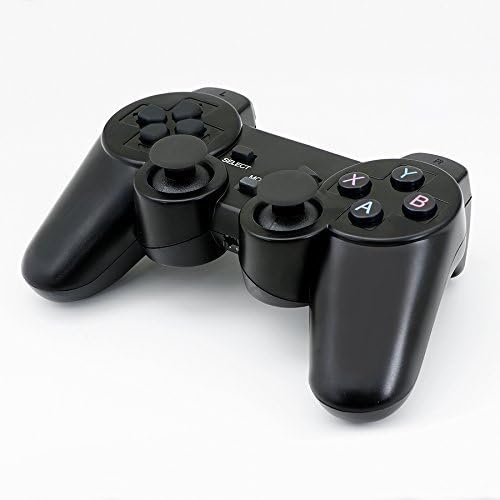
الشكل 4: الجزء العلوي view of the QUMOX L165U Gamepad, highlighting button layout.
- لوحة الاتجاهات (D-Pad): للحصول على إدخال اتجاهي دقيق.
- عصا التحكم التناظرية: عصا تحكم تناظرية مزدوجة للتحكم في الحركة بزاوية 360 درجة والتحكم في الكاميرا.
- أزرار الإجراءات (A، B، X، Y): أزرار الإجراءات القياسية للأوامر داخل اللعبة.
- أزرار الكتف (L1، R1) والمشغلات (L2، R2): Located on the top of the gamepad for additional actions.
- زر الاختيار/الرجوع: تُستخدم عادةً للتنقل بين القوائم أو لوظائف محددة داخل اللعبة.
- زر البدء: تُستخدم لإيقاف الألعاب مؤقتًا أو لتأكيد الاختيارات.
- زر الوضع: Cycles through different operating modes (e.g., Android, PC) if automatic detection fails.
عرض فيديو
الفيديو 1: فيديو مقدم من البائعview of a 2-pack wireless controller, demonstrating its features and compatibility. While showing a similar product, it illustrates general wireless controller usage and setup.
صيانة
- تنظيف: استخدم قطعة قماش ناعمة وجافة لتنظيف وحدة التحكم. تجنب استخدام المواد الكيميائية القاسية أو المواد الكاشطة.
- تخزين: قم بتخزين وحدة التحكم في اللعبة في مكان بارد وجاف بعيدًا عن أشعة الشمس المباشرة ودرجات الحرارة العالية.
- العناية بالبطارية: قم بإزالة البطاريات إذا لم يتم استخدام وحدة التحكم لفترة طويلة لمنع التسرب.
استكشاف الأخطاء وإصلاحها
| مشكلة | السبب المحتمل | حل |
|---|---|---|
| Gamepad does not connect. | Low batteries, incorrect mode, adapter not properly inserted. | Replace batteries. Press the 'MODE' button to cycle through modes. Ensure USB adapter is fully inserted into PC or OTG adapter. |
| الأزرار أو عصي التحكم لا تستجيب. | Connection issue, game incompatibility, physical damage. | Reconnect the gamepad. Check game settings for controller support. If issue persists, contact support. |
| Android device does not recognize gamepad. | Android device lacks OTG support, OTG adapter issue. | Verify your Android device supports OTG. Ensure OTG adapter is functioning correctly. |
تحديد
| ميزة | التفاصيل |
|---|---|
| رقم الموديل | ل165و |
| تكنولوجيا الاتصال | لاسلكي بتردد 2.4 جيجاهرتز (عبر محول USB) |
| الأجهزة المتوافقة | PC, Android (with OTG support) |
| مصدر الطاقة | 2 × بطاريات AAA |
| وزن العنصر | 5.3 أونصات |
| أبعاد الحزمة | 8.07 × 5.63 × 2.95 بوصة |
| لون | أسود |
الضمان والدعم
For warranty information or technical support, please refer to the contact details provided with your purchase or visit the official QUMOX webالموقع. احتفظ بإثبات الشراء الخاص بك لاستخدامه في أي مطالبات بالضمان.