
1. المقدمة
The Vgate iCar 3 WiFi OBD2 Scanner is a compact diagnostic tool designed to connect to your vehicle's On-Board Diagnostics II (OBD2) port. It allows you to perform comprehensive computer diagnostics and monitor various vehicle parameters using your iOS or Android device via a Wi-Fi connection. This device supports auto-sleep mode to conserve car battery power.
تتضمن الميزات الرئيسية ما يلي:
- Full EOBD/OBD2 protocol support (CAN, KWP2000, ISO9141-2, J1850 VPW, J1850 PWM).
- Ability to read and clear diagnostic trouble codes (DTCs) for the check engine light.
- Display of real-time sensor data on your phone or tablet.
- Monitoring of car performance and various ECU data.
- Small, compact design for easy installation.
- High reliable WiFi connection.
- Super low power consumption (up to 10mA standby current).
2. دليل الإعداد
Follow these steps to set up your Vgate iCar 3 WiFi OBD2 Scanner:
- Download Your Preferred App: بحث عن compatible OBD2 diagnostic applications on your device's app store. Recommended apps for iOS include OBD Fusion, OBD Auto Doctor, Car Scanner. For Android, consider Torque, OBD Fusion, OBD Auto Doctor, or Car Scanner.
- Plug the Adapter into the Vehicle's OBDII Port: Locate your vehicle's 16-pin OBDII diagnostic port, typically found under the dashboard on the driver's side. Firmly insert the Vgate iCar 3 adapter into this port. Once plugged in, start your vehicle's engine.
- Connect Your Phone via Wi-Fi: On your iOS or Android device, go to your Wi-Fi settings. Look for a Wi-Fi network named "Vgate" or similar (e.g., "V-LINK"). Connect to this network. If prompted for a password, enter 1234.
- Launch Your Preferred App: Open the diagnostic application you downloaded. Within the app, select the Vgate adapter as your connection device. You can now begin diagnosing your vehicle.

Image: Quick Setup Guide illustrating the four steps: Download App, Plug into OBDII port, Connect via Wi-Fi, Launch App.
3. تعليمات التشغيل
Once connected, the Vgate iCar 3 allows you to access various diagnostic functions through your chosen application:
- قراءة رموز أعطال التشخيص (DTCs): View current, pending, and permanent diagnostic trouble codes that illuminate the Check Engine Light.
- مسح رموز المشاكل: امسح رموز الأعطال التشخيصية وأوقف تشغيل مؤشر العطل Lamp (MIL) / Check Engine Light.
- عرض بيانات المستشعر الحالية: Monitor real-time operating performance data, including but not limited to:
- عدد دورات المحرك في الدقيقة
- قيمة التحميل المحسوبة
- درجة حرارة سائل التبريد
- حالة نظام الوقود
- سرعة السيارة
- تعديل الوقود قصير المدى
- تعديل الوقود على المدى الطويل
- ضغط مشعب السحب
- توقيت مسبقا
- درجة حرارة الهواء المدخول
- معدل تدفق الهواء
- موقف خنق المطلق
- حجم مستشعر الأكسجينtagتعديلات الوقود قصيرة المدى المرتبطة
- ضغط الوقود
- Monitor Car Performance: Access various ECU data to understand your vehicle's operational status.
Note: The specific parameters available depend on your vehicle manufacturer's implementation and the capabilities of the diagnostic app used.
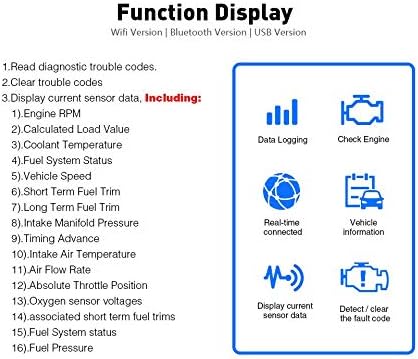
Image: Function Display illustrating various diagnostic capabilities such as data logging, checking engine status, real-time connectivity, vehicle information, sensor data display, and fault code management.
4. التوافق
The Vgate iCar 3 WiFi OBD2 Scanner supports all five standard OBD2 protocols:
- ISO15765-4 (CAN)
- ISO14230-4 (KWP2000)
- ايزو 9141-2
- J1850 VPW
- جنومكس بوم
General vehicle compatibility by region:
- الولايات المتحدة: Vehicles manufactured from 1996 onwards.
- الإتحاد الأوربي: Vehicles manufactured from 2002 onwards.
- Asian Union: Vehicles manufactured from 2002 onwards.
Note: This device may not support some Hybrid or electric vehicles. It is also not applicable to heavy-duty diesel vehicles (e.g., semi-trucks, tractors) as they use different diagnostic protocols. Always verify your vehicle's compatibility with standard OBD2 protocols.

Image: Compatibility chart detailing supported OBDII protocols and regional vehicle manufacturing year ranges.
5. استكشاف الأخطاء وإصلاحها
- Device Not Connecting to Phone (Wi-Fi):
- Ensure the Vgate iCar 3 is firmly plugged into the OBDII port and your vehicle's engine is running.
- Verify that your phone's Wi-Fi is enabled and you are connected to the correct Vgate network (e.g., "Vgate" or "V-LINK").
- Confirm the Wi-Fi password is entered correctly (default is 1234).
- Try restarting your phone and the diagnostic app.
- تأكد من أن نظام التشغيل الخاص بهاتفك محدث.
- App Not Displaying Data or Connecting to Adapter:
- Make sure the app is compatible with the Vgate iCar 3 WiFi adapter.
- Within the app settings, confirm that the correct connection type (Wi-Fi) and adapter are selected.
- أغلق التطبيق ثم أعد فتحه.
- Check if the app requires any specific permissions on your device.
- No Data for Certain Parameters:
- Not all vehicles support all OBD2 parameters. The availability of data depends on your vehicle's ECU and manufacturer's implementation.
- Consult your vehicle's manual or an online resource for supported OBD2 PIDs (Parameter IDs).
- اتصال متقطع:
- Ensure there are no strong Wi-Fi interference sources nearby.
- Try using the device in an open area away from garages or structures that might block signals.
6. المواصفات
| ميزة | مواصفة |
|---|---|
| أبعاد المنتج | 4.72 × 2.76 × 1.46 بوصة |
| وزن العنصر | 0.64 أونصات |
| نوع الاتصال | واي فاي |
| أنظمة التشغيل المدعومة | أندرويد، آي أو إس |
| مصدر الطاقة | Vehicle OBD2 Port (Adapter) |
| البروتوكولات المدعومة | CAN, KWP2000, ISO9141-2, J1850 VPW, J1850 PWM |
| التيار الاحتياطي | تصل إلى 10 مللي أمبير |
| رقم الموديل | Wi-Fi for iOS iPhone iPad/Android |
| رمز المنتج الموحد | 612677391628 |
7. ترقية البرامج الثابتة
The Vgate iCar 3 WiFi OBD2 Scanner supports firmware upgrades. For instructions and assistance with updating the device firmware, please contact the Vgatemall support team.
8. الدعم
For any questions, technical support, or warranty inquiries regarding your Vgate iCar 3 WiFi OBD2 Scanner, please contact the Vgatemall customer service team. They are available to assist with product issues and provide guidance.