
1. المقدمة
The Zmodo Outdoor Security Camera Wireless (2 Pack) provides a comprehensive monitoring solution for your home or business. This system features 1080p Full HD video, night vision, and motion detection capabilities. Designed for both indoor and outdoor use, it offers remote viewing via the Zmodo app and is compatible with Amazon Alexa and Google Assistant for voice control.
تتضمن الميزات الرئيسية ما يلي:
- الإعداد السهل: Connect cameras within minutes using the Zmodo app.
- True 1080p HD Live Video: نهار وليل viewing up to 65ft in the dark.
- يعمل مع Alexa: تحكم في الكاميرا باستخدام الأوامر الصوتية.
- Smartz Eaze Cloud Recording: Receive video clips upon motion detection (14-day free trial included).
- Wall-mount Design: Flexible installation for optimal viewزوايا متعددة.
2. ماذا يوجد في الصندوق
The Zmodo Outdoor Security Camera Wireless (2 Pack) package includes the following items:
- 2 x Zmodo Outdoor Cameras

3. الإعداد
Setting up your Zmodo Outdoor Security Camera is a straightforward process. Follow these steps for quick installation and configuration.
3.1 التثبيت المادي
- اختر الموقع: اختر موقعًا مناسبًا للكاميرا، وتأكد من أنها تتمتع برؤية واضحة. view of the area you wish to monitor and is within range of your Wi-Fi network. The camera is designed for wall mounting.
- تركيب الكاميرا: Use the provided mounting bracket and screws to securely attach the camera to a wall or desired surface.
- توصيل الطاقة: Plug the camera's power adapter into a nearby electrical outlet.
- Attach Wi-Fi Antenna: Screw the Wi-Fi antenna into the designated port on the back of the camera.


3.2 تكوين التطبيق
- Download the Zmodo App: Download the free Zmodo app from your smartphone's app store (iOS or Android).
- إنشاء حساب: Open the app and follow the on-screen instructions to create a new Zmodo account or log in if you already have one.
- إضافة جهاز: In the app, select the option to add a new device. Follow the prompts to connect your camera to your Wi-Fi network. This typically involves scanning a QR code on the camera or following guided steps.
- سمِّ كاميرتك: Assign a descriptive name to your camera (e.g., "Front Door Camera," "Backyard Camera") for easy identification.
3.3 فيديوهات الإعداد
For visual guidance on the setup process, refer to the following videos:
4. تعليمات التشغيل
Once your Zmodo camera is set up, you can begin monitoring your property and utilizing its smart features.
4.1 مباشر View والتشغيل
- الوصول إلى البث المباشر: Open the Zmodo app on your smartphone or tablet. Select the desired camera from your device list to view its live 1080p Full HD video feed.
- الرؤية الليلية: The camera automatically switches to night vision mode in low-light conditions, providing clear black and white video up to 65 feet.
- التخزين السحابي: With the optional Smartz Eaze cloud recording plan, motion-triggered video clips are saved to the cloud. You can review, save, and share footage at any time. A 14-day free trial is available.


4.2 اكتشاف الحركة والتنبيهات
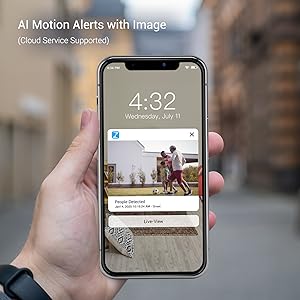
- تلقي التنبيهات: The camera sends intelligent mobile alerts to your smartphone when motion is detected.
- كشف الحركة بالذكاء الاصطناعي: Advanced AI helps detect and identify humans, pets, and vehicles accurately, reducing false alerts.
4.3 تكامل أليكسا
The Zmodo camera is compatible with Amazon Alexa, allowing for convenient voice control.
- الأوامر الصوتية: Use commands like "Alexa, show me the front door" to view a live stream from your camera on compatible Alexa devices such as Echo Show or Fire TV.
- تحديث البرامج الثابتة: Ensure your Zmodo product is updated to the latest device version for optimal interaction with Amazon Alexa.

4.4 Alexa Integration Video
Watch this video for detailed instructions on how to integrate your Zmodo camera with Amazon Alexa and Fire TV:
5. الصيانة
To ensure optimal performance and longevity of your Zmodo Outdoor Security Camera, follow these maintenance guidelines:
- التنظيف المنتظم: قم بتنظيف عدسة الكاميرا بشكل دوري باستخدام قطعة قماش ناعمة.amp cloth to remove dust, dirt, or smudges that may affect image clarity. Avoid abrasive cleaners.
- التحقق من الاتصالات: Ensure all cables (power, antenna) are securely connected and free from damage.
- تحديثات البرامج الثابتة: Regularly check for and install firmware updates through the Zmodo app to benefit from new features, improvements, and security enhancements.
- حماية الطقس: على الرغم من أن الكاميرا مقاومة للماء بمعيار IP65، تأكد من تركيبها في مكان يقلل من تعرضها المباشر لظروف الطقس القاسية قدر الإمكان، وذلك لإطالة عمرها الافتراضي.

6. استكشاف الأخطاء وإصلاحها
If you encounter issues with your Zmodo camera, refer to the following common problems and solutions:
| مشكلة | الحل المحتمل |
|---|---|
| الكاميرا غير متصلة بالإنترنت/لا يمكن الاتصال بشبكة Wi-Fi | Ensure the camera is powered on. Check your Wi-Fi signal strength at the camera's location. Restart your router and the camera. Re-add the camera through the Zmodo app. |
| جودة الفيديو رديئة | Clean the camera lens. Ensure adequate lighting for day vision. Check Wi-Fi signal strength; a weak signal can degrade video quality. |
| لم يتم استلام تنبيهات الحركة | Verify motion detection is enabled in the app settings. Check app notification settings on your phone. Ensure the camera has a clear view من منطقة الكشف. |
| Alexa integration not working | Ensure the Zmodo skill is enabled in the Alexa app and your Zmodo account is linked. Verify your Alexa device (Echo Show/Fire TV) is connected to the same network. Update camera firmware. |
7. المواصفات
Detailed technical specifications for the Zmodo Outdoor Security Camera (Model ZM-W0002-2):
| ميزة | التفاصيل |
|---|---|
| ماركة | زمودو |
| اسم الموديل | ZM-W0002-2 |
| تكنولوجيا الاتصال | Cloud, Wi-Fi, 2.4GHz |
| المميزات الخاصة | HD Resolution, Motion Sensor, Night Vision |
| الاستخدام الداخلي والخارجي | داخلي، خارجي |
| الأجهزة المتوافقة | أليكسا ، مساعد جوجل |
| نوع التركيب | حامل الحائط |
| لون | أبيض |
| عامل الشكل | رصاصة |
| تصنيف مقاومة الماء | IP65 |
| دقة مستشعر الصورة | 1080 بكسل |
| دقة التقاط الفيديو | 1080 بكسل |
| معدل الإطارات | 25 إطارًا في الثانية |
| Viewزاوية جي | 90 درجة |
| التكبير البصري | 4 × |
| نطاق الرؤية الليلية | 65 أقدام |
| مصدر الطاقة | كهرباء سلكية |
| المجلدtage | 12 فولت |
| واتtage | 5 واط |
| أبعاد العنصر | 2.2 × 2.1 × 3.4 بوصة |
8. الضمان والدعم
ضمان: The Zmodo Outdoor Security Camera comes with a 3-year manufacturer's warranty.
دعم العملاء: For technical assistance, troubleshooting, or warranty claims, please visit the official Zmodo website or contact their customer support team. Refer to the Zmodo app or packaging for the most up-to-date contact information.