
1. المقدمة
Thank you for choosing the UNIC UC18 Mini Projector. This compact and portable projector is designed to provide a versatile viewing experience for home entertainment, presentations, and more. Featuring an LED lighting system, built-in speaker, and multiple input options, the UC18 offers convenience and functionality. Please read this manual thoroughly to ensure proper setup, operation, and maintenance of your device.
2. معلومات السلامة
- مزود الطاقة: استخدم محول الطاقة المحدد فقط. تأكد من مستوى الصوتtagيتوافق مع متطلبات جهاز العرض.
- تهوية: لا تسد فتحات التهوية. تأكد من وجود مساحة كافية حول جهاز العرض لضمان تدفق الهواء بشكل صحيح ومنع ارتفاع درجة حرارته.
- رُطُوبَة: أبقِ جهاز العرض بعيدًا عن الماء والمطر والرطوبة الزائدة. لا تشغّله بأيدٍ مبللة.
- تنظيف: Disconnect power before cleaning. Use a soft, dry cloth. Avoid liquid or aerosol cleaners.
- التعامل: تعامل مع جهاز العرض بحرص. تجنب إسقاطه أو تعريضه لصدمات قوية.
- حماية العين: لا تنظر مباشرة إلى عدسة جهاز العرض عندما يكون الضوءamp يتم تشغيله، لأن الضوء الساطع يمكن أن يسبب إجهادًا أو تلفًا للعين.
- التفكيك: لا تحاول تفكيك أو إصلاح جهاز العرض بنفسك. أسند جميع أعمال الصيانة إلى فنيين مؤهلين.
3. محتويات العبوة
يرجى التحقق من محتويات العبوة عند فتحها. في حال وجود أي نقص أو تلف في المنتجات، يرجى الاتصال بالبائع.
- UNIC UC18 Mini Projector
- كابل الطاقة
- 3 في 1 كابل صوت وصورة
- Remote Control (requires lithium battery, not included)
- دليل المستخدم
4. انتهى المنتجview
تخطيط جهاز العرض
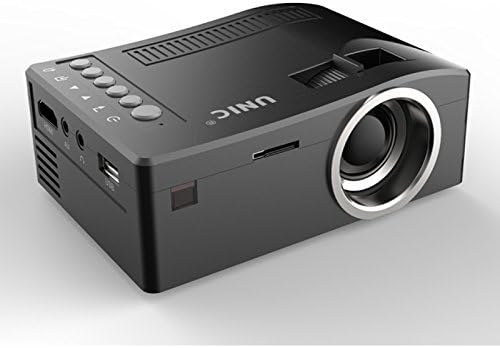
الامام والجانب view of the UNIC UC18 Mini Projector, showing the lens, ventilation, and various ports.
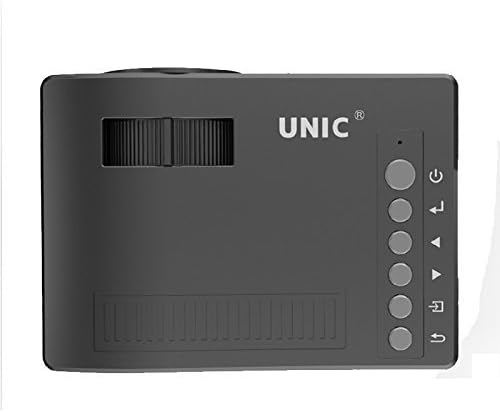
قمة view of the UNIC UC18 Mini Projector, highlighting the control buttons and focus wheel.
المنافذ والضوابط
The UNIC UC18 Mini Projector features a range of ports and controls for easy connectivity and operation:
- عدسة: يعرض الصورة على الشاشة.
- عجلة التركيز: ضبط يدوي لتحسين وضوح الصورة.
- زر الطاقة: لتشغيل جهاز العرض أو إيقاف تشغيله.
- زر القائمة: يتم الوصول إلى قائمة إعدادات جهاز العرض.
- أزرار التنقل (أعلى/أسفل/يسار/يمين): يتم استخدامه للتنقل بين القوائم وضبط الإعدادات.
- زر موافق: تأكيد الاختيارات في القائمة.
- زر المصدر: Selects the input source (HDMI, USB, AV, TF).
- منفذ USB: يُستخدم لتوصيل أجهزة التخزين USB لتشغيل الوسائط.
- منفذ HDMI: Connects to HDMI-enabled devices like laptops, gaming consoles, or media players.
- منفذ AV: Connects to devices using the included 3-in-1 AV cable.
- فتحة بطاقة TF: Inserts a TF (Micro SD) card for media playback.
- مقبس سماعة رأس مقاس 3.5 ملم: Connects external headphones or speakers.
- استقبال الأشعة تحت الحمراء: يستقبل اشارات من جهاز التحكم عن بعد.
5. الإعداد
5.1 توصيل الطاقة
- قم بتوصيل كابل الطاقة بمنفذ إدخال الطاقة الخاص بجهاز العرض.
- قم بتوصيل الطرف الآخر من كابل الطاقة بمنفذ طاقة مناسب.
- سوف يضيء مؤشر الطاقة الموجود على جهاز العرض.
5.2 توصيل أجهزة الإدخال
- HDMI: Connect an HDMI cable from your source device (e.g., laptop, DVD player) to the projector's HDMI port.
- USB: أدخل محرك أقراص فلاش USB في منفذ USB.
- من: Use the provided 3-in-1 AV cable to connect to devices with AV output. Match the yellow, white, and red connectors.
- بطاقة TF: Insert a TF (Micro SD) card into the TF card slot.
5.3 وضع جهاز العرض
Place the projector on a stable, flat surface. For optimal image quality, position the projector perpendicular to the projection surface (wall or screen). The throw distance can range from 0.48 to 2.43 meters, producing a picture size from 12 to 66 inches.
6. تعليمات التشغيل
6.1 تشغيل/إيقاف التشغيل
Press the Power button on the projector or the remote control to turn the device on or off.
6.2 ضبط التركيز
After powering on, if the image appears blurry, rotate the manual focus wheel located near the lens until the image becomes clear and sharp.

Close-up of the manual focus wheel on the UNIC UC18 Mini Projector, located near the lens.
6.3 تحديد مصدر الإدخال
Press the 'Source' button on the projector or remote control. Use the navigation buttons to select your desired input source (HDMI, USB, AV, TF) and press 'OK' to confirm.
6.4 تصفح القائمة
Press the 'Menu' button to access the projector's settings. Use the navigation buttons to browse options and 'OK' to select. Press 'Menu' again to exit.
6.5 إخراج الصوت
The projector has a built-in speaker. For private listening or connecting to external audio systems, plug headphones or external speakers into the 3.5mm headphone jack.
7. الصيانة
7.1 تنظيف العدسة
استخدم قطعة قماش ناعمة وخالية من الوبر مصممة خصيصًا للعدسات البصرية. امسح العدسة برفق لإزالة الغبار أو البقع. تجنب استخدام المواد الكاشطة أو المواد الكيميائية القاسية.
7.2 تنظيف جسم جهاز العرض
امسح الجزء الخارجي من جهاز العرض بقطعة قماش ناعمة وجافة. لا تستخدم المنظفات السائلة أو المذيبات.
7.3 التخزين
عند عدم استخدام جهاز العرض لفترات طويلة، يُحفظ في مكان بارد وجاف، بعيداً عن أشعة الشمس المباشرة ودرجات الحرارة القصوى. غطِّ العدسة لحمايتها من الغبار.
8. استكشاف الأخطاء وإصلاحها
| مشكلة | السبب المحتمل | حل |
|---|---|---|
| لا توجد صورة معروضة | Power not connected; Incorrect input source; Loose cable connection | Check power cable; Select correct input source; Reconnect cables securely |
| الصورة ضبابية | لم يتم ضبط التركيز؛ جهاز العرض قريب جدًا/بعيد جدًا | Adjust the focus wheel; Reposition the projector within recommended throw distance |
| لا يوجد صوت | Volume too low; Muted; Audio cable not connected; Source device audio issue | Increase volume; Unmute; Check audio cable connection; Verify audio output on source device |
| جهاز التحكم عن بعد لا يعمل | Batteries low/incorrectly inserted; Obstruction between remote and projector | Replace batteries (lithium battery required); Ensure clear line of sight to IR receiver |
| ارتفاع درجة حرارة جهاز العرض | انسداد التهوية؛ الاستخدام المطول في بيئة حارة | Ensure ventilation openings are clear; Operate in a well-ventilated area; Allow to cool down |
9. المواصفات
المواصفات الفنية
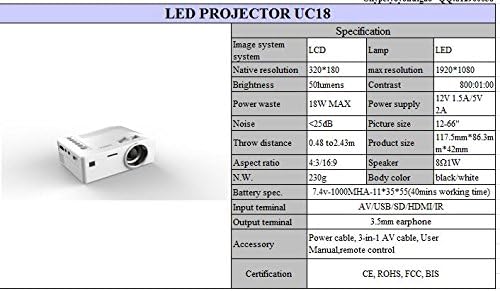
Detailed technical specifications for the UNIC UC18 Mini Projector, including resolution, contrast, and dimensions.
| ميزة | مواصفة |
|---|---|
| ماركة | مركز الأمم المتحدة للإعلام |
| اسم الموديل | UC18 |
| تكنولوجيا العرض | QVGA (LCD) |
| الدقة الأصلية | 320 × 240 بكسل |
| الحد الأقصى للدقة المدعومة | 1920 × 1080 بكسل (1080P) |
| سطوع | 50 لومن |
| نسبة التباين | 500:1 |
| نسبة العرض إلى الارتفاع | 16:9 (also supports 4:3) |
| مسافة الرمي | 0.48 متر - 2.43 متر (1.57 قدم - 7.97 قدم) |
| حجم الصورة | 12 - 66 بوصة |
| أطراف الإدخال | AV, USB, SD (TF), HDMI, IR |
| محطة الإخراج | شنومكسم سماعة جاك |
| المميزات الخاصة | مكبر صوت مدمج، محمول |
| استهلاك الطاقة | 24 واط (الحد الأقصى 18 واط) |
| مزود الطاقة | شنومكسف شنومكسا / شنومكسف شنومكسا |
| مستوى الضوضاء | <25 ديسيبل |
| أبعاد المنتج (الطول × العرض × الارتفاع) | 117.5 مم × 86.3 مم × 42 مم |
| الوزن الصافي | 230 جرام |
| نوع التركيب | حامل الحائط |
| جهاز التحكم عن بعد | Yes (battery not included) |
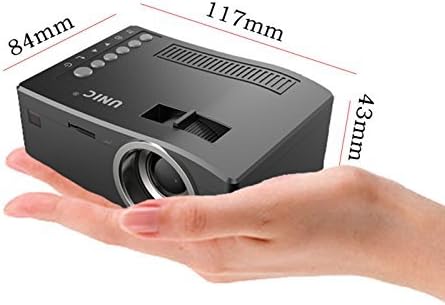
The UNIC UC18 Mini Projector held in a hand, illustrating its compact size and dimensions (117mm x 84mm x 43mm).
10. الضمان والدعم
للحصول على معلومات الضمان أو الدعم الفني، يرجى الرجوع إلى الوثائق المرفقة وقت الشراء أو الاتصال بالبائع. احتفظ بإثبات الشراء لتقديم أي مطالبات ضمان.