
مقدمة
This manual provides detailed instructions for the proper use and maintenance of your ELECTRA RC7 Air Conditioner Remote Control. Please read this manual thoroughly before operating the device to ensure optimal performance and longevity. The RC7 remote control is designed for specific Airwell, Emailair, and Electra air conditioning units.
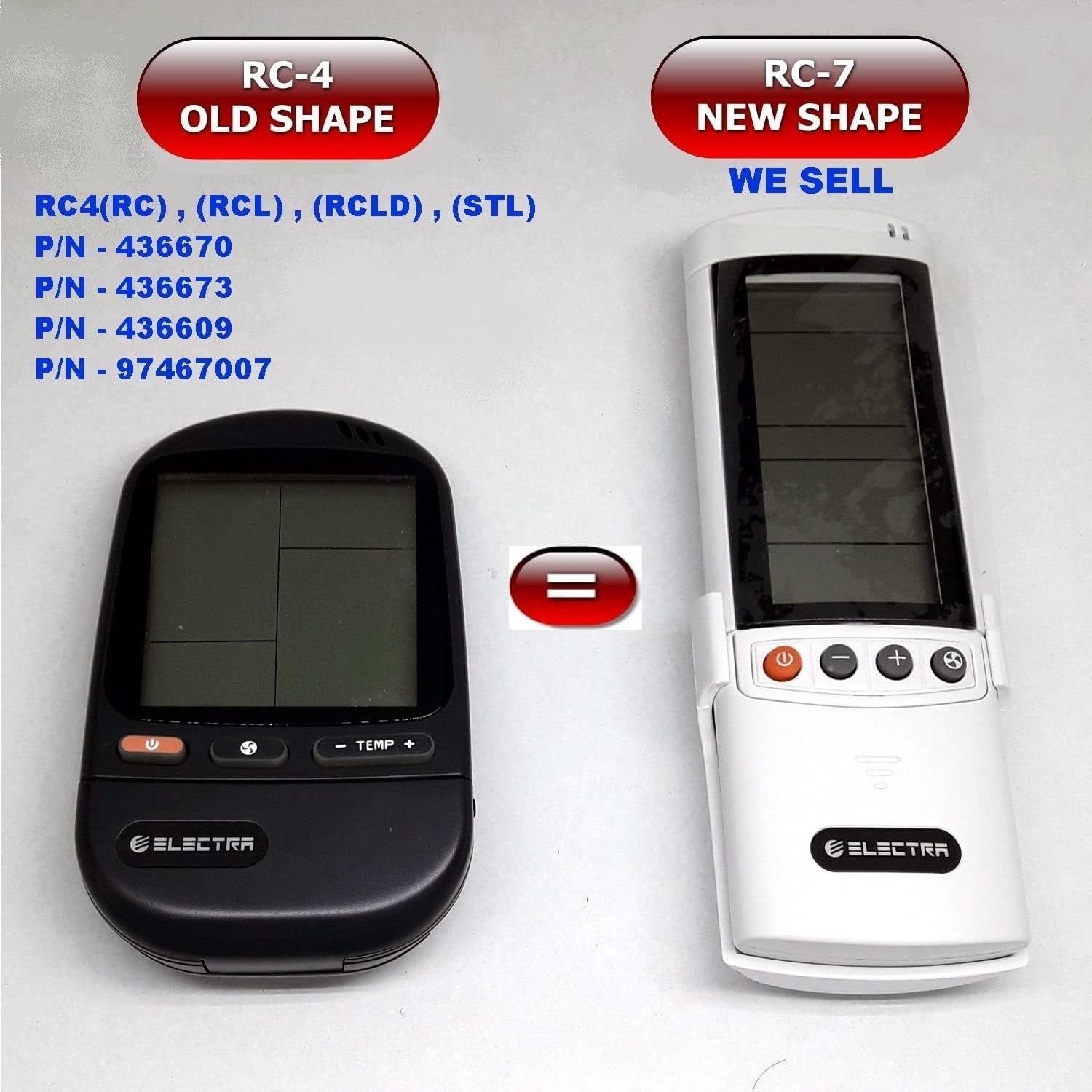
Image: Comparison of the older RC-4 model and the newer RC-7 model. This image helps users identify the correct remote control for their air conditioning unit.
محتويات الحزمة
- 1 x ELECTRA RC7 Air Conditioner Remote Control
- 1 x Wall Mount Holder (optional, may vary by package)

Image: The ELECTRA RC7 remote control shown alongside its accompanying wall mount holder, illustrating the complete package contents.
المنتج انتهىview
The ELECTRA RC7 remote control features an ergonomic design with clearly labeled buttons and a digital display for easy operation. Familiarize yourself with the layout below.
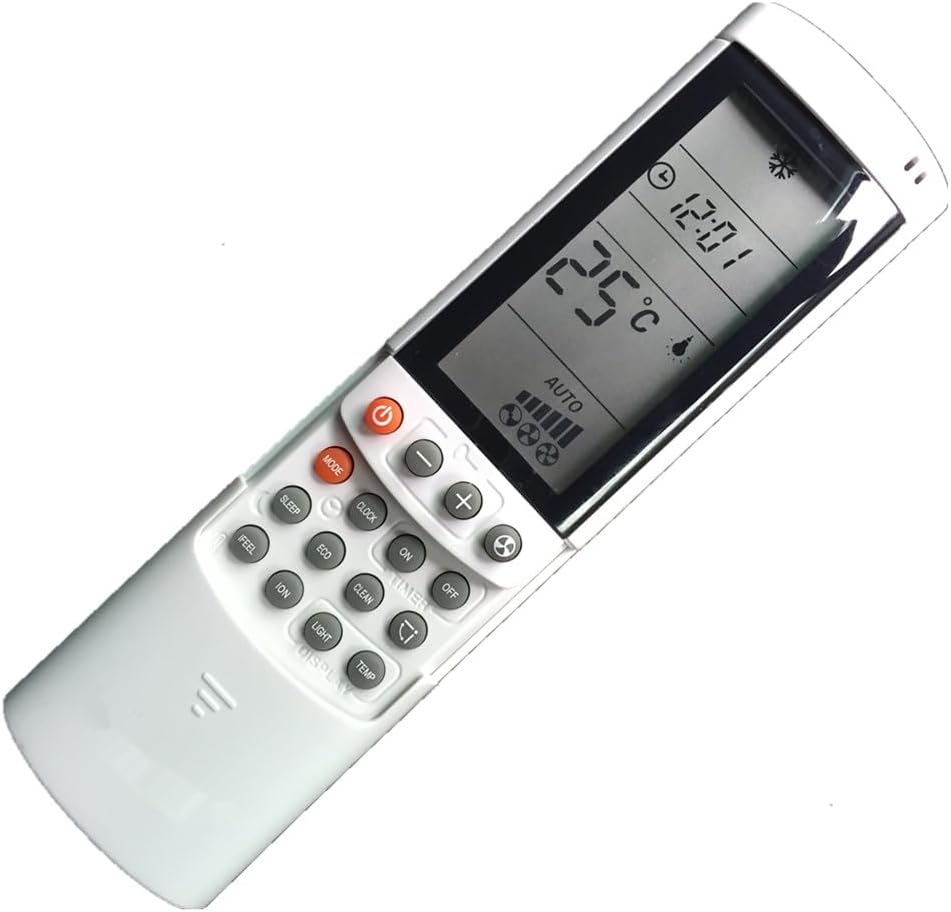
الصورة: تفصيلية view of the ELECTRA RC7 remote control, highlighting the digital display and various function buttons for air conditioner operation.
وظائف الأزرار:
- قوة (⏻): Turns the air conditioner unit On or Off.
- وضع: يقوم بالتنقل بين أوضاع التشغيل (مثل التبريد، والتدفئة، والتهوية، والتجفيف، والوضع التلقائي).
- تعيين: Used for confirming settings or entering specific menus.
- ارتفاع درجة الحرارة (+) / تحت (-): يضبط درجة الحرارة المطلوبة.
- سرعة المروحة (☁): يضبط سرعة المروحة (على سبيل المثال، منخفضة، متوسطة، عالية، تلقائي).
- المؤقت: Sets the timer for automatic On/Off operation.
- ينام: Activates or deactivates sleep mode for comfortable night operation.
- واضح: Clears current settings or cancels a function.
- يشعر: Activates a specific comfort mode based on ambient conditions.
- غرفة: Displays or sets the room temperature.
- ضوء: Controls the display light on the indoor unit.
- عرض: Toggles the remote's display backlight or unit's display.
- سابقة بمعنى البِيْئَة: Activates energy-saving mode.
- ينظف: Initiates a self-cleaning function for the indoor unit.
- ION: Activates the ionizer function (if available on the AC unit).
- تأرجح (⇄): Controls the louver swing direction.
يثبت
تركيب البطارية:
- حدد موقع غطاء حجرة البطارية في الجزء الخلفي من جهاز التحكم عن بعد.
- قم بتحريك الغطاء للأسفل أو اضغط على المزلاج لفتحه.
- أدخل بطاريتين (2) من نوع AAA، مع التأكد من تطابق الأطراف الموجبة (+) والسالبة (-) مع العلامات الموجودة داخل الحجرة.
- قم باستبدال غطاء حجرة البطارية، وتأكد من تثبيته بشكل آمن في مكانه.
ملحوظة: استخدم دائمًا بطاريات جديدة واستبدل البطاريتين في نفس الوقت. لا تخلط البطاريات القديمة والجديدة أو أنواعًا مختلفة من البطاريات.
تعليمات التشغيل
Ensure the remote control is pointed directly at the air conditioner's receiver when sending commands.
التشغيل الأساسي:
- تشغيل/إيقاف التشغيل: اضغط على قوة اضغط على الزر مرة واحدة لتشغيل الجهاز. اضغط عليه مرة أخرى لإيقاف تشغيل الجهاز.
- وضع التحديد: اضغط على وضع button repeatedly to cycle through available operating modes (e.g., Auto, Cool, Dry, Fan, Heat). The selected mode will be displayed on the remote's screen.
- ضبط درجة الحرارة: استخدم ارتفاع درجة الحرارة (+) or تحت (-) أزرار لضبط درجة الحرارة المرغوبة.
- ضبط سرعة المروحة: اضغط على سرعة المروحة button to cycle through different fan speed settings (e.g., Auto, Low, Medium, High).
الوظائف المتقدمة:
- وظيفة المؤقت: اضغط على المؤقت button to set a specific time for the unit to turn on or off. Follow the on-screen prompts to adjust the time using the temperature buttons and confirm with تعيين.
- وضع السكون: اضغط على ينام button to activate sleep mode, which typically adjusts temperature and fan speed for quiet, comfortable sleep.
- نمط الصدى: اضغط على سابقة بمعنى البِيْئَة button to engage energy-saving operation, which optimizes settings to reduce power consumption.
- وظيفة التأرجح: اضغط على يتأرجح button to activate or adjust the automatic louver swing, distributing air evenly.
صيانة
تنظيف جهاز التحكم عن بعد:
- امسح سطح جهاز التحكم عن بعد بقطعة قماش ناعمة وجافة.
- للأوساخ العنيدة، بخفة دampبللي قطعة القماش بالماء ومنظف خفيف، ثم امسحيها لتجف على الفور.
- Do not use abrasive cleaners, alcohol, or chemical solvents, as these can damage the remote's surface or internal components.
استبدال البطارية:
Replace batteries when the remote's display becomes dim or the remote fails to operate the air conditioner from a normal distance. Refer to the "Battery Installation" section under Setup for detailed instructions.
مهم: قم بإزالة البطاريات إذا لم يتم استخدام جهاز التحكم عن بعد لفترة طويلة لمنع التسرب والتلف.
استكشاف الأخطاء وإصلاحها
- جهاز التحكم عن بعد لا يستجيب:
- تأكد من إدخال البطاريات بشكل صحيح مع مراعاة القطبية الصحيحة.
- استبدل البطاريات القديمة بأخرى جديدة.
- تأكد من عدم وجود أي عوائق بين جهاز التحكم عن بعد وجهاز استقبال مكيف الهواء.
- Confirm the remote is pointed directly at the air conditioner.
- العرض باهت أو فارغ:
- قد تكون البطاريات ضعيفة. استبدلها.
- نطاق تشغيل محدود:
- Batteries may be weak. Replace them.
- Ensure no strong light sources (e.g., direct sunlight) are interfering with the signal.
تحديد
- نموذج: ار سي 7
- ماركة: ELECTRA (Compatible with Airwell, Emailair, Electra)
- نوع تحكم: التحكم بالأزرار
- ميزة خاصة: تصميم مريح
- لون: أبيض
- الحد الأقصى لعدد الأجهزة المدعومة: 1 (لكل جهاز تحكم عن بعد)
- الحد الأقصى للمدى: حوالي 10 أمتار (33 قدمًا)
- مصدر الطاقة: 2 بطاريات AAA (غير مدرجة)
الضمان والدعم
For warranty information or technical support, please refer to the documentation provided with your air conditioning unit or contact the original seller or manufacturer of the ELECTRA RC7 remote control. Keep your purchase receipt as proof of purchase.