
1. المقدمة
This manual provides detailed instructions for the setup, operation, maintenance, and troubleshooting of your EXCELVAN E300 Portable Thermal Printer. Please read this manual carefully before using the printer to ensure proper function and longevity of the device.
The EXCELVAN E300 is a compact and efficient thermal printer designed for printing receipts and tickets. It features high-speed printing, a durable print head, and versatile connectivity options including Bluetooth and USB, making it suitable for various point-of-sale (POS) environments.
2. انتهى المنتجview
2.1 محتويات العبوة
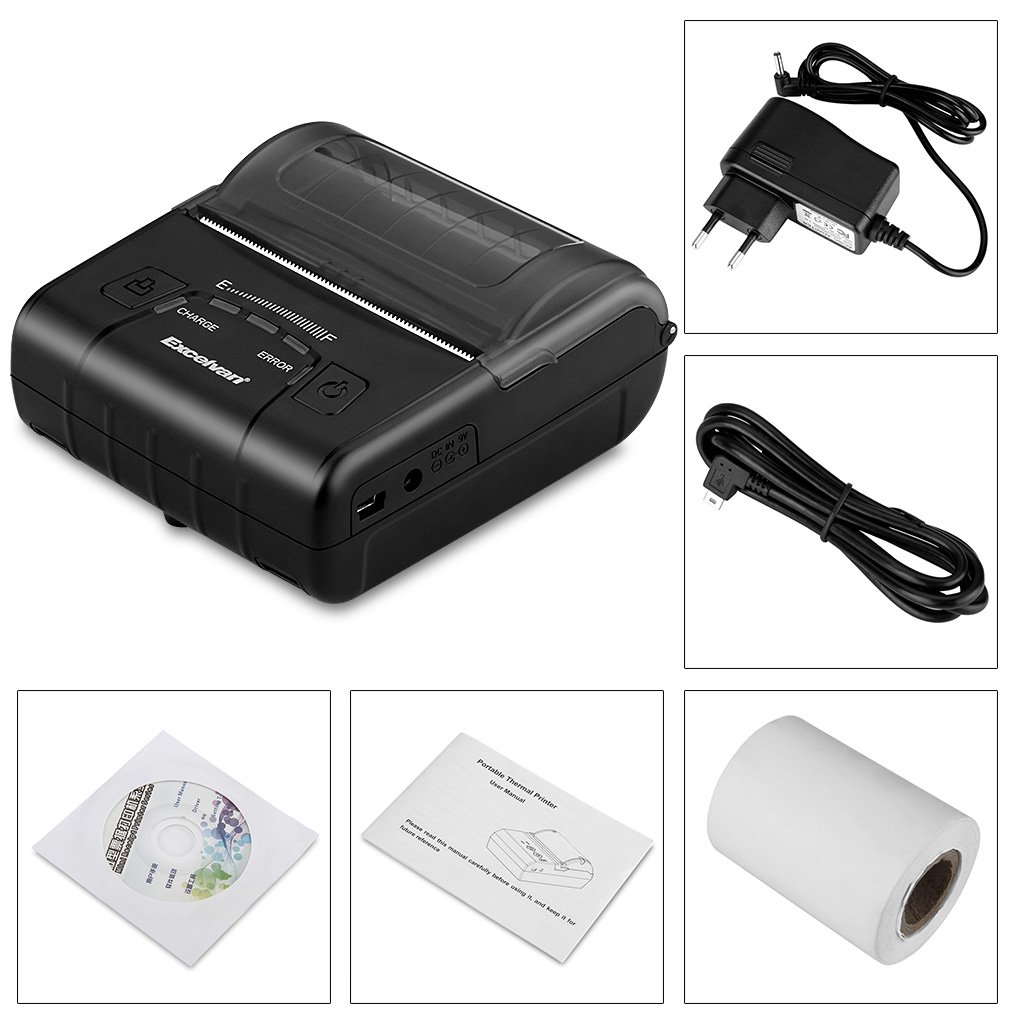
عند فتح العبوة، يرجى التأكد من وجود جميع العناصر المدرجة أدناه:
- 1 x 80mm Thermal Printer
- 1 × محول الطاقة
- 1 × بطارية ليثيوم
- 1 × كابل USB (110 سم)
- 1 × لفة ورق حراري
- 1 × دليل المستخدم (هذه الوثيقة)
- 1 x CD (containing drivers and software)
2.2 مكونات الطابعة
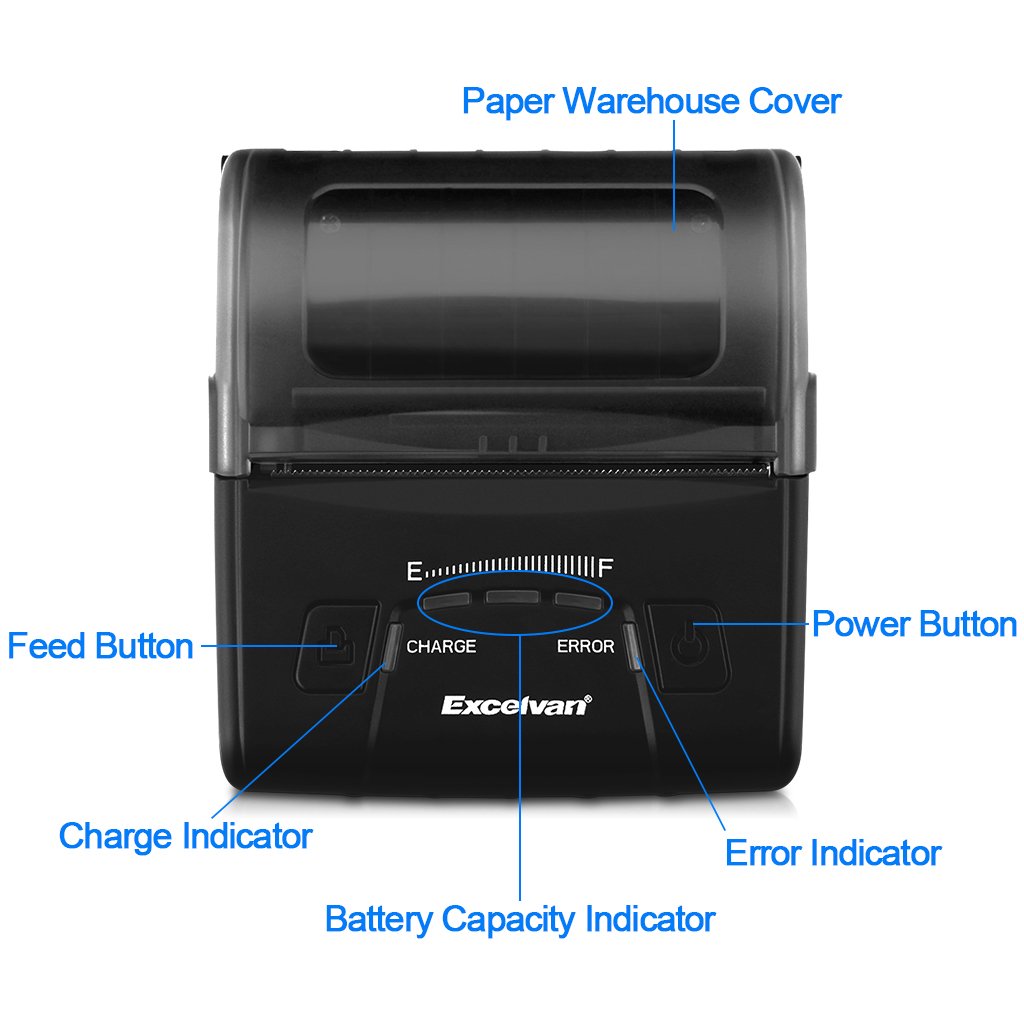
Familiarize yourself with the main components of your EXCELVAN E300 printer:

الشكل 1: أمام view of the EXCELVAN E300 printer with key components labeled.
- Paper Warehouse Cover: Protects the paper roll compartment.
- زر التغذية: Advances the paper.
- مؤشر الشحن: يضيء عند شحن البطارية.
- مؤشر سعة البطارية: يظهر مستوى البطارية الحالي.
- مؤشر الخطأ: Lights up to indicate an error (e.g., paper out, cover open).
- زر الطاقة: يقوم بتشغيل/إيقاف الطابعة.
3. الإعداد
3.1 تركيب البطارية
- Open the battery compartment cover located on the bottom of the printer.
- أدخل بطارية الليثيوم المرفقة، مع التأكد من محاذاة نقاط التلامس بشكل صحيح.
- مهم: Remove any insulating tape from the battery contacts before installation or charging.
الشكل 2: Battery installation and warning to remove insulating tape.
- أغلق غطاء حجرة البطارية جيدًا.
3.2 شحن البطارية
Before first use, fully charge the printer battery.
- Connect the power adapter to the printer's DC IN 9V port.
- قم بتوصيل محول الطاقة بمأخذ الحائط.
- The Charge Indicator light will illuminate during charging. It will turn off or change color (depending on model) when fully charged.
- ملحوظة: The USB cable is for data connection to a computer only and does not charge the device.
الشكل 3: Charging port and USB port. Use the power adapter for charging.
3.3 تحميل الورق الحراري
تستخدم الطابعة لفائف ورق حراري بعرض 80 مم.
- Open the Paper Warehouse Cover by gently lifting it.
- Insert the thermal paper roll into the compartment, ensuring the paper feeds from the bottom and the leading edge comes out towards the front of the printer.
- اسحب كمية صغيرة من الورق إلى ما بعد حافة القطع.
- Close the Paper Warehouse Cover firmly until it clicks into place.
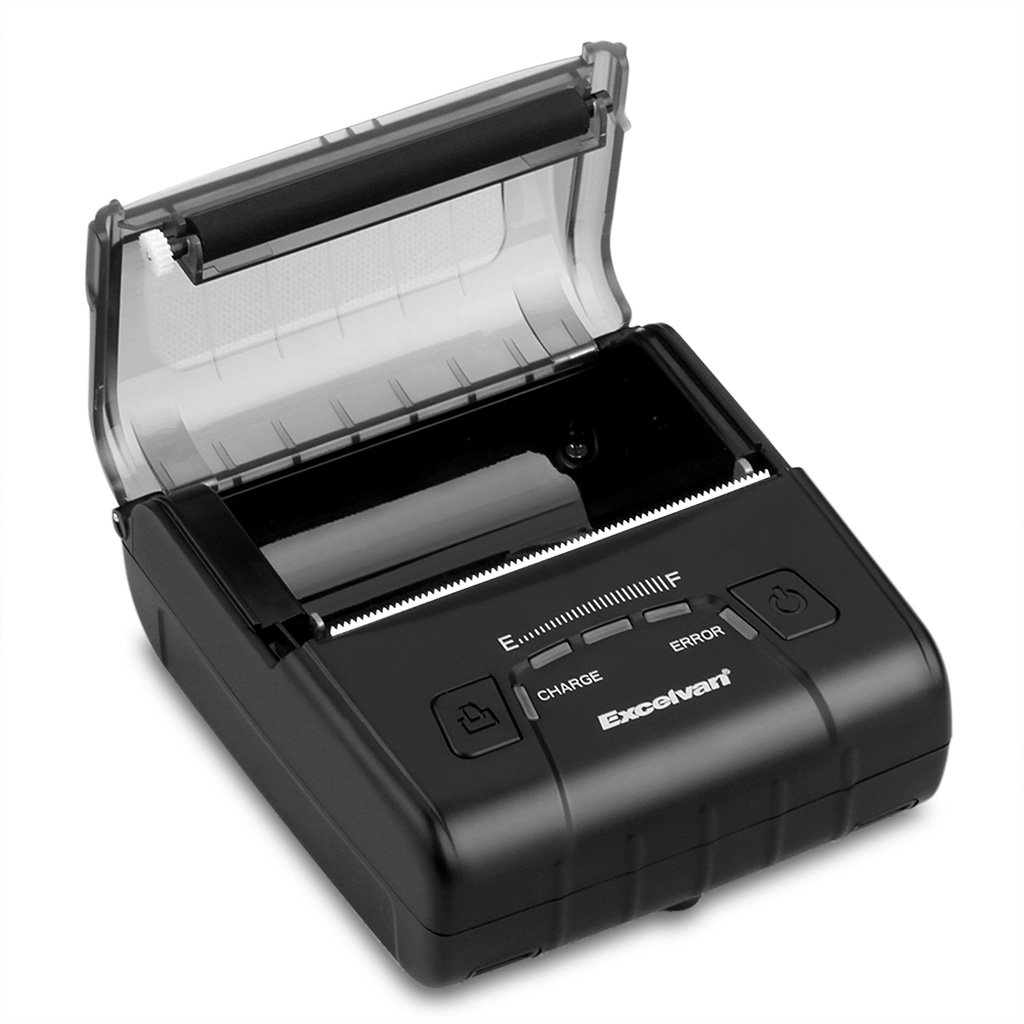
الشكل 4: Loading thermal paper into the printer.
4. تعليمات التشغيل
4.1 تشغيل/إيقاف التشغيل
- لتشغيل: اضغط مع الاستمرار على زر التشغيل حتى تضيء مؤشرات الإضاءة.
- لإيقاف التشغيل: اضغط مع الاستمرار على زر التشغيل حتى تنطفئ أضواء المؤشر.
4.2 تثبيت برنامج التشغيل
Install the appropriate drivers for your operating system from the provided CD or download them from the official EXCELVAN webالموقع (إن وجد).
- Supported Operating Systems: Android, iOS, Linux, Windows (2000, 2003, XP, 7, 8, 8.1, 10).
4.3 توصيل الطابعة
The EXCELVAN E300 supports both Bluetooth and USB connectivity.
4.3.1 اتصال البلوتوث
- تأكد من تشغيل الطابعة.
- على جهازك (الهاتف الذكي، الجهاز اللوحي، الكمبيوتر)، قم بتمكين البلوتوث وابحث عن الأجهزة المتاحة.
- Select "EXCELVAN E300" or a similar name from the list.
- Enter the pairing PIN (usually "0000" or "1234") if prompted.
- Once paired, you can select the printer from your application's print settings.
4.3.2 اتصال USB
- Connect one end of the USB cable to the printer's USB port.
- قم بتوصيل الطرف الآخر بمنفذ USB متاح على جهاز الكمبيوتر الخاص بك.
- Ensure the necessary drivers are installed. The printer should appear as an available printing device in your system settings.
4.4 الطباعة
Once connected and drivers are installed, you can initiate printing from your application.

الشكل 5: The printer in operation, producing a receipt.
- Use the Feed Button to advance paper manually if needed.
- The printer supports ESC/POS commands for advanced control.
- Graphic printing, including bitmaps and QR codes, is supported.
5. الصيانة
5.1 تنظيف رأس الطباعة
يضمن التنظيف المنتظم لرأس الطباعة جودة طباعة مثالية ويطيل عمر الطابعة.
- أطفئ الطابعة وافصل محول الطاقة.
- Open the Paper Warehouse Cover.
- استخدمي قطعة قطنية برفقampتم تنظيفها بالكحول الأيزوبروبيلي لمسح رأس الطباعة الحرارية برفق (الشريط الداكن داخل الغطاء).
- اترك رأس الطباعة يجف تمامًا قبل إغلاق الغطاء وتشغيل الطابعة.
5.2 العناية بالبطارية
- تجنب تفريغ البطارية بالكامل بشكل متكرر.
- Charge the battery regularly, even if the printer is not in use for extended periods.
- قم بتخزين الطابعة في مكان بارد وجاف عندما لا تكون قيد الاستخدام.
6. استكشاف الأخطاء وإصلاحها
This section addresses common issues you might encounter with your EXCELVAN E300 printer.
| مشكلة | السبب المحتمل | حل |
|---|---|---|
| الطابعة لا تعمل. | بطارية منخفضة أو لا توجد طاقة. | Charge the battery using the power adapter. Ensure the power adapter is correctly connected. |
| No paper output. | Paper out, paper jam, or cover not closed. | Check if the paper roll is empty and replace if necessary. Clear any paper jams. Ensure the Paper Warehouse Cover is securely closed. |
| Error Indicator is lit. | Paper out, cover open, or print head overheating. | Check paper status and cover. If the printer has been printing continuously, allow it to cool down. |
| جودة طباعة رديئة. | Dirty print head, low battery, or incorrect paper. | Clean the print head (see Section 5.1). Ensure the battery is sufficiently charged. Use high-quality thermal paper. |
| لا يمكن الاتصال عبر البلوتوث. | Bluetooth not enabled, incorrect pairing, or interference. | Ensure Bluetooth is enabled on both devices. Re-attempt pairing. Move closer to the printer and away from other wireless devices. |
7. المواصفات
Detailed technical specifications for the EXCELVAN E300 Thermal Printer:
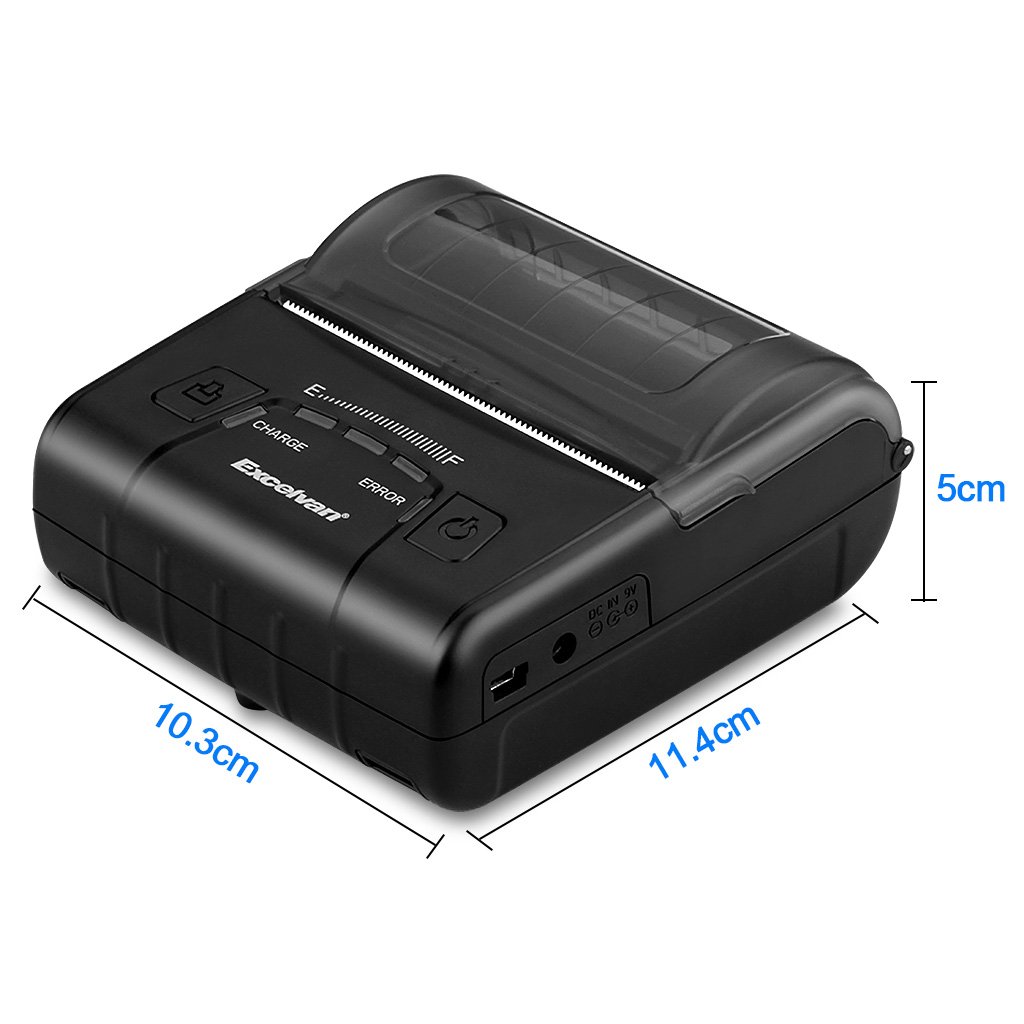
الشكل 6: EXCELVAN E300 Printer Dimensions.
| ميزة | مواصفة |
|---|---|
| طريقة الطباعة | خط الطباعة الحرارية |
| عرض الطباعة الفعال | 72 ملم |
| دقة | 384 نقطة / خط |
| سرعة الطباعة | 90 مم/ثانية |
| الواجهة | يو اس بي، بلوتوث |
| نوع الورق | ورق حراري |
| عرض الورق | 79.5 ± 0.5 ملم |
| قطر الورق | ≤ 43 mm (40 mm recommended) |
| الأوامر | ESC/POS compatible |
| مزود الطاقة | بطارية ليثيوم بوليمر قابلة للشحن |
| سعة البطارية | 2500 ماه / 7.4 الخامس |
| مخرج محول الطاقة | 9.0 فولت / 2 أمبير |
| برنامج التشغيل | Android, iOS, Linux, Win2000/2003/XP/7/8/8.1/10 |
| حياة رأس الطباعة | 50 km (Print Density ≤ 12.5) |
| درجة حرارة التشغيل | 5 درجة مئوية ~ 45 درجة مئوية |
| رطوبة التشغيل | 10% ~ 80% |
| الأبعاد (الطول × العرض × الارتفاع) | 11 × 5 × 10 سم (تقريبًا) |
| وزن | 285 جرام |
8. الضمان والدعم
8.1 معلومات الضمان
The EXCELVAN E300 printer comes with a standard manufacturer's warranty. Please refer to the warranty card included in your package or contact your retailer for specific terms and conditions regarding warranty coverage and duration.
8.2 دعم العملاء
For technical assistance, troubleshooting not covered in this manual, or inquiries about your product, please contact EXCELVAN customer support or your authorized dealer. Contact information can typically be found on the product packaging or the official EXCELVAN webموقع.