
1. انتهى المنتجview
The Excelvan Wireless Weather Station (Model AOK-5061A) is designed to provide accurate indoor and outdoor temperature and humidity readings, along with weather forecasts and an alarm clock function. It features a large, colorful LCD display with LED backlight for easy readability.
المميزات الرئيسية:
- Indoor/Outdoor Temperature and Humidity Measurement
- Weather Forecast with 5 Icons (Sunny, Partially Sunny, Cloudy, Rain, Heavy Rain)
- DCF Radio-Controlled Clock with Manual Setting
- Alarm with Snooze Function
- Large Color LCD Display with LED Backlight
- DST (Daylight Saving Time) Automatic Update
- Wireless Outdoor Sensor with up to 50m range

الشكل 1: الجبهة view of the Excelvan Wireless Weather Station main unit, displaying weather forecast, outdoor/indoor temperature and humidity, and time.
2. دليل الإعداد
2.1 محتويات العبوة
قبل البدء في عملية التركيب، تأكد من وجود جميع العناصر في العبوة:
- 1 × الوحدة الرئيسية لمحطة الطقس
- مستشعر لاسلكي واحد
- شنومكس x أس محول الطاقة
- 1 × دليل المستخدم

Figure 2: The complete package contents, including the main weather station unit, wireless remote sensor, power adapter, and user manual.
2.2 تشغيل الوحدة الرئيسية
- تركيب البطارية (اختياري): Open the battery compartment on the back of the main unit. Insert 3 x 1.5V AA batteries (not included), ensuring correct polarity. The LED backlight will stay on for 5 minutes when powered by batteries.
- AC Power Adapter (Recommended): For continuous backlight, connect the provided AC power adapter (4.5V, 150mA) to the main unit's power input and then plug it into a wall outlet.

الشكل 3: خلفي view of the main unit showing the battery compartment with the cover removed, ready for battery insertion.

الشكل 4: خلفي view of the main unit with the AC power adapter connected, illustrating the power input port.
2.3 Powering the Wireless Remote Sensor
- Open the battery compartment of the wireless remote sensor.
- أدخل 2 بطاريات AAA بجهد 1.5 فولت (غير مرفقة)، مع التأكد من القطبية الصحيحة.
- أغلق حجرة البطارية بشكل محكم.

Figure 5: The wireless remote sensor, showing its display and the battery compartment on the back.
2.4 وضع المستشعر
- The main unit is intended for indoor use only.
- Place the wireless remote sensor outdoors in a sheltered area, away from direct sunlight and rain, to ensure accurate readings.
- Ensure the sensor is within 50 meters (open space) of the main unit for optimal signal reception.
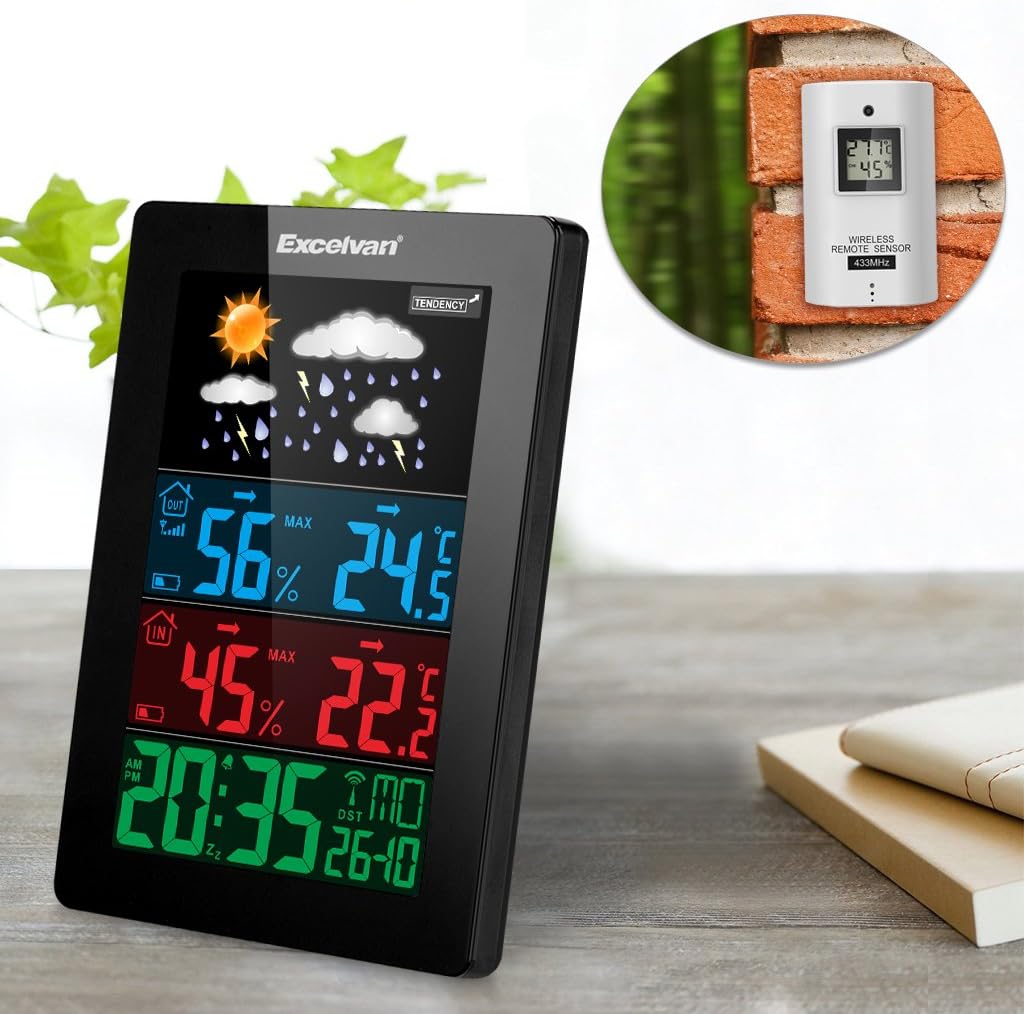
Figure 6: An illustration showing the main weather station unit indoors and the wireless remote sensor mounted on an outdoor wall.

Figure 7: A diagram highlighting the effective wireless transmission distance of 50 meters between the main unit and the remote sensor.
3. تعليمات التشغيل
3.1 المزامنة الأولية
After powering both units, the main unit will automatically attempt to synchronize with the remote sensor and receive the DCF radio-controlled time signal. This process may take a few minutes.
3.2 عرض أكثرview
تعرض شاشة LCD الكبيرة معلومات متنوعة:
- القسم العلوي: Weather forecast icons (sunny, cloudy, rainy, etc.) and weather tendency indicator.
- Middle-Top Section (Blue): Outdoor humidity and temperature.
- Middle-Bottom Section (Red): Indoor humidity and temperature.
- Bottom Section (Green): Current time (12/24 hour format), day of the week, and date.
Figure 8: Close-up of the main unit's display, illustrating the different data sections for weather, outdoor/indoor conditions, and time.
3.3 ضبط الوقت والتاريخ يدوياً
While the unit is radio-controlled, manual adjustments can be made:
- اضغط على وضع زر للتنقل بين أوضاع العرض.
- امسك وضع button for a few seconds to enter time setting mode.
- استخدم + و - أزرار لضبط القيم.
- يضعط وضع again to confirm and move to the next setting (e.g., hour, minute, year, month, day, language for day of week).
3.4 وظيفة التنبيه والغفوة
- اضغط على إنذار زر ل view or set the alarm time.
- امسك إنذار استخدم الزر للدخول إلى وضع ضبط المنبه. + و - للتعديل.
- لتنشيط/إلغاء تنشيط التنبيه، اضغط على إنذار اضغط الزر لفترة وجيزة. سيظهر/يختفي رمز التنبيه على الشاشة.
- عندما يصدر صوت التنبيه، المس غفوة / ضوء button on top of the unit to activate the snooze function. The alarm will sound again after a few minutes.
- To stop the alarm completely, press any other button.

Figure 9: Top edge of the main unit, highlighting the "SNOOZE/LIGHT" touch-sensitive button for alarm snooze and backlight activation.
3.5 اختيار وحدة درجة الحرارة
اضغط على - زر للتبديل بين وحدات قياس درجة الحرارة المئوية (°C) والفهرنهايتية (°F).
3.6 توقعات الطقس
The weather station predicts weather conditions based on atmospheric pressure changes. The icons (sunny, partially sunny, cloudy, rain, heavy rain) indicate the forecast for the next 12-24 hours, not the current weather.
4. الصيانة
- تنظيف: امسح الوحدة الرئيسية والمستشعر بقطعة قماش ناعمة و...amp القماش. لا تستخدم المنظفات أو المذيبات الكاشطة.
- استبدال البطارية: Replace batteries in both the main unit and the remote sensor when the low battery indicator appears on the display. Ensure correct polarity.
- وضع الاستشعار: Periodically check the outdoor sensor's placement to ensure it remains sheltered and within range.
- تخزين: في حالة تخزين الجهاز لفترة طويلة، قم بإزالة جميع البطاريات لمنع التسرب.
5. استكشاف الأخطاء وإصلاحها
| مشكلة | السبب المحتمل | حل |
|---|---|---|
| لا توجد قراءة لدرجة الحرارة والرطوبة الخارجية. |
|
|
| عرض الوقت غير صحيح. |
|
|
| العرض باهت أو فارغ. |
|
|
6. المواصفات
| ميزة | التفاصيل |
|---|---|
| ساعة يتم التحكم بها عن طريق الراديو | DCF77 |
| نطاق درجة الحرارة الداخلية | 0 درجة مئوية إلى +50 درجة مئوية (32 درجة فهرنهايت إلى 122 درجة فهرنهايت) |
| نطاق درجة الحرارة الخارجية | -20 درجة مئوية إلى +60 درجة مئوية (-4 درجة فهرنهايت إلى 140 درجة فهرنهايت) |
| دقة قياس درجة الحرارة | ±2 درجة مئوية |
| نطاق الرطوبة الداخلية/الخارجية | 20-90٪ رطوبة نسبية |
| قرار الرطوبة | 1% |
| Wireless Sensor Frequency | 433 ميجا هرتز |
| نطاق الإشارة اللاسلكية | تصل إلى 50 متر (مساحة مفتوحة) |
| Probe Cable Length (for external probe, if applicable) | 1 متر |
| Waterproof Level of Sensor | IPX3 |
| Main Station Power | 3 x 1.5V AA batteries (not included) or 4.5V, 150mA AC adapter (included) |
| طاقة مستشعر عن بعد | 2 × 1.5 فولت بطاريات AAA (غير متضمنة) |
| Main Station Dimensions | 148 × 110 × 30 ملم |
| Main Station Weight (without batteries) | 242 جرام |
| Remote Sensor Dimensions | 60 × 100 × 20 ملم |
| Remote Sensor Weight (without batteries) | 50 جرام |
| Day of Week Languages | German, English, Italian, French, Dutch, Spanish, Danish |
7. الضمان والدعم
For warranty information or technical support, please refer to the documentation provided with your purchase or contact Excelvan customer service through their official webالموقع أو بائع التجزئة الخاص بك.
ملاحظة: هذا الدليل لأغراض إعلامية فقط. المواصفات قابلة للتغيير دون إشعار مسبق.