
1. المقدمة
This manual provides detailed instructions for the installation, operation, and maintenance of your Wipro 4.3-inch iview Video Door Phone. Please read this manual thoroughly before using the product to ensure proper function and safety. The Wipro iview-mini is a compact and secure video door phone system featuring a 4.3-inch TFT color monitor and a high-resolution HD-CMOS camera for clear visuals. It includes an exclusive SOS alarm system for enhanced security and an outdoor unit with IP55 protection.
2. معلومات السلامة
- Ensure all wiring is performed by a qualified technician to prevent electrical hazards.
- Do not expose the indoor monitor to direct sunlight, high temperatures, or high humidity.
- Keep the outdoor unit free from obstructions that may block the camera's view or microphone.
- Use only the provided power supply adapter.
- لا تحاول تفكيك أو إصلاح الجهاز بنفسك. اتصل بفني صيانة مؤهل.
- Clean the units with a soft, dry cloth. Avoid using abrasive cleaners or solvents.
3. محتويات العبوة
تأكد من تضمين جميع العناصر التالية في الحزمة الخاصة بك:
- 4.3" TFT color monitor (Indoor Unit)
- Door camera unit (Outdoor Unit)
- محول التيار الكهربائي
- دليل المستخدم
4. انتهى المنتجview
4.1 الوحدة الخارجية
The outdoor unit houses the HD-CMOS camera, microphone, speaker, and call button. It is designed for outdoor installation and features IP55 protection against dust and water splashes.

الشكل 4.1: أمام view of the Wipro iview outdoor unit. This image shows the camera lens, speaker grille, call button, and Wipro branding.

الشكل 4.2: جانب view of the Wipro iview outdoor unit, illustrating its compact design and mounting bracket.
4.2 شاشة داخلية
The indoor monitor features a 4.3-inch TFT color display for viewing the outdoor camera feed. It includes buttons for various functions such as monitoring, answering calls, and activating the SOS alarm.
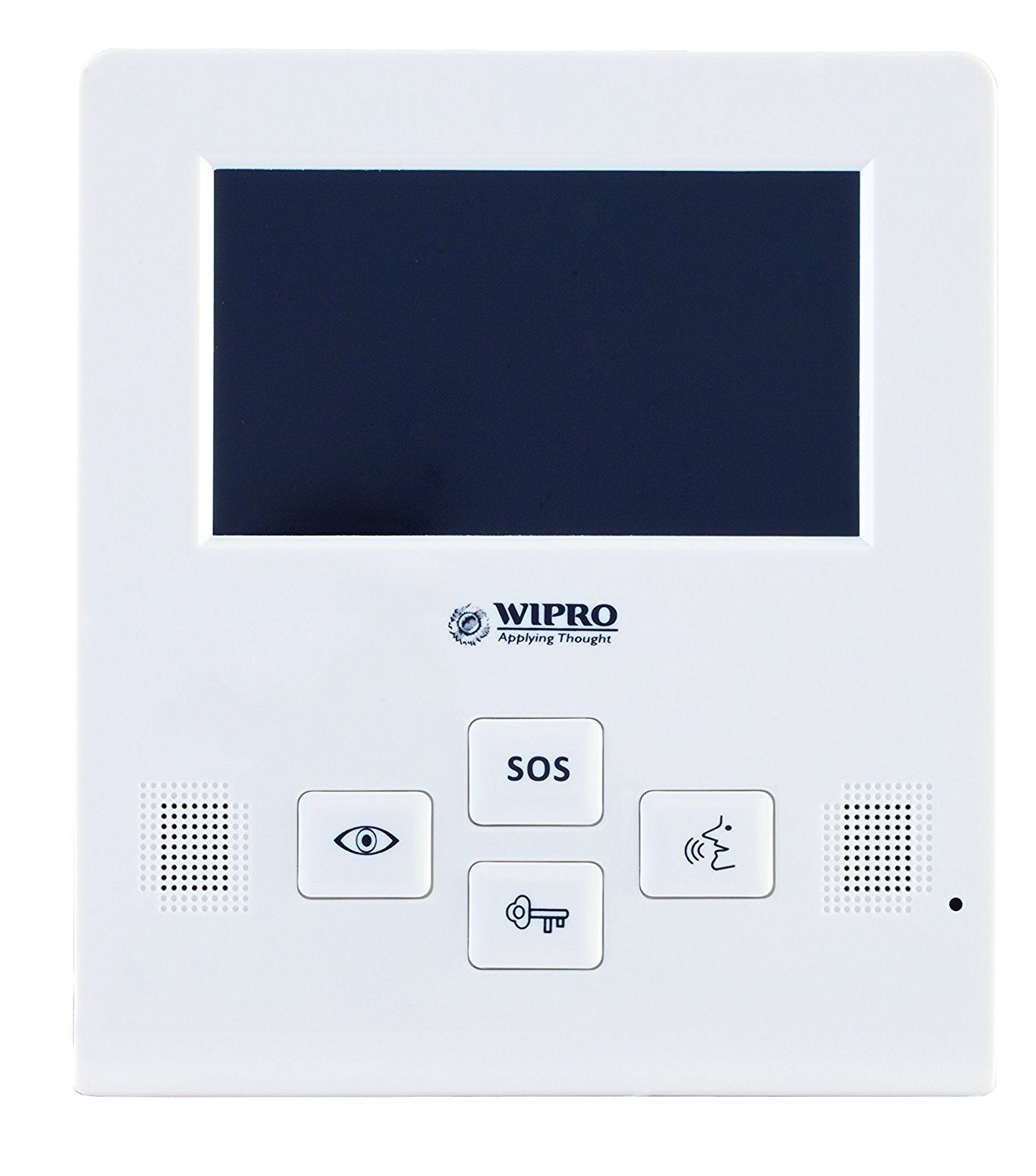
الشكل 4.3: أمام view of the Wipro iview indoor monitor. This image displays the 4.3-inch screen, speaker grilles, and control buttons including SOS, view, talk, and unlock.
5. الإعداد والتثبيت
Proper installation is crucial for optimal performance. It is recommended to have the installation performed by a qualified technician.
5.1 Mounting the Outdoor Unit
- Choose a suitable location near your door, ensuring the camera has a clear view of the visitor's face. The recommended height is approximately 1.5 meters (5 feet) from the ground.
- حدد نقاط الحفر لتركيب دعامة التثبيت.
- قم بثقب الجدران وأدخل سدادات الحائط إذا لزم الأمر.
- قم بتثبيت كتيفة التثبيت على الحائط.
- Connect the wiring from the outdoor unit to the indoor monitor as per the wiring diagram (refer to section 5.3).
- Attach the outdoor unit to the mounting bracket.
5.2 تركيب الشاشة الداخلية
- Select a convenient indoor location, typically near the main entrance, where the monitor is easily accessible.
- Mark the drilling points for the indoor monitor's mounting bracket.
- Drill holes and secure the bracket to the wall.
- Connect the wiring from the outdoor unit and the power adapter to the indoor monitor.
- Mount the indoor monitor onto its bracket.
5.3 توصيلات الأسلاك
A typical wiring setup involves connecting the outdoor unit to the indoor monitor using a multi-core cable. Ensure correct polarity for power and signal lines. Consult the detailed wiring diagram provided in the separate installation guide or contact customer support for specific wiring instructions.
ملحوظة: Incorrect wiring can damage the device and void the warranty.
5.4 التشغيل
Once all connections are secure, plug the power supply adapter into a wall outlet and connect it to the indoor monitor. The monitor should power on, and you should see the Wipro logo or a standby screen.
6. تعليمات التشغيل
6.1 الرد على المكالمة
- When a visitor presses the call button on the outdoor unit, the indoor monitor will ring and display the visitor's image.
- اضغط على يتحدث button (often indicated by a microphone icon) on the indoor monitor to establish two-way audio communication with the visitor.
- لإنهاء المحادثة، اضغط على يتحدث button again or wait for the call to automatically disconnect after a set period.
6.2 المراقبة
أنت تستطيع view the outdoor camera feed at any time without a visitor pressing the call button.
- اضغط على View button (often indicated by an eye icon) on the indoor monitor. The screen will display the live feed from the outdoor camera.
- اضغط على View button again to turn off the monitoring function.
6.3 Unlocking (If Connected to an Electronic Lock)
If your video door phone system is connected to an electronic door lock (purchased separately), you can unlock the door remotely.
- أثناء المكالمة أو أثناء المراقبة، اضغط على فتح button (often indicated by a key icon) on the indoor monitor.
- The door will unlock for a brief period.
6.4 Using the SOS Alarm
The Wipro iview features a built-in SOS alarm for emergencies.
- In case of an emergency or unwanted intruder, press and hold the نداء استغاثة button on the indoor monitor.
- The system will activate an audible alarm to deter intruders and alert others.
- Refer to the full installation guide for details on how the SOS alarm integrates with other security systems, if applicable.
7. الصيانة
- تنظيف: Use a soft, dry, lint-free cloth to clean the indoor monitor screen and the outdoor unit's camera lens. Do not use liquid or aerosol cleaners, as they may damage the finish or internal components.
- العناية بالوحدة الخارجية: Regularly check the outdoor unit for any obstructions (e.g., dirt, spiderwebs) that might block the camera or microphone. Ensure the unit is securely mounted.
- مزود الطاقة: Ensure the power adapter is not damaged and is securely connected.
8. استكشاف الأخطاء وإصلاحها
| مشكلة | السبب المحتمل | حل |
|---|---|---|
| لا توجد صورة على الشاشة الداخلية. |
|
|
| لا يوجد صوت أثناء المحادثة. |
|
|
| Outdoor unit not ringing indoor monitor. |
|
|
9. المواصفات
| ميزة | التفاصيل |
|---|---|
| نموذج | iview |
| شاشة عرض داخلية | 4.3" TFT Color |
| Outdoor Unit Camera | HD-CMOS |
| Outdoor Unit Protection | IP55 |
| واتtage | 12 واط |
| مادة | بلاستيك |
| ينهي | لامع |
| لون | أبيض |
| أبعاد العنصر (الطول × العرض × الارتفاع) | 365 mm x 275 mm x 85 mm (Package dimensions, actual unit dimensions may vary) |
| وزن العنصر | 1 كجم 40 جرام |
| وزن الشحن | 1.04 كيلوغرام |
10. الضمان والدعم
The Wipro 4.3-inch iview Video Door Phone comes with a ضمان لمدة 1 سنوات يسري الضمان على المنتج من تاريخ الشراء. يرجى الاحتفاظ بإيصال الشراء كإثبات للضمان.
For technical support, service, or warranty claims, please contact Wipro customer service. Contact details can typically be found on the Wipro official webالموقع أو على عبوة منتجك.