
KeylessOption LHJ011
KeylessOption Keyless Entry Remote Car Key Fob and Key Replacement for LHJ011 Instruction Manual
Model: LHJ011 | Brand: KeylessOption
مقدمة
This manual provides detailed instructions for the KeylessOption Keyless Entry Remote Car Key Fob and Key Replacement, model LHJ011. It covers product overview, setup, programming, maintenance, and specifications to ensure proper use and functionality.
المنتج انتهىview
The KeylessOption LHJ011 is a replacement keyless entry remote and key designed to function identically to your vehicle's original equipment. It includes a fully tested remote with a pre-installed battery and an uncut key blade.
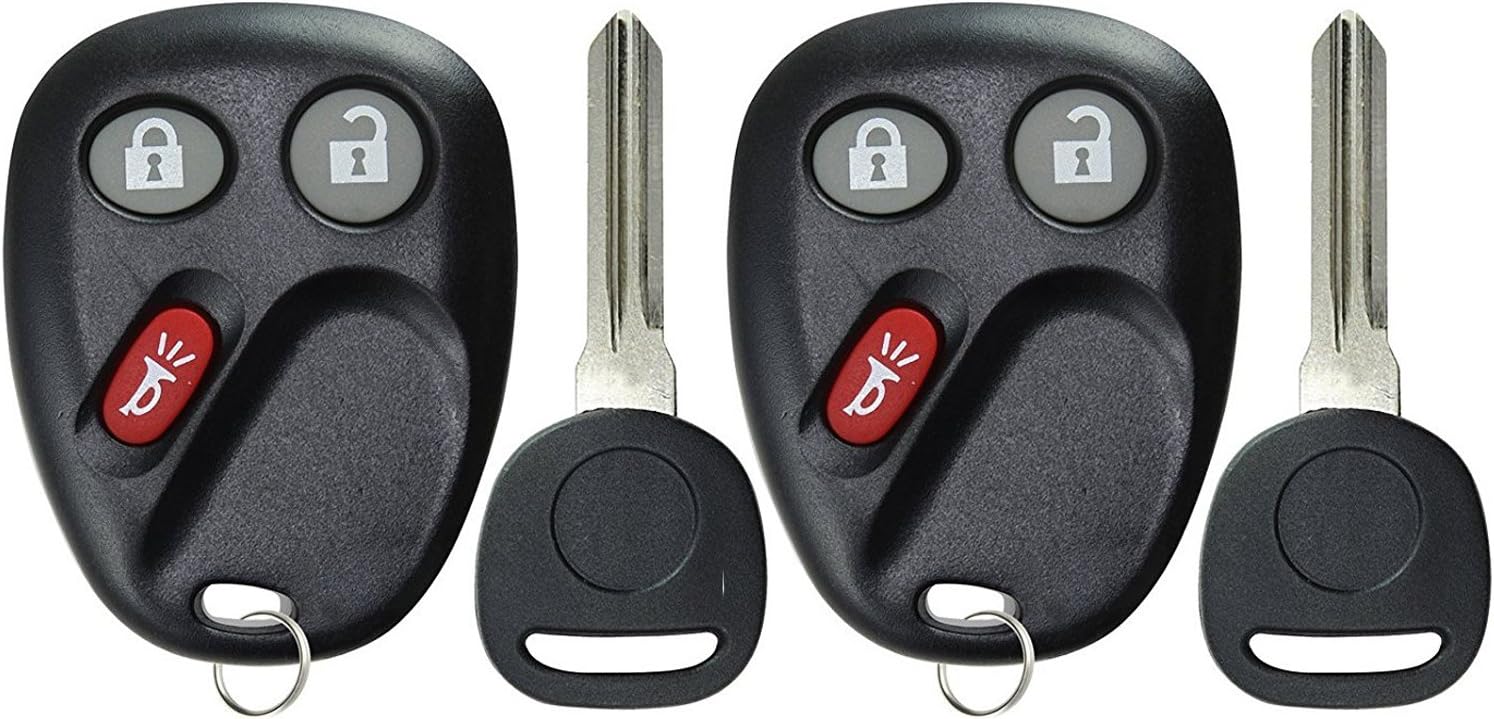
الصورة: الجبهة view of two KeylessOption LHJ011 key fobs, each featuring lock and unlock buttons, a red panic button, and an attached uncut key blade. These units are designed for keyless entry and vehicle ignition.

الصورة: الخلف view of two KeylessOption LHJ011 key fobs, showing the smooth, black plastic casing and the key ring attachment point. This view highlights the compact design of the remote units.
Setup and Key Cutting
Before programming the remote functions, the included key blade must be cut to match your vehicle's original key. This process is typically performed by a professional locksmith or an automotive dealership.
- نسخ المفاتيح: Take the new key fob and your original vehicle key to a qualified locksmith or dealership. They will cut the new key blade to match your existing key. This is essential for starting the vehicle.
- تركيب البطارية: The remote comes with a CR2032 battery pre-installed. If replacement is needed, refer to the maintenance section.
Operating Instructions: Remote Programming
The KeylessOption LHJ011 remote control functions (lock, unlock, panic) are self-programmable for many compatible vehicles. Follow these step-by-step instructions carefully. It is recommended to program all new and existing remotes in a single session.
General Programming Procedure (Example for GM Vehicles, verify specific vehicle instructions):
- تحضير: Gather all key fobs (new and existing) you wish to program. Ensure all vehicle doors are closed.
- أدخل وضع البرمجة:
- Sit in the driver's seat.
- اضغط باستمرار على فتح button on the driver's side door panel.
- While holding the UNLOCK button, insert your newly cut key into the ignition.
- Cycle the ignition to the ON position (do not start the engine), then immediately to عن، ثم العودة إلى ON، ومن ثم إلى عن مرة أخرى.
- Release the UNLOCK button on the door panel. The vehicle's door locks should cycle (lock and unlock) to confirm that the vehicle is now in programming mode.
- Program Remote(s):
- Take the first remote you wish to program (e.g., for Driver 1).
- اضغط مع الاستمرار على قفل و فتح أزرار على جهاز التحكم عن بعد.
- Continue holding these buttons until the vehicle's door locks cycle again (this may take 15 to 30 seconds, or up to 100 seconds). This confirms the remote has been programmed.
- If you have additional remotes (e.g., for Driver 2), immediately repeat the previous step for each remaining remote. Do not exit programming mode between remotes.
- الخروج من وضع البرمجة:
- Once all remotes are programmed, turn the ignition key to the ON position, then to عن.
- Open the driver's door. This action typically exits the programming mode.
- Test Remotes: Test all programmed remotes to ensure they function correctly (lock, unlock, panic). The first remote programmed will typically be assigned to Driver 1, and subsequent remotes to Driver 2, if your vehicle supports this feature.
ملحوظة: Specific programming procedures may vary slightly by vehicle make and model. Always refer to your vehicle's owner's manual or the manufacturer's recommended programming instructions if these steps do not work.
صيانة
استبدال البطارية
The KeylessOption LHJ011 remote uses one CR2032 coin cell battery. When the remote's range decreases or it stops responding, the battery may need replacement.
- Open the Fob Casing: افتح غطاء جهاز التحكم عن بعد بحذرasing. There is usually a small notch on the side where you can insert a flat-head screwdriver or a coin to gently separate the two halves.
- إزالة البطارية القديمة: Note the orientation (+/-) of the existing CR2032 battery. Gently remove it.
- أدخل بطارية جديدة: Insert a new CR2032 battery with the positive (+) side facing the same direction as the old battery.
- إغلاق جasing: قم بمحاذاة نصفي جهاز التحكم عن بعد (ج)asinواضغط عليهما بقوة معًا حتى يستقرا في مكانهما بإحكام.
- وظيفة الاختبار: Test the remote's functions (lock, unlock) to ensure the new battery is working correctly.
ملحوظة: تخلص من البطاريات القديمة بطريقة مسؤولة وفقًا للوائح المحلية.
استكشاف الأخطاء وإصلاحها
| مشكلة | السبب المحتمل | حل |
|---|---|---|
| لا يعمل جهاز التحكم عن بعد بعد البرمجة. | Incorrect programming steps, dead battery, or incompatible vehicle. |
|
| Key blade does not turn in ignition. | Key not cut correctly or damaged. |
|
| نطاق الاتصال عن بعد ضعيف. | انخفاض مستوى البطارية أو وجود تداخل بيئي. |
|
تحديد
- نموذج: إل إتش جيه011
- ماركة: خيار بدون مفتاح
- رقم قطعة الشركة المصنعة: KPT4037
- أرقام قطع الغيار الأصلية: 15132198, 15186200, 15186201, 15186203, 15186209, 21997127, 22730827, LHJ011, 10377295, 15132197
- نوع البطارية: شنومكس x كرسنومكس (وشملت)
- مادة: بلاستيك
- أبعاد المنتج: تقريبًا 4 بوصة طول × 2 بوصة عرض
- وزن السلعة: حوالي 1.58 أونصة
- نوع ملاءمة السيارة: ملاءمة خاصة للمركبة
- عدد الأزرار: 2 (Lock, Unlock) + Panic
الضمان والدعم
Each KeylessOption product includes a warranty card. For specific warranty details, please refer to the included card or contact KeylessOption customer support. Technical support is available with each purchase to assist with programming or operational questions.
For further assistance, please visit the official KeylessOption store or contact their customer service department.
KeylessOption Store: زيارة المتجر
Ask a question about this manual
Ask about setup, troubleshooting, compatibility, parts, safety, or missing instructions. Manuals+ will review the question and use this page’s manual context to help answer it.