
1. المقدمة
This manual provides detailed instructions for the installation, operation, and maintenance of your PolarLander Single DIN Multimedia Car Stereo. This versatile unit combines a car stereo, DVD player, and FM radio, offering multiple connectivity options including Bluetooth, USB, SD card, and Aux input. Please read this manual thoroughly before use to ensure proper functionality and safety.

الشكل 1: الجبهة view of the PolarLander Single DIN Multimedia Car Stereo.
2. الإعداد
2.1. محتويات العبوة
قبل التثبيت، تأكد من وجود جميع المكونات:
- 1 x In-dash Car DVD Player
- 1 × جهاز التحكم عن بعد
- 1 × كابل الطاقة
- 1 x أداة التثبيت
- 1 × دليل باللغة الإنجليزية
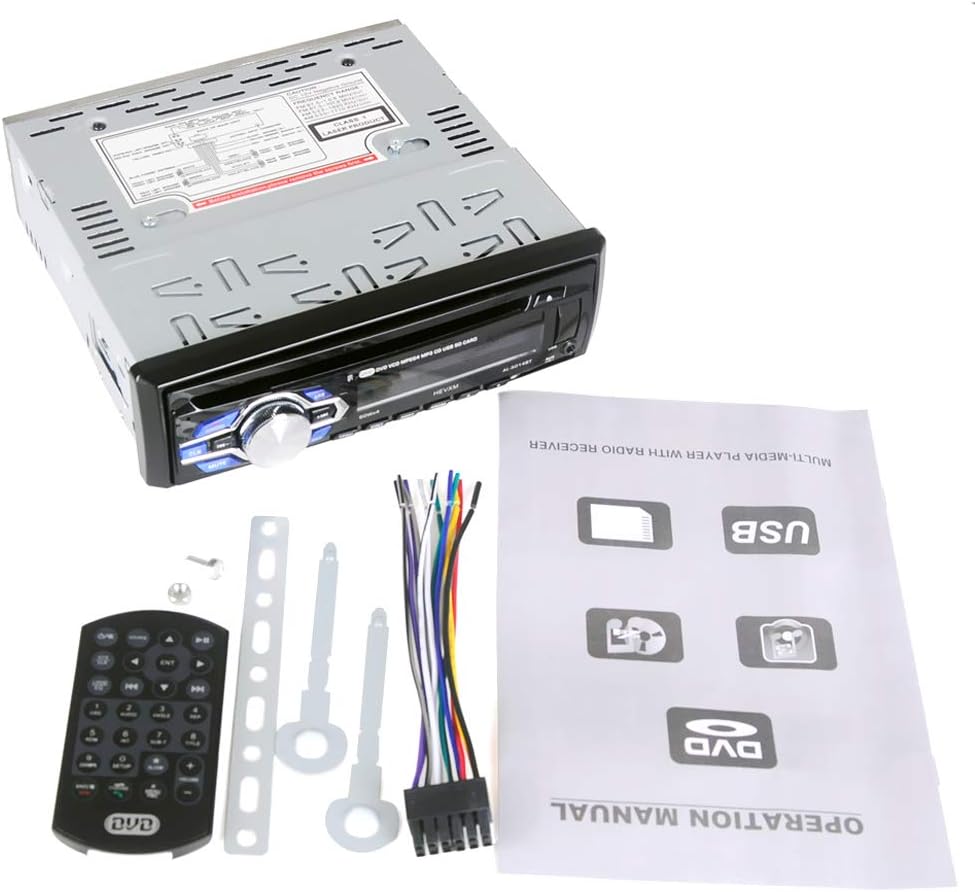
Figure 2: The car stereo unit along with its remote control, wiring harness, and installation tools.
2.2. التثبيت
Professional installation is recommended. Ensure the vehicle's power is disconnected before proceeding. Refer to the wiring diagram on the unit and in the included manual for correct connections. The unit requires a DC 12V power supply and has a maximum current draw of 10A.
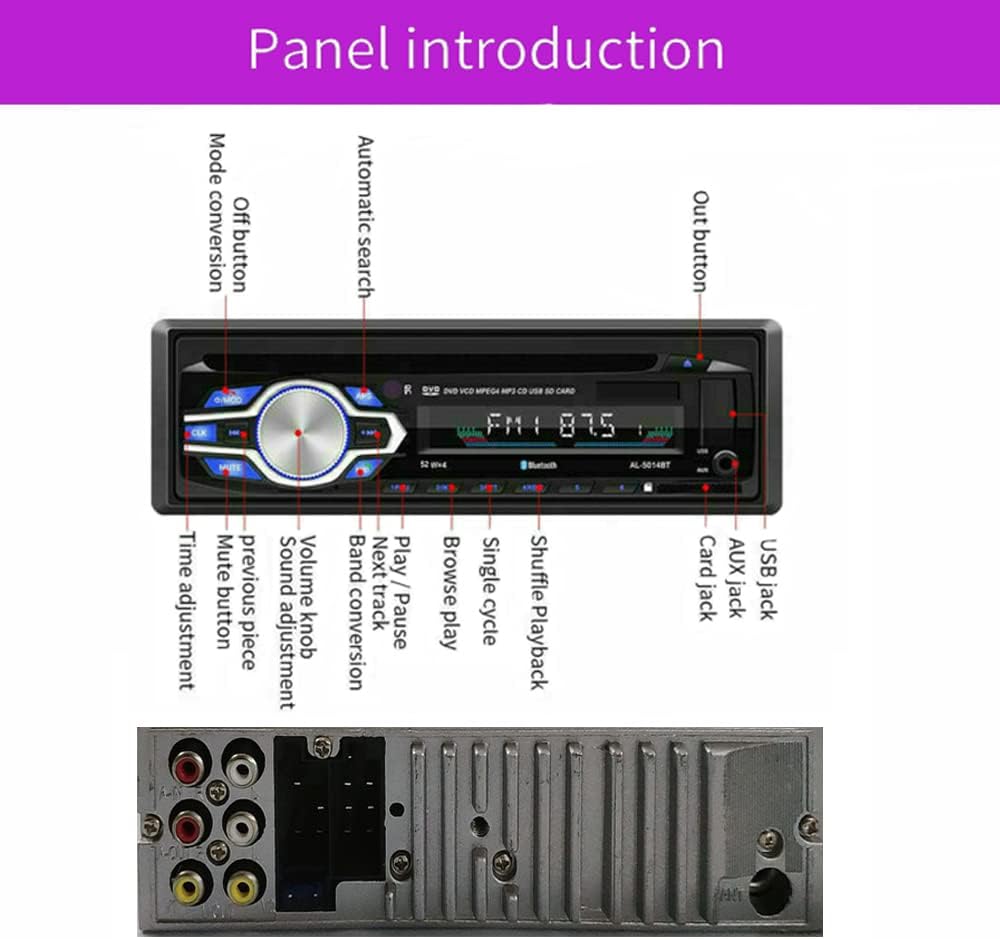
Figure 3: Rear panel of the car stereo, illustrating the wiring diagram and various input/output ports for installation.
3. تعليمات التشغيل
3.1. عناصر التحكم الأساسية
The front panel features a main rotary knob for volume control and various buttons for mode selection, mute, track navigation, and EQ settings. The unit also comes with a remote control for convenient operation.
3.2. وظيفة الراديو
The unit supports FM radio with a frequency range of 87.50-108.00 MHZ. It features automatic search and storage for up to 18 radio stations across FM1/FM2/FM3 bands. Use the tuning buttons to scan for stations and the memory function to save your favorites.

Figure 4: The car stereo's display showing the FM radio function in operation.
3.3. تشغيل أقراص DVD/CD
Insert a DVD or CD into the disc slot. The player is compatible with DVD/DVD+R/DVD-R/DVD-RW/VCD/MP3/CD/CD-RW/CD-R/WMA formats. The DVD OSD (On-Screen Display) language is English. The unit supports external display output via RCA video outputs.

Figure 5: Illustrates inserting a DVD into the car stereo and its capability to connect to an external display.
3.4. تشغيل USB/بطاقة SD
The unit features built-in USB and SD card slots. The USB port supports flash drives or MP3 players up to 8GB. The SD card port supports SDHC cards up to 8GB. Simply insert your USB device or SD card to play MP3/WMA format audio fileس مباشرة.

Figure 6: The car stereo's front panel, highlighting the USB and SD card input slots.
3.5. اتصال البلوتوث
The car stereo has built-in Bluetooth and a microphone. Pair your cellphone to the unit to answer calls hands-free and stream music wirelessly. The unit supports Bluetooth audio streaming (BT Audio) and phone functions (BT Phone).

الشكل 7: انتهىview of the car stereo's multimedia capabilities, including Bluetooth, USB, and AUX input.
3.6. شحن USB
The USB port also supports 5V charging for compatible cellphones, allowing you to listen to music and charge your device simultaneously.

Figure 8: The car stereo's USB port being used to charge a smartphone.
3.7. EQ Effects
Adjust the audio output with preset EQ effects: POP, ROCK, CLASSIC, and JAZZ. Use the EQ button to cycle through these options.
4. فيديو توضيحي للمنتج
Video 1: A demonstration of the PolarLander Single DIN Multimedia Car Stereo's features, including radio, USB, DVD, and Bluetooth functions.
5. الصيانة
- تنظيف: استخدم قطعة قماش ناعمة وجافة لتنظيف الجزء الخارجي من الجهاز. لا تستخدم المنظفات الكاشطة أو المذيبات.
- العناية بالقرص: Handle discs by their edges. Keep them clean and free of scratches to ensure optimal playback.
- درجة حرارة: تجنب تعريض الوحدة لدرجات حرارة عالية أو لأشعة الشمس المباشرة لفترات طويلة.
6. استكشاف الأخطاء وإصلاحها
إذا واجهت أي مشكلات، راجع المشكلات والحلول الشائعة التالية:
- لا يوجد طاقة: Check all power connections and the vehicle's fuse box. Ensure the unit is correctly wired to a 12V DC source.
- لا يوجد صوت: Verify speaker connections. Check volume levels and ensure the unit is not muted. Confirm correct audio output settings.
- مشاكل تشغيل الأقراص: Ensure the disc is clean and free of scratches. Check if the disc format is supported.
- USB/SD Not Reading: Ensure the USB drive or SD card is formatted correctly (FAT32) and contains supported audio files (MP3/WMA). Check for maximum capacity limits (8GB for USB, 8GB for SDHC).
- فشل اقتران البلوتوث: Ensure Bluetooth is enabled on both the stereo and your device. Make sure the device is discoverable and within range.
7. المواصفات
| ميزة | التفاصيل |
|---|---|
| مزود الطاقة | تيار مستمر 12 فولت |
| الحد الأقصى الحالي | 10 أمبير |
| Ampإخراج مكبر الصوت | 4*45W (7388) |
| حجم المنتج (LxWxH) | 188 مم × 170 مم × 5.8 مم |
| الوزن الصافي | 1.26كجم |
| بلوتوث | Built-in Bluetooth and Microphone |
| تأثيرات المعادل | POP, ROCK, CLASSIC, JAZZ |
| منفذ يو اس بي | Supports USB flash drive/MP3 player (max 8G), 5V charging |
| منفذ بطاقة SD | Supports SDHC Card (max 8G) |
| تنسيقات الأقراص المتوافقة | DVD/DVD+R/DVD-R/DVD-RW/VCD/MP3/CD/CD-RW/CD-R/WMA |
| Radio FM Range | شنومكس-شنومكس مهز |
| الإدخال/الإخراج | 1 x Radio Antenna Input, 1 x Aux In Port, 2 x RCA Video Output, RCA Audio FL/FR/RL/RR/Subwoofer Output, 1 x USB In port |
| المميزات الخاصة | Auto-Memory Function, Built-in LCD Clock Display, Adjustable Function, Remote Control Function |
8. الضمان والدعم
For warranty information or technical support, please refer to the contact details provided with your purchase documentation or visit the official PolarLander webالموقع. احتفظ بإيصال الشراء كإثبات للشراء.