
تعليمات السلامة الهامة
اقرأ كافة التعليمات بعناية قبل الاستخدام.
- افصل المروحة دائمًا عن مأخذ الطاقة قبل التنظيف أو الصيانة أو النقل.
- لا تدخل أصابعك أو أي أجسام أخرى من خلال الشبكة أثناء تشغيل المروحة.
- لا تقم بتشغيل أي مروحة بسلك أو قابس تالف. تخلص من المروحة أو أعدها إلى مركز خدمة معتمد للفحص و/أو الإصلاح.
- لا تمرر السلك تحت السجاد. لا تغطي السلك بسجاد أو أغطية أو أغطية مماثلة. ضع السلك بعيدًا عن منطقة المرور حيث لن يتعثر.
- لا تستخدم المروحة في الرطب أو دamp أماكن مثل الحمامات أو مناطق غسيل الملابس.
- هذه المروحة مخصصة للاستخدام الداخلي فقط. لا تستخدمها في الهواء الطلق.
- Keep the fan away from curtains, drapes, or any objects that may get caught in the fan blades.
- راقب الأطفال أثناء استخدام المروحة.
المنتج انتهىview
The Optimus 18-inch High Velocity Industrial Floor Fan is designed to provide powerful air circulation in various indoor environments. Its robust construction and high-velocity motor make it suitable for workshops, garages, and large rooms.
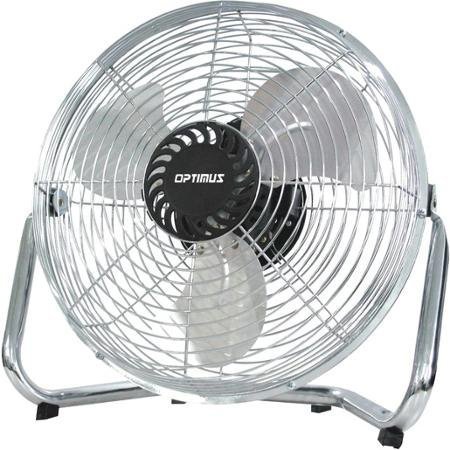
Image: Optimus 18-inch High Velocity Industrial Floor Fan. This image shows the fan with its silver metallic finish and sturdy floor stand.
المميزات الرئيسية:
- قطر 18 بوصة لتوزيع الهواء على نطاق واسع.
- Industrial-grade high velocity airflow.
- Durable metallic finish.
- Floor standing design for stable placement.
- Multiple power levels for adjustable airflow.
تعليمات الإعداد
- فك المروحة: Carefully remove the fan and all components from the packaging. Retain packaging for future storage or transport.
- Assemble the Floor Stand:
- Attach the fan head to the floor stand using the provided screws and tools. Ensure all connections are secure.
- Verify the fan head can pivot smoothly on the stand.
- الموقع: Place the fan on a firm, level surface. Ensure there is adequate space around the fan for proper air circulation and to prevent obstruction of the air intake/output. Keep the fan at least 3 feet away from walls or furniture.
- توصيل الطاقة: Ensure the fan is in the "OFF" position before plugging it into a standard 120V AC electrical outlet.
تعليمات التشغيل
This fan features push-button controls for easy operation. A remote control may also be included for convenience.
- تشغيل/إيقاف التشغيل: Locate the power button on the control panel. Press the button once to turn the fan ON. Press it again to turn the fan OFF.
- ضبط سرعة المروحة: The fan has 4 power levels. After turning the fan ON, repeatedly press the speed control button to cycle through the available speed settings (Low, Medium, High, Max). The fan will operate at the selected speed.
- ضبط اتجاه تدفق الهواء: The fan head can be tilted manually to direct airflow upwards or downwards. Gently tilt the fan head to the desired angle. Do not force the fan head beyond its intended range of motion.
صيانة
سيضمن التنظيف والصيانة المنتظمان الأداء الأمثل وإطالة عمر المروحة.
- تنظيف المروحة:
- Always unplug the fan from the power source before cleaning.
- استخدمي قطعة قماش ناعمةamp cloth to wipe the exterior surfaces of the fan. Do not use abrasive cleaners or harsh chemicals, as these may damage the finish.
- To clean the fan blades, carefully remove the front grille (if detachable, refer to assembly instructions for details). Wipe the blades with a soft cloth. Ensure the grille is securely reattached before operating the fan.
- تأكد من أن جميع الأجزاء جافة تمامًا قبل توصيل المروحة مرة أخرى.
- تخزين: عند عدم استخدام المروحة لفترات طويلة، يُنصح بتخزينها في مكان بارد وجاف. كما يُفضل حفظها في عبوتها الأصلية لحمايتها من الغبار والتلف.
استكشاف الأخطاء وإصلاحها
| مشكلة | السبب المحتمل | حل |
|---|---|---|
| المروحة لا تعمل. | غير موصول بالكهرباء؛ مأخذ الطاقة لا يعمل؛ مفتاح المروحة مطفأ. | Ensure fan is securely plugged into a working outlet. Check household fuse/circuit breaker. Press the power button to turn the fan on. |
| انخفاض تدفق الهواء. | Fan speed set too low; obstructed intake/output; dirty blades. | Increase fan speed. Clear any obstructions. Clean fan blades and grilles as per maintenance instructions. |
| ضوضاء أو خشخشة غير عادية. | Loose parts; fan not on a level surface; foreign object in blades. | Unplug the fan and check for any loose screws or components. Place the fan on a stable, level surface. Carefully inspect for and remove any foreign objects. |
تحديد
| ميزة | التفاصيل |
|---|---|
| ماركة | أوبتيموس |
| اسم الموديل | سرعة عالية |
| رقم موديل العنصر | 306c1b92-f36b-4ccc-ac62-2ad33d5c9efb |
| القطر | 18 بوصة |
| لون | فضي |
| أسلوب | صناعي |
| مصدر الطاقة | كهرباء سلكية |
| عدد مستويات الطاقة | 4 |
| طريقة التحكم | التحكم بالأزرار |
| الاستخدام الداخلي والخارجي | داخلي |
| المكونات المضمنة | Floor Stand, Remote Control |
| التقى المواصفات | OSHA |
الضمان والدعم
Optimus products are manufactured to high-quality standards. This product is covered by a limited warranty against defects in materials and workmanship from the date of purchase. Please refer to the warranty card included with your product for specific terms and conditions.
For technical support, troubleshooting assistance, or warranty claims, please contact Optimus customer service. Contact information can typically be found on the product packaging or the official Optimus webموقع.
يرجى الاحتفاظ بإثبات الشراء لأغراض الضمان.