
1. انتهى المنتجview
The Midiplus Studio M is a compact and high-performance USB audio interface designed for studio recording. It features one input and two outputs, supporting high-quality microphone input and 24-bit/192kHz high-precision sampling. The device is powered via PC USB and includes 48V phantom power for condenser microphones. Its small, exquisite design is compatible with both Mac and Windows operating systems, making it a versatile tool for musicians and producers.
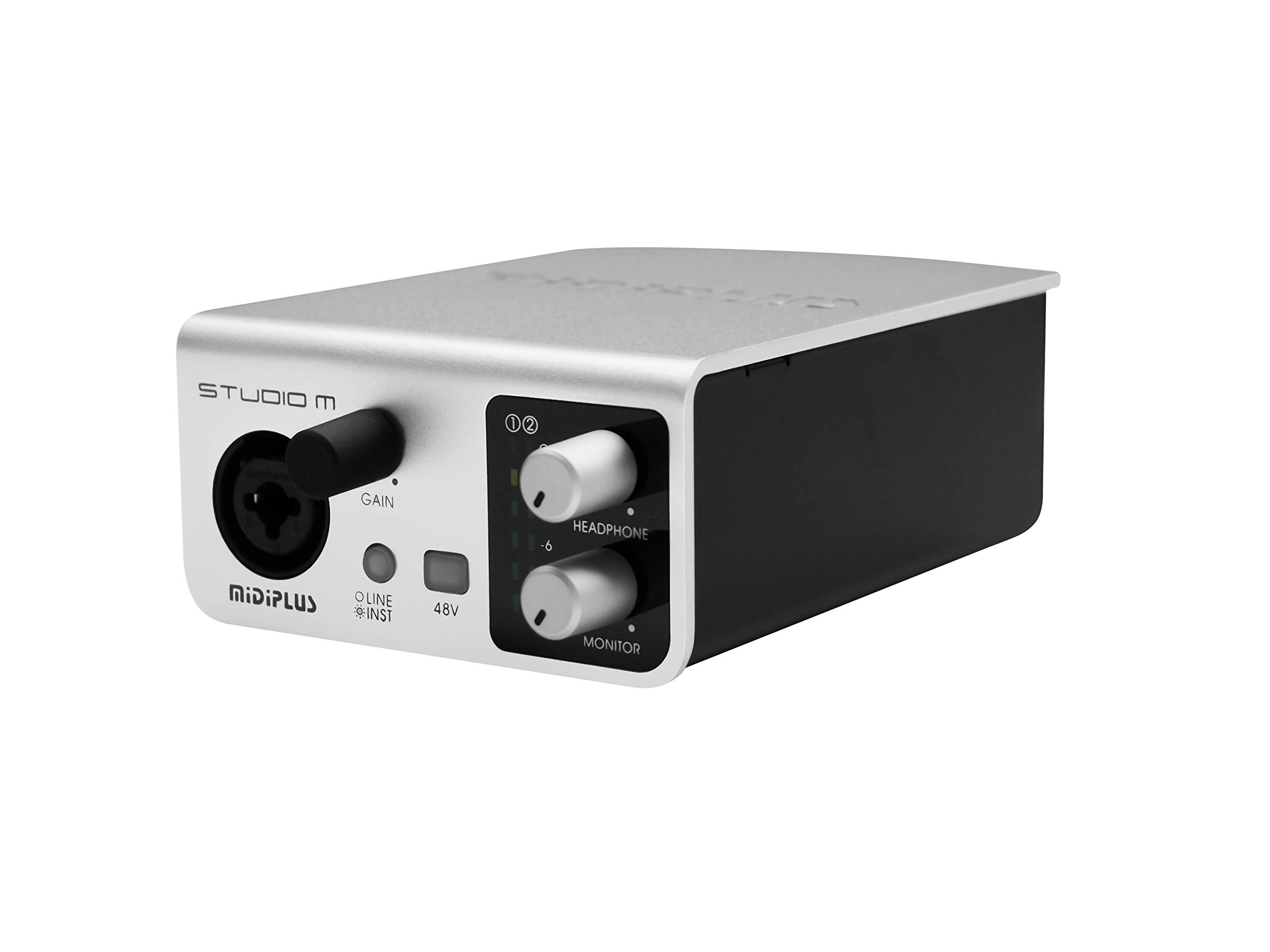
الشكل 1: الأمامي والخلفي view of the Midiplus Studio M USB Audio Interface.
2. دليل الإعداد
2.1 محتويات العبوة
- Midiplus Studio M USB Audio Interface
- كابل يو اس بي
- دليل المالك (هذه الوثيقة)
- بطاقة المعلومات
2.2 متطلبات النظام
- نظام التشغيل: ويندوز، ماك
- Compatible Devices: Personal Computer with USB port
2.3 توصيل الجهاز
- Connect the Midiplus Studio M to your computer using the provided USB cable. The device is USB-powered.
- Ensure your operating system (Windows or macOS) recognizes the device. Drivers may be required for optimal performance; refer to the Midiplus webموقع لتحميل أحدث برامج التشغيل.
- Connect your microphone or instrument to the Input (MIC/Line/Hi-z) interface on the front panel.
- Connect your headphones to the headphone interface on the front panel, or your studio monitors to the Output interface (Left/Right) on the rear panel.

Figure 2: Midiplus Studio M connected to a computer, showing input and output cables.
3. تعليمات التشغيل
3.1 ضوابط اللوحة الأمامية
- Input Gain Control Knob: Adjusts the input level for the connected microphone or instrument.
- Switch (Mic/Instrument) Button: Toggles between microphone and instrument input modes.
- 48V Phantom Power ON/OFF: Activates or deactivates 48V phantom power for condenser microphones.
- Headphone Volume Control Button: Adjusts the output volume for connected headphones.
- Output Volume Control Button: Adjusts the main output volume for connected studio monitors.

Figure 3: Midiplus Studio M in a studio setup, demonstrating its compact size and integration.
3.2 اتصالات اللوحة الخلفية
- واجهة USB: USB2.0 port for connection to your computer and power supply.
- Output Interface (Left/Right): Connects to your studio monitors or other output devices.
- Extensible Device Interface: Provides additional connectivity options for other devices.
4. الصيانة
- حافظ على نظافة الجهاز بمسحه بقطعة قماش ناعمة وجافة. تجنب استخدام المواد الكيميائية القاسية أو المواد الكاشطة.
- تأكد من توصيل جميع الكابلات بشكل آمن لمنع فقدان الإشارة أو تلفها.
- قم بتخزين الجهاز في مكان بارد وجاف بعيدًا عن أشعة الشمس المباشرة ودرجات الحرارة القصوى.
- تجنب وضع أشياء ثقيلة فوق الوحدة.
5. استكشاف الأخطاء وإصلاحها
5.1 لا يوجد إخراج صوت
- Check all cable connections (USB, input, output, headphones).
- Ensure the device is powered on and recognized by your computer.
- Verify that the output volume controls (headphone and main output) are turned up.
- Check your computer's sound settings to ensure the Midiplus Studio M is selected as the output device.
5.2 Input Signal Issues
- Adjust the Input Gain Control Knob.
- Ensure the correct input mode (Mic/Instrument) is selected.
- If using a condenser microphone, verify that 48V Phantom Power is enabled.
- Check the microphone/instrument cable for damage.
5.3 Device Not Recognized by Computer
- حاول توصيل كابل USB بمنفذ USB مختلف على جهاز الكمبيوتر الخاص بك.
- أعد تشغيل الكمبيوتر الخاص بك.
- Ensure the latest drivers for the Midiplus Studio M are installed from the official Midiplus webموقع.
- قم بإجراء الاختبار باستخدام كابل USB مختلف إذا كان متاحًا.
6. المواصفات الفنية
| ميزة | التفاصيل |
|---|---|
| رقم الموديل | Studio M |
| ماركة | ميدي بلس |
| تكنولوجيا الاتصال | USB (USB2.0) |
| دقة الصوت | 24 بت / 192kHz |
| المدخلات | 1 (MIC/Line/Hi-z) |
| المخرجات | 2 (Left/Right) |
| السلطة الوهمية | 48 فولت (قابل للتحويل) |
| أنظمة التشغيل المتوافقة | ويندوز، ماك أو إس |
| أبعاد المنتج | 5.28 × 3.54 × 1.89 بوصة |
| وزن العنصر | 14.1 أونصة (0.4 كجم) |
7. الضمان والدعم
For warranty information and technical support, please refer to the official Midiplus website or contact your local dealer. Keep your purchase receipt as proof of purchase for any warranty claims.