
مقدمة
This manual provides essential instructions for the safe and effective use of your T POWER 24V 3-Pin Charger. This power supply is designed to provide reliable power to compatible Verifone Point-of-Sale (POS) consoles, including specific models of Ruby2, RubyII, and Topaz XL II.
Please read this manual thoroughly before installation and operation to ensure proper functionality and to prevent damage to the device or connected equipment.

Image: The T POWER 24V 3-Pin Charger, featuring the main power brick and connected cables.
ملاحظة هامة حول التوافق
It is crucial to verify the compatibility of this charger with your specific Verifone POS console model or part number. Verifone POS consoles are available in various models, and not all are compatible with this charger. Please ensure your device's model or part number matches those listed below before connecting.
Compatible Verifone Models/Part Numbers:
- VeriFone GC99D130024 CPS124130-3A-R
- Verifone Ruby Ci Ruby2 Commander PN DOC169-001-01-A M169-300-01-NAA
- Verifone Topaz XL II 2 Touch Screen Console P050-02-310, 310R, 410, 110
- Verifone Ruby2 Ruby 2 II RubyII Touch Screen POS Console w/ ASM & Help Desk for Commander Model FSP120-AAAN2, PWR050-001-01-B, PWR050-001-B, PWR050-001-01-8, PWR050-001-8, PWR050-001-01B, PWR050-001B
- VeriFone Model GC99D130024 GC990130024 P/N: CPS124130-3A-R, CPS124130-3AR, CPS1241303A-R, CPS1241303AR, CP5124130-3A-R

Image: A Verifone Ruby2 Touch Screen POS Console, an example of a compatible device.
تعليمات الإعداد
- فك الشاحن: Carefully remove the T POWER 24V 3-Pin Charger from its packaging. Inspect it for any visible damage.
- تحديد الموصلات: Locate the 3-pin connector on the charger cable and the corresponding port on your Verifone POS console. The charger features a C143DIN-L 3-pin connector.
- Connect to POS Console: Gently insert the 3-pin connector into the power input port of your Verifone POS console. Ensure a secure and snug fit. Do not force the connector.
- الاتصال بمنفذ الطاقة: Plug the AC power cord (the standard 2-prong or 3-prong plug) into a standard AC 100V-240V wall outlet.
- تشغيل الطاقة: Once connected, your Verifone POS console should receive power. Follow your console's specific instructions to power it on.
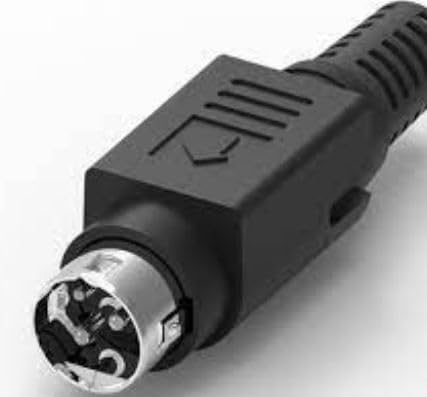
الصورة: عن قرب view of the 3-pin C143DIN-L connector on the charger cable.
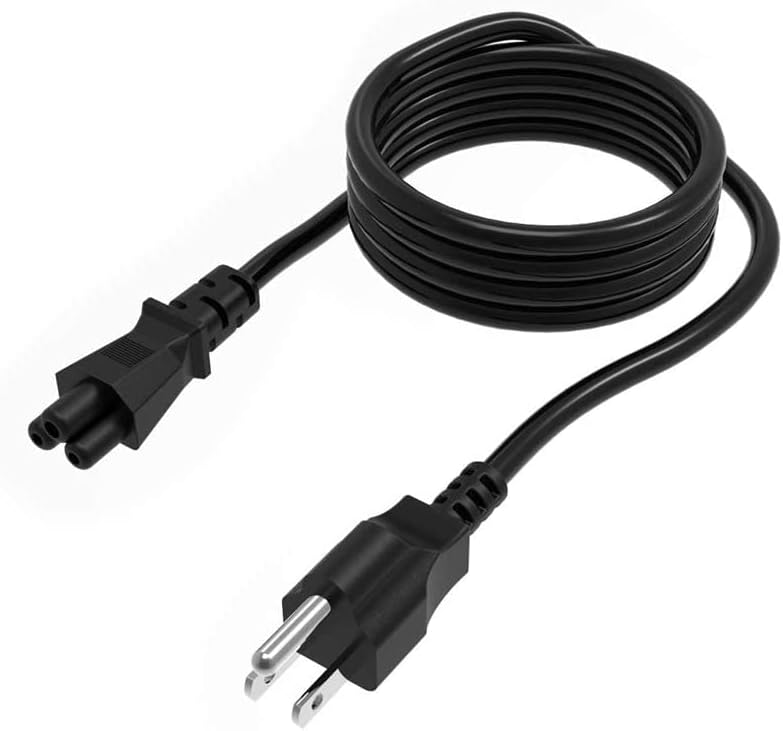
Image: The AC power cord, which connects the charger to a wall outlet.
تعليمات التشغيل
The T POWER 24V 3-Pin Charger is designed for continuous operation with compatible Verifone POS consoles. It provides a stable 24V DC output at 5 Ampق (أو 3 Amps, depending on specific model variant and load) from an AC 100V-240V input.
- تأكد من وضع الشاحن في منطقة جيدة التهوية لمنع ارتفاع درجة حرارته.
- Avoid placing the charger near heat sources or in direct sunlight.
- لا تقم بتغطية الشاحن أثناء التشغيل.
- If the POS console is not in use for an extended period, it is recommended to disconnect the charger from the wall outlet.
صيانة
To ensure the longevity and optimal performance of your T POWER charger, follow these simple maintenance guidelines:
- تنظيف: Disconnect the charger from both the power outlet and the POS console before cleaning. Use a soft, dry cloth to wipe the exterior. Do not use liquid cleaners or solvents.
- العناية بالكابلات: Avoid bending or crimping the power cables excessively. Do not place heavy objects on the cables.
- تخزين: عند عدم الاستخدام، قم بتخزين الشاحن في مكان بارد وجاف بعيدًا عن أشعة الشمس المباشرة والرطوبة.
- مميزات السلامة: This charger is equipped with multiple safety protections, including:
- حماية من التيار الزائد
- حماية من ارتفاع درجة الحرارة
- زيادة الحجمtagالحماية
- حماية من الدوائر القصيرة

Image: Diagram illustrating the safety features of T POWER adapters, including over-current, over-temp, over-voltage, and short circuit protection, along with quality certifications.
استكشاف الأخطاء وإصلاحها
If your Verifone POS console is not powering on or charging, consider the following:
- لا يوجد مؤشر للطاقة:
- Ensure the AC power cord is securely plugged into both the wall outlet and the charger.
- Verify the wall outlet is functional by testing it with another device.
- تحقق من عدم وجود أي ضرر واضح للشاحن أو الكابلات.
- وحدة التحكم لا تعمل:
- Confirm that the 3-pin connector is fully and correctly inserted into the POS console's power port.
- Re-check the compatibility of your Verifone model with this charger (refer to the "Important Compatibility Note" section).
- If possible, test the charger with another compatible Verifone device to isolate the issue.
- ارتفاع درجة الحرارة:
- إذا شعرت أن الشاحن ساخن جدًا، فافصله على الفور.
- Ensure it is in a well-ventilated area and not covered. Allow it to cool down before reconnecting.
If troubleshooting steps do not resolve the issue, please contact T POWER customer support.
تحديد
| ميزة | التفاصيل |
|---|---|
| ماركة | T POWER |
| رقم الموديل | TP-xV4-1U8, VeriFone PWR050-001-01-B |
| حجم الإدخالtage المدى | تيار متردد 100 فولت - 240 فولت |
| حجم الإخراجtage | 24 فولت تيار مستمر |
| الناتج Ampإيراج | 5 Amps (DC) / 3 Amps (Output Current) |
| نوع الموصل | 3-pin C143DIN-L |
| مادة | بلاستيك |
| وزن العنصر | 4 أونصة |
| أبعاد العنصر | 4 × 4 × 2 بوصة |
| الشهادات | UL, CE/FCC/RoHS certified |
الضمان والدعم
ضمان: This T POWER charger comes with a ضمان الشركة المصنعة لمدة سنة واحدةيغطي هذا الضمان عيوب المواد والصناعة في ظل الاستخدام العادي.
الإرجاعات: A سياسة الإرجاع خلال 30 يومًا is available for any reason, allowing for a full refund for undamaged products within 30 days of purchase.
الدعم الفني: For any questions, technical assistance, or warranty claims, please contact T POWER customer support. If you received an incorrect item or the adapter tip does not fit your device, please reach out for assistance. T POWER offers easy exchange and replacement for quality-related issues.
For support, please refer to the contact information provided with your purchase or visit the official T POWER store on Amazon: T POWER Amazon Store