
1. المقدمة
شكرا لك على الشراءasing the Silverlit Xion FPV Camera Drone 84765. This drone is designed for outdoor use and offers an exciting First-Person View (FPV) flying experience with its integrated camera. Please read this manual thoroughly before operating the drone to ensure safe and optimal performance. Keep this manual for future reference.

Image 1.1: The Silverlit Xion FPV Camera Drone 84765.
2. معلومات السلامة
تحذير: قد يؤدي عدم اتباع هذه التعليمات إلى الإصابة أو تلف المنتج.
- قم بتشغيل الطائرة بدون طيار دائمًا في مناطق مفتوحة وواضحة، بعيدًا عن الناس والحيوانات والمباني وخطوط الكهرباء.
- لا تطير في رياح قوية أو ظروف جوية سيئة.
- أبقِ يديك ووجهك وملابسك الفضفاضة بعيدة عن المراوح الدوارة.
- Ensure the drone battery and remote control batteries are fully charged before each flight.
- لا تترك بطاريات الشحن دون مراقبة أبدًا.
- This product is intended for children. Adult supervision is recommended.
- لا تقم بتعديل أو تفكيك الطائرة بدون طيار أو مكوناتها.
- قم دائمًا بإيقاف تشغيل الطائرة بدون طيار وجهاز التحكم عن بعد عند عدم استخدامهما.
3. محتويات العبوة
تأكد من وجود جميع العناصر في العبوة:
- Silverlit Xion FPV Camera Drone 84765
- جهاز التحكم عن بعد
- فبف نظارات واقية
- بطارية طائرة بدون طيار قابلة لإعادة الشحن
- USB Charging Cable (for drone battery)
- مراوح احتياطية
- دليل المستخدم

Image 3.1: The Silverlit Xion FPV Drone product box, showing the drone and FPV goggles.
4. الإعداد
4.1. تركيب بطارية التحكم عن بعد
- افتح حجرة البطارية الموجودة في الجزء الخلفي من جهاز التحكم عن بعد.
- Insert the required batteries (not included) according to the polarity indicators.
- أغلق حجرة البطارية بشكل محكم.
4.2. تركيب بطارية الطائرة بدون طيار
- تأكد من إيقاف تشغيل الطائرة بدون طيار.
- حدد مكان حجرة البطارية على الطائرة بدون طيار.
- Carefully insert the charged drone battery, ensuring it is properly seated and connected.
- أغلق غطاء حجرة البطارية.
4.3. تركيب المروحة (إذا لزم الأمر)
إذا لم تكن المراوح مثبتة مسبقاً، فقم بتثبيتها وفقاً للعلامات (مثل A وB) الموجودة على المراوح وأعمدة المحرك. تأكد من تثبيتها بإحكام.
4.4. Remote Control and Drone Pairing
- ضع الطائرة بدون طيار على سطح مستوٍ ومستوٍ.
- قم بتشغيل الطائرة بدون طيار. ستومض أضواء المؤشر.
- قم بتشغيل جهاز التحكم عن بعد.
- Move the left joystick (throttle) fully up, then fully down. The drone's indicator lights will become solid, indicating successful pairing.
4.5. FPV Goggle Setup
Connect the FPV goggles to your smartphone (if applicable) or power them on as per their specific instructions. Ensure a stable connection for live video feed.

Image 4.1: The remote control and FPV goggles for the Silverlit Xion Drone.
5. شحن بطارية الطائرة بدون طيار
The drone's battery requires charging before use. A USB charging cable is included, but a compatible USB power adapter (not included) is required.
- قم بتوصيل كابل الشحن USB ببطارية الطائرة بدون طيار.
- Plug the other end of the USB cable into a suitable USB power adapter (e.g., a smartphone charger or computer USB port).
- سيُظهر ضوء مؤشر الشحن حالة الشحن (راجع التعليمات الخاصة بالكابل لمعرفة سلوك الضوء).
- Charging typically takes 80-100 minutes for a full charge.
- After a flight, allow the battery to cool down for 10-15 minutes before recharging to prolong battery life.
Note: A fully charged battery provides approximately 4-5 minutes of flight time.
6. تشغيل الطائرة بدون طيار
6.1. قائمة مراجعة ما قبل الرحلة
- تأكد من شحن بطاريات الطائرة بدون طيار وجهاز التحكم عن بعد بالكامل.
- تأكد من أن المراوح مثبتة بشكل آمن وغير تالفة.
- Verify the flight area is clear of obstacles, people, and animals.
- Confirm successful pairing between the drone and remote control.
6.2. الإقلاع والهبوط
- ضع الطائرة بدون طيار على سطح مستوٍ ومستوٍ.
- ادفع عصا التحكم اليسرى (الخانق) ببطء إلى الأعلى لجعل الطائرة بدون طيار تصعد.
- To land, slowly pull the left joystick (throttle) downwards until the drone gently touches the ground.
6.3. أدوات التحكم الأساسية في الطيران
- عصا التحكم اليسرى (الخانق): Up/Down for altitude control.
- عصا التحكم اليسرى (الانعطاف): Left/Right for rotating the drone horizontally.
- عصا التحكم اليمنى (الميل/الدوران): Up/Down for moving forward/backward; Left/Right for moving left/right (sideways).
6.4. Camera Operation and FPV
The drone features a 1080p video recording capability and 0.3 MP effective still resolution. Refer to the remote control diagram for specific camera buttons.
- تسجيل الفيديو: Press the designated video button on the remote control to start/stop recording.
- تصوير: Press the designated photo button to take a still image.
- بث مباشر بتقنية FPV: Once the FPV goggles are set up and connected, you will see the live video feed from the drone's camera, enhancing your flying experience.
7. الصيانة
- تنظيف: استخدم قطعة قماش ناعمة وجافة لتنظيف الطائرة بدون طيار وجهاز التحكم عن بُعد. لا تستخدم مواد كيميائية أو مذيبات قاسية.
- فحص المروحة: Regularly check propellers for cracks, bends, or damage. Replace any damaged propellers with spare parts provided.
- تخزين: Store the drone and its components in a cool, dry place, away from direct sunlight and extreme temperatures. Remove batteries from the remote control if storing for extended periods.
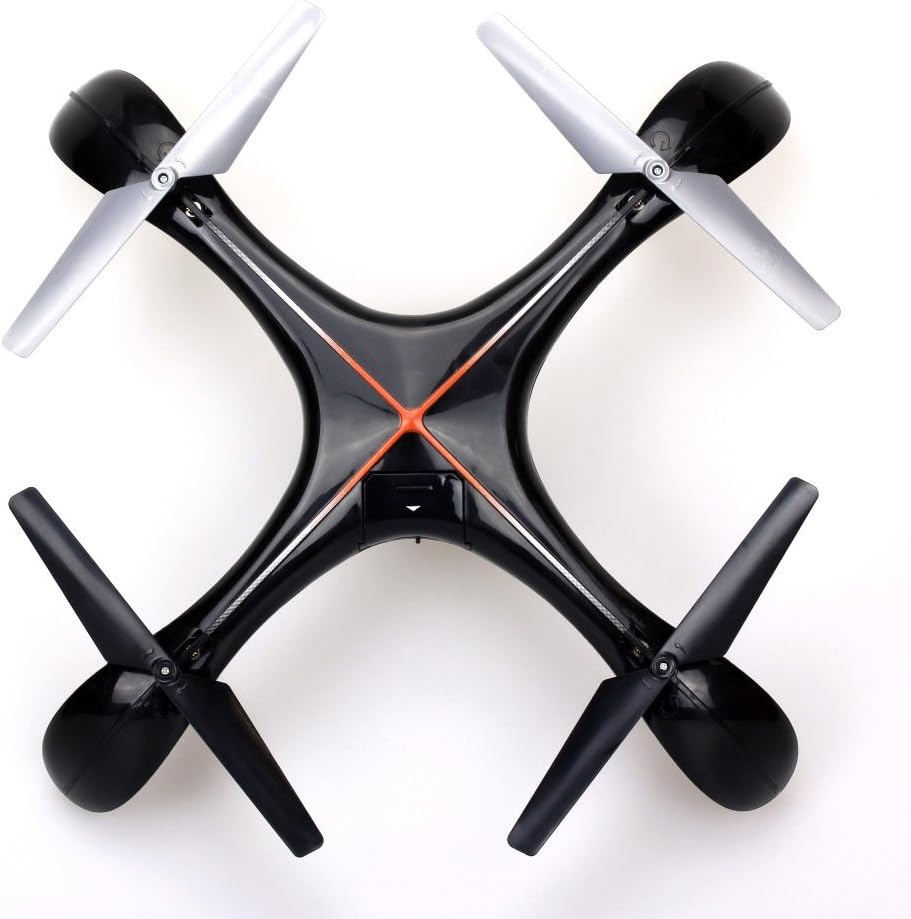
الصورة 7.1: الأعلى view of the Silverlit Xion FPV Drone, showing propeller orientation.
8. استكشاف الأخطاء وإصلاحها
| مشكلة | السبب المحتمل | حل |
|---|---|---|
| الطائرة بدون طيار لا تستجيب للتحكم عن بعد. | Low battery in drone or remote; not paired correctly. | Charge drone battery, replace remote control batteries, re-attempt pairing process. |
| تطير الطائرة بدون طيار بشكل غير منتظم أو تنجرف. | Drone not calibrated on a flat surface; damaged propeller. | Ensure drone is placed on a level surface during pairing/initialization. Check and replace damaged propellers. Refer to manual for calibration steps if available. |
| Poor video quality or no FPV feed. | Weak signal; FPV goggles not connected properly. | Ensure drone is within range. Check FPV goggle connection and battery. |
| وقت الرحلة قصير. | البطارية غير مشحونة بالكامل؛ البطارية قديمة. | Ensure battery is fully charged (80-100 minutes). Consider replacing the battery if it's old and performance has degraded. |
9. المواصفات
- ماركة: SILVERLIT
- اسم الموديل: 84765
- الفئة العمرية: طفل
- قرار تسجيل الفيديو: 1080 بكسل
- دقة ثابتة فعالة: 0.3 ميجا بكسل
- مستوى المهارة: Professional (Note: This may refer to advanced features, but basic operation is suitable for children with supervision)
- نوع التحكم: جهاز التحكم عن بعد
- البطاريات المتضمنة: لا (للتحكم عن بعد)
- يشمل جهاز التحكم عن بعد: نعم
- وزن المنتج: 1.5 كيلوغرام
10. الضمان والدعم
For warranty information or technical support, please refer to the documentation provided with your purchase or contact Silverlit customer service. Keep your proof of purchase for any warranty claims.