
1. المقدمة
This manual provides detailed instructions for the operation and maintenance of your Supersonic SC-1495BT Bluetooth AM/FM Boombox. Please read this manual thoroughly before using the device to ensure proper function and to maximize your listening experience.
2. معلومات السلامة
- لا تعرض الجهاز للمطر أو الرطوبة لتجنب نشوب حريق أو التعرض لصدمة كهربائية.
- لا تسد فتحات التهوية. تأكد من وجود مساحة كافية حول الوحدة لضمان تدفق الهواء بشكل صحيح.
- تجنب وضع الوحدة بالقرب من مصادر الحرارة مثل المشعات أو أجهزة التدفئة أو المواقد أو الأجهزة الأخرى (بما في ذلك ampالمُضخِّمات) التي تنتج الحرارة.
- استخدم فقط المرفقات/الملحقات المحددة من قبل الشركة المصنعة.
- افصل هذا الجهاز أثناء العواصف الرعدية أو عند عدم استخدامه لفترات طويلة.
- قم بإحالة جميع أعمال الصيانة إلى موظفي الخدمة المؤهلين. الصيانة مطلوبة في حالة تعرض الجهاز للتلف بأي شكل من الأشكال.
3. محتويات العبوة
عند تفريغ العبوة، يرجى التأكد من وجود جميع العناصر المدرجة أدناه:
- Supersonic SC-1495BT Bluetooth AM/FM Boombox
- سلك الطاقة المتردد
4. مواصفات المنتج
The Supersonic SC-1495BT Boombox offers a variety of features for versatile audio playback:
- Bluetooth Version 3.0 for wireless music streaming
- Built-in USB input for media playback
- Built-in SD card and Micro SD card slot for media playback
- 3.5 mm Line-in (AUX) jack for external audio devices
- Four-band radio: AM, FM, SW1, SW2
- Integrated rechargeable battery for portable use
- شاشة LCD واضحة
- Fast forward and rewind functions for media playback
- 360-degree rod antenna for enhanced radio reception
- التحكم في مستوى الصوت الدوار
- مقبس سماعة الأذن للاستماع الخاص
- AC/DC operation for flexible power options
5. الضوابط والتوصيلات
Familiarize yourself with the various controls and connection ports on your boombox.
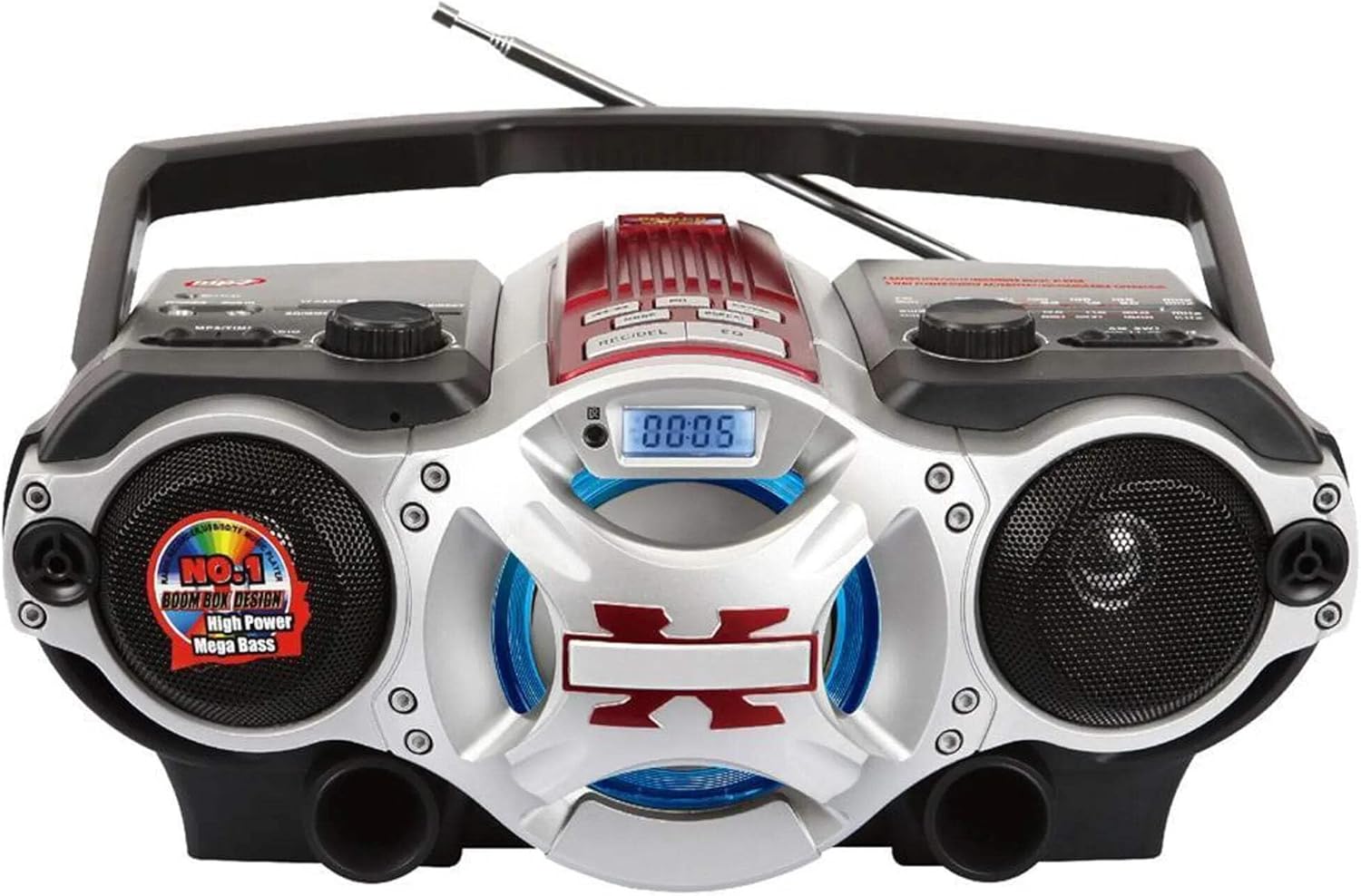
الشكل 1: أمام view of the Supersonic SC-1495BT Boombox, showing the speakers, central display, and main control area.

الشكل 2: Left side controls, including USB input, SD/Micro SD card slot, AUX IN, PHONES jack, BT/MP3/RADIO mode switch, and Rotary Volume control.

الشكل 3: Right side controls, featuring the AM/FM/SW1/SW2 band selector, TUNING knob, and playback control buttons (Play/Pause, Skip, Mode, Clock, EQ).
6. الإعداد
6.1 توصيل الطاقة
- طاقة التيار المتردد: Connect the included AC power cord to the AC input on the back of the boombox and then plug it into a standard wall outlet. The internal rechargeable battery will begin charging.
- DC Power (Battery): The boombox has a built-in rechargeable battery. Ensure it is charged before portable use. The unit can also operate on DC power from the internal battery when not connected to AC.
6.2 ضبط الهوائي
Extend the 360-degree rod antenna for optimal radio reception, especially for FM and SW bands. Adjust its position for the clearest signal.
7. تعليمات التشغيل
7.1 تشغيل/إيقاف التشغيل واختيار الوضع
- To power on the unit, slide the BT/MP3/RADIO switch to the desired mode (BT, MP3, or RADIO).
- لإيقاف التشغيل، حرك المفتاح إلى وضع الإيقاف.
7.2 تشغيل بلوتوث
- حرك مفتاح الوضع إلى BT (Bluetooth). The LCD display will indicate Bluetooth mode, and the unit will enter pairing mode.
- على جهازك الممكّن بتقنية Bluetooth (الهاتف الذكي، والكمبيوتر اللوحي، وما إلى ذلك)، قم بتمكين Bluetooth وابحث عن الأجهزة المتوفرة.
- Select "SC-1495BT" from the list of devices. Once paired, the unit will emit a confirmation sound.
- You can now play audio from your device through the boombox. Use your device or the boombox's playback controls (Play/Pause, Skip) to manage music.
7.3 Radio Operation (AM/FM/SW1/SW2)
- حرك مفتاح الوضع إلى راديو.
- Select the desired band (AM, FM, SW1, or SW2) using the band selector switch.
- Extend and adjust the rod antenna for optimal reception.
- تدوير ضبط knob to scan for radio stations. The frequency will be displayed on the LCD.
7.4 تشغيل بطاقة USB/SD
- حرك مفتاح الوضع إلى إم بي 3.
- Insert a USB flash drive into the USB input or an SD/Micro SD card into the corresponding slot. Ensure the card is inserted correctly.
- The unit will automatically detect and begin playing MP3 audio fileمن الوسائط المدرجة.
- Use the playback control buttons (Play/Pause, Skip, Fast Forward, Rewind) to navigate tracks.
7.5 مدخل إضافي (AUX)
- حرك مفتاح الوضع إلى إم بي 3.
- قم بتوصيل جهاز صوتي خارجي (مثل مشغل MP3 أو هاتف ذكي) بـ AUX IN مقبس باستخدام كابل صوت 3.5 ملم (غير مرفق).
- Play audio from your external device. The sound will be routed through the boombox speakers. Control playback from your external device.
7.6 التحكم في مستوى الصوت
تدوير مقدار قم بتدوير المقبض باتجاه عقارب الساعة لزيادة مستوى الصوت، وعكس اتجاه عقارب الساعة لخفضه.
7.7 جاك سماعة
For private listening, plug standard 3.5mm earphones (not included) into the الهواتف jack. The main speakers will be muted.
8. الصيانة
- تنظيف: استخدم قطعة قماش ناعمة وجافة لتنظيف الجزء الخارجي من الوحدة. لا تستخدم منظفات أو مذيبات كاشطة.
- تخزين: عند عدم استخدام جهاز الراديو لفترات طويلة، قم بتخزينه في مكان بارد وجاف بعيدًا عن أشعة الشمس المباشرة ودرجات الحرارة القصوى.
- العناية بالبطارية: To prolong the life of the built-in rechargeable battery, avoid fully discharging it frequently. Charge the unit regularly, even if not in use.
9. استكشاف الأخطاء وإصلاحها
إذا واجهت مشكلات مع جهاز الراديو الخاص بك، فراجع المشكلات والحلول الشائعة التالية:
| مشكلة | السبب المحتمل | حل |
|---|---|---|
| لا يوجد طاقة | AC cord not connected; Battery discharged; Power switch off | Ensure AC cord is securely plugged in; Charge the battery; Slide power switch to ON/BT/MP3/RADIO. |
| لا يوجد صوت | Volume too low; Mute activated (if applicable); Incorrect mode selected; Earphones connected | Increase volume; Ensure correct mode (BT, MP3, RADIO) is selected; Disconnect earphones. |
| البلوتوث غير مقترن | Boombox not in pairing mode; Device Bluetooth off; Too far from boombox | Ensure boombox is in BT mode; Enable Bluetooth on your device; Move device closer (within 30 feet/10 meters); Try re-pairing. |
| استقبال الراديو ضعيف | Antenna not extended/adjusted; Weak signal area | Fully extend and adjust the rod antenna; Try moving the unit to a different location. |
| بطاقة USB/SD لا تعمل | غير صحيح file التنسيق؛ لم يتم إدخال البطاقة/محرك الأقراص بشكل صحيح؛ تالف files | يضمن files are MP3 format; Re-insert card/drive; Try a different USB drive or SD card. |
10. المواصفات
- نموذج: SC-1495BT
- ماركة: أسرع من الصوت
- الاتصال: Bluetooth (Ver. 3.0), USB, SD/Micro SD, 3.5mm AUX
- نطاقات الراديو: AM, FM, SW1, SW2
- تنسيقات الصوت المدعومة: إم بي 3
- مصدر الطاقة: AC 110-220V, Built-in Rechargeable Battery
- المتحدثون: 2 (ستيريو)
- الأبعاد (الطول × العرض × الارتفاع): 15 × 10 × 12 بوصة
- وزن: 4.3 رطل
- الشركة المصنعة: Capitol Sales Company
- رمز المنتج العالمي: 639131814950
11. الضمان
This product comes with a 1-year limited warranty. Please retain your proof of purchase for warranty claims. For specific warranty terms and conditions, refer to the documentation included with your purchase or contact Supersonic customer support.
12. الدعم
For further assistance, technical support, or inquiries regarding your Supersonic SC-1495BT Boombox, please visit the official Supersonic webالموقع الإلكتروني أو تواصل مع قسم خدمة العملاء. عادةً ما تجد معلومات الاتصال على موقع الشركة المصنعة. webتغليف الموقع أو المنتج.