
1. المقدمة
Thank you for choosing the Superfish Smart Timer. This digital timer is designed to automate the on/off cycles of your aquarium lighting and other electrical devices, providing a consistent and stable environment for your aquatic life. Please read this manual carefully before use to ensure proper operation and safety.
2. تعليمات السلامة
- Always disconnect the timer from the power supply before handling or performing any maintenance.
- This device is designed for indoor use only. Do not expose it to water splashes or high humidity.
- Ensure your hands are dry when plugging in or unplugging the timer.
- Do not exceed the maximum load capacity specified for this timer.
- يحفظ بعيدًا عن متناول الأطفال.
- If the timer appears damaged, do not use it. Contact customer support.
- Do not attempt to open or repair the timer yourself. This will void the warranty.
3. انتهى المنتجview
The Superfish Smart Timer is a compact digital timer featuring a clear display and intuitive buttons for programming. It allows for precise control over the power supply to connected devices.
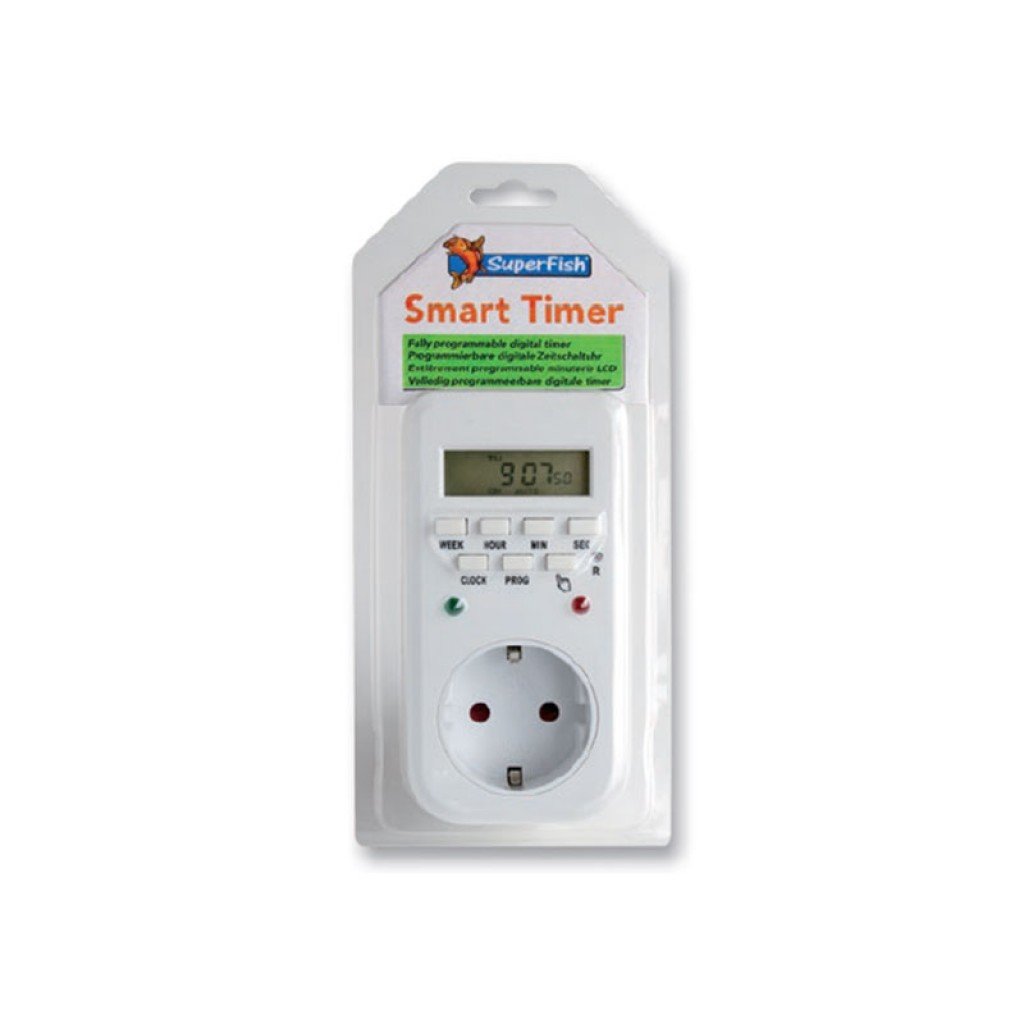
Image 1: Superfish Smart Timer. This image shows the front of the Superfish Smart Timer, highlighting its digital display and control buttons. The timer is designed for easy programming and monitoring of connected devices.
تشمل المكونات الرئيسية عادةً ما يلي:
- عرض رقمي: يعرض الوقت الحالي وحالة البرنامج والإعدادات.
- أزرار التحكم: For setting time, programs, and manual override.
- إبريز كهربائي: Where you connect your appliance.
- قابس الطاقة: To connect the timer to a wall socket.
4. الإعداد
- الرسوم الأولية (إن وجدت): If your timer has a built-in battery for memory backup, plug it into a wall socket for at least 30 minutes before first use to charge the internal battery.
- مسح كافة الإعدادات: Press the "R" (Reset) button with a pointed object (e.g., a pen tip) to clear all previous settings. The display will show "00:00".
- ضبط الوقت الحالي:
- اضغط على زر "الساعة" واستمر بالضغط عليه.
- While holding "CLOCK", press "WEEK" to set the day of the week.
- While holding "CLOCK", press "HOUR" to set the hour.
- While holding "CLOCK", press "MINUTE" to set the minute.
- Release the "CLOCK" button. The current time is now set.
- توصيل الجهاز: Plug the appliance you wish to control (e.g., aquarium light) into the outlet on the Superfish Smart Timer.
- Plug Timer into Wall Socket: Insert the Superfish Smart Timer's plug into a standard wall socket.
5. التشغيل
5.1 برمجة دورات التشغيل/الإيقاف
The Smart Timer allows you to set multiple ON/OFF programs. Follow these steps to program your desired cycles:
- Press the "PROG" button once. The display will show "1 ON".
- Press "WEEK" to select the day(s) for this program (e.g., MO, TU, WE, TH, FR, SA, SU, or combinations like MO-FR, SA-SU, MO-SU).
- Press "HOUR" to set the desired ON hour.
- Press "MINUTE" to set the desired ON minute.
- Press "PROG" again. The display will show "1 OFF".
- كرر الخطوات من 2 إلى 4 لضبط وقت الإيقاف المطلوب للبرنامج الأول.
- Continue pressing "PROG" to cycle through "2 ON", "2 OFF", and so on, up to the maximum number of programs supported by your timer.
- After setting all desired programs, press the "CLOCK" button to return to the current time display.
5.2 تجاوز يدوي
The "MANUAL" button allows you to override the programmed settings temporarily:
- Press "MANUAL" repeatedly to cycle through modes:
- على: The connected appliance will remain ON continuously, ignoring programs.
- OFF: The connected appliance will remain OFF continuously, ignoring programs.
- تلقاءي: The timer will operate according to the programmed ON/OFF cycles. This is the standard operating mode.
- Always ensure the timer is set to "AUTO" for automatic operation.
5.3 Random Function (if available)
Some models may include a "RANDOM" function, which can slightly vary the ON/OFF times to simulate a more natural environment or deter intruders. Consult your specific model's features for activation.
6. الصيانة
- تنظيف: Disconnect the timer from the power supply. Wipe the exterior with a soft, dry cloth. Do not use abrasive cleaners or immerse the timer in water.
- تخزين: إذا كنت ستخزن المؤقت لفترة طويلة، فتأكد من نظافته وجفافه. خزّنه في مكان بارد وجاف بعيدًا عن أشعة الشمس المباشرة.
- البطارية النسخ الاحتياطي: The internal battery (if present) is designed for memory backup. If the display becomes dim or resets frequently after power outages, the internal battery may need recharging by keeping the timer plugged in for several hours.
7. استكشاف الأخطاء وإصلاحها
| مشكلة | السبب المحتمل | حل |
|---|---|---|
| شاشة المؤقت فارغة. | لا يوجد مصدر للطاقة. | Check if the timer is properly plugged into a live wall socket. Check the wall socket with another appliance. |
| لا يتم تشغيل الجهاز أو إيقاف تشغيله كما هو مبرمج. | Incorrect program settings; Timer in Manual ON/OFF mode; Appliance not working. | Review program settings carefully. Ensure the timer is in "AUTO" mode. Test the appliance by plugging it directly into a wall socket. |
| Time or programs reset after power outage. | Internal backup battery low or not charged. | Keep the timer plugged into a live socket for at least 4 hours to fully charge the internal battery. |
| الأزرار لا تستجيب. | خلل مؤقت في البرنامج. | Perform a full reset using the "R" button. Re-program all settings. |
8. المواصفات
- نموذج: SF-SMARTIMER
- ASIN: B01CZTS47E
- وزن السلعة: 349.27 جرام
- البطاريات المطلوبة: No (internal backup battery for memory, not user-replaceable)
- التجميع مطلوب: لا
- مرجع الشركة المصنعة: SF-SMARTIMER
- أول تاريخ متاح: 2 ديسمبر 2022
- تحديثات البرامج مضمونة حتى: مجهول
- توقف من قبل الشركة المصنعة: لا
- Note: Specific electrical ratings (Voltage, Max Load) are typically printed on the device itself. Always adhere to these ratings.
9. الضمان والدعم
Superfish products are manufactured to high-quality standards. For warranty information, please refer to the documentation provided with your purchase or visit the official Superfish webالموقع. احتفظ بإثبات الشراء الخاص بك لتقديم مطالبات الضمان.
For technical support or further assistance, please contact your retailer or the Superfish customer service department. Contact details can usually be found on the product packaging or the official Superfish webموقع.
Webموقع: www.superfish.com (ملاحظة: هذا عنصر نائب URLيرجى التحقق من المصدر الرسمي الفعلي website for Superfish.)