
WASABI MANGO UHD430 SE
Wasabi Mango UHD430 4K Monitor User Manual
Model: UHD430 SE
مقدمة
The Wasabi Mango UHD430 Real 4K HDMI 2.0 Monitor is a high-performance display featuring a 43-inch LG AH-IPS panel, delivering stunning 3840 x 2160 UHD 4K resolution. Designed for clarity and vibrant colors, this monitor supports 10-bit color depth and offers wide viewزوايا متعددة.
تتضمن الميزات الرئيسية ما يلي:
- 43-inch LG AH-IPS LED Backlit Panel for superior image quality.
- UHD 4K (3840 x 2160) resolution for incredibly detailed visuals.
- 1.06 billion colors (10-bit) for rich and accurate color reproduction.
- Multiple connectivity options: HDMI 2.0 (x2), HDMI 1.4a (x2), DisplayPort 1.2 (x1), D-Sub, USB 3.0 Hub.
- 60Hz refresh rate via DisplayPort 1.2 and HDMI 2.0 for smooth motion.
- Built-in 10W + 10W speakers for integrated audio.

الصورة: الجبهة view of the Wasabi Mango UHD430 4K monitor, showcasing its sleek design and a remote control for operation.
محتويات الحزمة
يرجى تحديد المربع للعناصر التالية:
- Wasabi Mango UHD430 Monitor
- كابل ديسبلايبورت
- كابل HDMI
- Remote Control (Note: Text on remote may be in Korean)
- Power Cable (110~240V adapter + US plug)
- كابل محور USB
- Screws for stand
- كابل صوت بصري
- دليل المستخدم
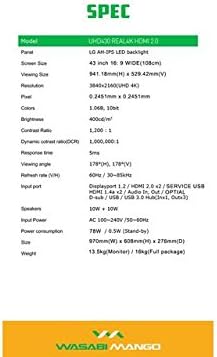
Image: A visual representation of the monitor's dimensions and a list of all accessories included in the package, such as various cables, remote control, and stand screws.
يثبت
1. تجميع الحامل
- ضع الشاشة بعناية بحيث يكون وجهها لأسفل على سطح ناعم ونظيف لمنع الخدوش.
- Attach the stand base to the monitor using the provided screws. Ensure it is securely fastened.
2. Connecting to a Power Source
- Connect the power cable to the monitor's power input port.
- قم بتوصيل الطرف الآخر من كابل الطاقة بمأخذ كهربائي مؤرض.
3. الاتصال بجهاز المصدر
The monitor supports various input types. Choose the appropriate cable for your device:
- منفذ العرض 1.2: For optimal 4K @ 60Hz performance, use the included DisplayPort cable. Connect one end to the monitor's DisplayPort input and the other to your computer's DisplayPort output.
- HDMI 2.0: For 4K @ 60Hz, use an HDMI 2.0 cable. Connect to one of the HDMI 2.0 ports on the monitor.
- منفذ HDMI 1.4a: Supports 4K @ 30Hz. Connect to one of the HDMI 1.4a ports.
- D-Sub: For analog connections.
- محور USB 3.0: Connect the USB Hub cable from your computer to the monitor's USB 3.0 input to enable the monitor's USB ports.
Note: Using a longer (over 1.5m) or low-quality DisplayPort/HDMI cable may limit the refresh rate to 30Hz at 4K resolution.
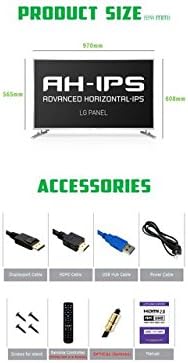
Image: The back panel of the monitor, illustrating the arrangement of power input, DisplayPort, HDMI, D-Sub, and USB ports for connection.
تشغيل الشاشة
تشغيل/إيقاف الطاقة
- اضغط على زر الطاقة الموجود على الشاشة أو جهاز التحكم عن بعد لتشغيل الشاشة أو إيقاف تشغيلها.
اختيار الإدخال
- Use the "Input" button on the remote control to cycle through available input sources (DisplayPort, HDMI1, HDMI2, HDMI3, HDMI4, D-Sub).
قائمة العرض على الشاشة (OSD)
The OSD menu allows you to adjust various display settings. Use the remote control to navigate:
- اضغط على زر "القائمة" لفتح شاشة العرض على الشاشة (OSD).
- Use the arrow keys (Up/Down/Left/Right) to navigate through menu options.
- اضغط على "موافق" أو "إدخال" لتحديد خيار أو تأكيد إعداد ما.
- اضغط على "خروج" أو "قائمة" مرة أخرى لإغلاق شاشة العرض.
تتضمن إعدادات OSD الشائعة ما يلي:
- إعدادات الصورة: Brightness, Contrast, Color Temperature, Sharpness.
- إعدادات الصوت: مستوى الصوت، كتم الصوت.
- تحديد الإدخال: Manual input source selection.
- إعدادات OSD: OSD Language, OSD Transparency, OSD Timeout.
- اعدادات اخرى: Aspect Ratio, ECO Mode.

Image: The monitor displaying content, with the remote control visible, indicating its use for navigating the monitor's functions and settings.
صيانة
تنظيف الشاشة
- افصل الشاشة دائمًا عن مأخذ الطاقة قبل التنظيف.
- استخدم قطعة قماش ناعمة وخالية من الوبر وامسحها برفق.ampاغسلها بالماء أو بمنظف شاشة غير كاشط.
- لا تقم برش المنظف مباشرة على الشاشة.
- Avoid using benzene, thinner, ammonia, or abrasive cleaners, as these can damage the display surface.
- امسح الشاشة بلطف لإزالة الغبار والبقع.
الرعاية العامة
- احتفظ بالشاشة بعيدًا عن أشعة الشمس المباشرة ومصادر الحرارة والغبار الزائد.
- تأكد من التهوية المناسبة حول الشاشة لمنع ارتفاع درجة الحرارة.
- لا تضع أشياء ثقيلة على الشاشة أو كابلاتها.
- تجنب إسقاط الشاشة أو تعريضها لصدمات قوية.
استكشاف الأخطاء وإصلاحها
| مشكلة | السبب المحتمل | حل |
|---|---|---|
| لا يوجد طاقة | كابل الطاقة غير متصل؛ منفذ الطاقة لا يعمل. | تأكد من توصيل كابل الطاقة بإحكام بالشاشة والمقبس. اختبر المقبس بجهاز آخر. |
| لا توجد إشارة / شاشة فارغة | Incorrect input source selected; Video cable loose or faulty; Source device not powered on. | Press "Input" button on remote to select correct source. Check video cable connections. Ensure source device is on and outputting video. |
| الصورة مشوهة أو ضبابية | Incorrect resolution setting; Faulty video cable; Graphics card driver issue. | Set display resolution to 3840x2160. Try a different video cable. Update graphics card drivers. |
| لا يوجد صوت | Volume too low or muted; Audio cable not connected (if using external speakers); Incorrect audio output selected on source device. | Increase volume or unmute. Ensure audio is routed correctly from source device to monitor. |
| جهاز التحكم عن بعد لا يعمل | Batteries are dead or incorrectly inserted; Obstruction between remote and monitor. | Replace batteries. Ensure clear line of sight to the monitor's IR receiver. |
تحديد
| ميزة | التفاصيل |
|---|---|
| اسم الموديل | UHD430 Real 4K HDMI 2.0 |
| نوع اللوحة | LG AH-IPS LED Backlight |
| حجم الشاشة | 43 inches (109.2 cm), 16:9 Wide |
| دقة | 3840 x 2160 UHD 4K |
| الألوان | 1.06 Billion (10-bit) |
| نسبة التباين | 1200:1 |
| نسبة التباين الديناميكي | 1,000,000:1 |
| سطوع | 400 شمعة/م² |
| وقت الاستجابة | 5 مللي ثانية (جي إلى جي) |
| Viewزاوية جي | 178 درجة أفقيًا و178 درجة رأسيًا |
| معدل التحديث | 60 Hz (DisplayPort 1.2 & HDMI 2.0), 30 Hz (HDMI 1.4a) |
| منافذ الإدخال | DisplayPort 1.2 x1, HDMI 2.0 x2, HDMI 1.4a x2, D-Sub x1, USB 3.0 Hub (In x1, Out x3) |
| صوتي | 10W + 10W Speakers |
| مدخلات الطاقة | أس شنومكس-شنومكسف / شنومكس-شنومكسهز |
| استهلاك الطاقة | 78W (Operating) / 0.5W (Stand-by) |
| الأبعاد (العرض × الارتفاع × العمق) | 970 مم × 608 مم × 276 مم (مع الحامل) |
| وزن | 13.5 kg (Monitor) / 18 kg (Full package) |
Image: A graphic detailing the technical specifications of the UHD430 monitor, such as screen size, resolution, and refresh rate.
الضمان والدعم
The Wasabi Mango UHD430 monitor comes with a manufacturer's warranty. Please refer to the warranty card included in your package for specific terms and conditions.
Defective Pixel Policy: For the UHD430 SE model, 0-15 defective pixels (including dead/stuck/sub pixels) are permitted under the warranty policy.
For technical support or service inquiries, please contact your retailer or the official Wasabi Mango support channels. Keep your purchase receipt and product serial number handy for faster service.
Ask a question about this manual
Ask about setup, troubleshooting, compatibility, parts, safety, or missing instructions. Manuals+ will review the question and use this page’s manual context to help answer it.