
1. المقدمة
This manual provides essential instructions for the installation, operation, maintenance, and troubleshooting of your Frigidaire Smart Window Air Conditioner, model FGRC0844S1. This 8,000 BTU, 115V unit is designed to cool rooms up to 350 square feet and features Wi-Fi connectivity for smart control via the Frigidaire app and compatibility with Alexa.
Please read this manual thoroughly before operating your air conditioner to ensure safe and efficient use.
2. الإعداد
2.1. التثبيت المادي
The Frigidaire Smart Window Air Conditioner is designed for window installation and includes a window mounting kit. Ensure your window opening meets the required dimensions for proper fit and sealing. The unit weighs approximately 54 pounds. Follow the detailed instructions provided in the separate installation guide for secure placement.

Image: Frigidaire Smart Window Air Conditioner model FGRC0844S1 securely installed in a window, demonstrating its sleek profile.
2.2. اتصال Wi-Fi وإعداد التطبيق
To utilize the smart features of your air conditioner, connect it to your home Wi-Fi network using the Frigidaire app. The app is available on Apple's iTunes Store for iPhone, iPad, and iPad mini, and on Google Play for Android smart devices.
- تنزيل التطبيق: Download and open the Frigidaire app on your smart device.
- إنشاء حساب: If you are a first-time user, create an account with a valid email address and password. You will need to validate your email to activate your account.
- تسجيل الدخول: Return to the app's home screen and sign in with your newly created account.
- إضافة جهاز: Tap the "Add Appliance" button and accept the terms and conditions.
- Activate Wi-Fi on AC: Press and hold the Connect button (often indicated by a Wi-Fi symbol) on the air conditioner unit until it beeps and the Wi-Fi LED light starts flashing.
- Connect Device to AC's Wi-Fi: On your smart device, go to your Wi-Fi settings. Select the network that includes "Air_Conditioner" in its name.
- Return to App: Once connected to the AC's Wi-Fi, return to the Frigidaire app and tap "Next".
- Connect AC to Home Wi-Fi: Select your home Wi-Fi network from the list. If not listed, refresh or select "Other" to manually enter the network name and password.
- انضم إلى الشبكة: Tap "Join" to connect your air conditioner to your home Wi-Fi.
- تسجيل: Register your appliance within the app.
Upon successful connection, the air conditioner will beep, and its Wi-Fi LED light will change from flashing to solid. You will then see the status of your smart appliance on the app, indicating it is ready for use.
Video: This video demonstrates the step-by-step process of connecting your Frigidaire Smart Window Air Conditioner to your smart device via the Frigidaire app, including account creation, appliance pairing, and Wi-Fi network selection.

Image: A hand holding a smartphone showing the Frigidaire app, which allows remote control and monitoring of the air conditioner.
3. تعليمات التشغيل
Your Frigidaire Smart Window Air Conditioner offers multiple ways to control its functions: the integrated control panel, the remote control, and the Frigidaire smart app.
3.1. Control Panel and Remote
The unit features a sleek control panel with touch-sensitive buttons and an illuminated temperature display. A remote control is also included for convenient operation.
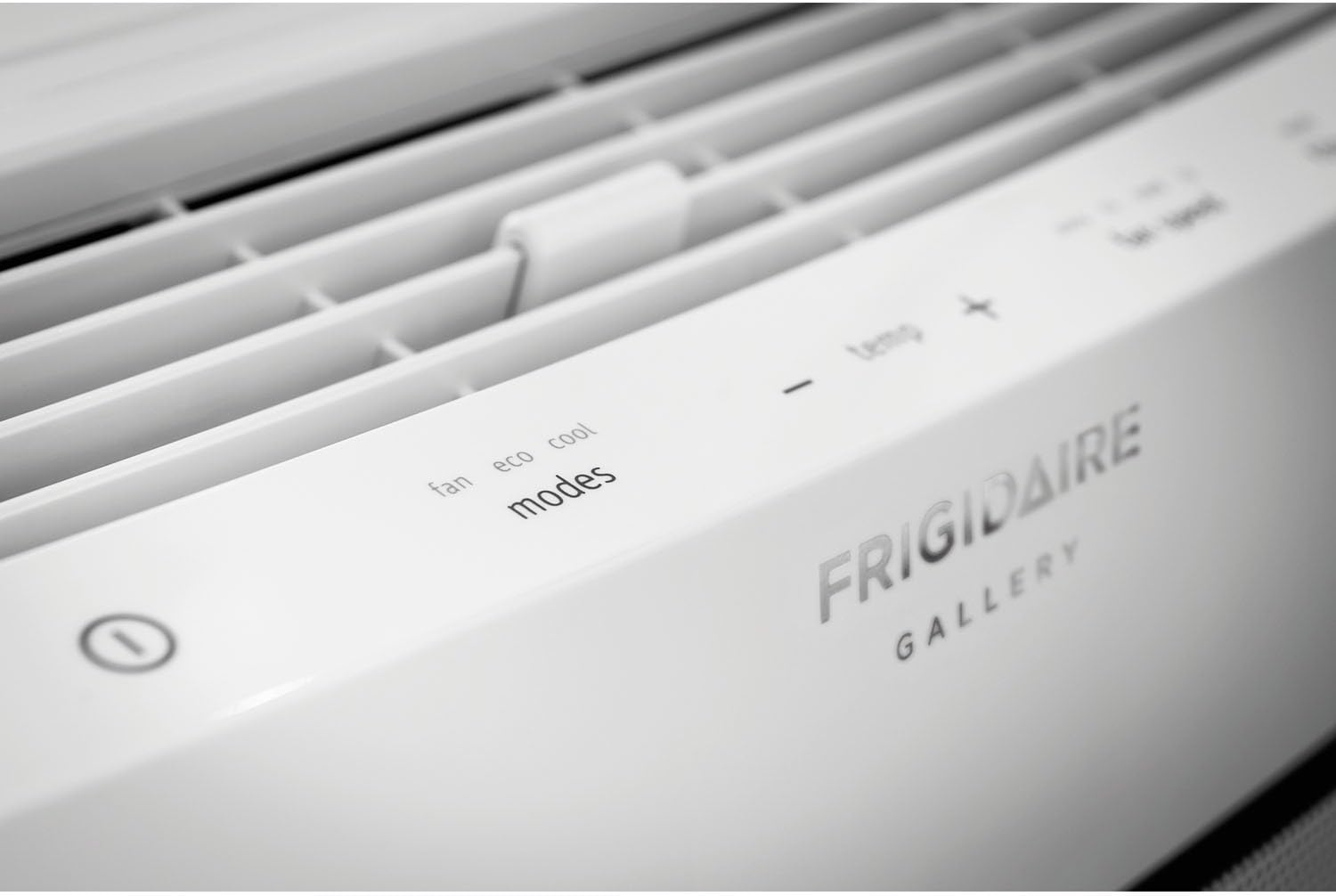
الصورة: لقطة مقربة view of the Frigidaire Smart Window Air Conditioner's top control panel, showing touch-sensitive buttons for fan, eco, cool modes, temperature adjustment, fan speed, filter reset, and scheduler.
3.2. الأوضاع والإعدادات
- وضع بارد: Provides cooling to the room. Adjust the desired temperature using the +/- buttons.
- نمط الصدى: يعمل على تحسين استهلاك الطاقة عن طريق تشغيل الضاغط والمروحة بشكل دوري للحفاظ على درجة الحرارة المحددة.
- وضع المروحة: Operates the fan without engaging the compressor, providing air circulation.
- إزالة الرطوبة: يقلل من الرطوبة في الغرفة.
- سرعات المروحة: Select from Auto, Low, Medium, or High fan speeds.
3.3. التحكم الذكي بالتطبيق
The Frigidaire app allows you to remotely control your air conditioner from anywhere with an internet connection. You can:
- قم بتشغيل الوحدة أو إيقاف تشغيلها.
- قم بتغيير إعداد درجة الحرارة.
- Control operating modes and fan speeds.
- Set custom schedules for 24/7 operation.
- Receive alerts, such as clean filter indicators.
3.4. اتجاه تدفق الهواء
The unit features innovative top, 2-way slanted louvers that direct airflow in an upward, circular motion. This design promotes even cooling throughout the room without directly blowing cold air onto occupants.
4. الصيانة
تضمن الصيانة المنتظمة الأداء الأمثل وطول العمر لمكيف الهواء الخاص بك.
4.1. تنظيف المرشح
Your air conditioner is equipped with a higher quality micro mesh fabric filter. A red light will illuminate approximately once a month to remind you to clean the filter. To clean:
- Carefully remove the front grill and then the filter.
- اغسل الفلتر بالماء الدافئ والصابون.
- اشطفها جيدًا واتركها حتى تجف تمامًا في الهواء قبل إعادة إدخالها.
- Press the "Filter Reset" button on the control panel or in the app after cleaning.

Image: The Frigidaire Smart Window Air Conditioner with its front panel detached, revealing the internal filter and cooling coils for maintenance access.
4.2 تنظيف بشكل عام
- امسح الجزء الخارجي من الوحدة بقطعة قماش ناعمة دamp قطعة قماش.
- تأكد من أن منطقة الصرف خالية من الحطام.
- Periodically check the window seals for any gaps that could reduce efficiency.
5. استكشاف الأخطاء وإصلاحها
If you encounter issues with your Frigidaire Smart Window Air Conditioner, refer to the following common problems and solutions:
| مشكلة | السبب المحتمل | حل |
|---|---|---|
| الوحدة لا تبرد بشكل فعال | Incorrect mode/temperature setting, dirty air filter, room size exceeds capacity, poor window seal. | Ensure unit is in Cool mode with a low set temperature. Clean the air filter. Verify room size is within 350 sq ft. Check and improve window insulation. |
| مشاكل الاتصال بشبكة Wi-Fi | Incorrect Wi-Fi password, weak signal, app malfunction, router issues. | Re-enter Wi-Fi password carefully. Ensure unit is within range of your router. Restart the Frigidaire app. Power cycle your home router. Repeat Wi-Fi setup process. |
| تصدر الوحدة أصواتًا غير عادية | Normal operating sounds (fan, compressor), loose parts, debris. | Some fan and compressor sounds are normal. Check for any loose components or foreign objects. If noise is excessive or unusual, contact customer support. |
| يتم إيقاف تشغيل الوحدة بشكل غير متوقع | Eco mode activation, power interruption, internal sensor issue. | In Eco mode, the unit cycles on/off to maintain temperature. Check power supply. If not in Eco mode and power is stable, contact customer support. |
6. المواصفات
| ميزة | التفاصيل |
|---|---|
| ماركة | فريجيدير |
| رقم الموديل | FGRC0844S1 |
| سعة التبريد | 8,000 وحدة حرارية بريطانية |
| المجلدtage | 115 فولت |
| مصدر الطاقة | كهرباء سلكية |
| واتtage | 673.5 واط |
| نسبة كفاءة الطاقة (EER) | 12.0 |
| قدرة إزالة الرطوبة | 1.7 باينت في الساعة |
| تغطية مساحة الأرضية | ما يصل إلى 350 قدم مربع |
| وزن العنصر | 54 رطل |
| Window Opening Max Height | 24 بوصة |
| المميزات الخاصة | Wi-Fi, Amazon Alexa Compatible |
| مادة التبريد | ر 410 أمبير |
| المكونات المضمنة | Air conditioner, window mounting kit, manual, warranty |

Image: U.S. Government Energy Guide label for the Frigidaire Room Air Conditioner, Model FGRC0844S1, highlighting its 8,000 BTUs capacity, estimated yearly energy cost, and 12.0 Energy Efficiency Ratio.
7. الضمان والدعم
7.1. معلومات الضمان
Your Frigidaire Smart Window Air Conditioner comes with a Full 1-year parts & labor warranty. Additionally, there is an additional 4 years limited warranty on the sealed systemيرجى الاحتفاظ بإثبات الشراء الخاص بك لاستخدامه في المطالبات بالضمان.
7.2. دعم العملاء
For further assistance, technical support, or warranty service, please visit the official Frigidaire website or contact their customer service department. You can also find more information and resources on the متجر فريجيدير على أمازون.